
abp(net core)+easyui+efcore实现仓储管理系统——EasyUI之货物管理六(二十四)
abp(net core)+easyui+efcore实现仓储管理系统目录
abp(net core)+easyui+efcore实现仓储管理系统——ABP总体介绍(一)
abp(net core)+easyui+efcore实现仓储管理系统——解决方案介绍(二)
abp(net core)+easyui+efcore实现仓储管理系统——领域层创建实体(三)
abp(net core)+easyui+efcore实现仓储管理系统——定义仓储并实现 (四)
abp(net core)+easyui+efcore实现仓储管理系统——创建应用服务(五)
abp(net core)+easyui+efcore实现仓储管理系统——展现层实现增删改查之控制器(六)
abp(net core)+easyui+efcore实现仓储管理系统——展现层实现增删改查之列表视图(七)
abp(net core)+easyui+efcore实现仓储管理系统——展现层实现增删改查之增删改视图(八)
abp(net core)+easyui+efcore实现仓储管理系统——展现层实现增删改查之菜单与测试(九)
abp(net core)+easyui+efcore实现仓储管理系统——多语言(十)
abp(net core)+easyui+efcore实现仓储管理系统——使用 WEBAPI实现CURD (十一)
abp(net core)+easyui+efcore实现仓储管理系统——菜单-上 (十六)
abp(net core)+easyui+efcore实现仓储管理系统——EasyUI前端页面框架 (十八)
abp(net core)+easyui+efcore实现仓储管理系统——EasyUI之货物管理一 (十九)
abp(net core)+easyui+efcore实现仓储管理系统——EasyUI之货物管理二 (二十)
在上一篇 abp(net core)+easyui+efcore实现仓储管理系统——EasyUI之货物管理五 (二十三)文章中,我们修正了一些BUG,让货物信息管理的前端与后台功能基本实现了我们所要。现在我们运行起应用程序看看新增功能。
十五、新增货物信息
继续来实现我们的货物信息管理功能,之前我们已经实现了列表功能,现在我们来实现货物信息的增加功能。
1. 在Visual Studio 2017的“解决方案资源管理器”中,右键单击在领域层“ABP.TPLMS.Web.Core”项目中的Controller目录。 找到TPLMSControllerBase文件,添加一个新的方法JsonEasyUIResult。此方法用来实现当我们完成了增加货物信息之后,返回给前端相关信息。代码如下。
protected dynamic JsonEasyUIResult(int id,string result)

{

    string strId = string.Empty;

    if (id>)

    {

        strId = id.ToString();

    }

        var obj = new

    {

        result = result,

        Id = strId

     };

     var json = ABP.TPLMS.Helpers.JsonHelper.Instance.Serialize(obj);

     return json;

}
2. 在Visual Studio 2017的“解决方案资源管理器”中,右键单击在展示层“ABP.TPLMS.Web.Mvc”项目中的Controller目录。 找到CargoController文件,添加一个新增方法,代码如下。
 public ActionResult Add(CargoDto createDto)

        {

            var json = string.Empty;

            string result = "NO";

            if (createDto == null)

            {

                json = JsonEasyUIResult(, result);

                return Content(json);

            }

            try

            {

                var cargo = ObjectMapper.Map<CreateUpdateCargoDto>(createDto);

                // TODO: Add logic here

                var obj = _cargoAppService.Create(cargo);

                int id = obj.GetAwaiter().GetResult().Id;

                if (obj != null)

                {

                    json = JsonEasyUIResult(id, "OK");

                }

                else

                {

                    json = JsonEasyUIResult(,result);

                }

            }

            catch

            {

            }

            return Content(json);

        }
3.在Visual Studio 2017中按F5运行应用程序。
4.在浏览器中的地址栏中输入“http://localhost:5000/”,然后输入管理员用户名进行登录。
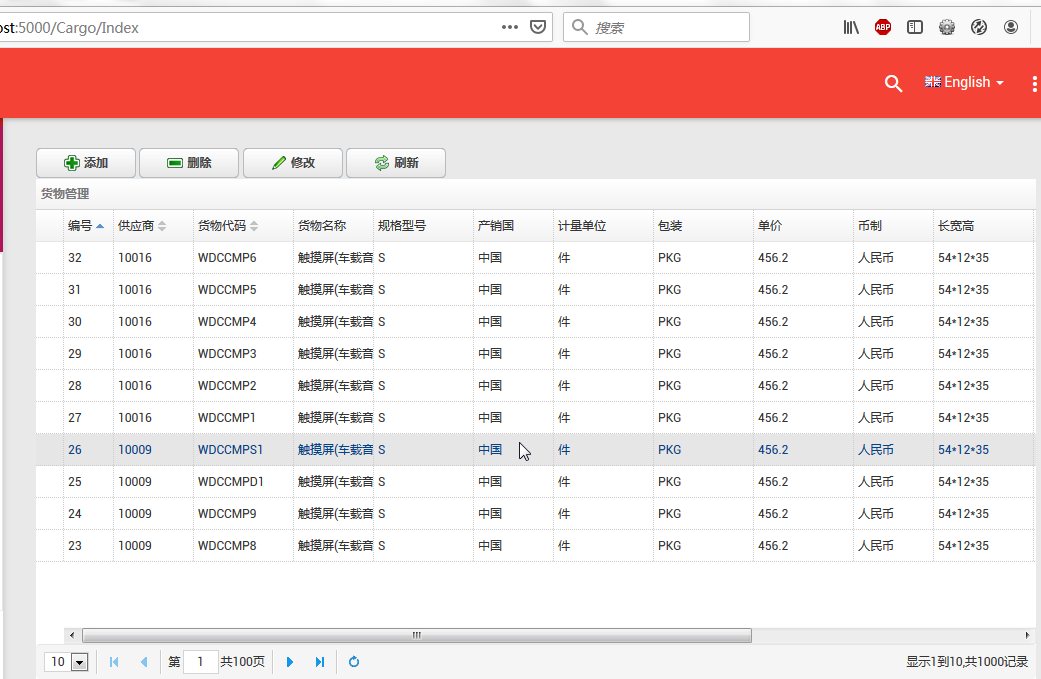
5.在主界面的菜单中,选择“Business->货物管理”菜单项,浏览器中呈现一个货物信息列表与四个按钮。如下图。关于菜单的生成可以参见文章(abp(net core)+easyui+efcore实现仓储管理系统——菜单-上 (十六)与 abp(net core)+easyui+efcore实现仓储管理系统——菜单-下(十七))。
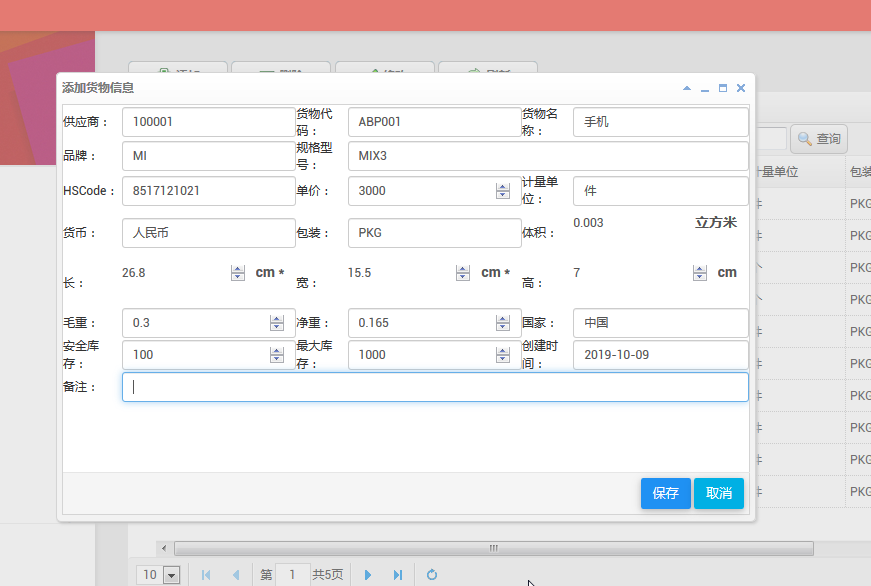
6.新增货物:点击“添加”按钮,弹出一个“添加货物”的操作界面,如下图中所示。
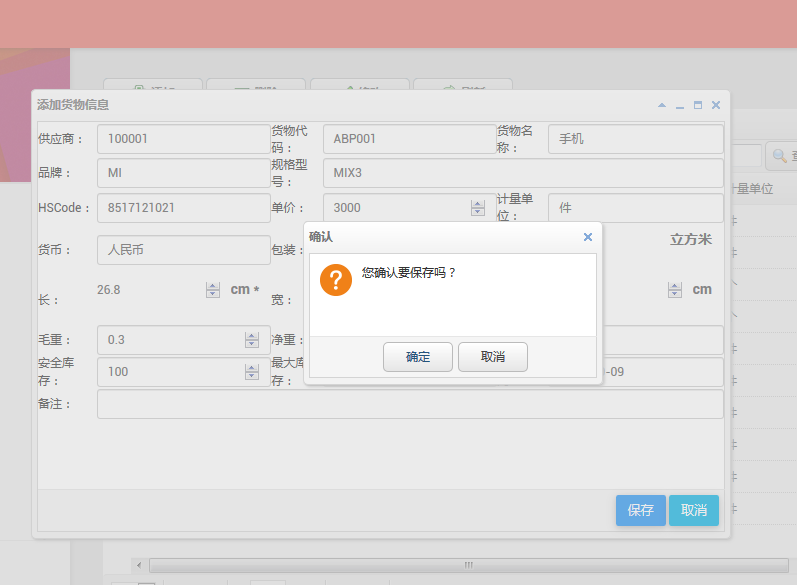
7.在输入相应的货物信息之后,点击“保存”按钮 。在弹出的确认对话框中点击“确定”按钮。在弹出的“保存成功”确认对话框中点击“确定”按钮。
8.然后系统就没有任何反应,没有弹出任何提示信息,查询数据也没有发现添加新数据。我们在浏览器中按F12,然后发现原来报错了。如下图。
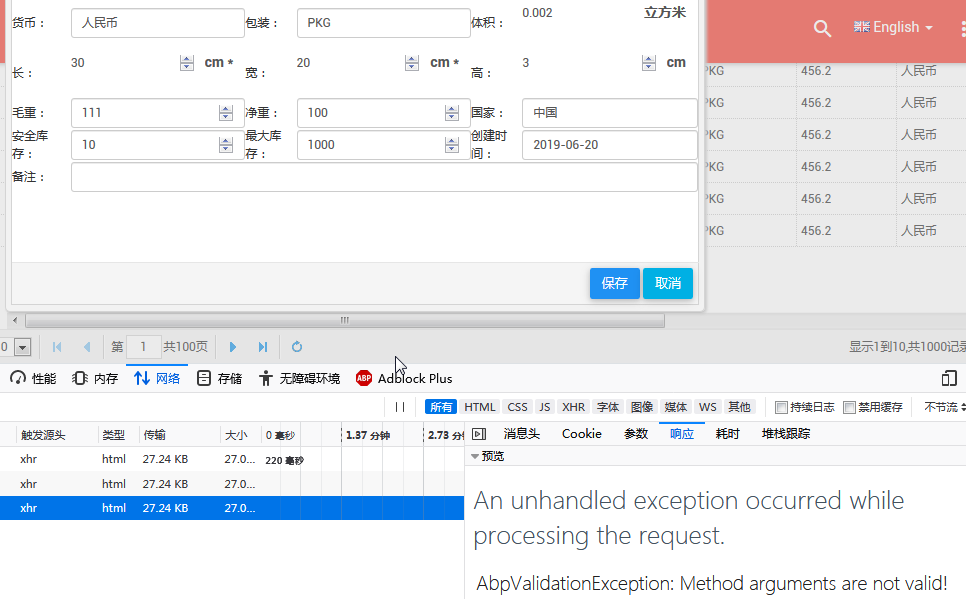
具体错误信息如下:
An unhandled exception occurred while processing the request.
AbpValidationException: Method arguments are not valid! See ValidationErrors for details.
Abp.Runtime.Validation.Interception.MethodInvocationValidator.ThrowValidationError() in MethodInvocationValidator.cs, line 118
9.原来是ABP的一个校验异常。ABP的两个特性EnableValidation和DisableValidation 用来控制validation。我们在Add方法上面添加两个特性[HttpPost]与[DisableValidation]。
[HttpPost]

[DisableValidation]

public ActionResult Add(CargoDto createDto)

{… 代码见第2步。}
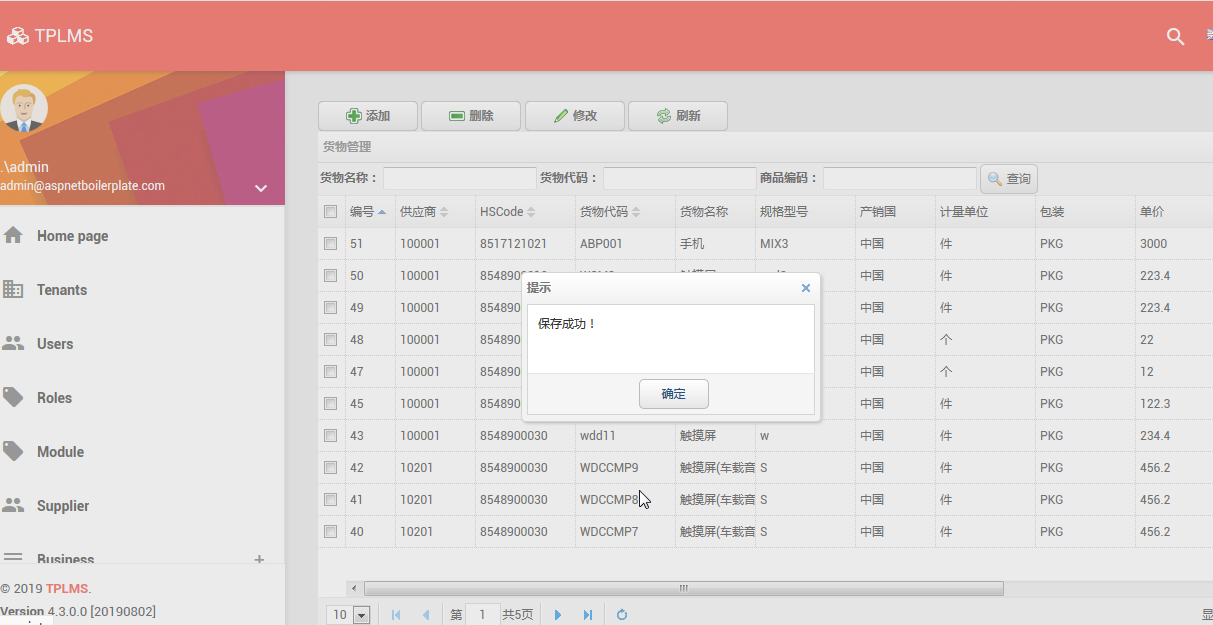
10.重新从第3步到第7步。这次保存成功。见下图。
abp(net core)+easyui+efcore实现仓储管理系统——EasyUI之货物管理六(二十四)的更多相关文章
- abp(net core)+easyui+efcore实现仓储管理系统——EasyUI之货物管理七(二十五)
abp(net core)+easyui+efcore实现仓储管理系统目录 abp(net core)+easyui+efcore实现仓储管理系统——ABP总体介绍(一) abp(net core)+ ...
- abp(net core)+easyui+efcore实现仓储管理系统——EasyUI之货物管理八(二十六)
abp(net core)+easyui+efcore实现仓储管理系统目录 abp(net core)+easyui+efcore实现仓储管理系统——ABP总体介绍(一) abp(net core)+ ...
- abp(net core)+easyui+efcore实现仓储管理系统——EasyUI之货物管理一 (十九)
abp(net core)+easyui+efcore实现仓储管理系统目录 abp(net core)+easyui+efcore实现仓储管理系统——ABP总体介绍(一) abp(net core)+ ...
- abp(net core)+easyui+efcore实现仓储管理系统——EasyUI之货物管理二 (二十)
abp(net core)+easyui+efcore实现仓储管理系统目录 abp(net core)+easyui+efcore实现仓储管理系统——ABP总体介绍(一) abp(net core)+ ...
- abp(net core)+easyui+efcore实现仓储管理系统——EasyUI之货物管理三 (二十一)
abp(net core)+easyui+efcore实现仓储管理系统目录 abp(net core)+easyui+efcore实现仓储管理系统——ABP总体介绍(一) abp(net core)+ ...
- abp(net core)+easyui+efcore实现仓储管理系统——EasyUI之货物管理四 (二十二)
abp(net core)+easyui+efcore实现仓储管理系统目录 abp(net core)+easyui+efcore实现仓储管理系统——ABP总体介绍(一) abp(net core)+ ...
- abp(net core)+easyui+efcore实现仓储管理系统——EasyUI之货物管理五 (二十三)
abp(net core)+easyui+efcore实现仓储管理系统目录 abp(net core)+easyui+efcore实现仓储管理系统——ABP总体介绍(一) abp(net core)+ ...
- abp(net core)+easyui+efcore实现仓储管理系统——EasyUI前端页面框架 (十八)
目录 abp(net core)+easyui+efcore实现仓储管理系统——ABP总体介绍(一) abp(net core)+easyui+efcore实现仓储管理系统——解决方案介绍(二) ab ...
- abp(net core)+easyui+efcore实现仓储管理系统——ABP WebAPI与EasyUI结合增删改查之一(二十七)
abp(net core)+easyui+efcore实现仓储管理系统目录 abp(net core)+easyui+efcore实现仓储管理系统——ABP总体介绍(一) abp(net core)+ ...
随机推荐
- vue-router路由元信息及keep-alive组件级缓存
路由元信息?(黑人问号脸???)是不是这么官方的解释很多人都会一脸懵?那么我们说meta,是不是很多人恍然大悟,因为在项目中用到或者看到过呢? 是的,路由元信息就是我们定义路由时配置的meta字段:那 ...
- 利用Python制作二维码
利用简单的Python代码制作二维码 一.制作工具 安装Python环境 + PyCharm编译器. 二.电脑系统 本人win10 + Python3.7.0 + PyCharm. 三.写代码前先下载 ...
- 死磕 java同步系列之Phaser源码解析
问题 (1)Phaser是什么? (2)Phaser具有哪些特性? (3)Phaser相对于CyclicBarrier和CountDownLatch的优势? 简介 Phaser,翻译为阶段,它适用于这 ...
- mysql 时间与字符串相互转换
时间.字符串.时间戳之间的相互转换:date转字符串.date转时间戳.字符串转date.字符串转时间戳.时间戳转date,时间戳转字符串用法 涉及的函数 date_format(date, form ...
- Thinkphp5.0终章
thinkphp5.0最终总结 前期刚开始我是跟着b站上的千峰教育的视频走的,一路上做笔记进行深化与实际操作,中间因为不会开报错,并且视频里面也没有讲到怎么弄报错,因为是新手,那种出错了却不知道错在哪 ...
- IDEA 学习笔记之 Maven项目开发
Maven项目开发: 配置Maven: 新建Maven项目: 选择webapp: 和eclipse一样,设置: 修改maven配置,添加一个新属性,可以加快项目创建速度: 完成: 新建java和tes ...
- tiki-graph_formula.php代码执行漏洞复现(或许??)
1.不知道从哪里翻出来的虚拟机镜像(不知道甚么时候出现在磁盘里面的) 打开配置一下是tikiwiki这个东西 2.遇到陌生的玩意总是忍不住好奇心的,打开nikto扫描一下,发现有些奇怪的东西 本来没抱 ...
- PHP获取客户端的真实IP
REMOTE_ADDR只能获取访问者本地连接中设置的IP,如中南民族大学校园网中自己设置的10.X.XXX.XXX系列IP,而这个函数获取的是局域网网关出口的IP地址, 如果访问者使用代理服务器,将不 ...
- XCTF-web2
这种题目是比较简单地..直接写个小脚本就行了2333 <?php $a=" a1zLbgQsCESEIqRLwuQAyMwLyq2L5VwBxqGA3RQAyumZ0tmMvSGM2Z ...
- Js获取宽高度的归纳集锦总结
首先,先吓唬一下我们的小白们!在js中的描述宽高的可以细分有22种.属性根据不同的兼容性也分为五种 window.innerWidth //除去菜单栏的窗口宽度,与浏览器相关 window.inner ...