
swing with transformjs
Antecedent
Facebook made a HTML5 game long time ago. The opening animation is a piece of software that is similar to tofu, the effect as shown below gif:

Facebook was using easeljs and tweenjs of createjs to produce, based on the Canvas animation. The basic principle is: circular motion skewX scaleY of DisplayObject to implement software swing.
Currently, transformjs also can do it, because the transformjs can also set the skewX and scaleY of dom element. First look at the way facebook.
tweenjs + transformjs
Note that the tweenjs here is a sub project under the createjs, it's net the tween.js project on the github.
var element = document.querySelector("#test");

Transform(element);

element.originY = 100;

element.skewX = -20;

var Tween = createjs.Tween,

    sineInOutEase = createjs.Ease.sineInOut;

Tween.get(element, {loop: true}).to({scaleY: .8}, 450, sineInOutEase).to({scaleY: 1}, 450, sineInOutEase);

Tween.get(element, {loop: true}).to({skewX: 20}, 900, sineInOutEase).to({skewX: -20}, 900, sineInOutEase);
Online demo: http://alloyteam.github.io/AlloyTouch/transformjs/example/soft2.html
The code above is very simple. Here's a little explanation:
- The initial skewX of element is -20 in order to keep step with scale
- element's originY is 100, for the penguin's center bottom as the reference point
you can see it, due to the high abstraction of transformjs, can be easily used with tweenjs, without any pressure.
AlloyFlow + transformjs
May the above code is not very understand the specific implementation of the process? To tell the truth, the first time to see the above code does not look at the clear process. Then use the AlloyFlow workflow to achieve the same way to achieve the same effect.
var element = document.querySelector("#test");

Transform(element);

element.originY = 100;

element.skewX = -20;

function sineInOut(a) {

    return 0.5 * (1 - Math.cos(Math.PI * a));

}

var alloyFlow = new AlloyFlow({

    workflow: [

        {

            work: function () {

                To.go(element, "scaleY", .8, 450, sineInOut);

                To.go(element, "skewX", 20, 900, sineInOut)

            },

            start: 0

        }, {

            work: function () {

                To.go(element, "scaleY", 1, 450, sineInOut)

            },

            start: 450

        }, {

            work: function () {

                To.go(element, "scaleY", .8, 450, sineInOut);

                To.go(element, "skewX", -20, 900, sineInOut)

            },

            start: 900

        }, {

            work: function () {

                To.go(element, "scaleY", 1, 450, sineInOut);

            },

            start: 1350

        }, {

            work: function () {

                this.start();

            },

            start: 1800

        }

    ]

}).start();
Online demo: http://alloyteam.github.io/AlloyTouch/transformjs/example/soft.html
Can see above the workflow there is a pile of work in accordance with the start of the time in order to execute, and finally in the 1800ms when the call this.start () will return to the starting point to start running again. Also need to explain why the choice of easing sineInOut. Can take a look at its easing image:
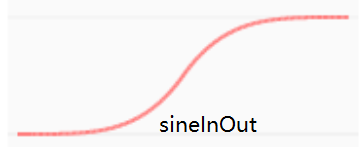
SineInOut rate is slow to fast and then slow, just in line with the software's own binding force simulation.
So, AlloyFlow is the artifact? And listen to the next single opening decomposition.
Start using transformjs
There are a lot of people ask, can transformjs do some cool effects?
In fact, transformjs he just provided the basis of the transformation capability, not with the time, and the movement of the library coupling. Can be used in conjunction with any time movement library. So how cool you completely rely on creativity and imagination .
Transformjs accounting to calculate the matrix3d assigned to the transform msTransform OTransform MozTransform webkitTransform DOM, to ensure hardware acceleration and compatibility at the same time, do not lose the programmable, point a praise.
Home:http://alloyteam.github.io/AlloyTouch/transformjs/
Github :https://github.com/AlloyTeam/AlloyTouch/tree/master/transformjs
swing with transformjs的更多相关文章
- 如何使用swing创建一个BeatBox
首先,我们需要回顾一些内容(2017-01-04 14:32:14): 1.Swing组件 Swing的组件(component,或者称之为元件),是较widget更为正确的术语,它们就是会放在GUI ...
- Java Swing interview
http://www.careerride.com/Swing-AWT-Interview-Questions.aspx Swing interview questions and answers ...
- Swing布局管理器介绍
创作品,允许转载,转载时请务必以超链接形式标明文章 原始出处 .作者信息和本声明.否则将追究法律责任.http://zhangjunhd.blog.51cto.com/113473/128174 当选 ...
- transformjs污染了DOM?是你不了解它的强大
原文链接: https://github.com/AlloyTeam/AlloyTouch/wiki/Powerful-transformjs 写在前面 上星期在React微信群里,有小伙伴觉得tra ...
- react动画难写?试试react版transformjs
简介 transformjs在非react领域用得风生水起,那么react技术栈的同学能用上吗?答案是可以的.junexie童鞋已经造了个react版本. 动画实现方式 传统 web 动画的两种方式: ...
- transformjs玩转星球
如你所见.这篇就是要讲下使用transformjs制作星球的过程.你也可以无视文章,直接去看源码和在线演示: 源码 | 在线演示 代码100行多一点,直接看也没有什么压力.下面分几步讲解下. 生成球上 ...
- 和transformjs一起摇摆
写在前面 记得以前facebook做过一款HTML5游戏.开场动画是一块软体类似豆腐的东西一起摇摆.类似的效果如下面的gif所示: facebook当时使用的是createjs下的子项目easeljs ...
- getting started with transformjs
Introduction In the past two years, more and more friends for mobile web development have used the t ...
- 移动Web利器transformjs入门
简介 在过去的两年,越来越多的同事.朋友和其他不认识的童鞋进行移动web开发的时候,都使用了transformjs,所有必要介绍一下,让更多的人受益,提高编程效率,并享受编程乐趣.(当然transfo ...
随机推荐
- Spring mvc @initBinder 类型转化器的使用
一.单日期格式 因为是用注解完完成的后台访问,所以必须在大配置中配置包扫描器: 1.applicactionContext.xml <?xml version="1.0" e ...
- Merge Sorted Array
Given two sorted integer arrays nums1 and nums2, merge nums2 into nums1 as one sorted array. Note:Yo ...
- 机器指令翻译成 JavaScript —— No.6 深度优化
第一篇 中我们曾提到,JavaScript 最终还得经过浏览器来解析.因此可以把一些优化工作,交给脚本引擎来完成. 现代浏览器的优化能力确实很强,但是,运行时的优化终归是有限的.如果能在事先实现,则可 ...
- 如何让我们的PHP在Jexus中跑起来
最近一段时间,经常看到不少的朋友在问,应该怎么设置才能够让Jexus支持PHP.其实,Jexus在很早之前就已经是可以支持PHP,像Apache或Nginx一样充当PHP的Web服务器的.不过由于没有 ...
- IOCP Internals
Buffer Type Buffer I/O 针对Buffer I/O的请求,系统会为其分配一个非换页内存作为缓存区,其大小等同于I/O请求的缓存区大小.对于写操作,I/O管理器在创建IRP时,将请求 ...
- ABP源码分析二十七:ABP.Entity Framework
IRepository:接口定义了Repository常见的方法 AbpRepositoryBase:实现了IRepository接口的常见方法 EfRepositoryBase:实现了AbpRepo ...
- 【Win 10 应用开发】手写识别
记得前面(忘了是哪天写的,反正是前些天,请用力点击这里观看)老周讲了一个14393新增的控件,可以很轻松地结合InkCanvas来完成涂鸦.其实,InkCanvas除了涂鸦外,另一个大用途是墨迹识别, ...
- 《ES6基础教程》之 map、forEach、filter indexOf 用法
1,map,对数组的每个元素进行一定操作,返回一个新的数组. var oldArr = [{first_name:"Colin",last_name:"Toh" ...
- ArrayAdapter
Android Adapter:ArrayAdapter篇 版权声明:本文为博主原创文章,未经博主允许不得转载.微博:厉圣杰源码:AndroidDemo/Notification文中如有纰漏,欢迎大家 ...
- Handler系列之使用
作为一个Android开发者,我们肯定熟悉并使用过Handler机制.最常用的使用场景是"在子线程更新ui",实际上我们知道上面的说话是错误的.因为Android中只有主线程才能更 ...