
swing with transformjs
Antecedent
Facebook made a HTML5 game long time ago. The opening animation is a piece of software that is similar to tofu, the effect as shown below gif:

Facebook was using easeljs and tweenjs of createjs to produce, based on the Canvas animation. The basic principle is: circular motion skewX scaleY of DisplayObject to implement software swing.
Currently, transformjs also can do it, because the transformjs can also set the skewX and scaleY of dom element. First look at the way facebook.
tweenjs + transformjs
Note that the tweenjs here is a sub project under the createjs, it's net the tween.js project on the github.
var element = document.querySelector("#test");

Transform(element);

element.originY = 100;

element.skewX = -20;

var Tween = createjs.Tween,

    sineInOutEase = createjs.Ease.sineInOut;

Tween.get(element, {loop: true}).to({scaleY: .8}, 450, sineInOutEase).to({scaleY: 1}, 450, sineInOutEase);

Tween.get(element, {loop: true}).to({skewX: 20}, 900, sineInOutEase).to({skewX: -20}, 900, sineInOutEase);
Online demo: http://alloyteam.github.io/AlloyTouch/transformjs/example/soft2.html
The code above is very simple. Here's a little explanation:
- The initial skewX of element is -20 in order to keep step with scale
- element's originY is 100, for the penguin's center bottom as the reference point
you can see it, due to the high abstraction of transformjs, can be easily used with tweenjs, without any pressure.
AlloyFlow + transformjs
May the above code is not very understand the specific implementation of the process? To tell the truth, the first time to see the above code does not look at the clear process. Then use the AlloyFlow workflow to achieve the same way to achieve the same effect.
var element = document.querySelector("#test");

Transform(element);

element.originY = 100;

element.skewX = -20;

function sineInOut(a) {

    return 0.5 * (1 - Math.cos(Math.PI * a));

}

var alloyFlow = new AlloyFlow({

    workflow: [

        {

            work: function () {

                To.go(element, "scaleY", .8, 450, sineInOut);

                To.go(element, "skewX", 20, 900, sineInOut)

            },

            start: 0

        }, {

            work: function () {

                To.go(element, "scaleY", 1, 450, sineInOut)

            },

            start: 450

        }, {

            work: function () {

                To.go(element, "scaleY", .8, 450, sineInOut);

                To.go(element, "skewX", -20, 900, sineInOut)

            },

            start: 900

        }, {

            work: function () {

                To.go(element, "scaleY", 1, 450, sineInOut);

            },

            start: 1350

        }, {

            work: function () {

                this.start();

            },

            start: 1800

        }

    ]

}).start();
Online demo: http://alloyteam.github.io/AlloyTouch/transformjs/example/soft.html
Can see above the workflow there is a pile of work in accordance with the start of the time in order to execute, and finally in the 1800ms when the call this.start () will return to the starting point to start running again. Also need to explain why the choice of easing sineInOut. Can take a look at its easing image:
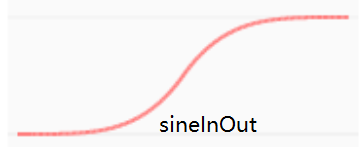
SineInOut rate is slow to fast and then slow, just in line with the software's own binding force simulation.
So, AlloyFlow is the artifact? And listen to the next single opening decomposition.
Start using transformjs
There are a lot of people ask, can transformjs do some cool effects?
In fact, transformjs he just provided the basis of the transformation capability, not with the time, and the movement of the library coupling. Can be used in conjunction with any time movement library. So how cool you completely rely on creativity and imagination .
Transformjs accounting to calculate the matrix3d assigned to the transform msTransform OTransform MozTransform webkitTransform DOM, to ensure hardware acceleration and compatibility at the same time, do not lose the programmable, point a praise.
Home:http://alloyteam.github.io/AlloyTouch/transformjs/
Github :https://github.com/AlloyTeam/AlloyTouch/tree/master/transformjs
swing with transformjs的更多相关文章
- 如何使用swing创建一个BeatBox
首先,我们需要回顾一些内容(2017-01-04 14:32:14): 1.Swing组件 Swing的组件(component,或者称之为元件),是较widget更为正确的术语,它们就是会放在GUI ...
- Java Swing interview
http://www.careerride.com/Swing-AWT-Interview-Questions.aspx Swing interview questions and answers ...
- Swing布局管理器介绍
创作品,允许转载,转载时请务必以超链接形式标明文章 原始出处 .作者信息和本声明.否则将追究法律责任.http://zhangjunhd.blog.51cto.com/113473/128174 当选 ...
- transformjs污染了DOM?是你不了解它的强大
原文链接: https://github.com/AlloyTeam/AlloyTouch/wiki/Powerful-transformjs 写在前面 上星期在React微信群里,有小伙伴觉得tra ...
- react动画难写?试试react版transformjs
简介 transformjs在非react领域用得风生水起,那么react技术栈的同学能用上吗?答案是可以的.junexie童鞋已经造了个react版本. 动画实现方式 传统 web 动画的两种方式: ...
- transformjs玩转星球
如你所见.这篇就是要讲下使用transformjs制作星球的过程.你也可以无视文章,直接去看源码和在线演示: 源码 | 在线演示 代码100行多一点,直接看也没有什么压力.下面分几步讲解下. 生成球上 ...
- 和transformjs一起摇摆
写在前面 记得以前facebook做过一款HTML5游戏.开场动画是一块软体类似豆腐的东西一起摇摆.类似的效果如下面的gif所示: facebook当时使用的是createjs下的子项目easeljs ...
- getting started with transformjs
Introduction In the past two years, more and more friends for mobile web development have used the t ...
- 移动Web利器transformjs入门
简介 在过去的两年,越来越多的同事.朋友和其他不认识的童鞋进行移动web开发的时候,都使用了transformjs,所有必要介绍一下,让更多的人受益,提高编程效率,并享受编程乐趣.(当然transfo ...
随机推荐
- PADS Layout 颜色设置
一.板框.装配线.标注线配置: 二.个人爱好,我一般把Top pads设置成为浅绿色,Top Trace/vias/2D Line/Text/Cooper设置成为深绿色,Error设置成为黄色,而Bo ...
- CYQ.Data 从入门到放弃ORM系列:开篇:自动化框架编程思维
前言: 随着CYQ.Data 开始回归免费使用之后,发现用户的情绪越来越激动,为了保持这持续的激动性,让我有了开源的念头. 同时,由于框架经过这5-6年来的不断演进,以前发的早期教程已经太落后了,包括 ...
- ReactNative入门(安卓)——API(上)
Alert - 弹窗 通过 Alert.alert() 方法调用唤起原生弹窗,点击会触发 onPress 回调(参考下方代码)并清除弹窗. import React, { AppRegistry, C ...
- DoraCMS 源码知识点备注
项目需要研究了下DoraCMS这款开源CMS,真心做的不错:).用的框架是常用的express 4 + mongoose,代码也很规范,值得学习. 源码中一些涉及到的小知识点备注下: https:// ...
- node应用线上部署时锁定包的依赖版本
npm shrinkwrap 我们使用node开发时,经常需要依赖一些模块来完成功能需求,而我们所依赖的模块也必然会依赖其他模块,就这样一级一级的依赖,而且这些依赖模块并不为我们所控制.一个产品或项目 ...
- exportfs 入门/ 错误
exportfs -uv 不能卸载, exportfs -au 才可以 ================================================================ ...
- 使用nodemailer发送邮件
今天闲来无事,一时兴起看了下如果使用javascript来发送邮件.经过调研发现,nodeJs可以实现这个功能. 具体的步骤如下: 1.安装依赖 npm install nodemailer -g ( ...
- MongoDB 安全和访问权限控制
MongoDB的访问控制能够有效保证数据库的安全,访问控制是指绑定Application监听的IP地址,设置监听端口,使用账户和密码登录 一,访问控制的参数 1,绑定IP地址 mongod 参数:-- ...
- 前端进阶试题(css部分)
一.css 40分 1. 什么是盒模型? 答: 2. Doctype的几种类型? 答:①.过渡的:②.严格的:③.框架的 更多详细介绍参考:资料 3. 如何布局左不动右边自适应的两列布局? 答:两种简 ...
- ASP.NET MVC5+EF6+EasyUI 后台管理系统(2)-easyui构建前端页面框架[附源码]
系列目录 前言 为了符合后面更新后的重构系统,本文于2016-10-31日修正一些截图,文字 我们有了一系列的解决方案,我们将动手搭建新系统吧. 后台系统没有多大的UI视觉,这次我们采用的是标准的左右 ...