
issues about Facebook Login
在学习The complete iOS 9 Developer Course - Build 18 Apps 中的Letture134-Facebook Login,需要整合(integrate)Parse+Facebook在iOS(Xcode)中,也就是用Facebook的账户登录制作的APP(copy Tinder),然后在Parse中记录账户的相关信息,而不用手动建立。登陆成功之后在后台返回账户的名称等public_profile。
此Lecture算是至今最难的一节,因为1、Parse的更新速度很快,已经开源且2017年不再提供服务2、Facebook Dev网站上写的与Parse整合的相关tutorial在不断更新,由于我看到这门课的时候,相关步骤已经与教学视频中变化很大。虽然Rob(teacher)提供了一个project,用此project可以完成该lecture,但是由于不是最新的,所以以后隐患大大。
用最新的Parse SDK+Facebook SDK+Swift+Xcode则问题重重。
好在经过摸索+参考其他classmate的question,最终解决了相关问题。现记录如下:
1、在info.plist中添加
<key>CFBundleURLTypes</key>

<array>

  <dict>

  <key>CFBundleURLSchemes</key>

  <array>

    <string>fb---------------</string>

    <string>fbauth2</string>

  </array>

  </dict>

</array>

<key>FacebookAppID</key>

<string>16----------------</string>

<key>FacebookDisplayName</key>

<string>Tinder2</string>

<key>LSApplicationQueriesSchemes</key>

<array>

  <string>fbapi</string>

  <string>fb-messenger-api</string>

  <string>fbauth</string>

  <string>fbauth2</string>

  <string>fbshareextension</string>

</array>
如下图:
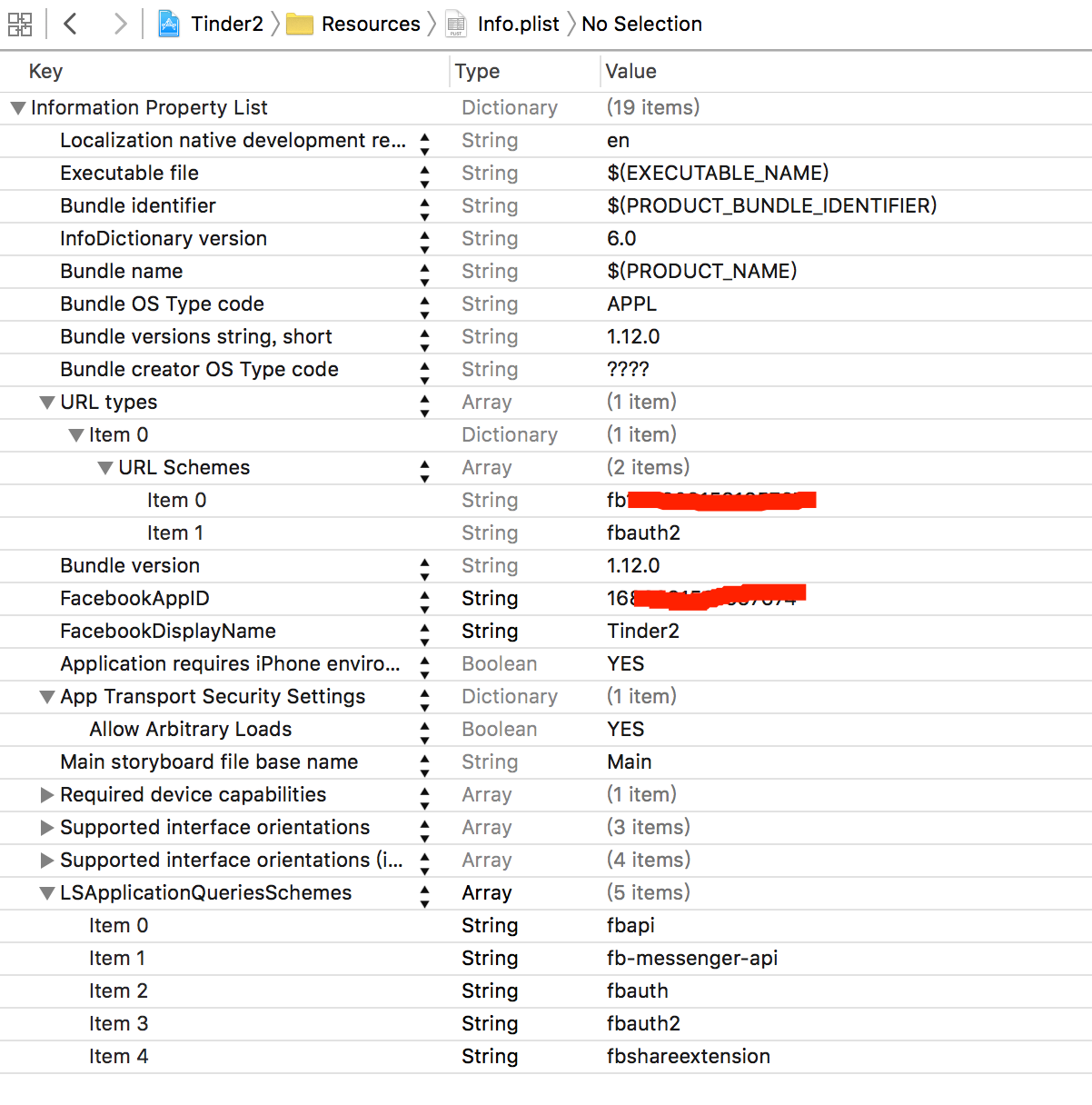
2、添加ParseStarterProject-Bridging-Header.h文件
新建一个文件也成,或者从Rob的project中复制也成,然后在Build Settings中,添加这个文件所在的目录。要注意,是这个文件的正确路径,可以先查看一下再添加。
然后修改文件如下:
//

//  ParseStarterProject-Bridging-Header.h

//

//  Copyright 2011-present Parse Inc. All rights reserved.

//

#ifndef ParseStarterProject_Bridging_Header_h

#define ParseStarterProject_Bridging_Header_h

// If you are using Facebook, uncomment this line to get automatic import of the header inside your project.

#import <ParseFacebookUtilsV4/PFFacebookUtils.h>

#import <FBSDKCoreKit/FBSDKCorekit.h>

#endif

这里要注意一定要选上那个 All 否则会有一些项出不来。然后,只要修改箭头指出的那两项就可以了。
3、添加Facebook的SDK和Parse出的整合Facebook的SDK,其中,Parse那个需要下两个东西,一个Project+一个SDK。拖进来文件时不选择必要时复制,然后在framework search path中添加目录即可,同时修改 Always Search User Paths 为Yes,如下图:
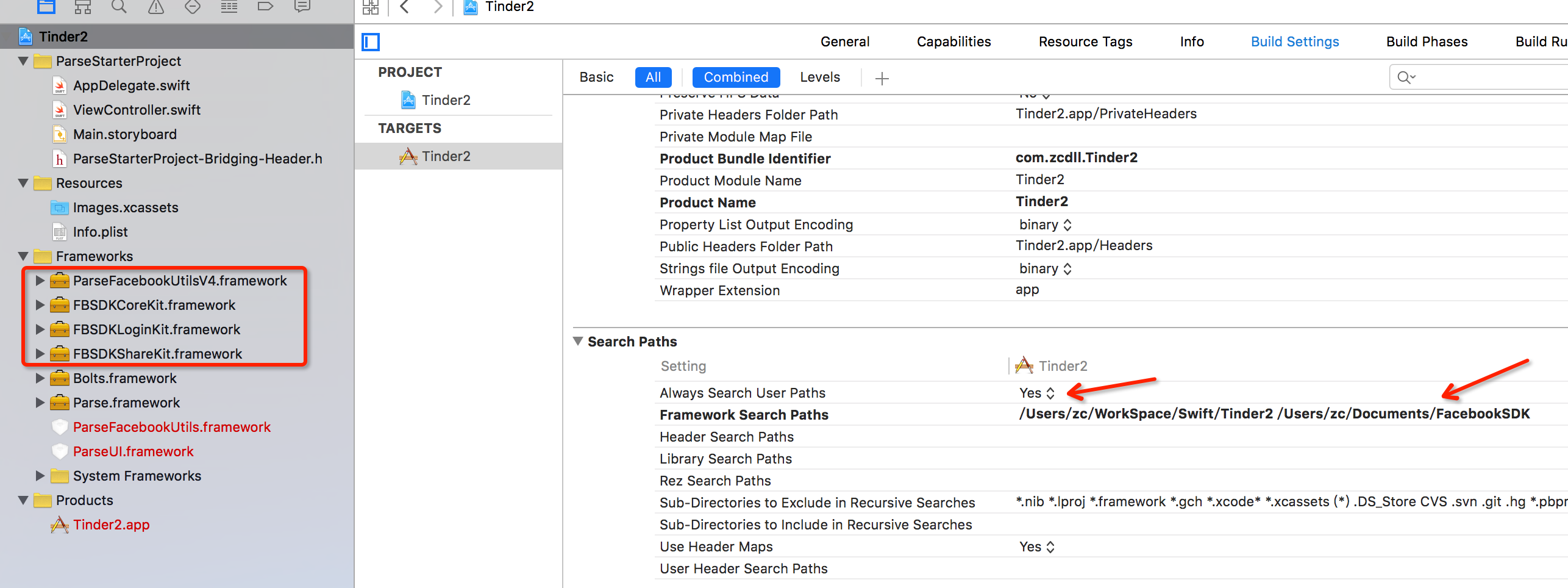
4、然后就是修改,AppDelegate.swift和ViewController.swift两个文件
//AppDelegate.swift中添加如下

import FBSDKCoreKit

import ParseFacebookUtilsV4

PFFacebookUtils.initializeFacebookWithApplicationLaunchOptions(launchOptions)

//

//

//省略若干

//

//

//  Swift 2.0 下面这些其实是取消注释

                if #available(iOS 8.0, *) {

                    let types: UIUserNotificationType = [.Alert, .Badge, .Sound]

                    let settings = UIUserNotificationSettings(forTypes: types, categories: nil)

                    application.registerUserNotificationSettings(settings)

                    application.registerForRemoteNotifications()

                } else {

                    let types: UIRemoteNotificationType = [.Alert, .Badge, .Sound]

                    application.registerForRemoteNotificationTypes(types)

                }

//这个是添加的

        return FBSDKApplicationDelegate.sharedInstance().application(application, didFinishLaunchingWithOptions: launchOptions)
//ViewController.swift

import UIKit

import Parse

import FBSDKCoreKit

import FBSDKLoginKit

import ParseFacebookUtilsV4

class ViewController: UIViewController {

    override func viewDidLoad() {

        super.viewDidLoad()

        // Do any additional setup after loading the view, typically from a nib.

        let logInToFBButton = FBSDKLoginButton()

        logInToFBButton.center = self.view.center

        self.view.addSubview(logInToFBButton)

        let permissions = ["public_profile"]

        PFFacebookUtils.logInInBackgroundWithReadPermissions(permissions) { (user: PFUser?, error: NSError?) -> Void in

            print("123")

            if let error = error {

                print(error)

            } else {

                if let user = user {

                    print(user)

                }

            }

        }

    }

    override func didReceiveMemoryWarning() {

        super.didReceiveMemoryWarning()

        // Dispose of any resources that can be recreated.

    }

}
然后就可以运行程序啦!
如果要搞清楚这里面的全部,还是很蛋疼的!
贴上Jonathan Hornby 和 Ng Yi Xian 两位童鞋的原回答
Got it working with all the latest SDKs! Read this before you start the lecture!

Lecture 131 Connecting to Facebook

Spent a whole day on this. Definitely the most challenging lecture thus far as a lot of moving parts have changed. This is a long note, but you will want to read it - covers a lot of the errors/ issues people have been struggling with.

I used Parse v1.9.0 (9 Oct 15) , FBSDK v4.7 (7 Oct 15) and the production Xcode 7.0.1 - it all works!

Here’s a run down of the issues I came across, and the solutions …

1st run of code to connect with Parse

When Rob did this, he looked at the Parse website to confirm that a user & test object had been created. I got nothing. After checking code with the video, I decided to write some code to create a class (just like we did in a previous lecture) … and bingo - it worked … I got a user entry and new class. Further along in the video, Rob deletes some similar code he used to create his testobject in the viewDidLoad section of his ViewController. Rob - when you update the video, I’d recommend you reference this before running the app/ checking for your entries ;-)

That was the easy bit, the rest was extremely difficult … but I learned a ton during the process.

The 1st real challenge was when you started to reference code from either PFFacebookUtilsV4 or FBSDKCoreKit. Lot’s of red error messages.

To cut a long story short, the Parse v1.9.0 downloads have a file missing: ParseStarterProject-Bridging-Header.h - without it, none of the import statements work

The Parse AppDelegate tells you to follow Facebooks instructions for setting everything up on the FB site & populating your info.plist file … then uncomment a line in the missing header file.

I created one from scratch: File > New > File > Header File and called it: ParseStarterProject-Bridging-Header.h Here are the contents I used:

#ifndef ParseStarterProject_Bridging_Header_h

#define ParseStarterProject_Bridging_Header_h

#import <ParseFacebookUtilsV4/PFFacebookUtils.h>

#import <FBSDKCoreKit/FBSDKCoreKit.h>

#endif /* ParseStarterProject_Bridging_Header_h */

When you unpack the Parse v1.9.0 starter project, it doesn’t contain all the frameworks, so make sure you unpack the Parse Library zip and drag them into your project. Ditto for Facebook. In Robs video, he ran a guided install package. The latest version of the FBSDK is in a zip file - unpack following the instructions on the Facebook site. I associated everything with the project (Core, Login, Messenger etc) ... just to be sure!

At this point, I thought everything would work - it didn’t. Still lots of red error messages. When I looked at the “issues navigator” it couldn’t find the FBSDK, ParseFacebookUtilsV4 or the header file I’d created. They were all in the navigation pane, so I was totally confused.

The key/ solution was in the Targets Build Settings.

Under Search Paths:

Always Search User Paths - I set this to YES - default was NO

Framework Search Paths - You should have a pointer to your project, but need to add one to your FBSDK location - Rob covered this in his video. If you followed the recommendations, it should be /Users/<your name>/Documents/FacebookSDK

Swift Compiler - Code Generation:

Install Objective-C Compatibility Header = YES

Objective-C Bridging Header = ParseStarterProject/ParseStarterProject-Bridging-Header.h

Took me a while to get the right syntax here - if you used the ParseStarterProject and put the header file in the same group as your AppDelegate and ViewController - the above should work for you.

Info.plist file:

Copy over the entries Facebook provide including the transport security entires.

Under LSApplicationQueriesSchemes I added entries for: fbapi, fbauth, fbauth2, fb-messenger-api, fbshareextension ... just to be sure

In the AppDelegate file:

I put …

import FBSDKCoreKit

import ParseFacebookUtilsV4

at the top.

The default PFFacebookUtils.initializeFacebook() line provided by parse for uncommenting didn’t work for me - kept showing an error, so I replaced with the code Rob used at 15:20 of the video:

PFFacebookUtils.initializeFacebookWithApplicationLaunchOptions(launchOptions)

Uncommented the swift 2 code “let types & settings”, but left the if #available check and associated else stmts commented out (I set my target to ios9 - so the check wasn’t needed).

Did the same as Rob at the end of the didFinsihLaunchWithOptions func:

return FBSDKApplicationDelegate.sharedInstance().application(application, didFinishLaunchingWithOptions: launchOptions)

At the end of the file “MARK: Facebook SDK Integration”

the return FBAppCall didn’t work for me, so I replaced with:

func application(application: UIApplication, openURL url: NSURL, sourceApplication: String?, annotation: AnyObject) -> Bool {

return FBSDKApplicationDelegate.sharedInstance().application(application, openURL: url, sourceApplication: sourceApplication, annotation: annotation)

}

and added the func Rob used at the very end:

func applicationDidBecomeActive(application: UIApplication) {

FBSDKAppEvents.activateApp()

}

In the ViewController file:

I put …

import FBSDKCoreKit

import FBSDKLoginKit

import ParseFacebookUtilsV4

at the top.

Robs code in the viewDidLoad func didn’t seem to work for me … at least, that’s what I thought when I ran the app … I was left with a white simulator screen and error messages in the output window: - canOpenURL: failed for URL: “fbauth2:/“ - error: “(null)”

I spent a lot of time researching this and couldn’t find an answer anywhere. That said, a few people had commented that the error was just a message and not important … which got me thinking. I decided to install and run the scrumptious sample app from Parse - it worked and authenticated - just like in Robs video. I checked all the build and plist settings and nothing was different. Then I noticed that the output log had the same error messages re fbauth2. Perhaps it wasn’t a failure after all …

Back on the Facebook dev site, they had some objective c code to test your integration. Part of it looked like the last bit of code in the AppDelegate file, but the code for the viewDidLoad func in the viewController used the FBSDKLoginButton.

I took a guess at how to convert to swift and added the following to viewDidLoad:

let logInToFbButton = FBSDKLoginButton()

logInToFbButton.center = self.view.center

self.view.addSubview(logInToFbButton)

Ran the App, got the error message … but also a Facebook login button on my simulator.

On selecting it, it took me to a login screen and after entering my username & pw it confirmed I was logged into Facebook. But before giving me access, it detected this was a new browser, so locked the account and asked me to enter a code they sent. The message popped up on my iPhone and took me to the Facebook code generator part of their app. Once I entered the code in simulator, it gave me the usual prompts for remembering the device.

Success!

Obviously, this didn't use Parse to authenticate, but I'm guessing that now I know the fbauth2 issue perhaps isn't a real issue the rest of the code will probably work - fingers crossed ;-)

The key for me was “tinkering” … one thing at a time as an experiment - running the app then looking at the messages in the “issues navigator” to get some inspiration/ direction. There were times when I was tempted to scrap everything and use the old SDK, but I figured these kind of challenges will always occur when Apple, Parse, Facebook etc decide to change things … so a good exercise to figure out a solution.

Hope it works for you (think I captured everything, but could have missed stuff)… and that the next challenge won’t be as tough ;-)

------Jonathan Hornby
Solution of solving -canOpenURL: failed for URL: "fbauth2:/" - error: "(null)"

I've found a solution to solve this problem without downgrade the simulator to iOS 8.4.

Here's the solution :

1) go to info.plist > open as source file

2) search CFBundleURLSchemes

3) under the <string>fb (ID) </string> paste this line : <string>fbauth2</string>

4) then add "Allow Arbitrary Loads" as YES in App Transport Security Settings. (add it if it's not there)

5) run it and see if it works

It works for me and hope this help. :D

Reference :

http://stackoverflow.com/questions/21893447/facebook-sdk-app-not-registered-as-a-url-scheme

------Ng Yi Xian
issues about Facebook Login的更多相关文章
- facebook login issue
If enable the facebook account in settings, when change account can't open the session. -(void)fbRes ...
- Facebook Login api
http://blog.kenyang.net/2012/01/androidfacebook-login-api.html http://blog.kenyang.net/2012/01/faceb ...
- Google Play sign sha1 转 Facebook login 需要的 hashkey
:4E:::::3A:1F::A6:0F:F6:A1:C2::E5::::2E | xxd -r -p | openssl base64 输出 M05IhBlQOh9jpg/2ocIx5QE4VS4= ...
- FaceBook登陆API -- Login with API calls
Login with API calls Related Topics Understanding sessions FBSession Error handling FBError FBLoginC ...
- [转]An introduction to OAuth 2.0 using Facebook in ASP.NET Core
本文转自:http://andrewlock.net/an-introduction-to-oauth-2-using-facebook-in-asp-net-core/ This is the ne ...
- php and js to facebook登陆 最佳实践
Facebook Login Flow & Best Practices Best practice for Facebook login flow with the JavaScript S ...
- Android 应用程序集成FaceBook 登录及二次封装
1.首先在Facebook 开发者平台注册一个账号 https://developers.facebook.com/ 开发者后台 https://developers.facebook.com/ap ...
- Facebook登录 AndroidStudio
简介 主页:https://www.facebook.com/ Android开发者支持:https://developers.facebook.com/docs/android/ 应用管理:htt ...
- 手游接入Facebook的那些坑
之前工作须要在手游中接入了facebook,并以此写了<手游接入Facebook功能>的博文.当时facebook sdk的版本号还是3.x.代码集成度比較低.集成起来也比較麻烦.文中仅仅 ...
随机推荐
- source、sh、bash、./执行脚本的区别
1.source命令用法: source FileName 作用:在当前bash环境下读取并执行FileName中的命令.该filename文件可以无"执行权限" 注:该命令通常用 ...
- EC读书笔记系列之16:条款35、36、37、38、39、40
条款35 考虑virtual函数以外的其他选择 记住: ★virtual函数的替代方案包括NVI手法及Strategy模式的多种形式.NVI手法自身是一个特殊形式的Template Method模式 ...
- 如何在Eclipse中开发并调试自己的插件(或者说如何将自己的代码插件化)
Setting up Eclipse to create and debug plugins for ImageJ 最近在做一个关于卫星遥感全链路仿真的项目,由于项目是基于ImageJ开发,而Imag ...
- gui组件
//guI; graphics user interfaceimport javax.swing.*;import java.awt.*; public class Main { public sta ...
- prob5 of 140
#include<stdio.h>int main(){ int n,i=1,j=1; double s=1,s1=0;; //scanf("%d",&n); ...
- leetcode Valid Sudoku python
#数独(すうどく,Sūdoku)是一种运用纸.笔进行演算的逻辑游戏.玩家需要根据9×9盘面上的已知数字,推理出所有剩余空格的数字,并满足每一行.每一列.每一个粗线宫内的数字均含1-9,不重复.#数独盘 ...
- 转:IIS请求筛选模块被配置为拒绝超过请求内容长度的请求
HTTP错误404.13 - Not Found 请求筛选模块被配置为拒绝超过请求内容长度的请求,原因是Web服务器上的请求筛选被配置为拒绝该请求,因为内容长度超过配置的值(IIS 7 默认文件上传大 ...
- [MUD]MUDLIB详解/MUDOS运行流程/最小MUDLIB/mud文件结构
现在大部分中文MUD都是在东方故事(esII)基础上发展起来的,其目录结构基本一样, 也有个别MUD为了标新立异对个别目录换了个名字以示不同,但其实质没有什么变化. 这个做的最可恶的是xkx,把一个好 ...
- fcntl记录锁
#include<fcntl.h> int fcntl(fd,F_GETLK/F_SETLK/F_SETLKW,struct flock *flockptr); F_GETLK:测试flo ...
- silverlight datagrid绑定匿名类
原文 http://www.cnblogs.com/luweis/archive/2011/10/21/2220587.html 刚开始遇到的一个问题是这样的,我有一个datagrid,根据不同的条件 ...