
ASP.NET Core的身份认证框架IdentityServer4--(5)自定义用户登录(通过接口登录,无UI版本)
官网接口详解文档地址:文档地址 (PS:可通过接口名称搜索相应接口信息。)
源码地址:https://github.com/YANGKANG01/IdentityServer4-IdentityAuth
一、修改服务端
1、修改Startup文件源码如下:
namespace Server

{

    public class Startup

    {

        public void ConfigureServices(IServiceCollection services)

        {

            //配置身份服务器与内存中的存储,密钥,客户端和资源

            services.AddIdentityServer()

                .AddDeveloperSigningCredential()

                .AddInMemoryIdentityResources(Config.GetIdentityResources());//添加对OpenID Connect的支持

                .AddInMemoryApiResources(Config.GetApiResources())//添加api资源

                .AddInMemoryClients(Config.GetClients())//添加客户端

                .AddResourceOwnerValidator<LoginValidator>()//用户校验

                .AddProfileService<ProfileService>();

        }

        public void Configure(IApplicationBuilder app, IHostingEnvironment env)

        {

            if (env.IsDevelopment())

            {

                app.UseDeveloperExceptionPage();

            }

            //添加到HTTP管道中。

            app.UseIdentityServer();

        }

    }

}
2、修改config文件
namespace Server

{

    public class Config

    {

        /// <summary>

        /// 添加对OpenID Connect的支持

        /// </summary>

        /// <returns></returns>

        public static IEnumerable<IdentityResource> GetIdentityResources()

        {

            return new List<IdentityResource>

            {

                new IdentityResources.OpenId(), //必须要添加,否则报无效的scope错误

                new IdentityResources.Profile()

            };

        }

        /// <summary>

        /// 范围定义系统中的API资源

        /// </summary>

        /// <returns></returns>

        public static IEnumerable<ApiResource> GetApiResources()

        {

            return new List<ApiResource>

            {

                new ApiResource("api1", "My API")

            };

        }

        /// <summary>

        /// 客户想要访问资源(又称范围)

        /// </summary>

        /// <returns></returns>

        public static IEnumerable<Client> GetClients()

        {

            // 客户端信息

            return new List<Client>

            {

             //自定义客户端

             new Client

                {

                    //客户端名称

                    ClientId = "client1",

                    //客户端访问方式:密码验证

                    AllowedGrantTypes = GrantTypes.ResourceOwnerPassword,

                    //用于认证的密码加密方式

                    ClientSecrets =

                    {

                        new Secret("secret".Sha256())

                    },

                    //客户端有权访问的范围

                    AllowedScopes = { "api1",IdentityServerConstants.StandardScopes.OpenId, //必须要添加,否则报403 forbidden错误

                  IdentityServerConstants.StandardScopes.Profile }

                }

            };

        }

    }

}
3、新建LoginValidator类,用于用户校验
namespace Server

{

    /// <summary>

    /// 自定义用户登录校验

    /// </summary>

    public class LoginValidator : IResourceOwnerPasswordValidator

    {

        public LoginValidator()

        {

        }

        /// <summary>

        /// 登录用户校验

        /// </summary>

        /// <param name="context"></param>

        /// <returns></returns>

        public async Task ValidateAsync(ResourceOwnerPasswordValidationContext context)

        {

            //根据context.UserName和context.Password与数据库的数据做校验,判断是否合法

            if (context.UserName == "test" && context.Password == "")

            {

                context.Result = new GrantValidationResult(

                 subject: context.UserName,

                 authenticationMethod: "custom",

                 claims: GetUserClaims());

            }

            else

            {

                //验证失败

                context.Result = new GrantValidationResult(TokenRequestErrors.InvalidGrant, "账号密码错误");

            }

        }

        /// <summary>

        /// 可以根据需要设置相应的Claim

        /// </summary>

        /// <returns></returns>

        private Claim[] GetUserClaims()

        {

            return new Claim[]

            {

            new Claim("UserId", .ToString()),

            new Claim(JwtClaimTypes.Name,"test"),

            new Claim(JwtClaimTypes.GivenName, "jaycewu"),

            new Claim(JwtClaimTypes.FamilyName, "yyy"),

            new Claim(JwtClaimTypes.Email, "test@qq.com"),

            new Claim(JwtClaimTypes.Role,"admin")

            };

        }

    }

}
4、新建ProfileService类,用于返回用户自定义信息
namespace Server

{

    /// <summary>

    /// 获取用户信息并返回给客户端

    /// </summary>

    public class ProfileService : IProfileService

    {

        /// <summary>

        /// 获取用户信息

        /// </summary>

        /// <param name="context"></param>

        /// <returns></returns>

        public async Task GetProfileDataAsync(ProfileDataRequestContext context)

        {

            try

            {

                //用户信息

                var claims = context.Subject.Claims.ToList();

                //获取用户信息

                context.IssuedClaims = claims.ToList();

            }

            catch (Exception ex)

            {

                //log your error

            }

        }

        /// <summary>

        /// 获取或设置一个值,该值指示主题是否处于活动状态并且可以接收令牌。

        /// </summary>

        /// <param name="context"></param>

        /// <returns></returns>

        public async Task IsActiveAsync(IsActiveContext context)

        {

            context.IsActive = true;

        }

    }

}
5、通过接口获取用户信息
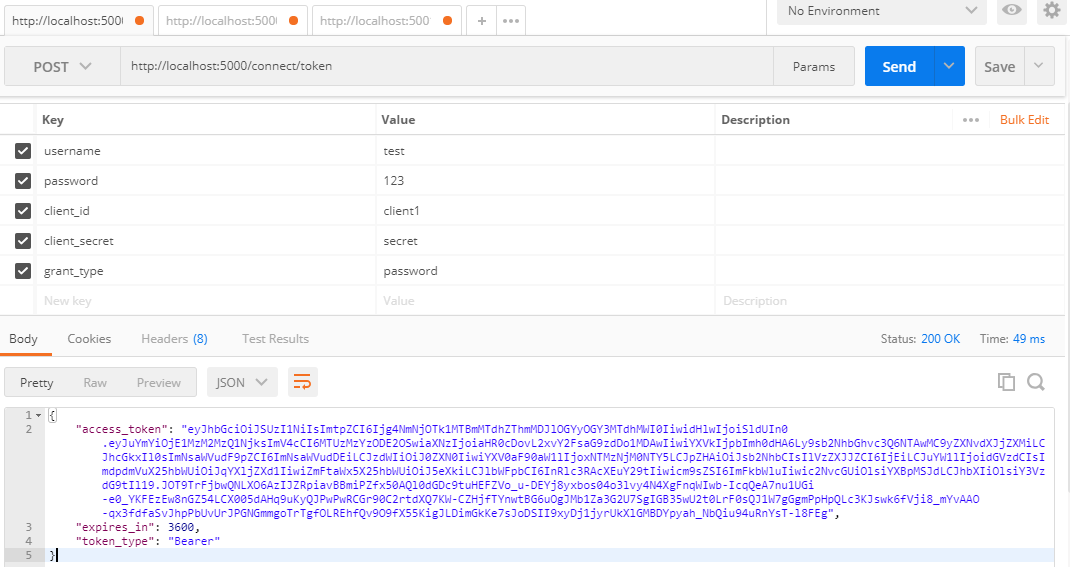
5.1、用户登录接口:http://localhost:5000/connect/token
| 参数名 | 说明 | 是否必填 | 示例 |
| username | 用户名 | Y | test |
| password | 密码 | Y | 123 |
| grant_type | 加密类型 | Y | password |
| client_id | 客户端名称 | Y | client1 |
| client_secret | 客户端加密类型 | Y | secret |
效果图:
5.2、获取用户信息接口:http://localhost:5000/connect/userinfo
| 参数 | 是否必填 | 说明 |
| Authorization | Y | 值的格式:key空格value |
PS:key 的值为上面接口返回的 token_type 的值,value 为 access_token 的值。
通过调用上面两个接口,完成登录授权。
效果图:

ASP.NET Core的身份认证框架IdentityServer4--(5)自定义用户登录(通过接口登录,无UI版本)的更多相关文章
- ASP.NET Core的身份认证框架IdentityServer4(7)- 使用客户端证书控制API访问
前言 今天(2017-9-8,写于9.8,今天才发布)一口气连续把最后几篇IdentityServer4相关理论全部翻译完了,终于可以进入写代码的过程了,比较累.目前官方的文档和Demo以及一些相关组 ...
- ASP.NET Core的身份认证框架IdentityServer4(1)-特性一览
IdentityServer4是ASP.NET Core的一个包含OpenID和OAuth 2.0协议的框架.OpenID和OAuth 的区别请看 https://www.zhihu.com/ques ...
- ASP.NET Core的身份认证框架IdentityServer4(6)- 开始
安装和概述 启动一个新的IdentityServer项目有两种基本方法: 从头开始 从Visual Studio中的ASP.NET身份模板开始 如果从头开始,我们提供了一些文档.项目帮助和内存存储支持 ...
- ASP.NET Core的身份认证框架IdentityServer4(5)- 包和构建
包和构建 IdentityServer有许多nuget包 IdentityServer4 nuget | github 包含IdentityServer核心对象模型,服务和中间件. 仅支持内存配置和用 ...
- ASP.NET Core的身份认证框架IdentityServer4(9)-使用OpenID Connect添加用户认证
OpenID Connect OpenID Connect 1.0是OAuth 2.0协议之上的一个简单的身份层. 它允许客户端基于授权服务器执行的身份验证来验证最终用户的身份,以及以可互操作和类似R ...
- ASP.NET Core的身份认证框架IdentityServer4(3)-术语的解释
IdentityServer4 术语 IdentityServer4的规范.文档和对象模型使用了一些你应该了解的术语. 身份认证服务器(IdentityServer) IdentityServer是一 ...
- ASP.NET Core的身份认证框架IdentityServer4(8)- 使用密码认证方式控制API访问
前言 本文及IdentityServer这个系列使用的都是基于.net core 2.0的.上一篇博文在API项目中我使用了icrosoft.AspNetCore.Authentication.Jwt ...
- ASP.NET Core的身份认证框架IdentityServer4(4)- 支持的规范
IdentityServer实现以下规范: OpenID Connect OpenID Connect Core 1.0 (spec) OpenID Connect Discovery 1.0 (sp ...
- ASP.NET Core的身份认证框架IdentityServer4--入门
ASP.NET Core的身份认证框架IdentityServer4--入门 2018年08月11日 10:09:00 qq_42606051 阅读数 4002 https://blog.csdn ...
- ASP.NET Core的身份认证框架IdentityServer4--入门【转】
原文地址 Identity Server 4是IdentityServer的最新版本,它是流行的OpenID Connect和OAuth Framework for .NET,为ASP.NET Cor ...
随机推荐
- scrum立会报告+燃尽图(第三周第二次)
此作业要求参见:https://edu.cnblogs.com/campus/nenu/2018fall/homework/2284 项目地址:https://coding.net/u/wuyy694 ...
- ncnblogs.com的用户体验
你是什么样的用户, 有什么样的心理, 对cnblogs 的期望值是什么? 我是一名普通的学生,上cnblogs的期望是发表博客完成老师布置的任务. 当你第一次使用cnblogs 的功能的时候, 碰到了 ...
- “我爱淘”第二冲刺阶段Scrum站立会议7
完成任务: 完成学院分类的点击查看书籍功能,可以点击书的条目查看书的详细信息.将登陆界面以及注册发布界面完善了一下修复一些bug. 计划任务: 将书的详细信息进行完善,并且可以点击收藏以及已预订等功能 ...
- 《我是一只IT小小鸟》 读书笔记
<我是一只IT小小鸟>讲述了IT人员的成长经历,邀请了许多名IT行业的职员,学生,研究生写了自己的亲身经历和人生感悟,以书中可以看到我国IT行业的快速进步,以及看到IT员在这条道路上的坎坷 ...
- 小白用Android MVP-初体验(一)
写android以来,一直都是采用MVC的模式,所有的业务逻辑,网络请求等都放在了View中,即Activity或者Fragment中.看了一些mvp文章,很多跨度较大,也因为自己造诣不够,还不能跟上 ...
- (一)Tensorflow安装
主要包括下面两个指令: $ sudo apt-get install python-pip python-dev $ sudo pip install --upgrade https://storag ...
- J2EE面试常见试题
一.基础问答 1.下面哪些类可以被继承? java.lang.Thread (T) java.lang.Number (T) java.lang.Double (F) java.lang.Math ...
- flink写入mysql的两种方式
方式一 通过JDBCOutputFormat 在flink中没有现成的用来写入MySQL的sink,但是flink提供了一个类,JDBCOutputFormat,通过这个类,如果你提供了jdbc的dr ...
- 常用的Redis客户端的并发模型(转)
伪代码模型 # get lock : timestamp = current Unix time + lock = SETNX lock.foo timestamp or (now() > ...
- POJ2823_Sliding Window
以前也碰到过这种类型的题目,以前好像做出来过,但是忘记了,这次又坑了. 题目很简单,对于从前到后每一个连续的长度为k的数字,求出这段数字中的最大的数字和最小的数字. 一开始我用离散化+树状数组来更新和 ...