
基于HTML5堆木头游戏
今天要来分享一款很经典的HTML5游戏——堆木头游戏,这款游戏的玩法是将木头堆积起来,多出的部分将被切除,直到下一根木头无法堆放为止。这款HTML5游戏的难点在于待堆放的木头是移动的,因此需要你很好的控制木头下落的位置。
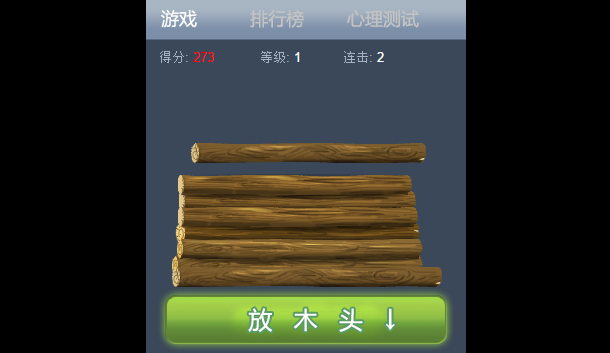
实现的代码。
html代码:
<div style="width: 320px; height: 370px;">
<br />
<div style="position: absolute; margin-top: 400px; width: 320px; heigth: 48px; background: #ffffff">
</div>
<div id="alertbox">
<div id="alertbox_flekk">
</div>
<div id="alertbox_content">
</div>
</div>
<a id="button_xwuz" onclick="return menuswitch(document.getElementById('button_about'));"
ontouchstart="return menuswitch(document.getElementById('button_about'));"></a>
<div id="imenu">
<a id="button_game" href="#game" class="active" onclick="return menuswitch(this);"
ontouchstart="return menuswitch(this);"><span style="display: none">重新开始</span></a>
<a id="button_highscore" href="#highscore" onclick="return menuswitch(this);" ontouchstart="return menuswitch(this);">
<span style="display: none">游戏排行榜</span></a> <a id="button_about" href="http://sc.chinaz.com/"
ontouchstart="return menuswitch(this);"><span style="display: none">更多游戏</span></a>
</div>
<div class="ibox" id="container">
<div style="width: 10000px;" id="container_scroller">
<div id="ibox_game" class="iboxcontent ibc1" style="position: relative;">
<div style="width: 237px; height: 15px; overflow: hidden; margin-left: 13px; padding-top: 10px;
font-size: 90%; position: absolute; z-index: 20;">
<div style="float: left">
<div style="float: left" id="score_title">
得分: </div>
<div id="score" style="float: left; width: 2em;">
0</div>
</div>
<div style="float: right">
<div style="float: left">
连击: </div>
<div id="combo" style="float: left; width: 1.5em;">
0</div>
</div>
<div style="text-align: center">
等级: <span id="level">1</span></div>
</div>
<div style="width: 320px; height: 316px; overflow: hidden; position: relative;" id="st_outerarea">
</div>
</div>
<div id="ibox_highscore" class="iboxcontent ibc2">
<h3>
您目前的最高分是...</h3>
<div id="yourbest">
</div>
<p>
一般人努力点可以达到<span class="fontostext">2500</span> 分, 高手可以达到<span class="fontostext">3500</span>
分. 你可以分享给好友挑战下</p>
<p>
你已经玩了 <span id="gamesplayed" class="fontostext">0</span> 次 <span class="fontostext">
堆木头</span>.</p>
<p>
点击右上角分享分数到朋友圈</p>
</div>
</div>
</div>
css代码:
 body

        {

            font-family: helvetica, arial;

            background-color: #000000;

            color: #a3b3c3;

            border:;

            padding:;

            font-size: 90%;

            overflow: hidden;

            width: 320px;

            margin: auto;

        }

        h1

        {

            margin: .4em;

        }

        h3

        {

            font-size: 120%;

            margin: 12px;

            padding-left:;

            margin-bottom: .5em;

            color: #ffffff;

        }

        p

        {

            margin:;

            margin: 12px;

            margin-top: .5em;

            margin-bottom: .5em;

            font-size: 84%;

        }

        a

        {

            color: #ffffff;

        }

        td

        {

            text-align: center;

            font-size: 70%;

        }

        .ibox

        {

            width: 320px;

            height: 315px;

            overflow: hidden;

            background-color: #000000;

            margin: auto;

        }

        .iboxcontent

        {

            width: 320px;

            height: 315px;

            float: left;

            overflow: hidden;

        }

        .ibc1

        {

            background-color: #3b4859;

            background-image: url(./i/bg1.png);

        }

        .ibc2

        {

            background-color: #404d5e;

            background-image: url(./i/bg2.png);

        }

        #alertbox

        {

            display: none;

            position: absolute;

            z-index:;

        }

        #alertbox_flekk

        {

            position: absolute;

            width: 320px;

            height: 356px;

            background-color: #000000;

            opacity: .8;

        }

        #alertbox_content

        {

            position: absolute;

            width: 320px;

            height: 286px;

            margin-top: 70px;

            text-align: center;

            color: #ffffff;

        }

        #alertbox_content .fontostext

        {

            color: #a3b3c3;

        }

        #alertbox a

        {

            margin: 10px;

            width: 114px;

            height: 54px;

        }

        img

        {

            border:;

        }

        #imenu

        {

            width: 320px;

            height: 41px;

            margin: auto;

            text-align: center;

            background-image: url(./i/menu.png);

            background-position: 0 0px;

        }

        #imenu a:hover

        {

            opacity: .5;

        }

        #button_game

        {

            background-image: url(./i/menu.png);

            display: block;

            float: left;

            width: 72px;

            height: 41px;

            background-position: 0 0;

        }

        #button_highscore

        {

            background-image: url(./i/menu.png);

            display: block;

            float: left;

            width: 110px;

            height: 41px;

            background-position: -72px -41px;

        }

        #button_about

        {

            background-image: url(./i/menu.png);

            display: block;

            float: left;

            width: 100px;

            height: 41px;

            background-position: -182px -41px;

        }

        #score, #combo, #level

        {

            color: #ffffff;

        }

        #button_xwuz

        {

            position: absolute;

            display: block;

            width: 48px;

            height: 57px;

            margin: 5px 0 0 267px;

            background-image: url(./i/xwuz.png);

            z-index:;

            cursor: pointer;

        }

        #yourbest

        {

            text-align: center;

            font-weight: bold;

            color: #ffffff;

            font-size: 300%;

            margin: .5em auto .5em auto;

            background-image: url(./i/flekk.png);

            width: 296px;

            height: 65px;

            padding-top: 15px;

        }

        .fontostext

        {

            color: #ffffff;

        }

        #preload

        {

            width: 320px;

            position: absolute;

            visibility: hidden;

            overflow: hidden;

        }
js代码:
<!--

            firstinit();

            ialert('<h1>堆木头</h1><p style="margin: 0 20px 0 20px; text-align:left;"><img src="i/icon.png" alt="堆木头!" style="width:64px; height:64px;float:left; margin-right:5px;"/> 当木头移动到木头堆正上方时,按下按钮放木头,尽可能的对齐木头.</p>' +

'<div style="width:110px; margin:30px auto -30px auto;"></div>', 'restartgame()');

            //-->

            function play68_init() {

                updateShare(0);

            }

            function updateShare(bestScore) {

                imgUrl = 'http://sc.chinaz.com';

                lineLink = 'http://sc.chinaz.com/';

                descContent = "创意跳高游戏,快来一起跳!";

                updateShareScore(bestScore);

                appid = '';

            }

            function updateShareScore(bestScore) {

                if (bestScore > 0) {

                    shareTitle = "我跳我跳我跳跳跳到" + bestScore + "米,你跳你跳你跳跳跳看!";

                }

                else {

                    shareTitle = "我跳我跳我跳跳跳,你跳你跳你跳跳跳!";

                }

            }

            play68_init();
via:http://www.w2bc.com/Article/15527
基于HTML5堆木头游戏的更多相关文章
- HTML5堆木头游戏
在线演示 本地下载
- 基于HTML5的SLG游戏开发(序)
2012年前后,HTML5游戏凭借跨平台.易移植.部署简单.节省成本等优点被炒的火热,经过一两年的快速发展,市场出现了一些成功地HTML5游戏产品,像磊友的<修仙三国>,神奇时 ...
- 基于HTML5坦克大战游戏简化版
之前我们有分享过不少经典的HTML5游戏,有些还是很有意思的,比如HTML5版切水果游戏和HTML5中国象棋游戏.今天要分享的是一款简化版的HTML5坦克大战游戏,方向键控制坦克的行进方向,空格键发射 ...
- 基于HTML5的SLG游戏开发( 三):认识PureMVC
在游戏开发中,对于一般网络游戏,由于需要多人协同开发,每个人负责不同的模块开发,为了减少耦合,需要用来一些MVC框架,减少模块之间的耦合.我们现在使用的mvc框架是pureMVC.pureMVC的官网 ...
- 基于HTML5的SLG游戏开发( 二):创建HTML5页面
HTML5游戏的开发过程中是在浏览器上进行运行调试的,所以首先我们需要建立一个html页面. 其中,我们把所有的canvas都放到一个viewporter(视图)里面,因此,在body中放置了一个id ...
- 基于HTML5的SLG游戏开发(一):搭建开发环境(2)
游戏开发过程中经常需要处理各种事件,而HTML5游戏开发中,所有的场景和UI面板都是绘制在Canvas上面,假设需要对某一UI面板上的关闭按钮添加事件监听,采取的方法是对关闭按钮图片资源进 ...
- 基于HTML5的SLG游戏开发(一):搭建开发环境(1)
开发环境: 1.操作系统:MacOS 10.8.5 2.本地web服务器:Apache 2.2.24 (Window环境推荐使用WampServer) 3.编码工具:WebStrom 7.0 4.调试 ...
- 基于HTML5的Web SCADA工控移动应用
在电力.油田燃气.供水管网等工业自动化领域Web SCADA的概念已经提出了多年,早先年的Web SCADA前端技术大部分还是基于Flex.Silverlight甚至Applet这样的重客户端方案,在 ...
- 基于HTML5实现的中国象棋游戏
棋类游戏在桌面游戏中已经非常成熟,中国象棋的版本也非常多.今天这款基于HTML5技术的中国象棋游戏非常有特色,我们不仅可以选择中国象棋的游戏难度,而且可以切换棋盘的样式.程序写累了,喝上一杯咖啡,和电 ...
随机推荐
- java学习笔记9--内部类总结
java学习笔记系列: java学习笔记8--接口总结 java学习笔记7--抽象类与抽象方法 java学习笔记6--类的继承.Object类 java学习笔记5--类的方法 java学习笔记4--对 ...
- windows live writer首行缩进问题的解决
使用live writer写博客的确方便,但有个简单的问题,我始终无法解决,就是发布的博客老是无法首行缩进,试过好多方法,都有问题: 直接加全角空格.上传时就给过滤掉了. 修改defaultcss,结 ...
- Sql server2005 优化查询速度50个方法小结
Sql server2005 优化查询速度50个方法小结 Sql server2005优化查询速度51法查询速度慢的原因很多,常见如下几种,大家可以参考下. I/O吞吐量小,形成了瓶颈效应. ...
- (剑指Offer)面试题5:从尾到头打印链表
题目: 输入一个链表的头结点,从尾到头反过来打印每个结点的值. 链表结点定义: struct ListNode{ int value; ListNode* pNext; }; 思路: 1.改变链表结构 ...
- Service 生命周期
有了 Service 类我们如何启动他呢,有两种方法: • Context.startService() • Context.bindService() 1. 在同一个应用任何地方调用 start ...
- Google开源单元測试框架Google Test:VS2012 配置
由题目可知,Google Test(简称gtest)是Google公布的一个开源C/C++測试框架,被应用于多个开源项目及Google内部项目中,包括Chrome浏览器.LLVM编译器架构.Proto ...
- python2.7里的StringIO.StringIO与BytesIO有什么区别
import StringIO与from io import BytesIO的区别 open()函数返回的文件对象取决于模式.当使用文本模式打开文件时,它返回一个TextIOBase的子类.当使用二进 ...
- Drag & drop a button widget
In the following example, we will demonstrate how to drag & drop a button widget. #!/usr/bin/pyt ...
- Creating a Fragment: constructor vs newInstance()
from stack overflow and another chapter I recently grew tired of constantly having to know String ke ...
- Hadoop集群+Spark集群搭建(一篇文章就够了)
本文档环境基于ubuntu16.04版本,(转发请注明出处:http://www.cnblogs.com/zhangyongli2011/ 如发现有错,请留言,谢谢) 一.准备 1.1 软件版本 Ub ...