
基于HTML5堆木头游戏
今天要来分享一款很经典的HTML5游戏——堆木头游戏,这款游戏的玩法是将木头堆积起来,多出的部分将被切除,直到下一根木头无法堆放为止。这款HTML5游戏的难点在于待堆放的木头是移动的,因此需要你很好的控制木头下落的位置。
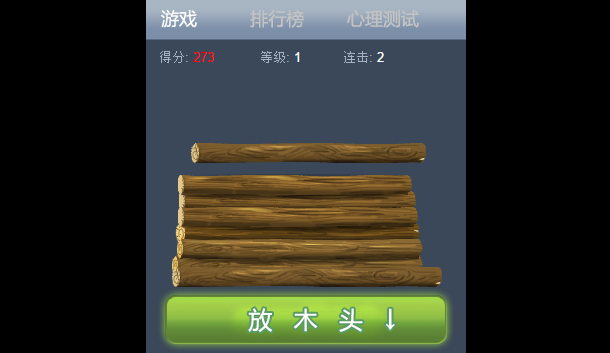
实现的代码。
html代码:
<div style="width: 320px; height: 370px;">
<br />
<div style="position: absolute; margin-top: 400px; width: 320px; heigth: 48px; background: #ffffff">
</div>
<div id="alertbox">
<div id="alertbox_flekk">
</div>
<div id="alertbox_content">
</div>
</div>
<a id="button_xwuz" onclick="return menuswitch(document.getElementById('button_about'));"
ontouchstart="return menuswitch(document.getElementById('button_about'));"></a>
<div id="imenu">
<a id="button_game" href="#game" class="active" onclick="return menuswitch(this);"
ontouchstart="return menuswitch(this);"><span style="display: none">重新开始</span></a>
<a id="button_highscore" href="#highscore" onclick="return menuswitch(this);" ontouchstart="return menuswitch(this);">
<span style="display: none">游戏排行榜</span></a> <a id="button_about" href="http://sc.chinaz.com/"
ontouchstart="return menuswitch(this);"><span style="display: none">更多游戏</span></a>
</div>
<div class="ibox" id="container">
<div style="width: 10000px;" id="container_scroller">
<div id="ibox_game" class="iboxcontent ibc1" style="position: relative;">
<div style="width: 237px; height: 15px; overflow: hidden; margin-left: 13px; padding-top: 10px;
font-size: 90%; position: absolute; z-index: 20;">
<div style="float: left">
<div style="float: left" id="score_title">
得分: </div>
<div id="score" style="float: left; width: 2em;">
0</div>
</div>
<div style="float: right">
<div style="float: left">
连击: </div>
<div id="combo" style="float: left; width: 1.5em;">
0</div>
</div>
<div style="text-align: center">
等级: <span id="level">1</span></div>
</div>
<div style="width: 320px; height: 316px; overflow: hidden; position: relative;" id="st_outerarea">
</div>
</div>
<div id="ibox_highscore" class="iboxcontent ibc2">
<h3>
您目前的最高分是...</h3>
<div id="yourbest">
</div>
<p>
一般人努力点可以达到<span class="fontostext">2500</span> 分, 高手可以达到<span class="fontostext">3500</span>
分. 你可以分享给好友挑战下</p>
<p>
你已经玩了 <span id="gamesplayed" class="fontostext">0</span> 次 <span class="fontostext">
堆木头</span>.</p>
<p>
点击右上角分享分数到朋友圈</p>
</div>
</div>
</div>
css代码:
 body

        {

            font-family: helvetica, arial;

            background-color: #000000;

            color: #a3b3c3;

            border:;

            padding:;

            font-size: 90%;

            overflow: hidden;

            width: 320px;

            margin: auto;

        }

        h1

        {

            margin: .4em;

        }

        h3

        {

            font-size: 120%;

            margin: 12px;

            padding-left:;

            margin-bottom: .5em;

            color: #ffffff;

        }

        p

        {

            margin:;

            margin: 12px;

            margin-top: .5em;

            margin-bottom: .5em;

            font-size: 84%;

        }

        a

        {

            color: #ffffff;

        }

        td

        {

            text-align: center;

            font-size: 70%;

        }

        .ibox

        {

            width: 320px;

            height: 315px;

            overflow: hidden;

            background-color: #000000;

            margin: auto;

        }

        .iboxcontent

        {

            width: 320px;

            height: 315px;

            float: left;

            overflow: hidden;

        }

        .ibc1

        {

            background-color: #3b4859;

            background-image: url(./i/bg1.png);

        }

        .ibc2

        {

            background-color: #404d5e;

            background-image: url(./i/bg2.png);

        }

        #alertbox

        {

            display: none;

            position: absolute;

            z-index:;

        }

        #alertbox_flekk

        {

            position: absolute;

            width: 320px;

            height: 356px;

            background-color: #000000;

            opacity: .8;

        }

        #alertbox_content

        {

            position: absolute;

            width: 320px;

            height: 286px;

            margin-top: 70px;

            text-align: center;

            color: #ffffff;

        }

        #alertbox_content .fontostext

        {

            color: #a3b3c3;

        }

        #alertbox a

        {

            margin: 10px;

            width: 114px;

            height: 54px;

        }

        img

        {

            border:;

        }

        #imenu

        {

            width: 320px;

            height: 41px;

            margin: auto;

            text-align: center;

            background-image: url(./i/menu.png);

            background-position: 0 0px;

        }

        #imenu a:hover

        {

            opacity: .5;

        }

        #button_game

        {

            background-image: url(./i/menu.png);

            display: block;

            float: left;

            width: 72px;

            height: 41px;

            background-position: 0 0;

        }

        #button_highscore

        {

            background-image: url(./i/menu.png);

            display: block;

            float: left;

            width: 110px;

            height: 41px;

            background-position: -72px -41px;

        }

        #button_about

        {

            background-image: url(./i/menu.png);

            display: block;

            float: left;

            width: 100px;

            height: 41px;

            background-position: -182px -41px;

        }

        #score, #combo, #level

        {

            color: #ffffff;

        }

        #button_xwuz

        {

            position: absolute;

            display: block;

            width: 48px;

            height: 57px;

            margin: 5px 0 0 267px;

            background-image: url(./i/xwuz.png);

            z-index:;

            cursor: pointer;

        }

        #yourbest

        {

            text-align: center;

            font-weight: bold;

            color: #ffffff;

            font-size: 300%;

            margin: .5em auto .5em auto;

            background-image: url(./i/flekk.png);

            width: 296px;

            height: 65px;

            padding-top: 15px;

        }

        .fontostext

        {

            color: #ffffff;

        }

        #preload

        {

            width: 320px;

            position: absolute;

            visibility: hidden;

            overflow: hidden;

        }
js代码:
<!--

            firstinit();

            ialert('<h1>堆木头</h1><p style="margin: 0 20px 0 20px; text-align:left;"><img src="i/icon.png" alt="堆木头!" style="width:64px; height:64px;float:left; margin-right:5px;"/> 当木头移动到木头堆正上方时,按下按钮放木头,尽可能的对齐木头.</p>' +

'<div style="width:110px; margin:30px auto -30px auto;"></div>', 'restartgame()');

            //-->

            function play68_init() {

                updateShare(0);

            }

            function updateShare(bestScore) {

                imgUrl = 'http://sc.chinaz.com';

                lineLink = 'http://sc.chinaz.com/';

                descContent = "创意跳高游戏,快来一起跳!";

                updateShareScore(bestScore);

                appid = '';

            }

            function updateShareScore(bestScore) {

                if (bestScore > 0) {

                    shareTitle = "我跳我跳我跳跳跳到" + bestScore + "米,你跳你跳你跳跳跳看!";

                }

                else {

                    shareTitle = "我跳我跳我跳跳跳,你跳你跳你跳跳跳!";

                }

            }

            play68_init();
via:http://www.w2bc.com/Article/15527
基于HTML5堆木头游戏的更多相关文章
- HTML5堆木头游戏
在线演示 本地下载
- 基于HTML5的SLG游戏开发(序)
2012年前后,HTML5游戏凭借跨平台.易移植.部署简单.节省成本等优点被炒的火热,经过一两年的快速发展,市场出现了一些成功地HTML5游戏产品,像磊友的<修仙三国>,神奇时 ...
- 基于HTML5坦克大战游戏简化版
之前我们有分享过不少经典的HTML5游戏,有些还是很有意思的,比如HTML5版切水果游戏和HTML5中国象棋游戏.今天要分享的是一款简化版的HTML5坦克大战游戏,方向键控制坦克的行进方向,空格键发射 ...
- 基于HTML5的SLG游戏开发( 三):认识PureMVC
在游戏开发中,对于一般网络游戏,由于需要多人协同开发,每个人负责不同的模块开发,为了减少耦合,需要用来一些MVC框架,减少模块之间的耦合.我们现在使用的mvc框架是pureMVC.pureMVC的官网 ...
- 基于HTML5的SLG游戏开发( 二):创建HTML5页面
HTML5游戏的开发过程中是在浏览器上进行运行调试的,所以首先我们需要建立一个html页面. 其中,我们把所有的canvas都放到一个viewporter(视图)里面,因此,在body中放置了一个id ...
- 基于HTML5的SLG游戏开发(一):搭建开发环境(2)
游戏开发过程中经常需要处理各种事件,而HTML5游戏开发中,所有的场景和UI面板都是绘制在Canvas上面,假设需要对某一UI面板上的关闭按钮添加事件监听,采取的方法是对关闭按钮图片资源进 ...
- 基于HTML5的SLG游戏开发(一):搭建开发环境(1)
开发环境: 1.操作系统:MacOS 10.8.5 2.本地web服务器:Apache 2.2.24 (Window环境推荐使用WampServer) 3.编码工具:WebStrom 7.0 4.调试 ...
- 基于HTML5的Web SCADA工控移动应用
在电力.油田燃气.供水管网等工业自动化领域Web SCADA的概念已经提出了多年,早先年的Web SCADA前端技术大部分还是基于Flex.Silverlight甚至Applet这样的重客户端方案,在 ...
- 基于HTML5实现的中国象棋游戏
棋类游戏在桌面游戏中已经非常成熟,中国象棋的版本也非常多.今天这款基于HTML5技术的中国象棋游戏非常有特色,我们不仅可以选择中国象棋的游戏难度,而且可以切换棋盘的样式.程序写累了,喝上一杯咖啡,和电 ...
随机推荐
- Plugin with id 'com.github.dcendents.android-maven' not found
导入开源项目的时候老是报这个错 Error:(2, 0) Plugin with id 'com.github.dcendents.android-maven' not found 挺郁闷的,不知道是 ...
- SpringMVC使用ModelAndView进行重定向
1.Servlet重定向forward与redirect: 使用servlet重定向有两种方式,一种是forward,另一种就是redirect.forward是服务器内部重定向,客户端并不知道服务器 ...
- QPS、RT、PV、UV之间的关系
QPS: 每秒查询率(Query Per Second) ,每秒的响应请求数,也即是最大吞吐能力. QPS = req/sec = 请求数/秒 QPS统计方式 [一般使用 http_load 进行统计 ...
- Spring 的ioc
Spring的两个非常重要的功能ioc和aop 依赖反转:依赖对象的获得被反转:很多非凡的应用都是由两个或多个类通过彼此的合作来上线业务逻辑.这使得每一个对象都须要与其它对象合作,也就是说 一个对象获 ...
- Codeforces Round #FF (Div. 1)-A,B,C
A:DZY Loves Sequences 一開始看错题了. .sad. 题目非常easy.做法也非常easy.DP一下就好了. dp[i][0]:到当前位置,没有不论什么数改变,得到的长度. dp[ ...
- 算法笔记_024:字符串的包含(Java)
目录 1 问题描述 2 解决方案 2.1 蛮力轮询法 2.2 素数相乘法 2.3 位运算法 1 问题描述 给定一长字符串A和一短字符串B.请问,如何最快地判断出短字符串B中的所有字符是否都在长字符串A ...
- AjaxAnyWhere 实现页面局部刷新,局部分页
这个比較jquery.单纯ajax异步简单多了.不多说了直接上代码. 须要引入:ajaxanywhere-1.2.1.jar (最新)和 /ajaxAnyWhereDemo/WebRoot/js/aa ...
- Quercus-基于 Java 的 PHP 框架
Quercus是Caucho公司采用纯Java开发的一个PHP5引擎.基于开源授权协议GPL发布.Quercus自带很多个PHP模块和扩展如 PDF,PDO,MySQL和JSON.可以利用这个引擎在一 ...
- Maven + Apache Felix + CXF + DOSGi series
This is a blog series on how to combine Maven + Apache Felix + CXF + DOSGi. The information presente ...
- P2P原理
简单介绍 前面文章在分布式计算泛型中介绍过P2P泛型.他是一种是一种无中心server的对等网络泛型. P2P即Peer-to-Peer的缩写.翻译为点对点或者端对端.就是我们常说的对等计算. P2P ...