
React 入门学习笔记整理(六)—— 组件通信
1、父子组件通信
1)父组件与子组件通信,使用Props
父组件将name传递给子组件
<GreateH name="kitty"/>
子组件通过props接收父组件的值,并显示
class GreateH extends React.Component{

    static defaultProps = {

        name:'CoCo'

    };

    constructor(props){

        super(props);

        this.state ={

            name:props.name

        }

    }

    render(){

        return <div>

            <h2>hello,{this.state.name}</h2>

        </div>

    }

}
2)子组件与父组件通信,执行回调函数
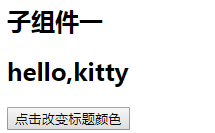
如图所示,点击子组件按钮改变父组件中标题颜色
class GreateH extends React.Component{

    static defaultProps = {

        name:'CoCo'

    };

    constructor(props){

        super(props);

        this.state ={

            name:props.name

        }

    }

    changeBtn(){

        if(typeof this.props.click == 'function' ){

          //触发父组件的事件,改变父组件中标题颜色

            this.props.click();

        }

    };

    render(){

        return <div>

            <h2>hello,{this.state.name}</h2>

            <button onClick={this.changeBtn.bind(this)}>点击改变标题颜色</button>

        </div>

    }

}

export default GreateH;
父组件中通过changeColor事件改变对应标题的颜色
class App extends Component {

   changeColor(obj){

       var oDom = document.getElementsByClassName(obj.class)[0];

       oDom.style.color = obj.color;

   };

  render() {

    return (

      <div className="App">

          <h2 className="title1">子组件一</h2>

          <GreateH name="kitty" click={this.changeColor.bind(this,{color:'red',class:'title1'})}/>

          <hr/>

          <h2 className="title2">子组件二</h2>

          <GreateH  name="lily" click={this.changeColor.bind(this,{color:'blue',class:'title2'})}/>

      </div>

    );

  }

}

export default App;

2、兄弟组件通信
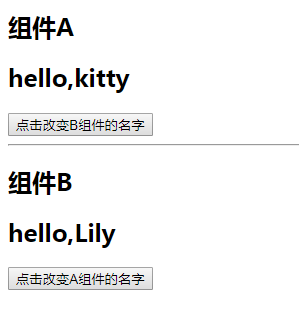
如图所示,要实现点击B组件的按钮改变A的名称,点击A组件的按钮改变B组件的名称
父组件:
class App extends Component {

    constructor(props){

        super(props);

        this.state = {

            nameA:'kitty',

            nameB:'Lily'

        }

    }

    changeBName(params){

        this.setState({

            nameB:params

        })

    }

    changeAName(params){

        this.setState({

            nameA:params

        })

    }

  render() {

    return (

      <div className="App">

          <h2 className="title1">组件A</h2>

          <GreateA name={this.state.nameA} click={this.changeBName.bind(this)}/>

          <hr/>

          <h2 className="title2">组件B</h2>

          <GreateB  name={this.state.nameB} click={this.changeAName.bind(this)}/>

      </div>

    );

  }

}
A组件:
class GreateH extends React.Component{

    static defaultProps = {

        name:''

    };

    changeBtn(){

        if(typeof this.props.click == 'function' ){

            this.props.click('kristy');

        }

    };

    render(){

        return <div>

            <h2>hello,{this.props.name}</h2>

            <button onClick={this.changeBtn.bind(this)}>点击改变B组件的名字</button>

        </div>

    }

}
B组件
class GreateH extends React.Component{

    static defaultProps = {

        name:''

    };

    changeBtn(){

        if(typeof this.props.click == 'function' ){

            this.props.click('CoCo');

        }

    };

    render(){

        return <div>

            <h2>hello,{this.props.name}</h2>

            <button onClick={this.changeBtn.bind(this)}>点击改变A组件的名字</button>

        </div>

    }

}
学到这里有个问题,为什么这样写没有用:
class GreateH extends React.Component{

    static defaultProps = {

        name:''

    };

    constructor(props){

        super(props);

        this.state ={

            name:this.props.name

        }

    }

    changeBtn(){

        if(typeof this.props.click == 'function' ){

            this.props.click('CoCo');

        }

    };

    render(){

        return <div>

            // 改成this.props.name之后才能检测到变化

            <h2>hello,{this.state.name}</h2>

            <button onClick={this.changeBtn.bind(this)}>点击改变A组件的名字</button>

        </div>

    }

}
这个需要加一个钩子函数,在钩子函数中去改变state的值,如下:
  static getDerivedStateFromProps(props,state){

        return {

            name:props.name

        }

    }
React 入门学习笔记整理(六)—— 组件通信的更多相关文章
- React 入门学习笔记整理目录
React 入门学习笔记整理(一)--搭建环境 React 入门学习笔记整理(二)-- JSX简介与语法 React 入门学习笔记整理(三)-- 组件 React 入门学习笔记整理(四)-- 事件 R ...
- React 入门学习笔记整理(三)—— 组件
1.定义组件 1)函数组件 function GreateH(props){ return <div> <h2>hello,{props.name}</h2> &l ...
- React 入门学习笔记整理(四)—— 事件
1.事件定义 React事件绑定属性的命名采用驼峰式写法,而不是小写. 如果采用 JSX 的语法你需要传入一个函数作为事件处理函数,而不是一个字符串(DOM元素的写法) 在类组件中定义函数,通过thi ...
- React 入门学习笔记整理(五)—— state
1.state 1)组件本省也是有状态的,定义在组件内部的state中,state的状态只能由组件自身改变,任何其他组件都不能改变. 当需要改变state时,通过调用setState方法来改变,set ...
- React 入门学习笔记整理(七)—— 生命周期
(1)react 生命周期 只有类组件有生命周期,函数组件没有生命周期 1.挂载阶段:这些方法会在组件实例被创建和插入DOM中时被调用: 1)constructor(props) 初始化组件的状态.绑 ...
- React 入门学习笔记整理(九)——路由
(1)安装路由 React-router React-router提供了一些router的核心api,包括Router, Route, Switch等,但是它没有提供dom操作进行跳转的api. Re ...
- React 入门学习笔记整理(一)——搭建环境
使用create-react-app脚手架搭建环境 1.安装node .软件下载地址:https://nodejs.org/en/,我下的推荐的版本. 安装之后测试是否安装成功.windows系统下, ...
- React 入门学习笔记整理(二)—— JSX简介与语法
先看下这段代码: import React from 'react'; //最终渲染需要调用ReactDOM库,将jsx渲染都页面中 import ReactDOM from 'react-dom'; ...
- React 入门学习笔记整理(八)—— todoList
APP.js import React, { Component,createRef,Fragment} from 'react'; import Todos from './components/t ...
随机推荐
- Filesystem Case-Sensitivity Mismatch
Filesystem Case-Sensitivity Mismatch The project seems to be located on a case-sensitive file system ...
- Eclipse 中 Debug 时鼠标悬停无法查看变量值
问题描述:Eclipse在Debug模式下,当鼠标移动到某个变量上面时不自动显示该变量对应的值. 解决方法:在Eclipse中点击 Window->Preferences->Java-&g ...
- 用redux-thunk异步获取数据
概述 最近学习redux,打算用redux-thunk给todo添加异步获取数据组件.记录下来,供以后开发时参考,相信对其他人也有用. 注意: 在todo下方,我异步获取我的react博客的标题,点击 ...
- 常用的评价指标:accuracy、precision、recall、F1-score、ROC-AUC、PR-AUC
- ArrayList源码解读笔记
简介: ArrayList是我们开发中非常常用的数据存储容器之一,其底层是数组实现的,我们可以在集合中存储任意类型的数据,ArrayList是线程不安全的,非常适合用于对元素进行查找,效率非常高. 线 ...
- [EXP]ThinkPHP 5.0.23/5.1.31 - Remote Code Execution
# Exploit Title: ThinkPHP .x < v5.0.23,v5.1.31 Remote Code Execution # Date: -- # Exploit Author: ...
- 课程四(Convolutional Neural Networks),第二 周(Deep convolutional models: case studies) —— 2.Programming assignments : Keras Tutorial - The Happy House (not graded)
Keras tutorial - the Happy House Welcome to the first assignment of week 2. In this assignment, you ...
- ES6中的proxy
1 概述 Proxy 可以理解成,在目标对象之前架设一层“拦截”,外界对该对象的访问,都必须先通过这层拦截,因此提供了一种机制,可以对外界的访问进行过滤和改写. Proxy 这个词的原意是代理,用在这 ...
- Django--视图函数views
1 视图函数 一个视图函数,简称视图,是一个简单的Python 函数,它接受Web请求并且返回Web响应.响应可以是一张网页的HTML内容,一个重定向,一个404错误,一个XML文档,或者一张图片. ...
- mysql 开发进阶篇系列 28 数据库二进制包安装(centos系统准备)
1. centos 7安装工作 对于mysql二进制安装,我这里在使用一台新的centos系统.准备好VMware,Xftp-6.0, Xshell-6.0.在VMware中网络使用桥接模式,分配20 ...