
Apache POI – Reading and Writing Excel file in Java
来源于:https://www.mkyong.com/java/apache-poi-reading-and-writing-excel-file-in-java/
In this article, we will discuss about how to read and write an excel file using Apache POI
1. Basic definitions for Apache POI library
This section briefly describe about basic classes used during Excel Read and Write.
HSSFis prefixed before the class name to indicate operations related to a Microsoft Excel 2003 file.XSSFis prefixed before the class name to indicate operations related to a Microsoft Excel 2007 file or later.XSSFWorkbookandHSSFWorkbookare classes which act as an Excel WorkbookHSSFSheetandXSSFSheetare classes which act as an Excel WorksheetRowdefines an Excel rowCelldefines an Excel cell addressed in reference to a row.
2. Download Apache POI
Apache POI library is easily available using Maven Dependencies.
<dependency>

  <groupId>org.apache.poi</groupId>

  <artifactId>poi-ooxml</artifactId>

  <version>3.15</version>

</dependency>
3. Apache POI library – Writing a Simple Excel
The below code shows how to write a simple Excel file using Apache POI libraries. The code uses a 2 dimensional data array to hold the data. The data is written to a XSSFWorkbook object. XSSFSheet is the work sheet being worked on. The code is as shown below:
package com.mkyong;

import org.apache.poi.ss.usermodel.Cell;

import org.apache.poi.ss.usermodel.Row;

import org.apache.poi.xssf.usermodel.XSSFSheet;

import org.apache.poi.xssf.usermodel.XSSFWorkbook;

import java.io.FileNotFoundException;

import java.io.FileOutputStream;

import java.io.IOException;

public class ApachePOIExcelWrite {

    private static final String FILE_NAME = "/tmp/MyFirstExcel.xlsx";

    public static void main(String[] args) {

        XSSFWorkbook workbook = new XSSFWorkbook();

        XSSFSheet sheet = workbook.createSheet("Datatypes in Java");

        Object[][] datatypes = {

                {"Datatype", "Type", "Size(in bytes)"},

                {"int", "Primitive", 2},

                {"float", "Primitive", 4},

                {"double", "Primitive", 8},

                {"char", "Primitive", 1},

                {"String", "Non-Primitive", "No fixed size"}

        };

        int rowNum = 0;

        System.out.println("Creating excel");

        for (Object[] datatype : datatypes) {

            Row row = sheet.createRow(rowNum++);

            int colNum = 0;

            for (Object field : datatype) {

                Cell cell = row.createCell(colNum++);

                if (field instanceof String) {

                    cell.setCellValue((String) field);

                } else if (field instanceof Integer) {

                    cell.setCellValue((Integer) field);

                }

            }

        }

        try {

            FileOutputStream outputStream = new FileOutputStream(FILE_NAME);

            workbook.write(outputStream);

            workbook.close();

        } catch (FileNotFoundException e) {

            e.printStackTrace();

        } catch (IOException e) {

            e.printStackTrace();

        }

        System.out.println("Done");

    }

}
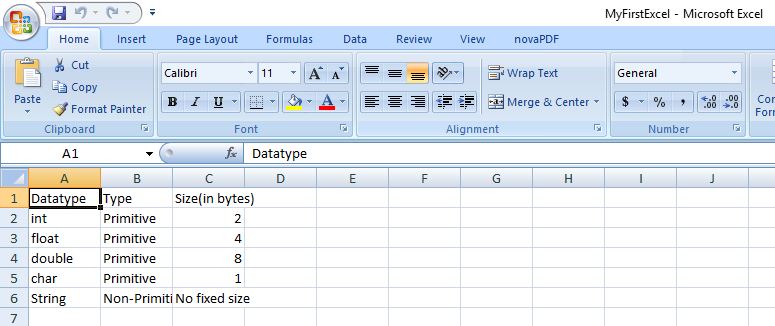
On executing the above code, you get below excel as an output.
4. Apache POI library – Reading an Excel file
The below code explains how to read an Excel file using Apache POI libraries. The function getCellTypeEnum is deprecated in version 3.15 and will be renamed to getCellType from version 4.0 onwards.
package com.mkyong;

import org.apache.poi.ss.usermodel.*;

import org.apache.poi.xssf.usermodel.XSSFWorkbook;

import java.io.File;

import java.io.FileInputStream;

import java.io.FileNotFoundException;

import java.io.IOException;

import java.util.Iterator;

public class ApachePOIExcelRead {

    private static final String FILE_NAME = "/tmp/MyFirstExcel.xlsx";

    public static void main(String[] args) {

        try {

            FileInputStream excelFile = new FileInputStream(new File(FILE_NAME));

            Workbook workbook = new XSSFWorkbook(excelFile);

            Sheet datatypeSheet = workbook.getSheetAt(0);

            Iterator<Row> iterator = datatypeSheet.iterator();

            while (iterator.hasNext()) {

                Row currentRow = iterator.next();

                Iterator<Cell> cellIterator = currentRow.iterator();

                while (cellIterator.hasNext()) {

                    Cell currentCell = cellIterator.next();

                    //getCellTypeEnum shown as deprecated for version 3.15

                    //getCellTypeEnum ill be renamed to getCellType starting from version 4.0

                    if (currentCell.getCellTypeEnum() == CellType.STRING) {

                        System.out.print(currentCell.getStringCellValue() + "--");

                    } else if (currentCell.getCellTypeEnum() == CellType.NUMERIC) {

                        System.out.print(currentCell.getNumericCellValue() + "--");

                    }

                }

                System.out.println();

            }

        } catch (FileNotFoundException e) {

            e.printStackTrace();

        } catch (IOException e) {

            e.printStackTrace();

        }

    }

}
On executing the above code, you get the below output.
Datatype--Type--Size(in bytes)--

int--Primitive--2.0--

float--Primitive--4.0--

double--Primitive--8.0--

char--Primitive--1.0--

String--Non-Primitive--No fixed size--
References
- Details about deprecation of getCellTypeEnum
- Apache POI reference regarding Deprecation
- Apache POI Maven Repo
- Apache POI API docs
Apache POI – Reading and Writing Excel file in Java的更多相关文章
- Read / Write Excel file in Java using Apache POI
Read / Write Excel file in Java using Apache POI 2014-04-18 BY DINESH LEAVE A COMMENT About a year o ...
- 【Java】使用Apache POI生成和解析Excel文件
概述 Excel是我们平时工作中比较常用的用于存储二维表数据的,JAVA也可以直接对Excel进行操作,分别有jxl和poi,2种方式. HSSF is the POI Project's pure ...
- apache poi根据模板导出excel
需要预先新建编辑好一个excel文件,设置好样式. 编辑好输出的数据,根据excel坐标一一对应. 支持列表数据输出,列表中列合并. 代码如下: package com.icourt.util; im ...
- java使用org.apache.poi读取与保存EXCEL文件
一.读EXCEL文件 package com.ruijie.wis.cloud.utils; import java.io.FileInputStream; import java.io.FileNo ...
- 利用Apache POI 实现简单的Excel表格导出
1.利用POI API实现简单的Excel表格导出 首先假设一个学生实体类: package com.sun.poi.domain; import java.io.Serializable; impo ...
- Java 使用Apache POI读取和写入Excel表格
1,引入所用的包 <dependency> <groupId>org.apache.poi</groupId> <artifactId>poi-ooxm ...
- 使用Apache poi来编写导出excel的工具类
在JavaWeb开发的需求中,我们会经常看到导出excel的功能需求,然后java并没有提供操作office文档的功能,这个时候我们就需要使用额外的组件来帮助我们完成这项功能了. 很高兴Apache基 ...
- 转:Apache POI Tutorial
Welcome to Apache POI Tutorial. Sometimes we need to read data from Microsoft Excel Files or we need ...
- 如何用Apache POI操作Excel文件-----如何在已有的Excel文件中插入一行新的数据?
在POI的第一节入门中,我们提供了两个简单的例子,一个是如何用Apache POI新建一个工作薄,另外一个例子是,如果用Apache POI新建一个工作表.那么在这个章节里面,我将会给大家演示一下,如 ...
随机推荐
- [翻译] ADPopupView 触摸弹出视窗
ADPopupView 触摸弹出视窗 https://github.com/Antondomashnev/ADPopupView ADPopupView is an iOS drop-in class ...
- [Linux] Systemd 入门教程:命令篇
reference : http://www.ruanyifeng.com/blog/2016/03/systemd-tutorial-commands.html Systemd 是 Linux 系统 ...
- OpenShift采用Blackbox_exporter进行服务状态监控
本文主要是针对prometheus的blackbox_exporter,对集群中的服务进行状态的监控 因为OpenShift 3.11版本自己带的promethues修改起来有一些问题,所以自己安装和 ...
- JQuery文件上传及以Base64字符串形式呈现图片
一:上传之 首先,你必然得有一个 file input,如下: <td> <img id="imgGif" style="display: no ...
- wtforms的简单示例
1.先定义一个类: #!/usr/bin/env python # -*- coding: utf-8 -*- # Created by xxx on 2017/3/13 from wtforms i ...
- 在Spark上运行TopK程序
1. scala程序如下 package com.cn.gao import org.apache.spark.SparkConf import org.apache.spark.SparkConte ...
- Android之属性动画(二)
上一篇文章(链接:http://www.cnblogs.com/jerehedu/p/4458928.html ),我们对属性动画有了简单的认识,并实际动手使用ObjectAnimator.Anim ...
- Linux c 屏蔽信号、切换信号
信号导致的问题 不是任何信号我们都需要的,如果遇到我们不想处理的信号,我们怎么避免这个信号? 1. 信号屏蔽 intsigprocmask(int how,//操作方式 SIG_BLOCK屏 ...
- (转)Overview : Writing Scripts in C# 使用C#书写脚本
Apart from syntax, there are some differences when writing scripts in C# or Boo. Most notable are: 除 ...
- 劣质代码评析——《写给大家看的C语言书(第2版)》附录B之21点程序(六)
. #include <stdio.h> . #include <time.h> . #include <ctype.h> . #include <stdli ...