
QEMU KVM Libvirt手册(9): network
虚拟网卡由-net nic定义
# qemu-system-x86_64 -enable-kvm -name ubuntutest -m 2048 -hda ubuntutest.img -vnc :19 -net nic
如果我们在monitor中查看info network
可以看到下面的
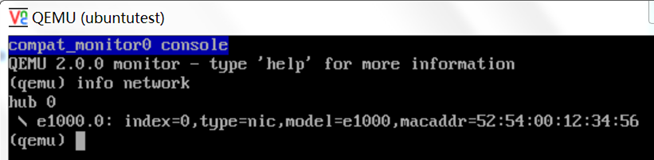
有时候,我们看到的是VLAN 0,这里的VLAN和802.1.q一点关系都没有,就是virtual hub的概念,在新的版本里面已经改了。
我们可以在monitor里面
set_link e1000.0 off
set_link e1000.0 on
来启停网卡
-net nic [, vlan = n] [, macaddr = mac] [, model = type] [, Name = str] [, addr = str] [, vectors = v]
vlan参数表示连接在哪个virtual hub上
可以指定mac addr
model有多种
# qemu-system-x86_64 -enable-kvm -name ubuntutest -m 2048 -hda ubuntutest.img -vnc :19 -net nic,model=?
qemu: Supported NIC models: ne2k_pci,i82551,i82557b,i82559er,rtl8139,e1000,pcnet,virtio
可以指定名字
addr是指在pci总线上的地址
我们可以添加多个网卡
# qemu-system-x86_64 -enable-kvm -name ubuntutest -m 2048 -hda ubuntutest.img -vnc :19 -net nic,vlan=3,model=ne2k_pci -net user,vlan=3 -net nic,vlan=2 -net user,vlan=2
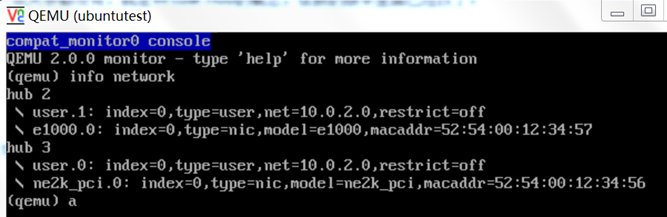
可以创建用户态的network
# qemu-system-x86_64 -enable-kvm -name ubuntutest -m 2048 -hda ubuntu-14.04.img -vnc :19 -net nic -net user
默认分配的IP是从10.0.2.15开始的
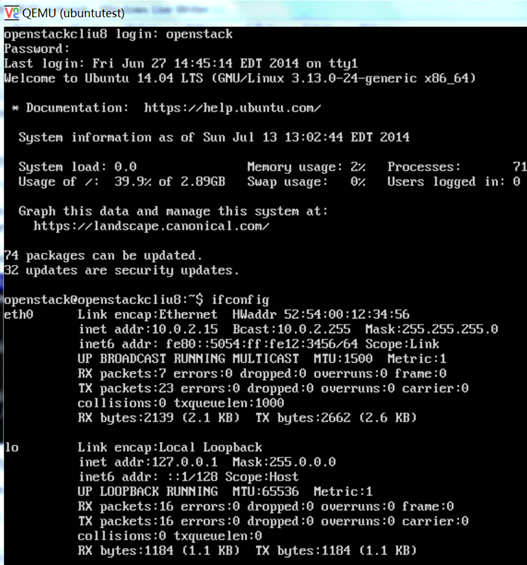
但是从外面无法ssh进去
Port-redirects from the host system (hostfwd)
# qemu-system-x86_64 -enable-kvm -name ubuntutest -m 2048 -hda ubuntu-14.04.img -vnc :19 -net nic -net user,hostfwd=tcp::12345-:22
会将在host机器上到端口12345的包转发给guest机器的22端口
我们可以从host上ssh
# ssh -p 12345 openstack@localhost
The authenticity of host '[localhost]:12345 ([127.0.0.1]:12345)' can't be established.
ECDSA key fingerprint is f2:ef:bc:8f:d8:bd:66:97:48:53:4d:0d:c1:d8:6d:c3.
Are you sure you want to continue connecting (yes/no)? yes
Warning: Permanently added '[localhost]:12345' (ECDSA) to the list of known hosts.
openstack@localhost's password:
Welcome to Ubuntu 14.04 LTS (GNU/Linux 3.13.0-24-generic x86_64)
* Documentation: https://help.ubuntu.com/
System information as of Sun Jul 13 14:12:34 EDT 2014
System load: 0.0 Memory usage: 2% Processes: 71
Usage of /: 39.9% of 2.89GB Swap usage: 0% Users logged in: 0
Graph this data and manage this system at:
https://landscape.canonical.com/
74 packages can be updated.
32 updates are security updates.
Last login: Sun Jul 13 13:03:03 2014
openstack@openstackcliu8:~$ ip addr
1: lo: <LOOPBACK,UP,LOWER_UP> mtu 65536 qdisc noqueue state UNKNOWN group default
link/loopback 00:00:00:00:00:00 brd 00:00:00:00:00:00
inet 127.0.0.1/8 scope host lo
valid_lft forever preferred_lft forever
inet6 ::1/128 scope host
valid_lft forever preferred_lft forever
2: eth0: <BROADCAST,MULTICAST,UP,LOWER_UP> mtu 1500 qdisc pfifo_fast state UP group default qlen 1000
link/ether 52:54:00:12:34:56 brd ff:ff:ff:ff:ff:ff
inet 10.0.2.15/24 brd 10.0.2.255 scope global eth0
valid_lft forever preferred_lft forever
inet6 fe80::5054:ff:fe12:3456/64 scope link
valid_lft forever preferred_lft forever
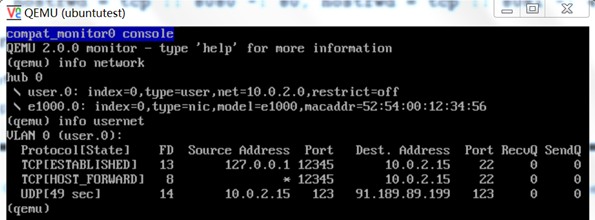
-net user, hostfwd = [tcp | udp]: [hostaddr]: host-port [guestaddr]: guest port
在monitor中也可以用下面的命令添加和删除hostfwd
(Qemu) hostfwd_add [VLAN_ID name] [tcp | udp]: [hostaddr]: host-port [guestaddr]: guest port
(Qemu) hostfwd_remove [VLAN_ID name] [tcp | udp]: [hostaddr]: host port
Redirects from the guest system (guestfwd)
Forward guest TCP connections to the IP address server on port port to the character device dev. This option can be given multiple times.
# qemu-system-x86_64 -enable-kvm -name ubuntutest -m 2048 -hda ubuntu-14.04.img -vnc :19 -net nic -net user,guestfwd=tcp:10.0.2.1:80-stdio
GET /index.html HTTP/1.1
User-Agent: Wget/1.15 (linux-gnu)
Accept: */*
Host: 10.0.2.1
Connection: Keep-Alive
出现下面的输出,是在guest里面运行wget http://10.0.2.1/index.html的时候
在上面的网络设置中,我们发现,guest system和host system的网络是完全隔离的,如果需要通信,则需要进行fwd功能,如果想全方位通信,则比较困难。
于是有了TUN/TAP network interfaces
它会将guest system的网络和host system的网络连在一起。
通过TUN/TAP adapter,会生成一个在host system上的虚拟网卡tap,而tun建立了point to point的网络设备,使得guest system的网卡和tap虚拟网卡成为一对,从而guest system的所有网络包,host system都能收到。
This driver basically allows a user-space application to obtain a file descriptor which is connected to a network device. Any frames sent to the kernel over the file descriptor will be received by the device and any frames transmitted via the device will be received by the application.
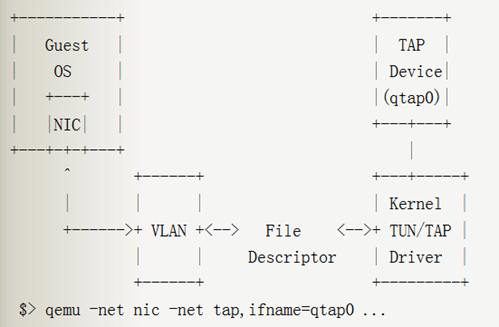
创建的过程如下
(1) 在Host机器上创建bridge br0
brctl addbr br0
(2) 将br0设为up
ip link set br0 up
(3) 创建tap device
# tunctl -b
tap0
(4) 将tap0设为up
ip link set tap0 up
(5) 将tap0加入到br0上
brctl addif br0 tap0
(6) 启动虚拟机
qemu-system-x86_64 -enable-kvm -name ubuntutest -m 2048 -hda ubuntu-14.04.img -boot c -vnc :19 -net nic,model=virtio -net tap,ifname=tap0,script=no,downscript=no
虚拟机连接tap0,tap0连接br0
(7) 虚拟机启动后,网卡没有配置,所以无法连接外网,先给br0设置一个ip
ifconfig br0 192.168.57.1/24
(8) 在虚拟机里面,给网卡设置地址
ifconfig eth0 192.168.57.2/24
这个时候在虚拟机里面可以ping的通192.168.57.1了,但是还是无法访问外网
(9) 在Host上设置NAT,并且enable ip forwarding
# sysctl -p
net.ipv4.ip_forward = 1
sudo iptables -t nat -A POSTROUTING -o eth0 -j MASQUERADE
(10) 在虚拟机里面设置默认网关
route add –net default gw 192.168.57.1
这个时候,可以ping的通外网网关了
ping 16.158.164.1
(11) 然后在虚拟机里面设置dns,则可以进行apt-get
# cat /etc/resolv.conf
# Dynamic resolv.conf(5) file for glibc resolver(3) generated by resolvconf(8)
# DO NOT EDIT THIS FILE BY HAND -- YOUR CHANGES WILL BE OVERWRITTEN
nameserver 16.110.135.52
nameserver 16.110.135.51
Multiple instances with sockets networking
通过-net socket参数,可以使得多个instance之间互通
TCP socket,一个监听一个connect,两者相连,相互通信
Host ~ $ qemu-system-x86_64 plate01.img -net nic,macaddr=52:54:00:12:34:56 -net socket, listen=:1234
Host ~ $ qemu-system-x86_64 plate02.img -net nic,macaddr=52:54:00:12:34:57 -net socket, connect = 127.0.0.1:1234
属于不同vlan的instance也可以相互连接
UDP multicast socket
Host ~ $ qemu-system-x86_64 plate01.img -net nic,macaddr = 52:54:00:12:34:56 -net socket, mcast = 230.0.0.1:1234
Host ~ $ qemu-system-x86_64 plate02.img -net nic,macaddr = 52:54:00:12:34:57 -net socket, mcast = 230.0.0.1:1234
Host ~ $ qemu-system-x86_64 plate03.img -net nic,macaddr = 52:54:00:12:34:58 -net socket, mcast = 230.0.0.1:1234
同一个multicast group可以相互通信
Bridging and Switching
可以使用brctl (bridge-utils), 也可以使用openvswitch
netdev参数
-netdev [user | tap | vde | socket], id = str [, option] [, option] [, ...]
Network protocol analysis
-net dump [,vlan=n][,file=f][,len=n]
qemu-system-x86_64 -enable-kvm -name ubuntutest -m 2048 -hda ubuntu-14.04.img -vnc :19 -net nic -net user -net dump
会生成一个文件
qemu-vlan0.pcap
需要用tcpdump查看
QEMU KVM Libvirt手册(9): network的更多相关文章
- QEMU KVM Libvirt手册(6) – Network Block Device
网络块设备是通过NBD Server将虚拟块设备通过TCP/IP export出来,可以远程访问. NBD Server通常是qemu-nbd 可以提供unix socket qemu-nbd -t ...
- QEMU KVM Libvirt手册(10):Managing Virtual Machines with libvirt
libvirt is a library that provides a common API for managing popular virtualization solutions, among ...
- QEMU KVM Libvirt手册(11): Managing Storage
When managing a VM Guest on the VM Host Server itself, it is possible to access the complete file sy ...
- QEMU KVM Libvirt手册(7): 硬件虚拟化
在openstack中,如果我们启动一个虚拟机,我们会看到非常复杂的参数 qemu-system-x86_64 -enable-kvm -name instance-00000024 -S -mach ...
- QEMU KVM libvirt 手册(3) - Storage Media
访问Hard Drive 使用-hda –hdb qemu-system-x86_64 -enable-kvm -name ubuntutest -m 2048 -hda ubuntutest.im ...
- QEMU KVM Libvirt手册(10): KVM的各种限制
Overcommits KVM allows for both memory and disk space overcommit. However, hard errors resulting fro ...
- QEMU KVM Libvirt手册(8): 半虚拟化设备virtio
KVM本身并不提供半虚拟化功能,是通过virtio来实现的 The benefits of virtio drivers are of lower overhead and higher perfor ...
- QEMU KVM libvirt手册(4) – images
RAW raw是默认的格式,格式简单,容易转换为其他的格式.需要文件系统的支持才能支持sparse file 创建image # qemu-img create -f raw flat.img 10G ...
- QEMU KVM libvirt手册(2): monitor
Administrating Virtual Machines with QEMU Monitor When QEMU is running, a monitor console is provide ...
随机推荐
- router-link 返回上页 和 新窗口打开链接
1.如果使用了Vue-router的话,就可以用 this.$router.go(-1) 实现返回: 2.如果没使用vue-router,就可以用 window.history.go(-1) 实现返回 ...
- rsync拉取服务器上的代码到本地
#!/bin/sh ];then echo "The parameters must be input:file path and host" read -p "(Exa ...
- VMware vSphere 组件和功能
https://pubs.vmware.com/vsphere-50/index.jsp?topic=%2Fcom.vmware.vsphere.introduction.doc_50%2FGUID- ...
- L1-046 整除光棍 大数除法
L1-046 整除光棍(20 分) 这里所谓的"光棍",并不是指单身汪啦~ 说的是全部由1组成的数字,比如1.11.111.1111等.传说任何一个光棍都能被一个不以5结尾的奇数整 ...
- 2018-2019-2 网络对抗技术 20165206 Exp2 后门原理与实践
- 2018-2019-2 网络对抗技术 20165206 Exp2 后门原理与实践 - 实验任务 (1)使用netcat获取主机操作Shell,cron启动 (0.5分) (2)使用socat获取主 ...
- spring boot 集成axis1.4 java.lang.NoClassDefFoundError: Could not initialize class org.apache.axis.client.AxisClient
pom配置: <dependencies> <dependency> <groupId>org.springframework.boot</groupId&g ...
- apache poi 读取xlsx并导出为json(没考虑xls)
1.用到的jar包:fastjson-1.2.9.poi(poi-3.15.poi-ooxml-3.15.poi-ooxml-schemas-3.15.xmlbeans-2.6.0.commons-c ...
- ArcGIS中CGCS2000投影坐标数据转CGCS2000地理坐标数据
拿到一批数据是CGCS2000投影坐标数据(单位:米),需要转成CGCS2000地理坐标数据(单位:经纬度). 在ArcGIS10.2.2中操作如下: 1.工具箱中选择“Project”工具,如下: ...
- linux swap空间的swappiness=0
linux 会使用硬盘的一部分做为SWAP分区,用来进行进程调度--进程是正在运行的程序--把当前不用的进程调成‘等待(standby)‘,甚至‘睡眠(sleep)’,一旦要用,再调成‘活动(acti ...
- Win10家庭版WindowsUpdate属性为灰色
一般的取消Windows更新只需要打开任务管理器,点击服务 然后点击左下角的打开服务 找到WindowsUpdate,右键属性 按照正常的电脑只要在启动类型中选择禁用,然后在恢复里的第一次操作选择无操 ...