
Quartz与Topshelf结合实现window定时服务
一,新建控制台应用程序
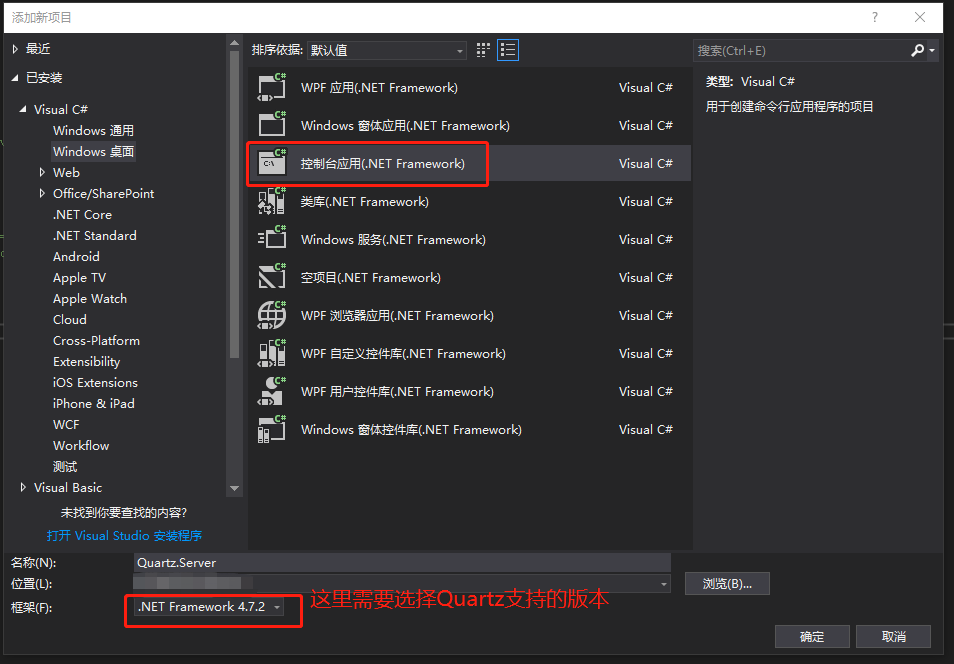
二,选中项目,右键 — 管理 NuGet 程序包,添加四个:
Quartz
Quartz.Plugins
Topshelf
log4net
三,创建项目文件
三个配置文件:必须放在项目根目录下。
(1)log4net.config


<?xml version="1.0" encoding="utf-8" ?>
<configuration>
<configSections>
<section name="log4net" type="log4net.Config.Log4NetConfigurationSectionHandler, log4net"/>
</configSections> <log4net>
<appender name="RollingLogFileAppender" type="log4net.Appender.RollingFileAppender">
<!--日志路径-->
<param name= "File" value= "Logs/"/>
<!--是否是向文件中追加日志-->
<param name= "AppendToFile" value= "true"/>
<!--log保留天数-->
<param name= "MaxSizeRollBackups" value= "10"/>
<!--日志文件名是否是固定不变的-->
<param name= "StaticLogFileName" value= "false"/>
<!--日志文件名格式为:yyyy-MM-dd.log-->
<param name= "DatePattern" value= "yyyy-MM-dd".log""/>
<!--日志根据日期滚动-->
<param name= "RollingStyle" value= "Date"/>
<layout type="log4net.Layout.PatternLayout">
<param name="ConversionPattern" value="[%d{yyyy-MM-dd HH:mm:ss,fff}] [%p] [%c] %m%n %n" />
</layout>
</appender> <!-- 控制台前台显示日志 -->
<appender name="ColoredConsoleAppender" type="log4net.Appender.ColoredConsoleAppender">
<mapping>
<level value="ERROR" />
<foreColor value="Red, HighIntensity" />
</mapping>
<mapping>
<level value="Info" />
<foreColor value="Green" />
</mapping>
<layout type="log4net.Layout.PatternLayout">
<conversionPattern value="%n%date{HH:mm:ss,fff} [%-5level] %m" />
</layout> <filter type="log4net.Filter.LevelRangeFilter">
<param name="LevelMin" value="Info" />
<param name="LevelMax" value="Fatal" />
</filter>
</appender> <root>
<!--(高) OFF > FATAL > ERROR > WARN > INFO > DEBUG > ALL (低) -->
<level value="all" />
<appender-ref ref="ColoredConsoleAppender"/>
<appender-ref ref="RollingLogFileAppender"/>
</root>
</log4net>
</configuration>
(2)quartz.config
<?xml version="1.0" encoding="utf-8" ?>

<!-- This file contains job definitions in schema version 2.0 format -->

<job-scheduling-data xmlns="http://quartznet.sourceforge.net/JobSchedulingData" xmlns:xsi="http://www.w3.org/2001/XMLSchema-instance" version="2.0">

  <processing-directives>

    <overwrite-existing-data>true</overwrite-existing-data>

  </processing-directives>

  <schedule>

    <job>

      <name>SampleJob</name>

      <group>SampleGroup</group>

      <description>Sample job for Quartz Server</description>

      <job-type>QuartzTopshelf.Jobs.SampleJob, QuartzTopshelf</job-type>

      <durable>true</durable>

      <recover>false</recover>

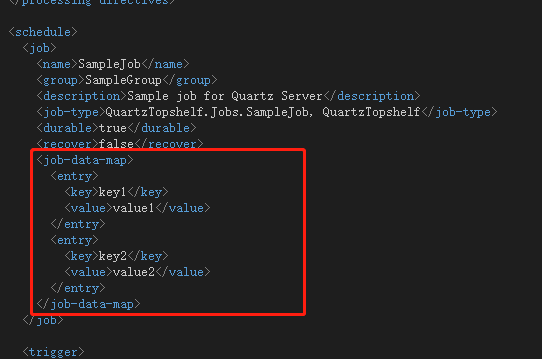
      <job-data-map>

        <entry>

          <key>key1</key>

          <value>value1</value>

        </entry>

        <entry>

          <key>key2</key>

          <value>value2</value>

        </entry>

      </job-data-map>

    </job>

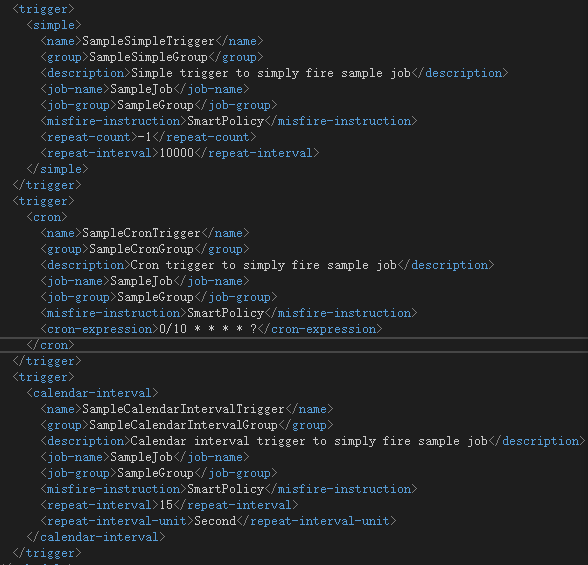
    <trigger>

      <simple>

        <name>SampleSimpleTrigger</name>

        <group>SampleSimpleGroup</group>

        <description>Simple trigger to simply fire sample job</description>

        <job-name>SampleJob</job-name>

        <job-group>SampleGroup</job-group>

        <misfire-instruction>SmartPolicy</misfire-instruction>

        <repeat-count>-1</repeat-count>

        <repeat-interval>10000</repeat-interval>

      </simple>

    </trigger>

    <trigger>

      <cron>

        <name>SampleCronTrigger</name>

        <group>SampleCronGroup</group>

        <description>Cron trigger to simply fire sample job</description>

        <job-name>SampleJob</job-name>

        <job-group>SampleGroup</job-group>

        <misfire-instruction>SmartPolicy</misfire-instruction>

        <cron-expression>0/10 * * * * ?</cron-expression>

      </cron>

    </trigger>

    <trigger>

      <calendar-interval>

        <name>SampleCalendarIntervalTrigger</name>

        <group>SampleCalendarIntervalGroup</group>

        <description>Calendar interval trigger to simply fire sample job</description>

        <job-name>SampleJob</job-name>

        <job-group>SampleGroup</job-group>

        <misfire-instruction>SmartPolicy</misfire-instruction>

        <repeat-interval>15</repeat-interval>

        <repeat-interval-unit>Second</repeat-interval-unit>

      </calendar-interval>

    </trigger>

  </schedule>

</job-scheduling-data>
也可以在项目配置文件App.config中配置,就不需要配置quartz.config
App.config
<?xml version="1.0" encoding="utf-8"?>

<configuration>

  <configSections>

    <section name="quartz" type="System.Configuration.NameValueSectionHandler, System, Version=1.0.5000.0,Culture=neutral, PublicKeyToken=b77a5c561934e089" />

  </configSections>

  <quartz>

    <add key="quartz.scheduler.instanceName" value="ServerScheduler" />

    <add key="quartz.threadPool.type" value="Quartz.Simpl.DefaultThreadPool, Quartz" />

    <add key="quartz.threadPool.maxConcurrency" value="10" />

    <add key="quartz.plugin.xml.type" value="Quartz.Plugin.Xml.XMLSchedulingDataProcessorPlugin, Quartz.Plugins" />

    <add key="quartz.plugin.xml.fileNames" value="~/quartz_jobs.xml" />

    <add key="quartz.scheduler.exporter.type" value="Quartz.Simpl.RemotingSchedulerExporter, Quartz" />

    <add key="quartz.scheduler.exporter.port" value="555" />

    <add key="quartz.scheduler.exporter.bindName" value="QuartzScheduler" />

    <add key="quartz.scheduler.exporter.channelType" value="tcp" />

    <add key="quartz.scheduler.exporter.channelName" value="httpQuartz" />

  </quartz>

  <startup>

    <supportedRuntime version="v4.0" sku=".NETFramework,Version=v4.7.2" />

  </startup>

  <runtime>

    <assemblyBinding xmlns="urn:schemas-microsoft-com:asm.v1">

      <dependentAssembly>

        <assemblyIdentity name="System.Memory" publicKeyToken="cc7b13ffcd2ddd51" culture="neutral" />

        <bindingRedirect oldVersion="0.0.0.0-4.0.1.1" newVersion="4.0.1.1" />

      </dependentAssembly>

    </assemblyBinding>

  </runtime>

</configuration>
(3)quartz_jobs.xml 具体我就不解释了,不懂的可以去查下Quartz.NET
<?xml version="1.0" encoding="utf-8" ?>

<!-- This file contains job definitions in schema version 2.0 format -->

<job-scheduling-data xmlns="http://quartznet.sourceforge.net/JobSchedulingData" xmlns:xsi="http://www.w3.org/2001/XMLSchema-instance" version="2.0">

  <processing-directives>

    <overwrite-existing-data>true</overwrite-existing-data>

  </processing-directives>

  <schedule>

    <job>

      <name>SampleJob</name>

      <group>SampleGroup</group>

      <description>Sample job for Quartz Server</description>

      <job-type>Quartz.Server.Jobs.SampleJob, Quartz.Server</job-type>

      <durable>true</durable>

      <recover>false</recover>

      <job-data-map>

        <entry>

          <key>key1</key>

          <value>value1</value>

        </entry>

        <entry>

          <key>key2</key>

          <value>value2</value>

        </entry>

      </job-data-map>

    </job>

    <trigger>

      <simple>

        <name>SampleSimpleTrigger</name>

        <group>SampleSimpleGroup</group>

        <description>Simple trigger to simply fire sample job</description>

        <job-name>SampleJob</job-name>

        <job-group>SampleGroup</job-group>

        <misfire-instruction>SmartPolicy</misfire-instruction>

        <repeat-count>-1</repeat-count>

        <repeat-interval>10000</repeat-interval>

      </simple>

    </trigger>

    <trigger>

      <cron>

        <name>SampleCronTrigger</name>

        <group>SampleCronGroup</group>

        <description>Cron trigger to simply fire sample job</description>

        <job-name>SampleJob</job-name>

        <job-group>SampleGroup</job-group>

        <misfire-instruction>SmartPolicy</misfire-instruction>

        <cron-expression>0/10 * * * * ?</cron-expression>

      </cron>

    </trigger>

    <trigger>

      <calendar-interval>

        <name>SampleCalendarIntervalTrigger</name>

        <group>SampleCalendarIntervalGroup</group>

        <description>Calendar interval trigger to simply fire sample job</description>

        <job-name>SampleJob</job-name>

        <job-group>SampleGroup</job-group>

        <misfire-instruction>SmartPolicy</misfire-instruction>

        <repeat-interval>15</repeat-interval>

        <repeat-interval-unit>Second</repeat-interval-unit>

      </calendar-interval>

    </trigger>

  </schedule>

</job-scheduling-data>
三个类文件:
(1)Configuration.cs 配置类
using System.Collections.Specialized;

using System.Configuration;

namespace QuartzTopshelf

{

    /// <summary>

    /// 定时服务的配置

    /// </summary>

    public class Configuration

    {

        private const string PrefixServerConfiguration = "quartz.server";

        private const string KeyServiceName = PrefixServerConfiguration + ".serviceName";

        private const string KeyServiceDisplayName = PrefixServerConfiguration + ".serviceDisplayName";

        private const string KeyServiceDescription = PrefixServerConfiguration + ".serviceDescription";

        private const string KeyServerImplementationType = PrefixServerConfiguration + ".type";

        private const string DefaultServiceName = "QuartzServer";

        private const string DefaultServiceDisplayName = "Quartz Server";

        private const string DefaultServiceDescription = "Quartz Job Scheduling Server";

        private static readonly string DefaultServerImplementationType = typeof(QuartzServer).AssemblyQualifiedName;

        private static readonly NameValueCollection configuration;

        /// <summary>

        /// 初始化 Configuration 类

        /// </summary>

        static Configuration()

        {

            configuration = (NameValueCollection)ConfigurationManager.GetSection("quartz");

        }

        /// <summary>

        /// 获取服务的名称

        /// </summary>

        /// <value>服务的名称</value>

        public static string ServiceName

        {

            get { return GetConfigurationOrDefault(KeyServiceName, DefaultServiceName); }

        }

        /// <summary>

        /// 获取服务的显示名称.

        /// </summary>

        /// <value>服务的显示名称</value>

        public static string ServiceDisplayName

        {

            get { return GetConfigurationOrDefault(KeyServiceDisplayName, DefaultServiceDisplayName); }

        }

        /// <summary>

        /// 获取服务描述

        /// </summary>

        /// <value>服务描述</value>

        public static string ServiceDescription

        {

            get { return GetConfigurationOrDefault(KeyServiceDescription, DefaultServiceDescription); }

        }

        /// <summary>

        /// 获取服务器实现的类型名称

        /// </summary>

        /// <value>服务器实现的类型</value>

        public static string ServerImplementationType

        {

            get { return GetConfigurationOrDefault(KeyServerImplementationType, DefaultServerImplementationType); }

        }

        /// <summary>

        /// 返回具有给定键的配置值。如果的配置不存在,则返回默认值。

        /// </summary>

        /// <param name="configurationKey">用于读取配置的键</param>

        /// <param name="defaultValue">未找到配置时返回的默认值</param>

        /// <returns>配置值</returns>

        private static string GetConfigurationOrDefault(string configurationKey, string defaultValue)

        {

            string retValue = null;

            if (configuration != null)

            {

                retValue = configuration[configurationKey];

            }

            if (retValue == null || retValue.Trim().Length == 0)

            {

                retValue = defaultValue;

            }

            return retValue;

        }

    }

}
(2)QuartzServer.cs 定时服务类
using System;

using System.Threading.Tasks;

using log4net;

using Quartz;

using Quartz.Impl;

using Topshelf;

namespace QuartzTopshelf

{

    /// <summary>

    /// Service interface for core Quartz.NET server.

    /// </summary>

    public interface IQuartzServer

    {

        /// <summary>

        /// Initializes the instance of <see cref="IQuartzServer"/>.

        /// Initialization will only be called once in server's lifetime.

        /// </summary>

        Task Initialize();

        /// <summary>

        /// Starts this instance.

        /// </summary>

        void Start();

        /// <summary>

        /// Stops this instance.

        /// </summary>

        void Stop();

        /// <summary>

        /// Pauses all activity in scheduler.

        /// </summary>

        void Pause();

        /// <summary>

        /// Resumes all activity in server.

        /// </summary>

        void Resume();

    }

    /// <summary>

    /// The main server logic.

    /// </summary>

    public class QuartzServer : ServiceControl, IQuartzServer

    {

        private readonly ILog logger;

        private ISchedulerFactory schedulerFactory;

        private IScheduler scheduler;

        /// <summary>

        /// Initializes a new instance of the <see cref="QuartzServer"/> class.

        /// </summary>

        public QuartzServer()

        {

            logger = LogManager.GetLogger(GetType());

        }

        /// <summary>

        /// Initializes the instance of the <see cref="QuartzServer"/> class.

        /// </summary>

        public virtual async Task Initialize()

        {

            try

            {

                schedulerFactory = CreateSchedulerFactory();

                scheduler = await GetScheduler().ConfigureAwait(false);

            }

            catch (Exception e)

            {

                logger.Error("Server initialization failed:" + e.Message, e);

            }

        }

        /// <summary>

        /// Gets the scheduler with which this server should operate with.

        /// </summary>

        /// <returns></returns>

        protected virtual Task<IScheduler> GetScheduler()

        {

            return schedulerFactory.GetScheduler();

        }

        /// <summary>

        /// Returns the current scheduler instance (usually created in <see cref="Initialize" />

        /// using the <see cref="GetScheduler" /> method).

        /// </summary>

        protected virtual IScheduler Scheduler => scheduler;

        /// <summary>

        /// Creates the scheduler factory that will be the factory

        /// for all schedulers on this instance.

        /// </summary>

        /// <returns></returns>

        protected virtual ISchedulerFactory CreateSchedulerFactory()

        {

            return new StdSchedulerFactory();

        }

        /// <summary>

        /// Starts this instance, delegates to scheduler.

        /// </summary>

        public virtual void Start()

        {

            try

            {

                scheduler.Start();

            }

            catch (Exception ex)

            {

                logger.Fatal(string.Format("Scheduler start failed: {0}", ex.Message), ex);

                throw;

            }

            //logger.Info("Scheduler started successfully");

        }

        /// <summary>

        /// Stops this instance, delegates to scheduler.

        /// </summary>

        public virtual void Stop()

        {

            try

            {

                scheduler.Shutdown(true);

            }

            catch (Exception ex)

            {

                logger.Error(string.Format("Scheduler stop failed: {0}", ex.Message), ex);

                throw;

            }

            //logger.Info("Scheduler shutdown complete");

        }

        /// <summary>

        /// Performs application-defined tasks associated with freeing, releasing, or resetting unmanaged resources.

        /// </summary>

        public virtual void Dispose()

        {

            // no-op for now

        }

        /// <summary>

        /// Pauses all activity in scheduler.

        /// </summary>

        public virtual void Pause()

        {

            scheduler.PauseAll();

        }

        /// <summary>

        /// Resumes all activity in server.

        /// </summary>

        public void Resume()

        {

            scheduler.ResumeAll();

        }

        /// <summary>

        /// TopShelf's method delegated to <see cref="Start()"/>.

        /// </summary>

        public bool Start(HostControl hostControl)

        {

            Start();

            return true;

        }

        /// <summary>

        /// TopShelf's method delegated to <see cref="Stop()"/>.

        /// </summary>

        public bool Stop(HostControl hostControl)

        {

            Stop();

            return true;

        }

        /// <summary>

        /// TopShelf's method delegated to <see cref="Pause()"/>.

        /// </summary>

        public bool Pause(HostControl hostControl)

        {

            Pause();

            return true;

        }

        /// <summary>

        /// TopShelf's method delegated to <see cref="Resume()"/>.

        /// </summary>

        public bool Continue(HostControl hostControl)

        {

            Resume();

            return true;

        }

    }

}
(3)QuartzServerFactory.cs 工厂类
using System;

using System.Reflection;

using log4net;

namespace QuartzTopshelf

{

    /// <summary>

    /// 用于创建Quartz服务实现的工厂类.

    /// </summary>

    public class QuartzServerFactory

    {

        private static readonly ILog logger = LogManager.GetLogger(MethodBase.GetCurrentMethod().DeclaringType);

        /// <summary>

        /// 创建Quartz.NET服务核心的新实例

        /// </summary>

        /// <returns></returns>

        public static QuartzServer CreateServer()

        {

            string typeName = Configuration.ServerImplementationType;

            Type t = Type.GetType(typeName, true);

            //logger.Debug("正在创建服务器类型的新实例'" + typeName + "'");

            QuartzServer retValue = (QuartzServer)Activator.CreateInstance(t);

            //logger.Debug("已成功创建实例");

            return retValue;

        }

    }

}
服务启动类:Program.cs
using System.IO;

using System.Reflection;

using Topshelf;

namespace QuartzTopshelf

{

    public static class Program

    {

        static void Main(string[] args)

        {

            // 从服务帐户的目录更改为更符合逻辑的目录

            Directory.SetCurrentDirectory(System.AppDomain.CurrentDomain.BaseDirectory);

            var logRepository = log4net.LogManager.GetRepository(Assembly.GetEntryAssembly());

            log4net.Config.XmlConfigurator.Configure(logRepository, new FileInfo("log4net.config"));

            HostFactory.Run(x => {

                x.RunAsLocalSystem();

                x.SetDescription(Configuration.ServiceDescription);

                x.SetDisplayName(Configuration.ServiceDisplayName);

                x.SetServiceName(Configuration.ServiceName);

                x.Service(factory =>

                {

                    QuartzServer server = QuartzServerFactory.CreateServer();

                    server.Initialize().GetAwaiter().GetResult();

                    return server;

                });

            });

        }

    }

}
四,添加Job类,以及在quartz_jobs.xml 配置job作业触发规则
SampleJob.cs
using System;

using System.Collections;

using System.Reflection;

using System.Threading.Tasks;

using log4net;

using Quartz;

namespace QuartzTopshelf.Jobs

{

    /// <summary>

    /// A sample job that just prints info on console for demostration purposes.

    /// </summary>

    public sealed class SampleJob : IJob

    {

        private static readonly ILog logger = LogManager.GetLogger(MethodBase.GetCurrentMethod().DeclaringType);

        /// <summary>

        /// Called by the <see cref="IScheduler" /> when a <see cref="ITrigger" />

        /// fires that is associated with the <see cref="IJob" />.

        /// </summary>

        /// <remarks>

        /// The implementation may wish to set a  result object on the

        /// JobExecutionContext before this method exits.  The result itself

        /// is meaningless to Quartz, but may be informative to

        /// <see cref="IJobListener" />s or

        /// <see cref="ITriggerListener" />s that are watching the job's

        /// execution.

        /// </remarks>

        /// <param name="context">The execution context.</param>

        public async Task Execute(IJobExecutionContext context)

        {

            //通过配置文件传递参数

            JobDataMap dataMap = context.JobDetail.JobDataMap;

            string key1 = dataMap.GetString("key1");

            logger.Info("key1 : " + key1);

            string key2 = dataMap.GetString("key2");

            logger.Info("key2 : " + key2);

            logger.Info("SampleJob running...");

            //Thread.Sleep(TimeSpan.FromSeconds(5));

            await Console.Out.WriteLineAsync("SampleJob is executing.");

            logger.Info("SampleJob run finished.");

        }

    }

}
作业触发规则在上面quartz_jobs.xml文件中配置
这里分析下特别提到下,job的trigger有以下几种常用的方法:
SimpleTrigger:简单的触发器(重点)
CalendarIntervalTrigger:日历触发器(可自行研究)
CronTrigger:Cron表达式触发器 (重点)
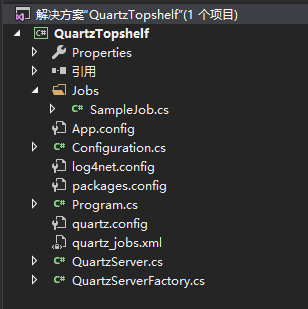
项目结构图:
另外可以通过配置文件设置参数传递给作业:

相关源代码地址:https://gitee.com/wyft/QuartzTopshelf
Quartz与Topshelf结合实现window定时服务的更多相关文章
- 使用Quartz Job 简单的做一个定时服务
第一步:创建一个windows服务 第二步:通过NuGet 安装Quartz (我搜索了Quartz 关键字 安装了 ) 第三步 代码部分 任务类 如 多个任务 就多几个类 public class ...
- 第九章 Net 5.0 快速开发框架 YC.Boilerplate --定时服务 Quartz.net
在线文档:http://doc.yc-l.com/#/README 在线演示地址:http://yc.yc-l.com/#/login 源码github:https://github.com/linb ...
- LBPL--基于Asp.net、 quartz.net 快速开发定时服务的插件化项目
LBPL 这一个基于Asp.net. quartz.net 快速开发定时服务的插件化项目 由于在实际项目开发中需要做定时服务的操作,大体上可以理解为:需要动态化监控定时任务的调度系统. 为了实现快速开 ...
- Spring定时服务QuartZ
在JavaEE系统中,我们会经常用到定时任务,比如每天凌晨生成前天报表,每一小时生成汇总数据等等. 我们可以使用java.util.Timer结合java.util.TimerTask来完成这项工作, ...
- Quartz.NET+Topshelf 创建Windows服务
由于项目开发中经常会有定时任务执行的需求,所以会第一时间就想到 windows 服务 的方式,但是做过开发的同学都知道windows服务不利于调试,安装也麻烦: 并且有开源的作业框架Quartz.NE ...
- C#基于Quartz.NET实现任务调度并部署Windows服务
一.Quartz.NET介绍 Quartz.NET是一个强大.开源.轻量的作业调度框架,是 OpenSymphony 的 Quartz API 的.NET移植,用C#改写,可用于winform和asp ...
- C#/.NET基于Topshelf创建Windows服务程序及服务的安装和卸载(极速,简洁)
本文首发于:码友网--一个专注.NET/.NET Core开发的编程爱好者社区. 文章目录 C#/.NET基于Topshelf创建Windows服务的系列文章目录: C#/.NET基于Topshelf ...
- webscheduler 开源定时服务和延迟服务
源码地址:https://gitee.com/eabeat/webscheduler 架构上采用 asp.net + access ,实现简单的管理界面,可以维护调用API,查看日志等功能.内核采用Q ...
- WebAPI项目添加定时服务
开发平台: VS2019 背景: 在开发小程序的API服务的时候,由于access_token的有效期为7200秒,也就是2小时,这就需要后端定时的去更新这个access_token,便于调用小程序的 ...
- 【OF框架】使用OF.WinService项目,添加定时服务,进行创建启动停止删除服务操作
准备 使用框架搭建完成项目,包含OF.WinService项目. 了解Window Service 和定时服务相关知识. 一.添加一个定时服务 第一步:了解项目结构 第二步:创建一个新的Job 第三步 ...
随机推荐
- Kubernetes集群管理工具kubectl
Kubernetes集群管理工具kubectl 概述 kubectl是Kubernetes集群的命令行工具,通过kubectl能够对集群本身进行管理,并能够在集群上进行容器化应用的安装和部署 命令格式 ...
- Git 实战分支版本管理策略 | TBD++ Flow
简介 随着Git的普及,为了更高效地进行团队协作开发,人们通过经验总结研究出了几套适用于各种团队和项目的分支管理策略,上篇文章我们讲解了 Git Flow 代码版本管理策略,它对版本控制较为严格,主 ...
- 2022春每日一题:Day 22
题目:[HAOI2008]糖果传递 光看题几乎没有思路,但是显然到最后每个人手中一定有 d=s/n个糖果(s为所有人糖果总和),不妨设2号给1号x2个糖果,3号给2号x3个.....1号给n号x1个, ...
- Django 接收到body后 json.loads() 报编码错误 且在报错之前打印body为空
python版本 3.7.5 Django版本 3.2.5 猜测可能是Django版本的问题,因为之前并没有出现过如此奇葩的问题. body = request.body.decode('utf-8' ...
- MyBatis-Plus 分页插件过时
引用:https://blog.csdn.net/zyw562123314/article/details/108903456//分页插件老版本过时 旧版本配置 @Bean public Pagina ...
- Microsoft.IO.RecyclableMemoryStream源码解读
一.RecyclableMemoryStreamManager 源码地址:https://github.com/Microsoft/Microsoft.IO.RecyclableMemoryStrea ...
- JavaEE Day10 JavaScript高级
今日内容 JavaScript ECMAScript:客户端脚本语言标准() BOM对象 DOM对象 事件 学习顺序:DOM-事件-BOM-DOM 一.简单入门 1.DOM 功能:控制HTML文档的内 ...
- 微服务开发平台 Spring Cloud Blade 部署实践
本文介绍使用 Rainbond 快速部署 Spring Cloud Blade 微服务平台.Spring Cloud Blade 是一个由商业级项目升级优化而来的微服务架构,采用Spring Boot ...
- 单点登录系统使用Spring Security的权限功能
背景 在配置中心增加权限功能 目前配置中心已经包含了单点登录功能,可以通过统一页面进行登录,登录完会将用户写入用户表 RBAC的用户.角色.权限表CRUD.授权等都已经完成 希望不用用户再次登录,就可 ...
- 将git仓库从submodule转换为subtree
三个脚本 Alexander Mikhailian cat .gitmodules |while read i do if [[ $i == \[submodule* ]]; then mpath=$ ...