
SQList基础+ListView基本使用
今日所学:
SQList基础语法
SDList下载地址 SQLite Download Page
SQList安装教程SQLite的安装与基本操作 - 极客开发者-博客
ListView用法
没遇到什么问题
成果展示
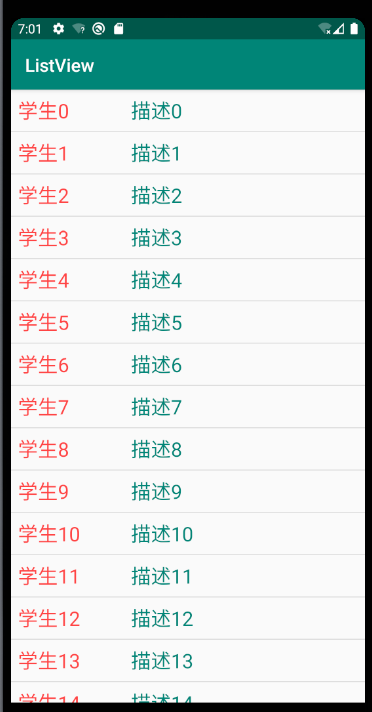
代码:
MainActivity.java
import androidx.appcompat.app.AppCompatActivity;

import android.os.Bundle;

import android.view.View;

import android.widget.AdapterView;

import android.widget.ListView;

import android.widget.Toast;

import com.example.listview.addapt.BaseAddapt;

import com.example.listview.bin.Student;

import java.util.ArrayList;

import java.util.List;

public class MainActivity extends AppCompatActivity {

    private ListView mListView;

    @Override

    protected void onCreate(Bundle savedInstanceState) {

        super.onCreate(savedInstanceState);

        setContentView(R.layout.activity_main);

        initUI();

        //初始化数据

        initData();

    }

    private void initData() {

        List<Student> students = new ArrayList<>();

        for(int i=0;i<100;i++){

            students.add(new Student(i,"学生"+i,"描述"+i));

        }

        //实例化构造器

        BaseAddapt myAdapter = new BaseAddapt(students,getApplicationContext());

        mListView.setAdapter(myAdapter);

        //注册点击事件

        mListView.setOnItemClickListener(new AdapterView.OnItemClickListener() {

            @Override

            public void onItemClick(AdapterView<?> parent, View view, int position, long id) {

                Toast.makeText(getApplicationContext(),"当前位置:"+position,Toast.LENGTH_LONG);

            }

        });

    }

    private void initUI() {

        mListView = findViewById(R.id.list_view);

    }

}
activity_main.xml
<?xml version="1.0" encoding="utf-8"?>

<LinearLayout xmlns:android="http://schemas.android.com/apk/res/android"

    xmlns:app="http://schemas.android.com/apk/res-auto"

    xmlns:tools="http://schemas.android.com/tools"

    android:layout_width="match_parent"

    android:layout_height="match_parent"

    tools:context=".MainActivity">

   <ListView

       android:id="@+id/list_view"

       android:layout_width="match_parent"

       android:layout_height="wrap_content"/>

</LinearLayout>
item_list.xml
<?xml version="1.0" encoding="utf-8"?>

<LinearLayout xmlns:android="http://schemas.android.com/apk/res/android"

    android:orientation="horizontal"

    android:layout_width="match_parent"

    android:layout_height="match_parent"

    android:padding="8dp">

    <TextView

        android:id="@+id/tv_name"

        android:text="姓名"

        android:textColor="@android:color/holo_red_light"

        android:textSize="22sp"

        android:layout_weight="1"

        android:layout_width="0dp"

        android:layout_height="wrap_content"/>

    <TextView

        android:id="@+id/tv_des"

        android:text="描述"

        android:layout_weight="2"

        android:layout_width="0dp"

        android:textColor="@color/colorPrimary"

        android:textSize="22sp"

        android:layout_height="wrap_content"/>

</LinearLayout>
明日计划:
保存用户信息到数据库
SQList基础+ListView基本使用的更多相关文章
- android基础---->ListView的使用
简单说明 ListView在android程序中比较常用,在此做一下简单的总结 内容:自定义ListView, 自定义Adapter,ListView滚动事件的应用! 项目结构如下图
- ListView 使用方法(Asp.Net)
您将须要用到的独有数据绑定控件. Fritz Onion 代码下载位置: ExtremeASPNET2008_03.exe (192 KB) Browse the Code Online 文件夹 L ...
- ListView 分页 排序、编辑、插入和删除
摘自网络地址:http://msdn.microsoft.com/zh-cn/magazine/cc337984.aspx ListView 基础 ListView 是模板驱动的控件,这意味着它默认情 ...
- ListView的基础应用
在写完基础的布局之后,下一课我们会学习一下如何使用Android中一个非常重要,但是对于新手略有困难的ListView,甚至很久以前都有人说过,会不会写ListView是Android能否入门的第一步 ...
- Android应用开发基础篇(3)-----ListView
一.概述 ListView是一个列表显示控件,它的应用非常广泛,在很多应用程序中都可以看到它的身影,比如来电通,网易新闻等等,特别是QQ.因此非常有必要熟练掌握它. 二.要求 能够利用ListView ...
- 【Android基础】listview控件的使用(3)------Map与SimpleAdapter组成的多显示条目的Listview
前面介绍的两种listview的使用都是最基础的,所以有很大的局限性,比如只能在一个item(即每一行的条目)中显示一个文本信息,这一篇我将介绍Map与SimpleAdapter组成的多显示条目的Li ...
- [转]C# ListView 单击标题实现排序(在转载的基础上有所完善)
using System; using System.Collections; using System.Windows.Forms; //在转载的基础上有所完善 namespace TDRFacto ...
- Android零基础入门第44节:ListView数据动态更新
原文:Android零基础入门第44节:ListView数据动态更新 经过前面几期的学习,关于ListView的一些基本用法大概学的差不多了,但是你可能发现了,所有ListView里面要填充的数据都是 ...
- Android零基础入门第43节:ListView优化和列表首尾使用
原文:Android零基础入门第43节:ListView优化和列表首尾使用 前面连续几期都在学习ListView的各种使用方法,如果细心的同学可能会发现其运行效率是有待提高的,那么本期就来一起学习有哪 ...
随机推荐
- python基础之序列类型的方法——字符串方法
python基础之序列类型的方法--字符串方法 Hello大家好,我是python学习者小杨同学,经过一段时间的沉淀(其实是偷懒不想更新),我终于想起了自己的博客账号,所以这次带来的是序列方法的后半部 ...
- sqlserver 中,如何将getdate()时间的时分秒固定为00:00:00或者忽略不要
在使用getdate()时,时间会实时刷新,那么我们就要再查询的时候就需要精确到毫秒后三位,非常难受,那么为了解决这个问题我们可以通过以下几种方法进行固定或者去掉毫秒 1.将毫秒固定为00:00:00 ...
- kubernetes允许master调度
1,让 Master 也当作 Node 使用 (1)如果想让 Pod 也能调度到在 Master(本样例即 localhost.localdomain)上,可以执行如下命令使其作为一个工作节点: 注意 ...
- STM32芯片命名规则 | STM32大中小容量芯片之间的差别
1. STM32命名规则 STM32F105和STM32F107互连型系列微控制器之前,意法半导体已经推出STM32基本型系列.增强型系列.USB基本型系列.增强型系列:新系列产品沿用增强型系列的72 ...
- 【推理引擎】ONNX 模型解析
定义模型结构 首先使用 PyTorch 定义一个简单的网络模型: class ConvBnReluBlock(nn.Module): def __init__(self) -> None: su ...
- 中国软件杯---电力客户行为分析---图表联动echarts-demo(flask)
中国软件杯---电力客户行为分析---图表联动echarts-demo(flask) 题目链接(可下载原始CSV数据集):http://www.cnsoftbei.com/plus/view.php? ...
- 测试odbc连接sqlsever数据库是否成功的代码
1 #include<stdio.h> 2 #include<stdlib.h> 3 #include<windows.h> 4 #include<sql.h ...
- Tomcat启动时shell窗口乱码解决方法
tomcat/conf/目录下,修改logging.properties java.util.logging.ConsoleHandler.encoding = utf-8 更改为 java.util ...
- Vue-cli安装步骤,搭建一个完整的 Vue 项目
安装node环境下载 node.js 官网地址:https://nodejs.org/en/ 下载完成后打开然后一路next安装完成后打开 dos 窗口输入命令:node -v 回车会输出node的版 ...
- Kafka01--Kafka生产者使用方式
Kafka之--生产者入门 前言: Kafka诞生至今,产生两个版本的生产者客户端:1是早期基于scala语言编写的客户端:2是随着Java用户的广泛涌入,kafka0.9版本开始退出Java版本的客 ...