
通过 SCF Component 轻松构建 REST API,再也不用熬夜加班了
本教程将分享如何通过 Serverless SCF Component 、云函数 SCF 及 API 网关组件,快速构建一个 REST API 并实现 GET/PUT 操作。

当一个应用需要对第三方提供服务接口时,REST API 无疑是目前最主流的选择。不过,如果自建 REST API,开发者需要购买虚拟机、配置环境等等,等一切都搞定,可能已经又是一个深夜。
而这些,都可以用 Serverless Framework 来解决。本教程将分享如何通过 Serverless SCF Component 、云函数 SCF 及 API 网关组件,快速构建一个 REST API ,并实现 GET/PUT 操作。
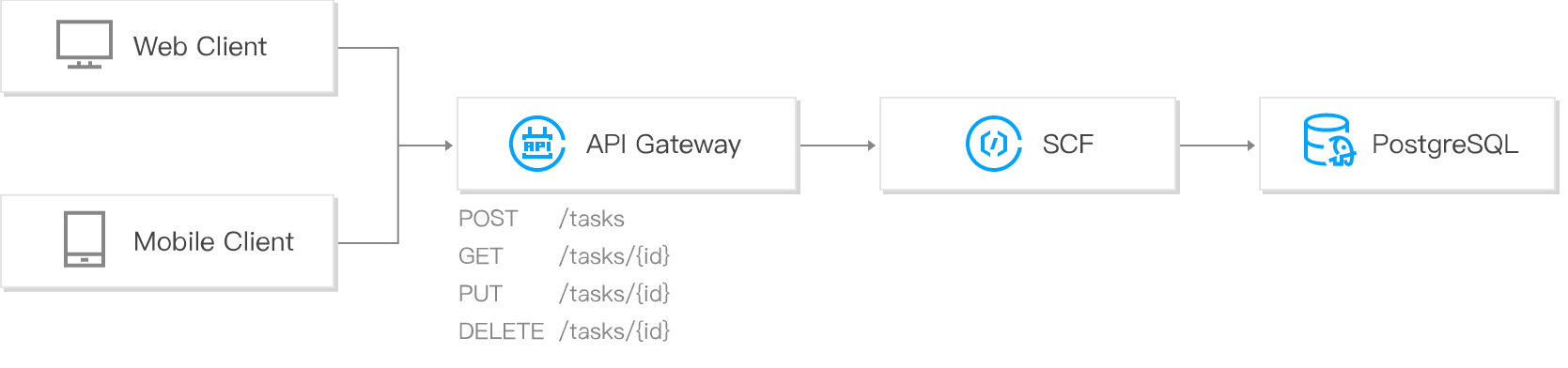
快速构建 REST API
快速开始
1. 安装
安装 Serverless Framework
$ npm install -g serverless
2. 配置
通过如下命令直接下载该例子,目录结构如下:
$ serverless create --template-url https://github.com/serverless/components/tree/master/templates/tencent-python-rest-api
.

├── code

|   └── index.py

└── serverless.yml
查看 code/index.py 代码,可以看到接口的传参和返回逻辑:
# -*- coding: utf8 -*-

def teacher_go():

    # todo: teacher_go action

    return {

        "result": "it is student_get action"

    }

def student_go():

    # todo: student_go action

    return {

        "result": "it is teacher_put action"

    }

def student_come():

    # todo: student_come action

    return {

        "result": "it is teacher_put action"

    }

def main_handler(event, context):

    print(str(event))

    if event["pathParameters"]["user_type"] == "teacher":

        if event["pathParameters"]["action"] == "go":

            return teacher_go()

    if event["pathParameters"]["user_type"] == "student":

        if event["pathParameters"]["action"] == "go":

            return student_go()

        if event["pathParameters"]["action"] == "come":

            return student_come()
3. 部署
通过 sls 命令进行部署,并可以添加 --debug 参数查看部署过程中的信息
如您的账号未登陆或注册腾讯云,您可以直接通过微信扫描命令行中的二维码进行授权登陆和注册。
$ serverless --debug

  DEBUG ─ Resolving the template's static variables.

  DEBUG ─ Collecting components from the template.

  DEBUG ─ Downloading any NPM components found in the template.

  DEBUG ─ Analyzing the template's components dependencies.

  DEBUG ─ Creating the template's components graph.

  DEBUG ─ Syncing template state.

  DEBUG ─ Executing the template's components graph.

  DEBUG ─ Compressing function myRestAPI file to /Users/dfounderliu/Desktop/restAPI/component/.serverless/myRestAPI.zip.

  DEBUG ─ Compressed function myRestAPI file successful

  DEBUG ─ Uploading service package to cos[sls-cloudfunction-ap-singapore-code]. sls-cloudfunction-default-myRestAPI-1574856533.zip

  DEBUG ─ Uploaded package successful /Users/dfounderliu/Desktop/restAPI/component/.serverless/myRestAPI.zip

  DEBUG ─ Creating function myRestAPI

  DEBUG ─ Updating code...

  DEBUG ─ Updating configure...

  DEBUG ─ Created function myRestAPI successful

  DEBUG ─ Setting tags for function myRestAPI

  DEBUG ─ Creating trigger for function myRestAPI

  DEBUG ─ Starting API-Gateway deployment with name myRestAPI.serverless in the ap-singapore region

  DEBUG ─ Service with ID service-ibmk6o22 created.

  DEBUG ─ API with id api-pjs3q3qi created.

  DEBUG ─ Deploying service with id service-ibmk6o22.

  DEBUG ─ Deployment successful for the api named myRestAPI.serverless in the ap-singapore region.

  DEBUG ─ Deployed function myRestAPI successful

  myRestAPI:

    Name:        myRestAPI

    Runtime:     Python3.6

    Handler:     index.main_handler

    MemorySize:  128

    Timeout:     20

    Region:      ap-singapore

    Role:        QCS_SCFExcuteRole

    Description: My Serverless Function

    APIGateway:

      - serverless - http://service-ibmk6o22-1250000000.sg.apigw.tencentcs.com/release

  10s › myRestAPI › done
4. 测试
通过如下命令测试 REST API 的返回情况:
注:如 Windows 系统中未安装
curl,也可以直接通过浏览器打开对应链接查看返回情况
$ curl -XGET http://service-9t28e0tg-1250000000.sg.apigw.tencentcs.com/release/users/teacher/go

{"result": "it is student_get action"}
$ curl -PUT http://service-9t28e0tg-1250000000.sg.apigw.tencentcs.com/release/users/student/go

{"result": "it is teacher_put action"}
5. 移除
可以通过以下命令移除 REST API 应用
$ sls remove --debug

  DEBUG ─ Flushing template state and removing all components.

  DEBUG ─ Removing any previously deployed API. api-37gk3l8q

  DEBUG ─ Removing any previously deployed service. service-9t28e0tg

  DEBUG ─ Removing function

  DEBUG ─ Request id

  DEBUG ─ Removed function myRestAPI successful

  7s » myRestAPI » done
账号配置(可选)
当前默认支持 CLI 扫描二维码登录,如您希望配置持久的环境变量/秘钥信息,也可以本地创建 .env 文件
$ touch .env # 腾讯云的配置信息
在 .env 文件中配置腾讯云的 SecretId 和 SecretKey 信息并保存
如果没有腾讯云账号,可以在此注册新账号。
如果已有腾讯云账号,可以在 API 密钥管理中获取 SecretId 和SecretKey.
# .env

TENCENT_SECRET_ID=123

TENCENT_SECRET_KEY=123
查看:完整仓库模板
目前 REST API 模板主要展示了 GET/PUT 操作,后续腾讯云 Serverless Framework 也将支持对 Serverless DB 的连接,可以完整实现 CRUD 操作,并支持资源的弹性扩缩容。您可以通过该模板快速开发业务 REST API、扩展代码,探索更丰富的场景。
传送门:
- GitHub: github.com/serverless
- 官网:serverless.com
欢迎访问:Serverless 中文网,您可以在 最佳实践 里体验更多关于 Serverless 应用的开发!
通过 SCF Component 轻松构建 REST API,再也不用熬夜加班了的更多相关文章
- springboot集成swagger2构建RESTful API文档
在开发过程中,有时候我们需要不停的测试接口,自测,或者交由测试测试接口,我们需要构建一个文档,都是单独写,太麻烦了,现在使用springboot集成swagger2来构建RESTful API文档,可 ...
- 使用ASP.NET Core 3.x 构建 RESTful API - 2. 什么是RESTful API
1. 使用ASP.NET Core 3.x 构建 RESTful API - 1.准备工作 什么是REST REST一词最早是在2000年,由Roy Fielding在他的博士论文<Archit ...
- 使用ASP.NET Core构建RESTful API的技术指南
译者荐语:利用周末的时间,本人拜读了长沙.NET技术社区翻译的技术标准<微软RESTFul API指南>,打算按照步骤写一个完整的教程,后来无意中看到了这篇文章,与我要写的主题有不少相似之 ...
- 腾讯大牛半年心血高级编程PDF,帮你轻松构建企业级Web应用
毫无疑问,Java 是这些年来最流行的编程语言之一.它无处不在一计算机. 手机.网站以及各种嵌入式设备中都存在着大量的Java 应用程序,而其中应用最为广泛的应该就是Java EE Web应用程序(以 ...
- 在 .NET Core 中构建 REST API
翻译自 Camilo Reyes 2020年8月26日的文章 <Build a REST API in .NET Core> [1] REST API 可以使用简单的动词(如 POST.P ...
- Spring Boot 入门系列(二十二)使用Swagger2构建 RESTful API文档
前面介绍了如何Spring Boot 快速打造Restful API 接口,也介绍了如何优雅的实现 Api 版本控制,不清楚的可以看我之前的文章:https://www.cnblogs.com/zha ...
- Spring MVC中使用 Swagger2 构建Restful API
1.Spring MVC配置文件中的配置 [java] view plain copy <!-- 设置使用注解的类所在的jar包,只加载controller类 --> <contex ...
- php 使用 restler 框架构建 restfull api
php 使用 restler 框架构建 restfull api restler 轻量级,小巧,构建restfull api非常方便! 官网:http://restler3.luracast.com/ ...
- spring boot / cloud (三) 集成springfox-swagger2构建在线API文档
spring boot / cloud (三) 集成springfox-swagger2构建在线API文档 前言 不能同步更新API文档会有什么问题? 理想情况下,为所开发的服务编写接口文档,能提高与 ...
随机推荐
- DEVOPS技术实践_18:Jenkins的Pinpeline对于参数的使用
因为最近使用Pipeline声明式语法构建项目,但是最近项目的参数设置较多,特地的来学习一下关于参数的调用和测试,主要式从一个大神那里学习的,结尾回贴上大神的博客链接 1 构建一个pipeline项目 ...
- TVP访谈 | 贝壳金服史海峰:中台虽百家争鸣,但不是所有企业必需品
导语 | 中台作为一个技术概念,曾一度被捧得火热.那么,中台现在发展到了什么阶段呢?对于所有企业来讲,中台都是普适的么?中台在具体的落地过程中,究竟存在哪些问题呢?腾讯云最具价值专家(TVP)史海峰, ...
- 【C++】递归 课后习题3-13、3-14
// // main.cpp // 3-13递归Fibonacci级数 // // Created by T.P on 2018/3/21. // Copyright © 2018年 T.P. All ...
- 「UVA1328」「POJ1961」 Period 解题报告
UVA1328 Period 其他链接:luogu UVA1328 POJ1961 For each prefix of a given string S with N characters (eac ...
- EF 学习系列三 数据操作数据加载及EF中执行Sql
1.实体状态 我们通过EF来对数据库进行操作并持久化到数据库,那么EF必然通过EF上下文来维护实体的状态,明确知道每一个状态所对应的操作.也就是说EF通过上下文负责跟踪实体的状态.EF实体状态存在命名 ...
- windows生成github密钥并推送文件踩坑
强调官方文档最可靠,百度踩坑很浪费时间,建议去寻找一手数据源头 github官方文档提供了帮助 第一步 查看密钥 如果您还没有 SSH 密钥,则必须生成新 SSH 密钥. 如果您不确定是否已有 SSH ...
- 解决阿里云专有网络ftp无法远程链接
配置好ftp后本机测试可用但无法远程连接 网络上找了很多方法,配置防火墙出入站规则均无效 提交阿里云工单,给出解决方法,测试后可用
- CF854C Planning优先队列|set
C. Planning 传送门 Helen works in Metropolis airport. She is responsible for creating a departure sched ...
- ACM北大暑期课培训第四天
今天讲了几个高级搜索算法:A* ,迭代加深,Alpha-Beta剪枝 以及线段树 A*算法 启发式搜索算法(A算法) : 在BFS算法中,若对每个状态n都设定估价函数 f(n)=g(n)+h(n) ...
- 杂谈.netcore的Buffer相关新类型
1 文章范围 本文将.netcore新出现的与Buffer操作相关的类型进行简单分析与讲解,由于资料有限,一些见解为个人见解,可能不是很准确.这些新类型将包括BinaryPrimitives.Span ...