
RobotFramework+Appium 升级Appium v1.10.0后,执行click element时报错:InvalidSelectorException: Message: Locator Strategy 'css selector' is not supported for this session,解决办法
报错信息如下:
debug] [35m[XCUITest][39m Connection to WDA timed out
[debug] [35m[XCUITest][39m Connection to WDA timed out[info] [35m[HTTP][39m [37m-->[39m [37mPOST[39m [37m/wd/hub/session/0fa5e52b-19f3-4c08-87c7-053b1e9ed018/elements[39m
[info] [35m[HTTP][39m [90m{"using":"css selector","value":"[id=\"SVW_LoginChoiceView.swift130001\"]"}[39m
[debug] [35m[W3C (0fa5e52b)][39m Calling AppiumDriver.findElements() with args: ["css selector","[id=\"SVW_LoginChoiceView.swift130001\"]","0fa5e52b-19f3-4c08-87c7-053b1e9ed018"]
[debug] [35m[XCUITest][39m Executing command 'findElements'
[debug] [35m[BaseDriver][39m Valid locator strategies for this request: xpath, id, name, class name, -ios predicate string, -ios class chain, accessibility id
[debug] [35m[W3C (0fa5e52b)][39m Encountered internal error running command: InvalidSelectorError: Locator Strategy 'css selector' is not supported for this session
[debug] [35m[W3C (0fa5e52b)][39m at XCUITestDriver.validateLocatorStrategy (/Applications/Appium.app/Contents/Resources/app/node_modules/appium-base-driver/lib/basedriver/driver.js:344:13)
[debug] [35m[W3C (0fa5e52b)][39m at XCUITestDriver.validateLocatorStrategy (/Applications/Appium.app/Contents/Resources/app/node_modules/appium-xcuitest-driver/lib/driver.js:918:11)
[debug] [35m[W3C (0fa5e52b)][39m at XCUITestDriver.helpers.findElOrElsWithProcessing (/Applications/Appium.app/Contents/Resources/app/node_modules/appium-base-driver/lib/basedriver/commands/find.js:28:8)
[debug] [35m[W3C (0fa5e52b)][39m at XCUITestDriver.commands.findElements (/Applications/Appium.app/Contents/Resources/app/node_modules/appium-base-driver/lib/basedriver/commands/find.js:60:21)
[debug] [35m[W3C (0fa5e52b)][39m at curCommandCancellable._bluebird.default.resolve.then (/Applications/Appium.app/Contents/Resources/app/node_modules/appium-base-driver/lib/basedriver/driver.js:291:18)
[debug] [35m[W3C (0fa5e52b)][39m at tryCatcher (/Applications/Appium.app/Contents/Resources/app/node_modules/appium-base-driver/node_modules/bluebird/js/main/util.js:26:23)
[debug] [35m[W3C (0fa5e52b)][39m at Promise._settlePromiseFromHandler (/Applications/Appium.app/Contents/Resources/app/node_modules/appium-base-driver/node_modules/bluebird/js/main/promise.js:510:31)
[debug] [35m[W3C (0fa5e52b)][39m at Promise._settlePromiseAt (/Applications/Appium.app/Contents/Resources/app/node_modules/appium-base-driver/node_modules/bluebird/js/main/promise.js:584:18)
[debug] [35m[W3C (0fa5e52b)][39m at Promise._settlePromiseAtPostResolution (/Applications/Appium.app/Contents/Resources/app/node_modules/appium-base-driver/node_modules/bluebird/js/main/promise.js:248:10)
[debug] [35m[W3C (0fa5e52b)][39m at Async._drainQueue (/Applications/Appium.app/Contents/Resources/app/node_modules/appium-base-driver/node_modules/bluebird/js/main/async.js:128:12)
[debug] [35m[W3C (0fa5e52b)][39m at Async._drainQueues (/Applications/Appium.app/Contents/Resources/app/node_modules/appium-base-driver/node_modules/bluebird/js/main/async.js:133:10)
[debug] [35m[W3C (0fa5e52b)][39m at Immediate.Async.drainQueues (/Applications/Appium.app/Contents/Resources/app/node_modules/appium-base-driver/node_modules/bluebird/js/main/async.js:15:14)
[debug] [35m[W3C (0fa5e52b)][39m at runCallback (timers.js:696:18)
[debug] [35m[W3C (0fa5e52b)][39m at tryOnImmediate (timers.js:667:5)
[debug] [35m[W3C (0fa5e52b)][39m at processImmediate (timers.js:649:5)
[info]
解决办法:
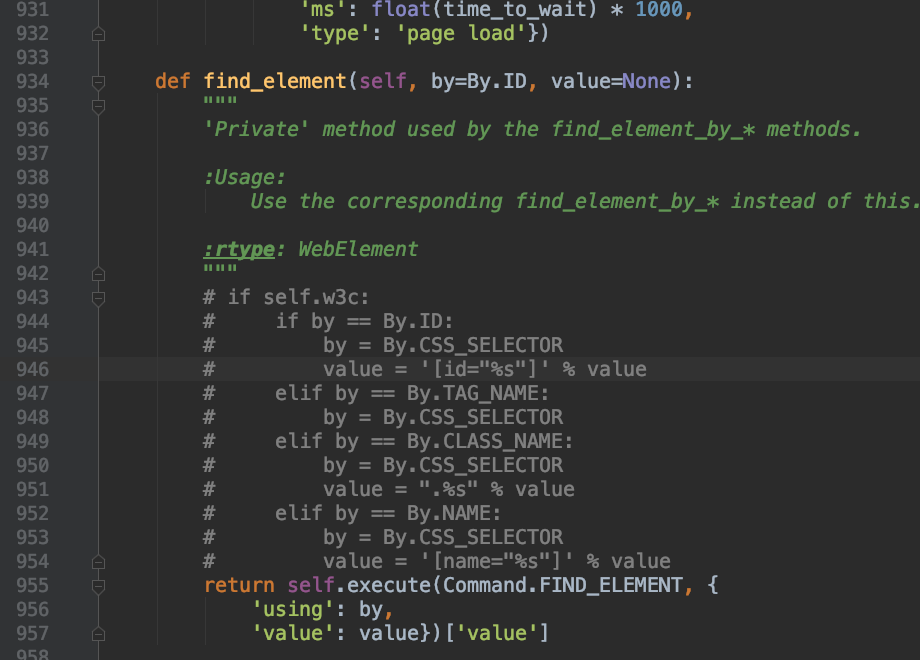
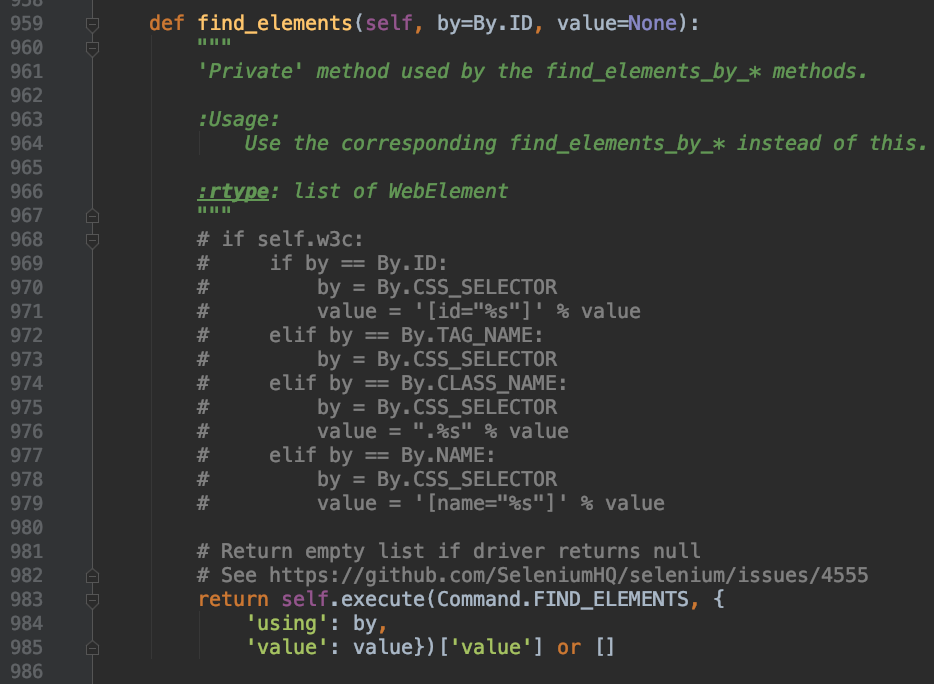
在python文件夹下找到site-pankages/selenium/webdriver/remote/webdriver.py中找到def find_element和def find_elements,注释掉if self.w3c;
保存后,再次运行,成功解决。
RobotFramework+Appium 升级Appium v1.10.0后,执行click element时报错:InvalidSelectorException: Message: Locator Strategy 'css selector' is not supported for this session,解决办法的更多相关文章
- Appium 运行脚本报错InvalidSelectorException: Message: Locator Strategy 'css selector' is not supported for (转)
现象:Appium运行脚本报错InvalidSelectorException: Message: Locator Strategy 'css selector' is not supported f ...
- Appium问题解决方案(5)- selenium.common.exceptions.InvalidSelectorException: Message: Locator Strategy 'name' is not supported for this session
背景 使用Appium Server 1.15.1版本 执行了以下脚本 test = driver.find_element_by_name("自动化测试") print(test ...
- Appium新版本遇到的问题,不能通过 name 去定位元素抛 Message: Locator Strategy 'name' is not supported for this session
环境: 1.Appium: 1.15.1 2.Python: 3.7.0 3.Selenium: 3.141.0 4.IDE: Pycharm 5.PC:Windows 10 问题:在 Pycharm ...
- DPA 9.1.85 升级到DPA 10.0.352流程
SolarWinds DPA的升级其实是一件非常简单的事情,这里介绍一下从DPA 9.1.95升级到 DPA 10.0.352版本的流程.为什么要升级呢? DPA给用户发的邮件已经写的非常清楚了(如下 ...
- 从零到一,利用kubeadm在ubuntu server 16.04 64位系统离线安装kubernetes v1.10.0
说明 初步接触kubernets,记录学习过程 本教程目的利用kubeadm在ubuntu server 16.04 64位系统离线安装kubernets v1.10.0 环境信息 节点IP地址 角色 ...
- Kube-OVN v1.10.0:新增Windows节点支持,用户自定义子网ACL等10+硬核功能
在Kube-OVN社区小伙伴的共同努力下,Kube-OVN v1.10.0于五月份正式发布.Kube-OVN v1.10.0版本中,我们一如既往地对Kube-OVN 的功能.性能.稳定性和易用性进行了 ...
- CentOS6 系统下升级python后yum命令使用时报错
CentOS6 系统下升级python后yum命令使用时报错,如下: [root@xxxxxxx]#yumFile"/usr/bin/yum",line30exceptKeyboa ...
- tomcat启动后,页面浏览时报错 Unable to compile class for JSP的解决方案
转:tomcat启动后,页面浏览时报错 Unable to compile class for JSP的解决方案 检查tomcat与web工程对应版本,tomcat中对应版本的jar包拷贝到web工程 ...
- Python3安装Celery模块后执行Celery命令报错
1 Python3安装Celery模块后执行Celery命令报错 pip3 install celery # 安装正常,但是执行celery 命令的时候提示没有_ssl模块什么的 手动在Python解 ...
随机推荐
- TIJ——Chapter Thirteen:Strings
String 对象是不可修改的,对于被String 重载的'+' 和'+=' 运算符来说,当你用它们来连接两个String 对象的时候,它在底层并不会对于每一次连接均生成一个String 对象,取而代 ...
- Win10系统使用Docker安装oracle并通过Navicat for oracle进行登录
一.安装Docker Linux系统可以直接采用命令进行Docker安装: Win7系统安装Dokcer实际通过Boot2Docker在Windows下安装一个VirtualBox来实现: Boot2 ...
- WPF动画之后属性值无法改变
原文:WPF动画之后属性值无法改变 前一段时间使用WPF写2048游戏的时候,遇到下面的情形:使用按键对色块进行移动时,触发位置左边X和Y属性的DoubleAnimation动画,但是 ...
- P2532 [AHOI2012]树屋阶梯
题目:P2532 [AHOI2012]树屋阶梯 思路: 打表之后不难看出是裸的Catalan数.简单证明一下: 对于任意一种合法方案,都可以表示为在左下角先放一个\(k*(n+1-k),k\in[1, ...
- 阿里云:面向5G时代的物联网无线连接服务
在4月24日落幕的2019中国联通合作伙伴大会“5G+物联网(IoT)论坛”上,阿里云高级运营专家李茁出席圆桌对话,分享了5G时代物联网如何更好地推动行业完成生产.管理和商业模式的创新,阿里云又会以何 ...
- 阿里云POLARDB荣膺2019中国数据库年度最佳创新产品
在日前的DTCC 2019(第十届中国数据库技术大会)上,阿里云自研云原生数据库POLARDB获选2019中国数据库——“年度最佳创新产品”. POLARDB是阿里云在2018年正式商业化的云原生数据 ...
- Knative Eventing 中如何实现 Registry 事件注册机制
摘要: 在最新的 Knative Eventing 0.6 版本中新增了 Registry 特性, 为什么要增加这个特性, 该特性是如何实现的.针对这些问题,希望通过本篇文章给出答案. 背景 作为事件 ...
- url地址栏参数<==>对象(将对象转换成地址栏的参数以及将地址栏的参数转换为对象)的实用函数
/** * @author web得胜 * @param {Object} obj 需要拼接的参数对象 * @return {String} * */ function obj2qs(obj) { i ...
- css white-space属性
css white-space属性 规定段落中的文本不进行换行
- 深度学习——Xavier初始化方法
“Xavier”初始化方法是一种很有效的神经网络初始化方法,方法来源于2010年的一篇论文<Understanding the difficulty of training deep feedf ...