
Vue_(组件通讯)动态组件结合keep-alive
keep-alive 传送门

<keep-alive> 包裹动态组件时,会缓存不活动的组件实例,而不是销毁它们。和 <transition> 相似,<keep-alive> 是一个抽象组件:它自身不会渲染一个 DOM 元素,也不会出现在父组件链中。
当组件在 <keep-alive> 内被切换,它的 activated 和 deactivated 这两个生命周期钩子函数将会被对应执行。
主要用于保留组件状态或避免重新渲染
Learn
一、不使用<keep-alive>包裹动态组件
二、使用<keep-alive>包裹动态组件
目录结构
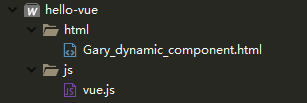
一、不使用<keep-alive>包裹动态组件
此时组件A、B、C组件中的数会一直随机0~100且不重复
        <div id="GaryId">

            <button @click="selectedName = 'my-component-a'"> a </button>

            <button @click="selectedName = 'my-component-b'"> b </button>

            <button @click="selectedName = 'my-component-c'"> c </button>

                <component :is="selectedName"></component>

        </div>
    "my-component-a":{

                        template:"<h1>A :{{num}}</h1>",

                        data(){

                            return{

                                num:Math.ceil(Math.random()*100)

                            }

                        }

                    },
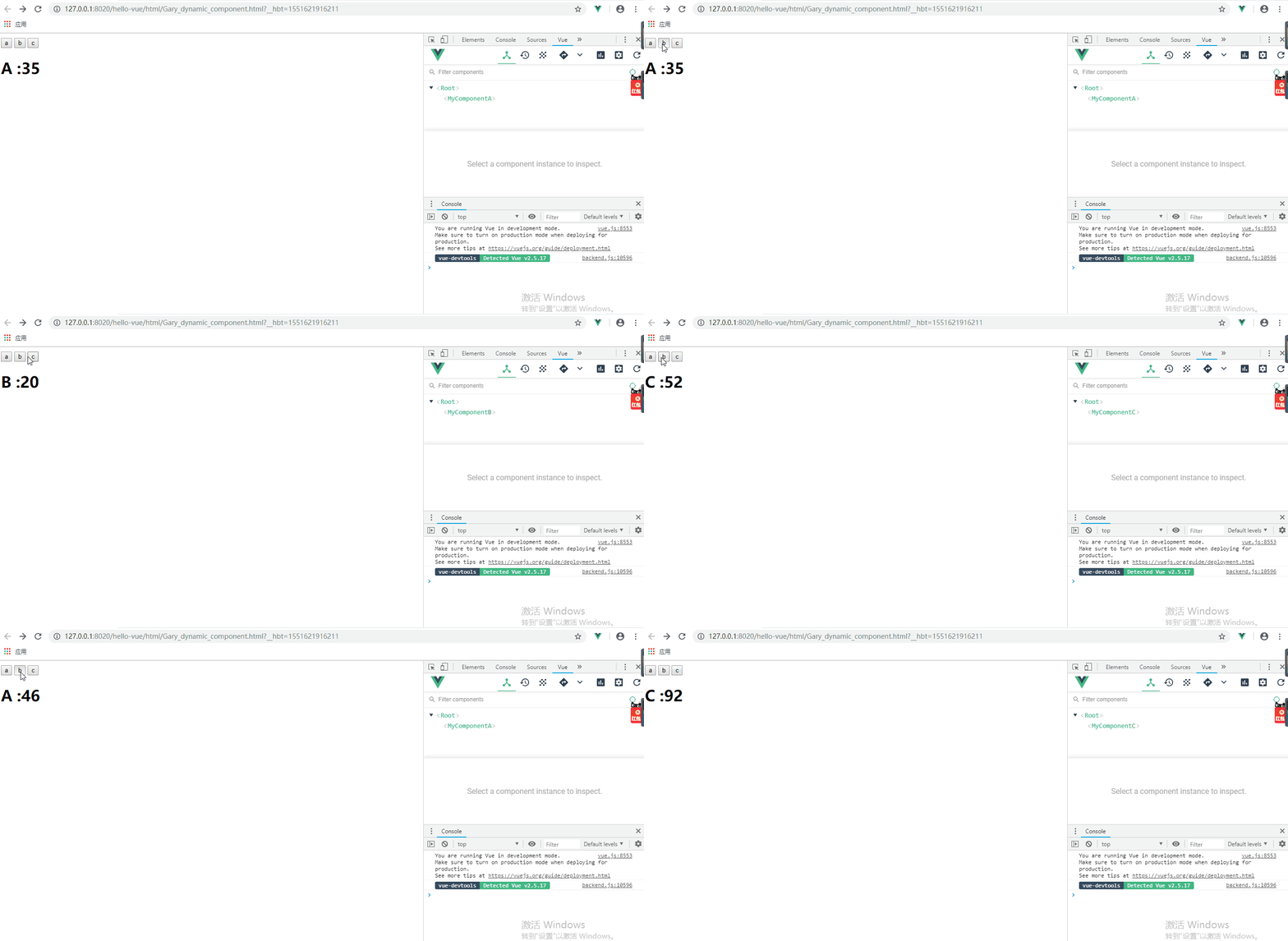
<!DOCTYPE html>

<html>

    <head>

        <meta charset="UTF-8">

        <title>Gary</title>

    </head>

    <body>

        <div id="GaryId">

            <button @click="selectedName = 'my-component-a'"> a </button>

            <button @click="selectedName = 'my-component-b'"> b </button>

            <button @click="selectedName = 'my-component-c'"> c </button>

                <component :is="selectedName"></component>

        </div>

    </body>

    <script type="text/javascript" src="../js/vue.js" ></script>

    <script type="text/javascript">

            new Vue({

                data:{

                    selectedName:'my-component-a'

                },

                components:{

                    "my-component-a":{

                        template:"<h1>A :{{num}}</h1>",

                        data(){

                            return{

                                num:Math.ceil(Math.random()*100)

                            }

                        }

                    },

                    "my-component-b":{

                        template:"<h1>B :{{num}}</h1>",

                        data(){

                            return{

                                num:Math.ceil(Math.random()*100)

                            }

                        }

                    },

                    "my-component-c":{

                        template:"<h1>C :{{num}}</h1>",

                        data(){

                            return{

                                num:Math.ceil(Math.random()*100)

                            }

                    }

                }

            }

            }).$mount("#GaryId");

    </script>

</html>
Gary_dynamic_component.html
二、使用<keep-alive>包裹动态组件
此时组件A、B、C组件中的数会第一次会随机出现,随后保存到缓存中,第二次再点击的时候它们会读取缓存中的数
        <div id="GaryId">

            <button @click="selectedName = 'my-component-a'"> a </button>

            <button @click="selectedName = 'my-component-b'"> b </button>

            <button @click="selectedName = 'my-component-c'"> c </button>

            <keep-alive>

                <component :is="selectedName"></component>

            </keep-alive>

        </div>
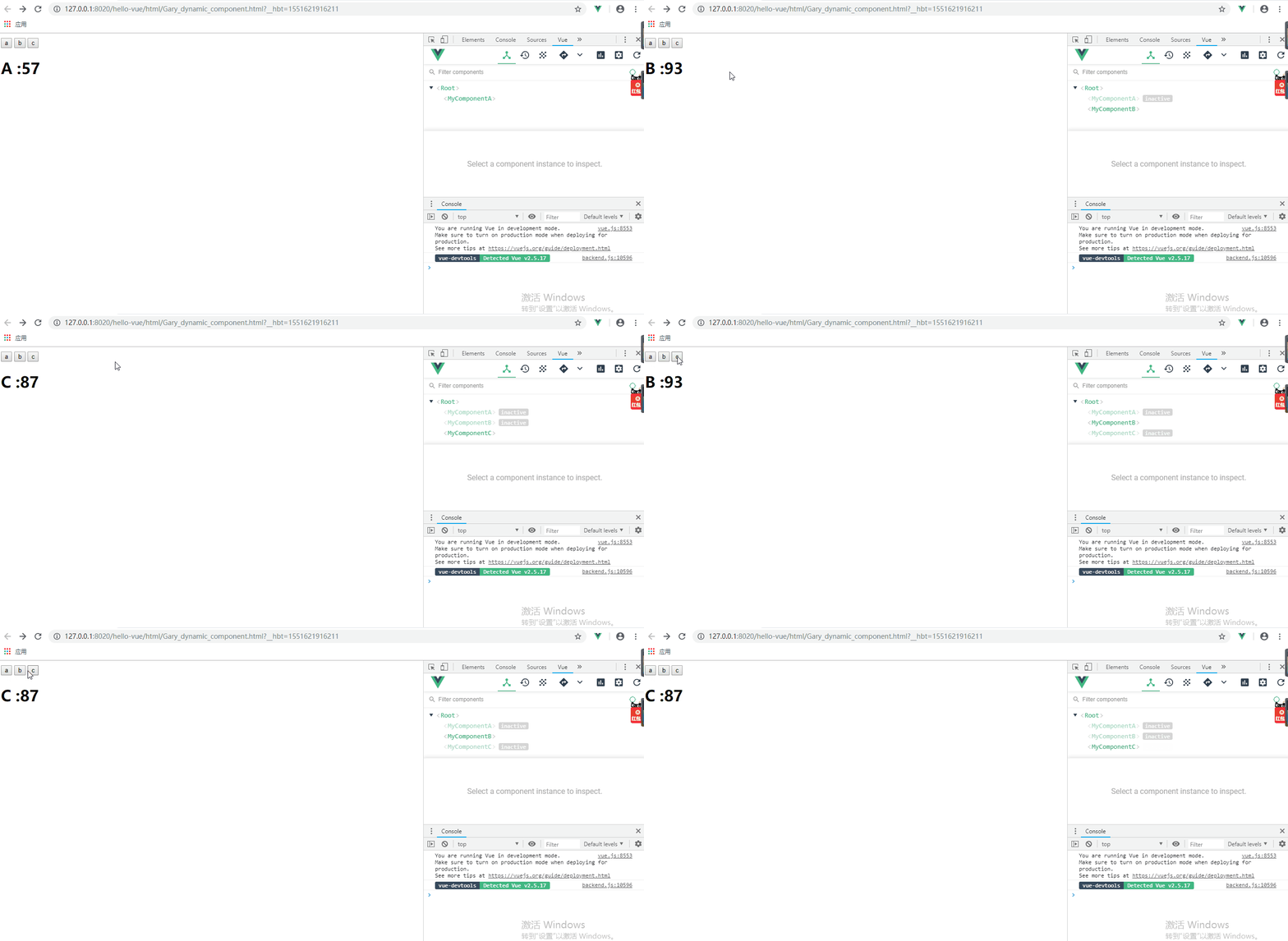
<!DOCTYPE html>

<html>

    <head>

        <meta charset="UTF-8">

        <title>Gary</title>

    </head>

    <body>

        <div id="GaryId">

            <button @click="selectedName = 'my-component-a'"> a </button>

            <button @click="selectedName = 'my-component-b'"> b </button>

            <button @click="selectedName = 'my-component-c'"> c </button>

            <keep-alive>

                <component :is="selectedName"></component>

            </keep-alive>

        </div>

    </body>

    <script type="text/javascript" src="../js/vue.js" ></script>

    <script type="text/javascript">

            new Vue({

                data:{

                    selectedName:'my-component-a'

                },

                components:{

                    "my-component-a":{

                        template:"<h1>A :{{num}}</h1>",

                        data(){

                            return{

                                num:Math.ceil(Math.random()*100)

                            }

                        }

                    },

                    "my-component-b":{

                        template:"<h1>B :{{num}}</h1>",

                        data(){

                            return{

                                num:Math.ceil(Math.random()*100)

                            }

                        }

                    },

                    "my-component-c":{

                        template:"<h1>C :{{num}}</h1>",

                        data(){

                            return{

                                num:Math.ceil(Math.random()*100)

                            }

                    }

                }

            }

            }).$mount("#GaryId");

    </script>

</html>
Gary_dynamic_component.html
当只想缓存A组件
            <keep-alive include="my-component-a">

                <component :is="selectedName"></component>

            </keep-alive>
当想缓存A组件和B组件时候
            <keep-alive :include="['my-component-a','my-component-b']">

                <component :is="selectedName"></component>

            </keep-alive>
排除缓存A组件和B组件的时候
            <keep-alive :exclude="['my-component-a','my-component-b']">

                <component :is="selectedName"></component>

            </keep-alive>
Vue_(组件通讯)动态组件结合keep-alive的更多相关文章
- Vue_(组件通讯)动态组件
动态组件 传送门 在一个元素上挂载多个组件,根据不同状态进行切换的时候,可以使用动态组件 动态组件的使用:需要使用内置组件<component></component>,根据 ...
- Vue_(组件通讯)子组件向父组件传值
Vue组件 传送门 子组件向父组件传值:子组件通过$.emit()方法以事件形式向父组件发送消息传值: 使用步骤: 1.定义组件:现有自定义组件com-a.com-b,com-a是com-b的父组件: ...
- Vue_(组件通讯)父组件向子组件传值
Vue组件 传送门 父组件向子组件传值:父组件通过属性向下传值的方式和子组件通信: 使用步骤: 1.定义组件:现有自定义组件com-a.com-b,com-a是com-b的父组件 2.准备获取数据:c ...
- Vue_(组件通讯)父子组件简单关系
Vue组件 传送门 在Vue的组件内也可以定义组件,这种关系成为父子组件的关系 如果在一个Vue实例中定义了component-a,然后在component-a中定义了component-b,那他们的 ...
- Hibernate学习---第五节:普通组件和动态组件
一.普通组件映射配置 1.创建组件类,代码如下: package learn.hibernate.bean; /** * 组件类 */ public class Phones { private St ...
- Vue两种组件类型介绍:递归组件和动态组件
一递归组件 递归组件的特性就是可以在自己的template模板中调用自己本身.值得注意的它必须设置name属性. // 递归组件 recursive.vue <template> < ...
- [Vue]组件——实现动态组件:keep-alive的使用
1.在app.vue中用一个 <keep-alive> 元素将其动态组件包裹起来: keepAlive为true时,第一次被创建的时候缓存下来,为false时,不会缓存 <keep- ...
- Vue 组件4 动态组件
动态组件 通过使用保留的<component>元素,动态的绑定到它的is特性,我们让多个组件同时使用同一个挂载点,并动态切换: var vm = new Vue({ el: '#examp ...
- Vue组件的操作-自定义组件,动态组件,递归组件
作者 | Jeskson 来源 | 达达前端小酒馆 v-model双向绑定 创建双向数据绑定,v-model指令用来在input,select,checkbox,radio等表单控件.v-model指 ...
随机推荐
- Eclipse错误提示: Symbol 'xxxx' could not be resolved
在eclipse中安装maven(网上资源):https://zhinan.sogou.com/guide/detail/?id=1610049267 项目名 右键->configure-> ...
- 洛谷题解P4314CPU监控--线段树
题目链接 https://www.luogu.org/problemnew/show/P4314 https://www.lydsy.com/JudgeOnline/problem.php?id=30 ...
- mybatis-plus使用Oracle函数生成主键
函数的调用方式为: select pkg1.fun1 from dual; mybatis-plus一般会使用的主键生成策略为: @Bean public OracleKeyGenerator ora ...
- CSS模块化:less
less的安装与基本使用 less的语法及特性 一.本地使用less的方法 Less (Leaner Style Sheets 的缩写) 是一门向后兼容的 CSS 扩展语言.是一种动态样式语言,属于c ...
- Asp.Net Server.MapPath()用法
做了一个上传文件的功能 本地测试没问题 部署到服务器之后 一直报错 由于 某些历史原因 看不到错误信息 最后发现是路径的问题 其实这么简单的问题 最早该想到的 ...... Server.MapPat ...
- python 列表字典按照字典中某个valu属性进行排序
对用户名进行排序 1. 直接上代码 base_dn_list = [ {', 'tenant': 'HAD', 'role': {'roleID': 'project', 'roleName': '项 ...
- python之文件 I/O
打印到屏幕 最简单的输出方法是用print语句,你可以给它传递零个或多个用逗号隔开的表达式.此函数把你传递的表达式转换成一个字符串表达式,并将结果写到标准输出如下: >>> prin ...
- CentOS7.2安装Airflow
1 安装pip yum -y install epel-release yum install python-pip 2 更新pip pip install --upgrade pip pip ins ...
- Bridge的数据在内核处理流程
转:http://blog.sina.com.cn/s/blog_67cc0c8f0101oh33.html 转载一篇Bridge的数据在内核处理流程,文章写的不错啊! (2013-07-05 16: ...
- python自学笔记之开源小工具:SanicDB介绍
SanicDB 是为 Python的异步 Web 框架 Sanic 方便操作MySQL而开发的工具,是对 aiomysql.Pool 的轻量级封装.Sanic 是异步IO的Web框架,同时用异步IO读 ...