
Entity Framework(七):Fluent API配置案例
一、配置主键
要显式将某个属性设置为主键,可使用 HasKey 方法。在以下示例中,使用了 HasKey 方法对 Product 类型配置 ProductId 主键。
1、新加Product类
 using System;

 using System.Collections.Generic;

 using System.Linq;

 using System.Text;

 using System.Threading.Tasks;

 namespace FluentAPI.Model

 {

     public class Product

     {

         public int ProductId { get; set; }

         public string ProductName { get; set; }

         public decimal Price { get; set; }

     }

 }
2、新建ProductMap类,用来设置主键
 using System;

 using System.Collections.Generic;

 using System.Linq;

 using System.Text;

 using System.Threading.Tasks;

 using System.Data.Entity;

 using System.Data.Entity.ModelConfiguration;

 using FluentAPI.Model;

 namespace FluentAPI.Data.FluentAPIMap

 {

     public class ProductMap : EntityTypeConfiguration<Product>

     {

         public ProductMap()

         {

             //使用 HasKey 方法对 Product 类型配置 ProductId 主键。

             this.HasKey(p => p.ProductId);

         }

     }

 }
3、查看数据库
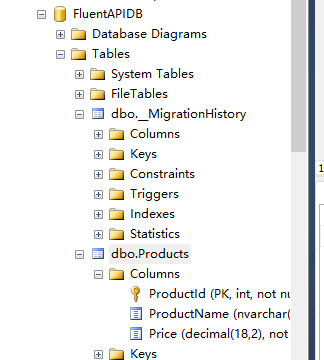
二、配置复合主键
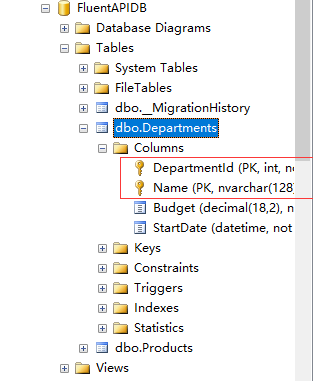
以下示例配置要作为Department 类型的组合主键的DepartmentID 和 Name 属性。
1、创建Department类:
 using System;

 using System.Collections.Generic;

 using System.Linq;

 using System.Text;

 using System.Threading.Tasks;

 namespace FluentAPI.Model

 {

     public class Department

     {

         public int DepartmentId { get; set; }

         public string Name { get; set; }

         public decimal Budget { get; set; }

         public DateTime StartDate { get; set; }

     }

 }
2、创建DepartmentMap类,用来设置复合主键
 using FluentAPI.Model;

 using System;

 using System.Collections.Generic;

 using System.Data.Entity.ModelConfiguration;

 using System.Linq;

 using System.Text;

 using System.Threading.Tasks;

 namespace FluentAPI.Data.FluentAPIMap

 {

     public class DepartmentMap : EntityTypeConfiguration<Department>

     {

         public DepartmentMap()

         {

             // 使用匿名类的方式配置DepartmentId和Name作为复合主键

             this.HasKey(p => new {p .DepartmentId,p.Name});

         }

     }

 }
3、查看数据库
使用EF的数据迁移,然后查看数据库表
三、关闭数值主键的标识
数值主键的标识DatabaseGeneratedOption是一个枚举值,该枚举值具有下面三个值:
DatabaseGeneratedOption.None:关闭数值主键。
DatabaseGeneratedOption.Identity:设置数值主键 自动增长 ,
DatabaseGeneratedOption.Computed :数值主键的值由计算得到(此列将无法插入值)。
1、设置关闭数值主键
 using FluentAPI.Model;

 using System;

 using System.Collections.Generic;

 using System.ComponentModel.DataAnnotations.Schema;

 using System.Data.Entity.ModelConfiguration;

 using System.Linq;

 using System.Text;

 using System.Threading.Tasks;

 namespace FluentAPI.Data.FluentAPIMap

 {

     public class DepartmentMap : EntityTypeConfiguration<Department>

     {

         public DepartmentMap()

         {

             // 使用匿名类的方式配置DepartmentId和Name作为复合主键

             this.HasKey(p => new {p .DepartmentId,p.Name});

             // 以下示例将DepartmentID 属性设置为System.ComponentModel.DataAnnotations.DatabaseGeneratedOption.None,以指示该值不由数据库生成。

             this.Property(p => p.DepartmentId).HasDatabaseGeneratedOption(DatabaseGeneratedOption.None);

         }

     }

 }
插入数据库表的时候DepartmentId列要显示的指定值:
INSERT INTO Departments VALUES (1, '人事部',12.3,GETDATE());
四、指定属性的最大长度
HasMaxLength可以设置表中列的最大长度。
 using FluentAPI.Model;

 using System;

 using System.Collections.Generic;

 using System.ComponentModel.DataAnnotations.Schema;

 using System.Data.Entity.ModelConfiguration;

 using System.Linq;

 using System.Text;

 using System.Threading.Tasks;

 namespace FluentAPI.Data.FluentAPIMap

 {

     public class DepartmentMap : EntityTypeConfiguration<Department>

     {

         public DepartmentMap()

         {

             // 使用匿名类的方式配置DepartmentId和Name作为复合主键

             this.HasKey(p => new {p .DepartmentId,p.Name});

             // 以下示例将DepartmentID 属性设置为System.ComponentModel.DataAnnotations.DatabaseGeneratedOption.None,以指示该值不由数据库生成。

             //this.Property(p => p.DepartmentId).HasDatabaseGeneratedOption(DatabaseGeneratedOption.None);

             //  以下示例将DepartmentID 属性设置为System.ComponentModel.DataAnnotations.DatabaseGeneratedOption.None,以指示该值由数据库自动生成。

             //this.Property(p => p.DepartmentId).HasDatabaseGeneratedOption(DatabaseGeneratedOption.Identity);

             //Name属性不应超过 50 个字符。如果其值超过 50 个字符,则出现 DbEntityValidationException 异常。

             //如果 Code First 基于此模型创建数据库,它还会将 Name 列的最大长度设置为50 个字符。

             this.Property(p => p.Name).HasMaxLength();

         }

     }

 }
五、将属性配置为必需
 using FluentAPI.Model;

 using System;

 using System.Collections.Generic;

 using System.ComponentModel.DataAnnotations.Schema;

 using System.Data.Entity.ModelConfiguration;

 using System.Linq;

 using System.Text;

 using System.Threading.Tasks;

 namespace FluentAPI.Data.FluentAPIMap

 {

     public class DepartmentMap : EntityTypeConfiguration<Department>

     {

         public DepartmentMap()

         {

             // 使用匿名类的方式配置DepartmentId和Name作为复合主键

             this.HasKey(p => new {p .DepartmentId,p.Name});

             // 以下示例将DepartmentID 属性设置为System.ComponentModel.DataAnnotations.DatabaseGeneratedOption.None,以指示该值不由数据库生成。

             //this.Property(p => p.DepartmentId).HasDatabaseGeneratedOption(DatabaseGeneratedOption.None);

             //  以下示例将DepartmentID 属性设置为System.ComponentModel.DataAnnotations.DatabaseGeneratedOption.None,以指示该值由数据库自动生成。

             //this.Property(p => p.DepartmentId).HasDatabaseGeneratedOption(DatabaseGeneratedOption.Identity);

             //Name属性不应超过 50 个字符。如果其值超过 50 个字符,则出现 DbEntityValidationException 异常。

             //如果 Code First 基于此模型创建数据库,它还会将 Name 列的最大长度设置为50 个字符。

             this.Property(p => p.Name).HasMaxLength();

             /*

             Name属性是必需的。如果不指定 Name,则出现 DbEntityValidationException 异常。如果 Code First 基于此模型创建数据库,则用于存储此属性的列将不可为空。

             */

             this.Property(p => p.Name).IsRequired();

         }

     }

 }
六、指定不将CLR 属性映射到数据库中的列
 using FluentAPI.Model;

 using System;

 using System.Collections.Generic;

 using System.ComponentModel.DataAnnotations.Schema;

 using System.Data.Entity.ModelConfiguration;

 using System.Linq;

 using System.Text;

 using System.Threading.Tasks;

 namespace FluentAPI.Data.FluentAPIMap

 {

     public class DepartmentMap : EntityTypeConfiguration<Department>

     {

         public DepartmentMap()

         {

             // 使用匿名类的方式配置DepartmentId和Name作为复合主键

             this.HasKey(p => new {p .DepartmentId,p.Name});

             // 以下示例将DepartmentID 属性设置为System.ComponentModel.DataAnnotations.DatabaseGeneratedOption.None,以指示该值不由数据库生成。

             //this.Property(p => p.DepartmentId).HasDatabaseGeneratedOption(DatabaseGeneratedOption.None);

             //  以下示例将DepartmentID 属性设置为System.ComponentModel.DataAnnotations.DatabaseGeneratedOption.None,以指示该值由数据库自动生成。

             //this.Property(p => p.DepartmentId).HasDatabaseGeneratedOption(DatabaseGeneratedOption.Identity);

             //Name属性不应超过 50 个字符。如果其值超过 50 个字符,则出现 DbEntityValidationException 异常。

             //如果 Code First 基于此模型创建数据库,它还会将 Name 列的最大长度设置为50 个字符。

             this.Property(p => p.Name).HasMaxLength();

             /*

             Name属性是必需的。如果不指定 Name,则出现 DbEntityValidationException 异常。如果 Code First 基于此模型创建数据库,则用于存储此属性的列将不可为空。

             */

             this.Property(p => p.Name).IsRequired();

             /*

            以下示例显示如何指定CLR 类型的属性不映射到数据库中的列。

            Ignore 等同于数据注解NotMapped

            */

             this.Ignore(p => p.Budget);

         }

     }

 }
七、将CLR 属性映射到数据库中的特定列
HasColumnName可以用来设置映射到数据库表中列的列名。
 using System;

 using System.Collections.Generic;

 using System.Linq;

 using System.Text;

 using System.Threading.Tasks;

 using System.Data.Entity;

 using System.Data.Entity.ModelConfiguration;

 using FluentAPI.Model;

 using System.ComponentModel.DataAnnotations.Schema;

 namespace FluentAPI.Data.FluentAPIMap

 {

     public class ProductMap : EntityTypeConfiguration<Product>

     {

         public ProductMap()

         {

             //使用 HasKey 方法对 Product 类型配置 ProductId 主键。

             this.HasKey(p => p.ProductId);

             /*

              * 以下示例将Price CLR 属性映射到ProductPrice 数据库列。

              */

             this.Property(p => p.Price).HasColumnName("ProductPrice");

         }

     }

 }
八、配置字符串属性是否支持Unicode 内容
IsUnicode()方法可以用来设置是否支持Unicode字符,该方法有两个重载函数。
1、没有参数的重载,默认支持Unicode字符

2、有参数的重载,参数为bool值,true支持Unicode,false不支持Unicode

 using System;

 using System.Collections.Generic;

 using System.Linq;

 using System.Text;

 using System.Threading.Tasks;

 using System.Data.Entity;

 using System.Data.Entity.ModelConfiguration;

 using FluentAPI.Model;

 using System.ComponentModel.DataAnnotations.Schema;

 namespace FluentAPI.Data.FluentAPIMap

 {

     public class ProductMap : EntityTypeConfiguration<Product>

     {

         public ProductMap()

         {

             //使用 HasKey 方法对 Product 类型配置 ProductId 主键。

             this.HasKey(p => p.ProductId);

             /*

              * 以下示例将Price CLR 属性映射到ProductPrice 数据库列。

              */

             this.Property(p => p.Price).HasColumnName("ProductPrice");

             /*

             * 默认情况下,字符串为Unicode(SQLServer 中的nvarchar)。您可以使用IsUnicode 方法指定字符串应为varchar 类型。

             */

             this.Property(p => p.PlaceOfOrigin).IsUnicode(false);

         }

     }

 }
查看数据库列类型:

九、配置数据库列的数据类型
HasColumnType 方法支持映射到相同基本类型的不同表示。
 /*

 HasColumnType 方法支持映射到相同基本类型的不同表示。使用此方法并不支持在运行时执行任何数据转换。

 * 请注意,IsUnicode 是将列设置为 varchar 的首选方法,因为它与数据库无关。

 */

 this.Property(p => p.Name).HasColumnType("varchar");
十、配置复杂类型的属性
1、新建类Course,里面有一个Department类型的属性:
 using System;

 using System.Collections.Generic;

 using System.Linq;

 using System.Text;

 using System.Threading.Tasks;

 namespace FluentAPIApp.Model

 {

     public class Course

     {

         public int CourseID { get; set; }

         public string Title { get; set; }

         public int Credits { get; set; }

         public virtual Department Department { get; set; }

     }

 }
 using FluentAPI.Model;

 using System;

 using System.Collections.Generic;

 using System.Data.Entity.ModelConfiguration;

 using System.Linq;

 using System.Text;

 using System.Threading.Tasks;

 namespace FluentAPI.Data.FluentAPIMap

 {

     public class CourseMap : EntityTypeConfiguration<Course>

     {

         public CourseMap()

         {

             /*可以使用点表示法访问复杂类型的属性。

               设置Course类里面的Department属性的Name的最大长度是32

              */

             this.Property(p => p.Department.Name).HasMaxLength();

         }

     }

 }
十一、将CLR 实体类型映射到数据库中的特定表
 /*Department 的所有属性都将映射到名为 t_ Department 的表中的列。*/

 ToTable("t_Department");

 /*您也可以这样指定架构名称:*/

 ToTable("t_Department", "school");
代码地址:https://pan.baidu.com/s/1eR20fWe
Entity Framework(七):Fluent API配置案例的更多相关文章
- Entity Framework(Fluent API)
一.概述 Fluent API 可以理解为一种从POCO到数据库的映射约定,包括字段长度,类型,主外键等等,在EF Code First进行开发时候经常用到. 1.主键 modelBuilder.En ...
- Entity Framework 实体框架的形成之旅--Code First模式中使用 Fluent API 配置(6)
在前面的随笔<Entity Framework 实体框架的形成之旅--Code First的框架设计(5)>里介绍了基于Code First模式的实体框架的经验,这种方式自动处理出来的模式 ...
- Entity Framework Code First (五)Fluent API - 配置关系
上一篇文章我们讲解了如何用 Fluent API 来配置/映射属性和类型,本文将把重点放在其是如何配置关系的. 文中所使用代码如下 public class Student { public int ...
- Entity Framework Code First (五)Fluent API - 配置关系 转载 https://www.cnblogs.com/panchunting/p/entity-framework-code-first-fluent-api-configuring-relationships.html
上一篇文章我们讲解了如何用 Fluent API 来配置/映射属性和类型,本文将把重点放在其是如何配置关系的. 文中所使用代码如下 public class Student { public int ...
- EF里的默认映射以及如何使用Data Annotations和Fluent API配置数据库的映射
I.EF里的默认映射 上篇文章演示的通过定义实体类就可以自动生成数据库,并且EF自动设置了数据库的主键.外键以及表名和字段的类型等,这就是EF里的默认映射.具体分为: 数据库映射:Code First ...
- 使用 Fluent API 配置/映射属性和类型(摘自微软Data Access and Storage)
使用 Fluent API 配置/映射属性和类型 使用实体框架 Code First 时,默认行为是使用一组 EF 中内嵌的约定将 POCO 类映射到表.但是,有时您无法或不想遵守这些约定,需要将实体 ...
- 使用 Fluent API 配置/映射属性和类型
使用 Fluent API 配置/映射属性和类型 使用实体框架 Code First 时,默认行为是使用一组 EF 中内嵌的约定将 POCO 类映射到表.但是,有时您无法或不想遵守这些约定,需要将实体 ...
- EF——默认映射以及如何使用Data Annotations和Fluent API配置数据库的映射 02 (转)
EF里的默认映射以及如何使用Data Annotations和Fluent API配置数据库的映射 I.EF里的默认映射 上篇文章演示的通过定义实体类就可以自动生成数据库,并且EF自动设置了数据库 ...
- EF的默认映射以及如何使用Data Annotations和Fluent API配置数据库的映射
I.EF的默认映射 上节我们创建项目,通过定义实体类就可以自动生成数据库,并且EF帮我们自动设置了数据库的主键.外键以及表名和字段的类型等,这就是EF的默认映射.具体分为: 数据库映射:Code Fi ...
随机推荐
- PostgreSQL流复制参数max_wal_senders详解
转自:http://my.oschina.net/Kenyon/blog/152234PostgreSQL 9.2.4 主机:192.25.10.76 从机:192.25.10.71 做postgre ...
- iOS kvo 结合 FBKVOController 的使用
iOS kvo 结合 FBKVOController 的使用 一:FBKVOControlloer是FaceBook开源的一个 在 iOS,maxOS上使用 kvo的 开源库: 提供了block和@s ...
- vue 1.x 总结
1.Vuejs组件 vuejs构建组件使用 Vue.component('componentName',{ /*component*/ }): 这里注意一点,组件要先注册再使用,也就是说: Vue.c ...
- 〖Linux〗不知谁写的,很实用的Linux命令
第一部分 . sudo 运行上一条命令 sudo !! . HTTP方式共享当前目录 python -m SimpleHTTPServer . vim保存一个root用户文件 :w !sudo tee ...
- UI_storyboard实现页面回调
新建类 注意继承关系 #import <UIKit/UIKit.h> @interface CustomPopIt : UIStoryboardSegue @end #import &qu ...
- Tomcat中配置MySQL数据库连接池
Web开发中与数据库的连接是必不可少的,而数据库连接池技术很好的优化了动态页与数据库的连接,相比单个连接数据库连接池节省了很大的资源.用一个通俗的比喻:如果一个人洗澡需花一桶水,那一百个人就要花一百桶 ...
- 【APP接口开发】chrome浏览器DHC工具安装使用(亲测有效)
1.DHC文件获取地址:http://chromecj.com/web-development/2015-08/549/download.html 2.chrome安装DHC插件教程和步骤:http: ...
- Oracle常用函数脑图
全面的可参考(四)Oracle学习笔记—— 常见函数
- JavaScript:使用JavaScript 实现注册表单的校验
说明:在点击提交时进行表单校验,具体要求如下: 1)用户名为3~16个字符,且不能包含”@”和”#”字符: 2)密码和校验密码必须一致,且长度在8个字符到16个字符: 3)兴趣爱好至少选择一项: 4) ...
- Android上怎样使用《贝赛尔曲线》
首先对于<赛贝尔曲线>不是很了解的童鞋,请自觉白度百科.google. 为了方便偷懒的童鞋,这里给个<贝赛尔曲线>百科地址,以及一段话简述<贝赛尔曲线>: < ...