
Spring Boot学习记录(二)–thymeleaf模板
自从来公司后都没用过jsp当界面渲染了,因为前后端分离不是很好,反而模板引擎用的比较多,thymeleaf最大的优势后缀为html,就是只需要浏览器就可以展现页面了,还有就是thymeleaf可以很好的和spring集成.下面开始学习.
1.引入依赖
maven中直接引入
<dependency>

      <groupId>org.springframework.boot</groupId>

      <artifactId>spring-boot-starter-thymeleaf</artifactId>

    </dependency>
可以查看依赖关系,发现spring-boot-starter-thymeleaf下面已经包括了spring-boot-starter-web,所以可以把spring-boot-starter-web的依赖去掉.
2.配置视图解析器
spring-boot很多配置都有默认配置,比如默认页面映射路径为
classpath:/templates/*.html
同样静态文件路径为
classpath:/static/
在application.properties中可以配置thymeleaf模板解析器属性.就像使用springMVC的JSP解析器配置一样
#thymeleaf start

spring.thymeleaf.mode=HTML5

spring.thymeleaf.encoding=UTF-

spring.thymeleaf.content-type=text/html

#开发时关闭缓存,不然没法看到实时页面

spring.thymeleaf.cache=false

#thymeleaf end
具体可以配置的参数可以查看 org.springframework.boot.autoconfigure.thymeleaf.ThymeleafProperties这个类,上面的配置实际上就是注入到该类中的属性值.
3.编写DEMO
1.控制器
 @Controller

    public class HelloController {

        private Logger logger = LoggerFactory.getLogger(HelloController.class);

        /**

         * 测试hello

         * @return

         */

        @RequestMapping(value = "/hello",method = RequestMethod.GET)

        public String hello(Model model) {

            model.addAttribute("name", "Dear");

            return "hello";

        }

    }
2.view(注释为IDEA生成的索引,便于IDEA补全)
<!DOCTYPE HTML>

<html xmlns:th="http://www.thymeleaf.org">

<head>

    <title>hello</title>

    <meta http-equiv="Content-Type" content="text/html; charset=UTF-8" />

</head>

<body>

<!--/*@thymesVar id="name" type="java.lang.String"*/-->

<p th:text="'Hello!, ' + ${name} + '!'" ></p>

</body>

</html>
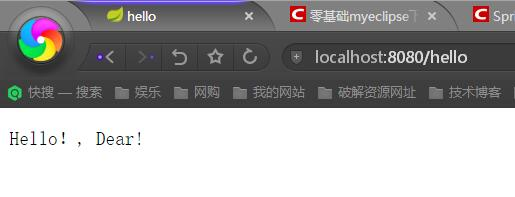
3.效果
4.基础语法
回味上面的DEMO,可以看出来首先要在改写html标签
<html xmlns:th="http://www.thymeleaf.org">
这样的话才可以在其他标签里面使用th:*这样的语法.这是下面语法的前提.
1.获取变量值
<p th:text="'Hello!, ' + ${name} + '!'" ></p>
可以看出获取变量值用$符号,对于javaBean的话使用变量名.属性名方式获取,这点和EL表达式一样.
另外$表达式只能写在th标签内部,不然不会生效,上面例子就是使用th:text标签的值替换p标签里面的值,至于p里面的原有的值只是为了给前端开发时做展示用的.这样的话很好的做到了前后端分离.
2.引入URL
Thymeleaf对于URL的处理是通过语法@{…}来处理的
<a th:href="@{http://blog.csdn.net/u012706811}">绝对路径</a>

<a th:href="@{/}">相对路径</a>

<a th:href="@{css/bootstrap.min.css}">Content路径,默认访问static下的css文件夹</a>
类似的标签有:th:href和th:src
3.字符串替换
很多时候可能我们只需要对一大段文字中的某一处地方进行替换,可以通过字符串拼接操作完成:
<span th:text="'Welcome to our application, ' + ${user.name} + '!'">
一种更简洁的方式是:
<span th:text="|Welcome to our application, ${user.name}!|">
当然这种形式限制比较多,|…|中只能包含变量表达式${…},不能包含其他常量、条件表达式等。
4.运算符
在表达式中可以使用各类算术运算符,例如+, -, *, /, %
th:with="isEven=(${prodStat.count} % 2 == 0)"
逻辑运算符>, <, <=,>=,==,!=都可以使用,唯一需要注意的是使用<,>时需要用它的HTML转义符:
 th:if="${prodStat.count} > 1"

    th:text="'Execution mode is ' + ( (${execMode} == 'dev')? 'Development' : 'Production')"
5.条件
if/unless
Thymeleaf中使用th:if和th:unless属性进行条件判断,下面的例子中,标签只有在th:if中条件成立时才显示:
<a th:href="@{/login}" th:unless=${session.user != null}>Login</a>
th:unless于th:if恰好相反,只有表达式中的条件不成立,才会显示其内容。
Switch
Thymeleaf同样支持多路选择Switch结构:
<div th:switch="${user.role}">

  <p th:case="'admin'">User is an administrator</p>

  <p th:case="#{roles.manager}">User is a manager</p>

</div>
<div th:switch="${user.role}">
<p th:case="'admin'">User is an administrator</p>
<p th:case="#{roles.manager}">User is a manager</p>
</div>
默认属性default可以用*表示:
div th:switch="${user.role}">

  <p th:case="'admin'">User is an administrator</p>

  <p th:case="#{roles.manager}">User is a manager</p>

  <p th:case="*">User is some other thing</p>

</div>
6.循环
渲染列表数据是一种非常常见的场景,例如现在有n条记录需要渲染成一个表格
,该数据集合必须是可以遍历的,使用th:each标签:
<body>

  <h1>Product list</h1>

  <table>

    <tr>

      <th>NAME</th>

      <th>PRICE</th>

      <th>IN STOCK</th>

    </tr>

    <tr th:each="prod : ${prods}">

      <td th:text="${prod.name}">Onions</td>

      <td th:text="${prod.price}">2.41</td>

      <td th:text="${prod.inStock}? #{true} : #{false}">yes</td>

    </tr>

  </table>

  <p>

    <a href="../home.html" th:href="@{/}">Return to home</a>

  </p>

</body>
可以看到,需要在被循环渲染的元素(这里是)中加入th:each标签,其中th:each=”prod : ${prods}”意味着对集合变量prods进行遍历,循环变量是prod在循环体中可以通过表达式访问。
7.Utilities
为了模板更加易用,Thymeleaf还提供了一系列Utility对象(内置于Context中),可以通过#直接访问:
- #dates
- #calendars
- #numbers
- #strings
- arrays
- lists
- sets
- maps
- …
下面用一段代码来举例一些常用的方法:
date
/*

 * Format date with the specified pattern

 * Also works with arrays, lists or sets

 */

${#dates.format(date, 'dd/MMM/yyyy HH:mm')}

${#dates.arrayFormat(datesArray, 'dd/MMM/yyyy HH:mm')}

${#dates.listFormat(datesList, 'dd/MMM/yyyy HH:mm')}

${#dates.setFormat(datesSet, 'dd/MMM/yyyy HH:mm')}

/*

 * Create a date (java.util.Date) object for the current date and time

 */

${#dates.createNow()}

/*

 * Create a date (java.util.Date) object for the current date (time set to 00:00)

 */

${#dates.createToday()}
string
/*

 * Check whether a String is empty (or null). Performs a trim() operation before check

 * Also works with arrays, lists or sets

 */

${#strings.isEmpty(name)}

${#strings.arrayIsEmpty(nameArr)}

${#strings.listIsEmpty(nameList)}

${#strings.setIsEmpty(nameSet)}

/*

 * Check whether a String starts or ends with a fragment

 * Also works with arrays, lists or sets

 */

${#strings.startsWith(name,'Don')}                  // also array*, list* and set*

${#strings.endsWith(name,endingFragment)}           // also array*, list* and set*

/*

 * Compute length

 * Also works with arrays, lists or sets

 */

${#strings.length(str)}

/*

 * Null-safe comparison and concatenation

 */

${#strings.equals(str)}

${#strings.equalsIgnoreCase(str)}

${#strings.concat(str)}

${#strings.concatReplaceNulls(str)}

/*

 * Random

 */

${#strings.randomAlphanumeric(count)}
快速的学习还是直接写例子最快,后期写Demo遇到问题再加上去
参考链接: http://www.tianmaying.com/tutorial/using-thymeleaf
整合项目地址:
https://github.com/nl101531/JavaWEB
补充
在spring-boot1.4之后,支持thymeleaf3,可以更改版本号来进行修改支持.
3相比2极大的提高了效率,并且不需要标签闭合,类似的link,img等都有了很好的支持,按照如下配置即可
<properties>

    <project.build.sourceEncoding>UTF-</project.build.sourceEncoding>

    <!-- set thymeleaf version -->

    <thymeleaf.version>3.0..RELEASE</thymeleaf.version>

    <thymeleaf-layout-dialect.version>2.0.</thymeleaf-layout-dialect.version>

    <!--set java version-->

    <java.version>1.8</java.version>

  </properties>
Spring Boot学习记录(二)–thymeleaf模板的更多相关文章
- Spring Boot学习记录(二)--thymeleaf模板 - CSDN博客
==他的博客应该不错,没有细看 Spring Boot学习记录(二)--thymeleaf模板 - CSDN博客 http://blog.csdn.net/u012706811/article/det ...
- 我的Spring Boot学习记录(二):Tomcat Server以及Spring MVC的上下文问题
Spring Boot版本: 2.0.0.RELEASE 这里需要引入依赖 spring-boot-starter-web 这里有可能有个人的误解,请抱着怀疑态度看. 建议: 感觉自己也会被绕晕,所以 ...
- Spring Boot 2.0 整合Thymeleaf 模板引擎
本节将和大家一起实战Spring Boot 2.0 和thymeleaf 模板引擎 1. 创建项目 2. 使用Spring Initlizr 快速创建Spring Boot 应用程序 3. 填写项目配 ...
- 【Spring Boot学习之二】WEB开发
环境 Java1.8 Spring Boot 1.3.2 一.静态资源访问 动静分离:动态服务和前台页面图片分开,静态资源可以使用CDN加速;Spring Boot默认提供静态资源目录位置需置于cla ...
- 【转载】Spring boot学习记录(二)-配置文件解析
前言:本系列文章非本人原创,转自:http://tengj.top/2017/04/24/springboot0/ 正文 Spring Boot使用了一个全局的配置文件application.prop ...
- spring boot 学习笔记(二) 构建web支持jsp
一.必须将项目打包成war包 <packaging>war</packaging> 二.pom.xml加入依赖包 <dependency> <groupId& ...
- Spring Boot 学习笔记--整合Thymeleaf
1.新建Spring Boot项目 添加spring-boot-starter-thymeleaf依赖 <dependency> <groupId>org.springfram ...
- 【转载】Spring boot学习记录(一)-入门篇
前言:本系列文章非本人原创,转自:http://tengj.top/2017/04/24/springboot0/ 正文 首先声明,Spring Boot不是一门新技术.从本质上来说,Spring B ...
- spring boot用ModelAndView向Thymeleaf模板传参数
最近在调试一个Spring Boot向Thymeleaf模板传参数的例子,但踩了很多坑,这里就把详细过程记录下来,以供大家参考. 先说下,这里遇到哪些坑呢? 1 我用的是IDEA社区版,这不支持JSP ...
随机推荐
- Linux下C语言多文件的编译以及makefile的应用
1.关于编译和链接 一般来说,无论是C.C++,首先要把源文件编译成中间代码文件,在Windows下也就是.obj文件,UNIX下是.o文件,即Object File,这个动作叫做编译(compile ...
- POJ1226 Substrings
后缀数组. 求多个字符串翻转与否中最长公共子串长. 二分答案,反过来多建一倍的字符串,二分时特判一下即可. By:大奕哥 #include<cstring> #include<cst ...
- 【SDOI2017】树点染色【线段树+LCT】
本来只是想练练LCT,没想到是个线段树 对于操作1:诶新的颜色?这不是access吗? 也就是说,我们用一棵splay来表示一种颜色 操作2直接在LCT上乱搞-- 不对啊,操作3要查子树 诶好像是静态 ...
- [ZROI #316] ZYB玩字符串
Introduction 每次在一开始为空的串$S$的任意位置插入串$p$ 给出最终的$S$,求长度最短(相同时字典序最小)的串$p$ Solution: 样例出锅差评啊,让我这种直接看样例选手挂掉5 ...
- 【hash】BZOJ3751-[NOIP2014]解方程
[题目大意] 已知多项式方程:a0+a1*x+a2*x^2+...+an*x^n=0.求这个方程在[1,m]内的整数解(n和m均为正整数). [思路] *当年考场上怒打300+行高精度,然而没骗到多少 ...
- 【左偏树+贪心】BZOJ1367-[Baltic2004]sequence
[题目大意] 给定一个序列t1,t2,...,tn ,求一个递增序列z1<z2<...<zn , 使得R=|t1−z1|+|t2−z2|+...+|tn−zn| 的值最小.本题中,我 ...
- Codeforces Beta Round #80 (Div. 1 Only) D. Time to Raid Cowavans 分块
D. Turtles Time Limit: 20 Sec Memory Limit: 256 MB 题目连接 http://codeforces.com/contest/103/problem/D ...
- Java Web----Java Web的数据库操作(三)
Java Web的数据库操作 前面介绍了JDBC技术和JDBC API及API的使用示例,下面详细介绍JDBC在Web中的应用. Java Web----Java Web的数据库操作(一) Java ...
- Delphi TFileStream 打开模式与共享模式
{ TFileStream create mode } fmCreate = $FF00; { Create a file with the given name. If a file with th ...
- Spring EL hello world实例
Spring EL与OGNL和JSF EL相似,计算评估或在bean创建时执行.此外,所有的Spring表达式都可以通过XML或注解. 在本教程中,我们将学习如何使用Spring表达式语言(SpEL) ...