
使用Python画玫瑰花
'''

Created on Nov 18, 2017

@author: QiZhao

'''

import turtle

# 设置初始位置

turtle.penup()

turtle.left(90)

turtle.fd(200)

turtle.pendown()

turtle.right(90)

# 花蕊

turtle.fillcolor("red")

turtle.begin_fill()

turtle.circle(10,180)

turtle.circle(25,110)

turtle.left(50)

turtle.circle(60,45)

turtle.circle(20,170)

turtle.right(24)

turtle.fd(30)

turtle.left(10)

turtle.circle(30,110)

turtle.fd(20)

turtle.left(40)

turtle.circle(90,70)

turtle.circle(30,150)

turtle.right(30)

turtle.fd(15)

turtle.circle(80,90)

turtle.left(15)

turtle.fd(45)

turtle.right(165)

turtle.fd(20)

turtle.left(155)

turtle.circle(150,80)

turtle.left(50)

turtle.circle(150,90)

turtle.end_fill()

# 花瓣1

turtle.left(150)

turtle.circle(-90,70)

turtle.left(20)

turtle.circle(75,105)

turtle.setheading(60)

turtle.circle(80,98)

turtle.circle(-90,40)

# 花瓣2

turtle.left(180)

turtle.circle(90,40)

turtle.circle(-80,98)

turtle.setheading(-83)

# 叶子1

turtle.fd(30)

turtle.left(90)

turtle.fd(25)

turtle.left(45)

turtle.fillcolor("green")

turtle.begin_fill()

turtle.circle(-80,90)

turtle.right(90)

turtle.circle(-80,90)

turtle.end_fill()

turtle.right(135)

turtle.fd(60)

turtle.left(180)

turtle.fd(85)

turtle.left(90)

turtle.fd(80)

# 叶子2

turtle.right(90)

turtle.right(45)

turtle.fillcolor("green")

turtle.begin_fill()

turtle.circle(80,90)

turtle.left(90)

turtle.circle(80,90)

turtle.end_fill()

turtle.left(135)

turtle.fd(60)

turtle.left(180)

turtle.fd(60)

turtle.right(90)

turtle.circle(200,60)

time.sleep(3)
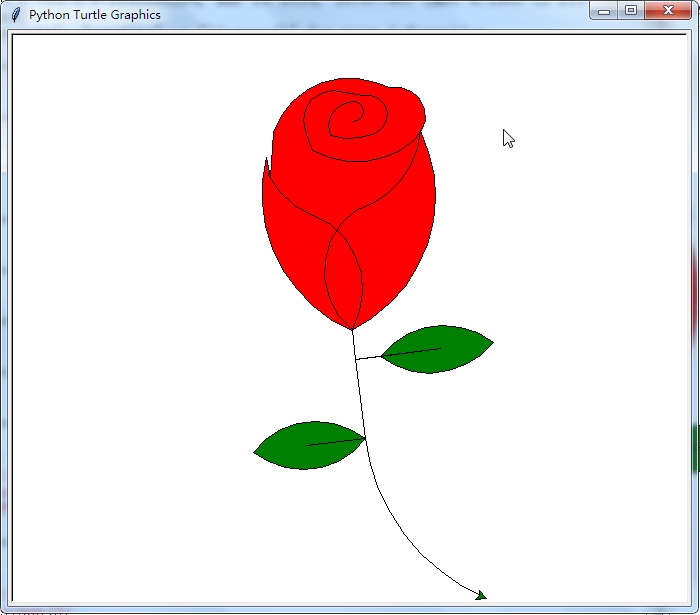
运行结果:
使用Python画玫瑰花的更多相关文章
- 沉淀再出发:用python画各种图表
沉淀再出发:用python画各种图表 一.前言 最近需要用python来做一些统计和画图,因此做一些笔记. 二.python画各种图表 2.1.使用turtle来画图 import turtle as ...
- python画樱花
用python画简单的樱花 代码如下: import turtle as T import random import time # 画樱花的躯干(60,t) def Tree(branch, t): ...
- python 画小猪佩奇
转自:python画个小猪佩奇 # -*- coding: utf-8 -*- """ Created on Mon May 20 11:36:03 2019 @auth ...
- 用python画 pareto front
用python画 pareto front 觉得有用的话,欢迎一起讨论相互学习~Follow Me 2D pf import os import matplotlib.pyplot as plt im ...
- python 画3D的高斯曲线
用python画3D的高斯曲线,我想如果有多个峰怎么画? import numpy as npimport matplotlib.pyplot as pltimport mathimport mpl_ ...
- python画一只佩奇
用python画一只佩奇 from turtle import* def nose(x,y):#鼻子 penup()#提起笔 goto(x,y)#定位 pendown()#落笔,开始画 sethead ...
- 利用python画出动态高优先权优先调度
之前写过一个文章. 利用python画出SJF调度图 动态高度优先权优先调度 动态优先权调度算法,以就绪队列中各个进程的优先权作为进程调度的依据.各个进程的优先权在创建进程时所赋予,随着进程的推进或其 ...
- 【python画圆】pip安装库时出现Read timed out.解决办法
昨天第一次用python画圆,当时并没有安装numpy库(导入数据包)和matplotlib库(导入图形包),于是尝试用pip安装库 首先,我先更新了pip,如下图: 顺便附上成功截图: 然后安装nu ...
- 用python画一朵玫瑰花
废话不多说,直接上代码 from turtle import * import time setup(600,800,0,0) speed(0) penup() seth(90) fd(340) se ...
随机推荐
- java游戏开发杂谈 - 画布和画笔
在Eclipse里,编写如下两个类: package game2; import java.awt.Color; import java.awt.Graphics; import javax.swin ...
- RazorPage 小测试,作下记录
@page@inject Microsoft.AspNetCore.Antiforgery.IAntiforgery Xsrf@{}@functions{ public AppInfo item { ...
- 堪称神器的Chrome插件
前言 相信很多人都在使用 Chrome 浏览器,其流畅的浏览体验得到了不少用户的偏爱,但流畅只是一方面, Chrome 最大的优势还是其支持众多强大好用的扩展程序(Extensions).最近为了更好 ...
- Eclipse4JavaEE安装SpringBoot
第一步:下载SpringBoot SpringBoot官网下载链接 第二步:在Eclipse里进行安装 打开Eclipse,菜单栏Help ->Install New Software,进入下图 ...
- 抽象工厂模式(Abstract Factory Pattern)
抽象工厂模式概述 定义:提供一个创建一系列相关或相互依赖对象的接口,而无需指定他们具体的类 抽象工厂抽象工厂,顾名思义,就是比工厂模式更抽象的工厂模式.在工厂模式中,一个具体工厂只负责生产一个具体产品 ...
- 设计模式 | 建造者模式/生成器模式(builder)
定义: 将一个复杂对象的构建与它的表示分离,使得同样的构建过程可以创建不同的表示. 结构:(书中图,侵删) 一个产品类 一个指定产品各个部件的抽象创建接口 若干个实现了各个部件的具体实现的创建类 一个 ...
- [20190130]删除tab$记录的恢复.txt
[20190130]删除tab$记录的恢复.txt --//网上提到许多删除tab$的案例,主要原因在于没有从官方正规渠道下载oracle版本,还有一些来自工具里面带有一些脚本删除tab$记录. -- ...
- cmake 入门实战
当你的程序只有一个源文件时,直接就可以用gcc命令编译它 g++ main.cc 这样会输出一个main.out https://www.hahack.com/codes/cmake/
- LOJ #6051. 「雅礼集训 2017 Day11」PATH
完了感觉最近留了好多坑的说,这题也是模模糊糊地会一点 首先我们发现题目要求的是单调不上升的序列个数,那么一个套路就是用值减去下标 然后考虑连续位置的限制,这个我们做一个置换然后尽量向后取 这样拿值和位 ...
- 露脸!钉钉通过SOC2隐私性原则审计,安全和隐私保护达超一流国际标准
2018年4月3日,阿里巴巴钉钉宣布已经正式通过了两项安全方面的权威资质:SOC2Type1服务审计报告和ISO27018(公有云体系下的隐私保护)证书. 钉钉方透露,此次通过美国注册会计师协会(AI ...