
Unity ARCore动态增加识别图
项目需要,有两点要求说明一下
1.如果你的图片是下载生成的,那没什么问题
2.如果你的识别图是存储在APK包里的话需要调整图片属性:
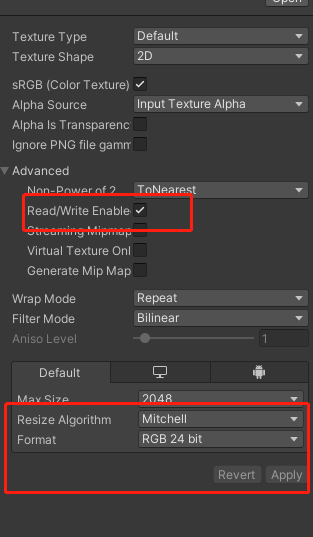
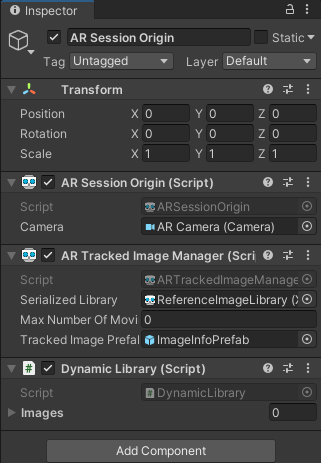
代码如下:
using QFramework;

using System;

using System.Collections.Generic;

using System.IO;

using System.Text;

using Unity.Jobs;

using UnityEditor;

using UnityEngine;

using UnityEngine.XR.ARFoundation;

using UnityEngine.XR.ARSubsystems;

namespace UnityEngine.XR.ARFoundation.Samples

{

    /// <summary>

    /// Adds images to the reference library at runtime.

    /// </summary>

    [RequireComponent(typeof(ARTrackedImageManager))]

    public class DynamicLibrary : MonoSingleton<DynamicLibrary>

    {

        [Serializable]

        public class ImageData

        {

            [SerializeField, Tooltip("The source texture for the image. Must be marked as readable.")]

            Texture2D m_Texture;

            public Texture2D texture

            {

                get => m_Texture;

                set => m_Texture = value;

            }

            [SerializeField, Tooltip("The name for this image.")]

            string m_Name;

            public string name

            {

                get => m_Name;

                set => m_Name = value;

            }

            [SerializeField, Tooltip("The width, in meters, of the image in the real world.")]

            float m_Width;

            public float width

            {

                get => m_Width;

                set => m_Width = value;

            }

            public AddReferenceImageJobState jobState { get; set; }

        }

        [SerializeField, Tooltip("The set of images to add to the image library at runtime")]

        ImageData[] m_Images;

        /// <summary>

        /// The set of images to add to the image library at runtime

        /// </summary>

        public ImageData[] images

        {

            get => m_Images;

            set => m_Images = value;

        }

        enum State

        {

            NoImagesAdded,

            AddImagesRequested,

            AddingImages,

            Done,

            Error

        }

        State m_State;

        string m_ErrorMessage = "";

        StringBuilder m_StringBuilder = new StringBuilder();

        private void Start()

        {

            //var pathName = Application.persistentDataPath + "/3.jpg";

            //Debug.Log(pathName);

            //var bytes = ReadFile(pathName);

            //int width = Screen.width;

            //int height = Screen.height;

            //Texture2D texture = new Texture2D(width, height, TextureFormat.RGB24, false);

            //texture.LoadImage(bytes);

            //texture = SettingTexture(texture);

            //ImageData data = new ImageData();

            //data.texture = texture;

            //data.name = "3Test";

            //data.width = 0.5f;

            //m_Images[0] = data;

            manager = GetComponent<ARTrackedImageManager>();

        }

        public void AddImageTracked(List<string> list_SavePath)

        {

            m_Images = new ImageData[list_SavePath.Count];

            for (int i = 0; i < list_SavePath.Count; i++)

            {

                int width = Screen.width;

                int height = Screen.height;

                var bytes = ReadFile(list_SavePath[i]);

                Texture2D texture = new Texture2D(width, height, TextureFormat.RGB24, false);

                texture.LoadImage(bytes);

                texture = SettingTexture(texture);

                ImageData data = new ImageData();

                data.texture = texture;

                data.name = i.ToString();

                data.width = 0.5f;

                m_Images[i] = data;

            }

            m_State = State.AddImagesRequested;

        }

        public void AddImageTracked(List<string> list_SavePath,Dictionary<string,Sprite>dicImageTracked)

        {

            m_Images = new ImageData[list_SavePath.Count];

            Debug.Log(list_SavePath.Count +"    "+ dicImageTracked.Count);

            for (int i = 0; i < list_SavePath.Count; i++)

            {

                Debug.Log("SavePath   "+list_SavePath[i]);

            }

            foreach (var item in dicImageTracked)

            {

                Debug.Log(item.Key);

            }

            for (int i = 0; i < list_SavePath.Count; i++)

            {

                if (dicImageTracked.ContainsKey(list_SavePath[i]))

                {

                    int width = dicImageTracked[list_SavePath[i]].texture.width;

                    int height = dicImageTracked[list_SavePath[i]].texture.height;

                    var bytes = dicImageTracked[list_SavePath[i]].texture.EncodeToPNG();

                    Texture2D texture = new Texture2D(width, height, TextureFormat.RGB24, false);

                    texture.LoadImage(bytes);

                    texture = SettingTexture(texture);

                    ImageData data = new ImageData();

                    data.texture = texture;

                    data.name = i.ToString();

                    data.width = 0.5f;

                    m_Images[i] = data;

                }

                else

                    Debug.LogError("Image Not SavePath");

            }

            m_State = State.AddImagesRequested;

        }

        byte[] ReadFile(string filePath)

        {

            var fs = new FileStream(filePath, FileMode.Open, FileAccess.Read);

            fs.Seek(0, SeekOrigin.Begin);

            var binary = new byte[fs.Length];

            fs.Read(binary, 0, binary.Length);

            fs.Close();

            return binary;

        }

        void OnGUI()

        {

            var fontSize = 50;

            GUI.skin.button.fontSize = fontSize;

            GUI.skin.label.fontSize = fontSize;

            float margin = 100;

            GUILayout.BeginArea(new Rect(margin, margin, Screen.width - margin * 2, Screen.height - margin * 2));

            switch (m_State)

            {

                case State.NoImagesAdded:

                    {

                        //if (GUILayout.Button("Add images" + manager.trackables.count))

                        //{

                        //    m_State = State.AddImagesRequested;

                        //}

                        break;

                    }

                case State.AddingImages:

                    {

                        m_StringBuilder.Clear();

                        m_StringBuilder.AppendLine("Add image status:");

                        foreach (var image in m_Images)

                        {

                            m_StringBuilder.AppendLine($"\t{image.name}: {(image.jobState.status.ToString())}");

                        }

                      //  GUILayout.Label(m_StringBuilder.ToString());

                        break;

                    }

                case State.Done:

                    {

                      //  GUILayout.Label("All images added  " + manager.trackables.count);

                        break;

                    }

                case State.Error:

                    {

                        GUILayout.Label(m_ErrorMessage);

                        break;

                    }

            }

            GUILayout.EndArea();

        }

        void SetError(string errorMessage)

        {

            m_State = State.Error;

            m_ErrorMessage = $"Error: {errorMessage}";

        }

        ARTrackedImageManager manager;

        void Update()

        {

            switch (m_State)

            {

                case State.AddImagesRequested:

                    {

                        if (m_Images == null)

                        {

                            SetError("No images to add.");

                            break;

                        }

                         manager = GetComponent<ARTrackedImageManager>();

                        if (manager == null)

                        {

                            SetError($"No {nameof(ARTrackedImageManager)} available.");

                            break;

                        }

                        // You can either add raw image bytes or use the extension method (used below) which accepts

                        // a texture. To use a texture, however, its import settings must have enabled read/write

                        // access to the texture.

                        for (int i = 0; i < m_Images.Length; i++)

                        {

                            if (!m_Images[i].texture.isReadable)

                            {

                                Texture2D tex = SettingTexture(m_Images[i].texture);

                                m_Images[i].texture = tex;

                            }

                        }

                        foreach (var image in m_Images)

                        {

                            if (!image.texture.isReadable)

                            {

                                SetError($"Image {image.name} must be readable to be added to the image library.");

                                break;

                            }

                           // else

                               // Debug.LogError(" IsReadable = true  "+image.name);

                        }

                        if (manager.referenceLibrary is MutableRuntimeReferenceImageLibrary mutableLibrary)

                        {

                            try

                            {

                                foreach (var image in m_Images)

                                {

                                    // Note: You do not need to do anything with the returned JobHandle, but it can be

                                    // useful if you want to know when the image has been added to the library since it may

                                    // take several frames.

                                    image.jobState = mutableLibrary.ScheduleAddImageWithValidationJob(image.texture, image.name, image.width);

                                }

                                m_State = State.AddingImages;

                            }

                            catch (InvalidOperationException e)

                            {

                                SetError($"ScheduleAddImageJob threw exception: {e.Message}");

                            }

                        }

                        else

                        {

                            SetError($"The reference image library is not mutable.");

                        }

                        break;

                    }

                case State.AddingImages:

                    {

                        // Check for completion

                        var done = true;

                        foreach (var image in m_Images)

                        {

                            if (!image.jobState.jobHandle.IsCompleted)

                            {

                                done = false;

                                break;

                            }

                        }

                        if (done)

                        {

                            m_State = State.Done;

                            GameManager.Instance.finish = true;

                        }

                        break;

                    }

            }

        }

        Texture2D SettingTexture( Texture2D texture)

        {

            //TextureImporter ti = (TextureImporter)TextureImporter.GetAtPath(AssetDatabase.GetAssetPath(texture));

            //ti.isReadable = true;

            //AssetDatabase.ImportAsset(AssetDatabase.GetAssetPath(texture));

            Texture2D tex = new Texture2D(texture.width, texture.height, TextureFormat.RGB24,false);

            byte[] data = texture.EncodeToPNG();

            tex.LoadImage(data);

            Debug.Log(tex.isReadable);

            return tex;

        }

    }

}
Unity ARCore动态增加识别图的更多相关文章
- Unity3D 动态地创建识别图
前面介绍了EasyAR的单图识别,它是提前在Unity设置好图片路径的,那么如果我们的图片是存储在服务器上的,那么我们肯定不能直接把服务的图片地址填上去了.这个时候我们可以动态地创建识别图.步骤如下: ...
- 可以动态增加系统的U盘启动器(基于grub)
前言:最近面试无果,就在宿舍看那本<30天自制操作系统>,里面使用的系统文件格式是img,要在真机上运行,就需要使用U盘进行启动,因为现在都没有软盘.而网上很多都是用软件写入U盘的.反正我 ...
- 使用Unity创造动态的2D水体效果
者:Alex Rose 在本篇教程中,我们将使用简单的物理机制模拟一个动态的2D水体.我们将使用一个线性渲染器.网格渲染器,触发器以及粒子的混合体来创造这一水体效果,最终得到可运用于你下款游戏的水纹和 ...
- Unity3D 创建动态的立方体图系统
Unity3D 创建动态的立方体图系统 这一篇主要是利用上一篇的Shader,通过脚本来完成一个动态的立方体图变化系统. 准备工作如下: 创建一个新的场景.一个球体.提供给场景一个平行光,准备2个立方 ...
- C++基础知识:动态类型识别
1.动态类型指的是基类指针所指向的对象的实际类型 2.C++中的多态根据实际的对象类型调用对应的虚函数(1)可以在基类中定义虚函数返回具体的类型信息(2)所有的派生类都必须实现类型相关的虚函数(3)每 ...
- 3D动态人脸识别技术分析——世纪晟人脸识别实现三维人脸建模
- 目录 - 国内3D动态人脸识别现状概况 - 新形势下人脸识别技术发展潜力 - 基于深度学习的3D动态人脸识别技术分析 1. 非线性数据建模方法 2. 基于3D变形模型的人脸建模 - 案例结合——世 ...
- Hyperledger fablic 1.0 在centos7环境下的安装与部署和动态增加节点
Hyperledger fablic 1.0 在centos7环境下的安装与部署和动态增加节点 一.安装docker 执行代码如下: curl -sSL https://get.daocloud.io ...
- iOS-------- Objective-C多态:动态类型识别+动态绑定+动态加载
一.Objective-C多态 1.概念:相同接口,不同的实现 来自不同类可以定义共享相同名称的方法. 动态类型能使程序直到执行时才确定对象所属类型 动态类型绑定能使程序直到执行时才确定要对对象调用的 ...
- Objective-C多态:动态类型识别+动态绑定+动态加载
http://blog.csdn.net/tskyfree/article/details/7984887 一.Objective-C多态 1.概念:相同接口,不同的实现 来自不同类可以定义共享相同名 ...
- vue项目中,无需打包而动态更改背景图以及标题
1.背景 今天,项目经理对已完成的项目提出了一个需求,即项目的基础功能目前针对于各个基层法院都适用,而对于不同的法院,我们每次都需要前端研发来更改所属法院的法院名称以及背景图,这样对于演示者来说是非常 ...
随机推荐
- [cocos2d-x]我发现的内存管理机制的一些问题
之前看过的一些文章中关于内存的管理机制讲的非常好,但是我发现它们在谈到每一帧都会创建一个新的内存池的时候,我发现源码并不是这样: PoolManager* PoolManager::getInstan ...
- 单例 pickle模块
今日内容 单例模式实现的多种方式 方式一: class C1: __instance = None def __init__(self,name,age): self.name = name self ...
- Codeforces Round #845 (Div. 2) and ByteRace 2023 A-D
Codeforces Round #845 (Div. 2) and ByteRace 2023 A-D A. Everybody Likes Good Arrays! 题意:对给定数组进行操作:删除 ...
- 一个项目配置多个GIT仓库,一个项目自由上传码云和GITHUB
- 如何在es中查询null值
目录 1.背景 2.需求 3.准备数据 3.1 创建mapping 3.2 插入数据 4.查询 name字段为null的数据 5.查询address不存在或值直接为null的数据 6.参考链接 1.背 ...
- Lamdba表达式的无参数无返回值的练习-Lambda表达式有参数有返回值的练习
Lamdba表达式的无参数无返回值的练习 题目给定一个厨子Cook接口,内含唯一的抽象方法makeFood,且无参数.无返回值.如下∶public interface cook {void makeF ...
- java通过idea启动查看类加载来源信息
本文为博主原创,转载请注明出处: jdk 8 环境时,可以在启动的环境中配置 :-XX:+TraceClassLoading 进行启动时查看 jdk 11 环境时,可以在启动的JVM 环境中配置 ...
- Idea导入本地Mavenue项目
转https://www.cnblogs.com/kaola8023/p/14069519.html 一.导入Maven项目的问题 1. 安装后运行idea会直接打开如下页面 , 我们点击 Open ...
- javaweb-LoginDemo在JdbcTemp的登录实现及总结+进阶javabean改进
刚开始发现- -我好像忘记了JdbcTemp的知识了,以为自己学漏了,重新回去看了一下,还好还记得,所以今天做一个案例: 案例分析: 登录的实现 步骤: 先导入jar包,然后写一个简单的html页面 ...
- 工控领域上云实践-Zstack和软赢
工业以太网常见五大协议对比 大规模电机控制的方案选择-电机和驱动器篇 大规模电机控制的方案选择-控制器篇 工控领域有各种各样的总线来通讯以控制设备,很小众的接口规范慢慢的更小众了,最常见的接口规范就是 ...