
《DSP using MATLAB》示例Example4.11
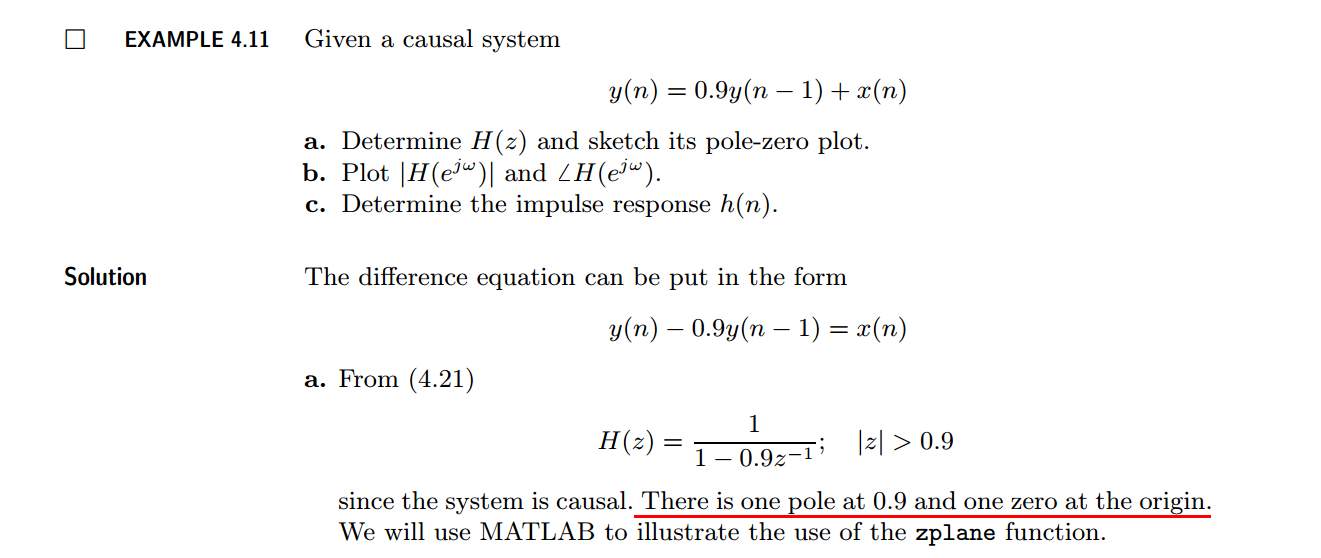
代码:
b = [1, 0]; a = [1, -0.9];               %

%% ----------------------------------------------

%%   START a    determine H(z) and sketch

%% ----------------------------------------------

figure('NumberTitle', 'off', 'Name', 'Example4.11a H(z) its pole-zero plot')

set(gcf,'Color','white');

zplane(b,a);

title('pole-zero plot'); grid on;

%% ----------------------------------------------

%%    END

%% ----------------------------------------------

%% --------------------------------------------------------------

%%    START    b   |H|   <H

%%    1st form of freqz

%% --------------------------------------------------------------

[H,w] = freqz(b,a,100);                 % 1st form of freqz

magH  = abs(H);  angH  = angle(H);  realH  = real(H);  imagH  = imag(H);

%% ================================================

%%              START H's  mag ang real imag

%% ================================================

figure('NumberTitle', 'off', 'Name', 'Example4.11b H its mag ang real imag');

set(gcf,'Color','white');

subplot(2,2,1); plot(w/pi,magH); grid on;  %axis([0,1,0,1.5]);

title('Magnitude Response');

xlabel('frequency in \pi units'); ylabel('Magnitude  |H|');

subplot(2,2,3); plot(w/pi, angH/pi); grid on; % axis([-1,1,-1,1]);

title('Phase Response');

xlabel('frequency in \pi units'); ylabel('Radians/\pi');

subplot('2,2,2'); plot(w/pi, realH); grid on;

title('Real Part');

xlabel('frequency in \pi units'); ylabel('Real');

subplot('2,2,4'); plot(w/pi, imagH); grid on;

title('Imaginary Part');

xlabel('frequency in \pi units'); ylabel('Imaginary');

%% ==================================================

%%             END H's  mag ang real imag

%% ==================================================

%% ---------------------------------------------------------------

%%    END    b   |H|   <H

%% ---------------------------------------------------------------

%% --------------------------------------------------------------

%%    START    b   |H|   <H

%%    2nd form of freqz

%% --------------------------------------------------------------

[H,w] = freqz(b,a,200,'whole');                 % 2nd form of freqz

magH  = abs(H(1:101));  angH  = angle(H(1:101));  realH  = real(H);  imagH  = imag(H);

%% ================================================

%%              START H's  mag ang real imag

%% ================================================

figure('NumberTitle', 'off', 'Name', 'Example4.11b  using 2nd form freqz ');

set(gcf,'Color','white');

subplot(2,2,1); plot(w/pi,magH); grid on;  %axis([0,1,0,1.5]);

title('Magnitude Response');

xlabel('frequency in \pi units'); ylabel('Magnitude  |H|');

subplot(2,2,3); plot(w/pi, angH/pi); grid on; % axis([-1,1,-1,1]);

title('Phase Response');

xlabel('frequency in \pi units'); ylabel('Radians/\pi');

subplot('2,2,2'); plot(w/pi, realH); grid on;

title('Real Part');

xlabel('frequency in \pi units'); ylabel('Real');

subplot('2,2,4'); plot(w/pi, imagH); grid on;

title('Imaginary Part');

xlabel('frequency in \pi units'); ylabel('Imaginary');

%% ==================================================

%%             END H's  mag ang real imag

%% ==================================================

%% ---------------------------------------------------------------

%%    END    b   |H|   <H

%% ---------------------------------------------------------------

%% --------------------------------------------------------------

%%    START    b   |H|   <H

%%    3rd form of freqz

%% --------------------------------------------------------------

w = [0:1:100]*pi/100;     H = freqz(b,a,w);

%[H,w] = freqz(b,a,200,'whole');                 % 3rd form of freqz

magH  = abs(H);  angH  = angle(H);  realH  = real(H);  imagH  = imag(H);

%% ================================================

%%              START H's  mag ang real imag

%% ================================================

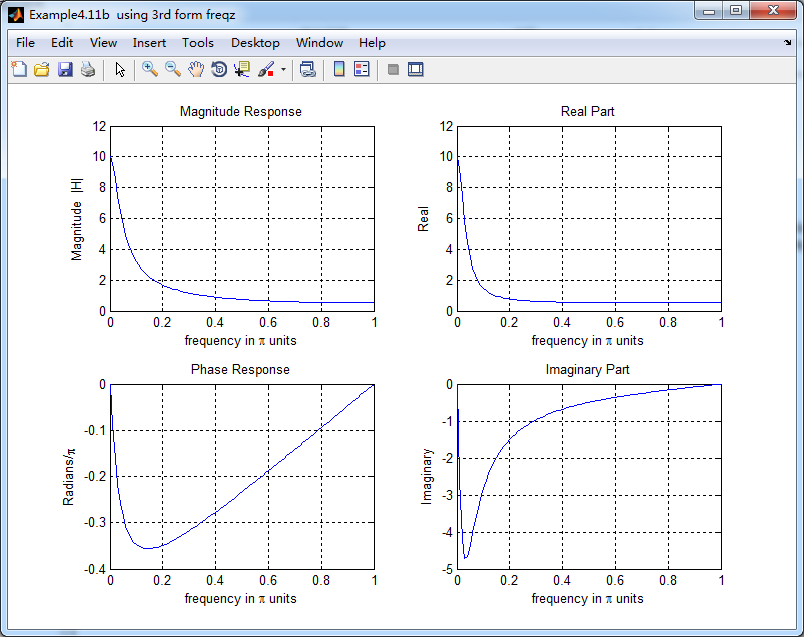
figure('NumberTitle', 'off', 'Name', 'Example4.11b  using 3rd form freqz ');

set(gcf,'Color','white');

subplot(2,2,1); plot(w/pi,magH); grid on;  %axis([0,1,0,1.5]);

title('Magnitude Response');

xlabel('frequency in \pi units'); ylabel('Magnitude  |H|');

subplot(2,2,3); plot(w/pi, angH/pi); grid on; % axis([-1,1,-1,1]);

title('Phase Response');

xlabel('frequency in \pi units'); ylabel('Radians/\pi');

subplot('2,2,2'); plot(w/pi, realH); grid on;

title('Real Part');

xlabel('frequency in \pi units'); ylabel('Real');

subplot('2,2,4'); plot(w/pi, imagH); grid on;

title('Imaginary Part');

xlabel('frequency in \pi units'); ylabel('Imaginary');

%% ==================================================

%%             END H's  mag ang real imag

%% ==================================================

%% ---------------------------------------------------------------

%%    END    b   |H|   <H

%% ---------------------------------------------------------------
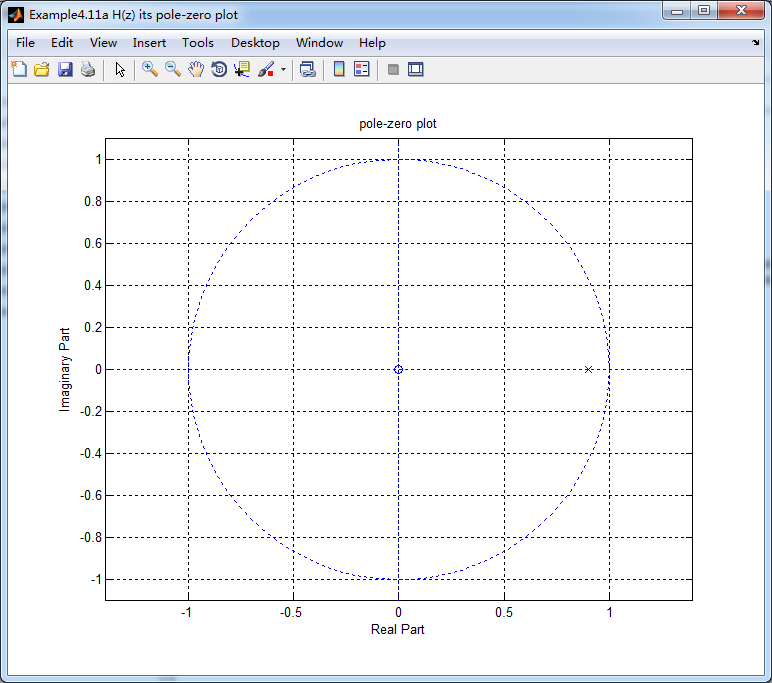
结果:

《DSP using MATLAB》示例Example4.11的更多相关文章
- DSP using MATLAB 示例 Example3.11
用到的性质 上代码: n = -5:10; x = rand(1,length(n)); k = -100:100; w = (pi/100)*k; % freqency between -pi an ...
- DSP using MATLAB 示例Example2.11
上代码: b = [1]; a = [1, -1, 0.9]; n = [-20:120]; h = impz(b,a,n); set(gcf,'Color','white'); %subplot(2 ...
- DSP using MATLAB 示例Example3.21
代码: % Discrete-time Signal x1(n) % Ts = 0.0002; n = -25:1:25; nTs = n*Ts; Fs = 1/Ts; x = exp(-1000*a ...
- DSP using MATLAB 示例 Example3.19
代码: % Analog Signal Dt = 0.00005; t = -0.005:Dt:0.005; xa = exp(-1000*abs(t)); % Discrete-time Signa ...
- DSP using MATLAB示例Example3.18
代码: % Analog Signal Dt = 0.00005; t = -0.005:Dt:0.005; xa = exp(-1000*abs(t)); % Continuous-time Fou ...
- DSP using MATLAB 示例Example3.8
代码: x = rand(1,11); n = 0:10; k = 0:500; w = (pi/500)*k; % [0,pi] axis divided into 501 points. X = ...
- DSP using MATLAB 示例Example3.7
上代码: x1 = rand(1,11); x2 = rand(1,11); n = 0:10; alpha = 2; beta = 3; k = 0:500; w = (pi/500)*k; % [ ...
- DSP using MATlAB 示例Example2.10
上代码 % noise sequence 1 x = [3, 11, 7, 0, -1, 4, 2]; nx = [-3:3]; % given signal x(n) [y,ny] = sigshi ...
- DSP using MATLAB 示例Example3.23
代码: % Discrete-time Signal x1(n) : Ts = 0.0002 Ts = 0.0002; n = -25:1:25; nTs = n*Ts; x1 = exp(-1000 ...
随机推荐
- 【leetcode】Best Time to Buy and Sell 3 (hard) 自己做出来了 但别人的更好
Say you have an array for which the ith element is the price of a given stock on day i. Design an al ...
- 【python】类中的self
在python的类中,经常会写self,代表对象自己.如下例: #coding=utf-8 class Foo: def __init__(self, name): self.name = name ...
- September 26th 2016 Week 40th Monday
The land didn't move, but moved. The sea wasn't still, yet was still. 大地止而亦行,大海动而亦静. Still waters ru ...
- Git 操作的一些场景
1. 某些不需要的文件/文件夹,如:/build 之类,在添加对应的gitignore之前Push了,导致每次编译都会产生新的文件 解决方法:直接删掉不需要的文件/文件夹,然后push gitigno ...
- iOS开发人员不容错过的10大工具
内容简介 1.iOS简介 2.iOS开发十大实用工具之开发环境 3.iOS开发十大实用工具之图标设计 4.iOS开发十大实用工具之原型设计 5.iOS开发十大实用工具之演示工具 6.iOS开发十大实用 ...
- jQuery插件:跨浏览器复制jQuery-zclip(转载)
转载地址:http://www.cnblogs.com/linjiqin/p/3532451.html jQuery-zclip是一个复制内容到剪贴板的jQuery插件,使用它我们不用考虑不同浏览器和 ...
- gcc【数学几何】
GCC Time Limit: 1000MS Memory limit: 65536K 题目描述 The GNU Compiler Collection (usually shortened to G ...
- java创建线程的几种方式
1.继承Thread类 /** * @author Ash * @date: 2016年8月6日 下午10:56:45 * @func: 通过继承Thread类来实现多线程 * @email 4086 ...
- 攻城狮在路上(壹) Hibernate(一)--- 软件环境、参考书目等一览表
1.环境配置: web容器:tomcat6.0 JDK:1.7.0_51 hibernate:4.2.0.Final 操作系统:WIN8 64位 数据库:mysql Ver 14.12 Distri ...
- apache lucene solr 官网历史版本下载地址
官网上一般只提供最新版本的下载,下面两个链接为所有历史版本的下载地址: lucene地址:archive.apache.org/dist/lucene/java/ solr地址:archive.apa ...