
JSBinding / About JSComponent and Serialization
About JSComponent
JSCompnent is a normal Unity script.
It inherits from JSSerializer and JSSerializer inherits from MonoBehaviour.
public class JSSerializer : MonoBehaviour {

}
public class JSComponent : JSSerializer {

}
When using c#, steps to add a component to a gameobject are:
- In Hierarchy window, select a GameObject
- In Inspector window, click AddComponent button
- Select script you need
In the case of javascript, how to add a 'js monobehaviour' to a gameobject? For example, we have a js monobehaviour:
// define a js monobehaviour

jss.define_mb("TestMb", function () {

    // called from c#

    this.Start = function () {

    }

    // called from c#

    this.Update = function () {

    }

});
Steps to add it to a gameobject:
- In Hierarchy window, select a GameObject
- In Inspector window, click AddComponent button
- Select JSComponent
- Set 'Js Class Name' to 'jss.TestMb'
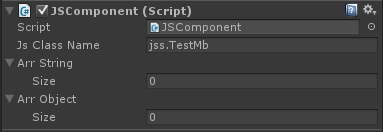
The main difference here is the use of JSComponent. JSComponent is an agent for javascript monobehaviour.
What does JSComponent do?
- Create a js object named 'jss.TestMb'
- Redirect MonoBehaviour's event funtions to js
- Destroy js object when its OnDestroy is called
public class JSComponent : JSSerializer

{

    int jsObjID;

    void initJs() {

        // 1 create js object

        jsObjID = JSApi.newJSClassObject(this.jsClassName);

    }

    void Start() {

        // 2 call js Start

        CallJSFunction(jsObjID, "Start");

    }

    void Update() {

        // 2 call js Update

        CallJSFunction(jsObjID, "Update");

    }

    void OnDestroy() {

        // 2 call js OnDestroy

        CallJSFunction(jsObjID, "OnDestroy");

        // 3 delete js object

        DeleteJSObject(jsObjID);

    }

}
About Serialization
Serializing data to js object is JSSerializer's job. Steps to add serialization fields to javascript and let JSSerializer do work for you:
- 1. Add some variables to javascript monobehaviour:
// define a js monobehaviour

jss.define_mb("TestMb", function () {

    // UnityEngine.Object

    this.oValue = null;

    // int

    this.iValue = 0;

    // string

    this.sValue = "";

    // double

    this.fValue = 0;

    // another js monobehaviour

    this.kValue = null;

});
- 2. Assign values in Inspector window:
Arr String
Size 5
Element 0 oValue/0
Element 1 iValue/5
Element 2 sValue/hello
Element 3 fValue/6.3
Element 4 kValue/1/jss.SayHello
Arr Object
Size 2
Element 0 [MainCamera]
Element 1 [SayHello]
After that, your js object's fields will be correctly assigned at application launching.
Extending & Customizing JSComponent
The default JSComponent only contains these event functions
- Awake
- Start
- OnDestroy
- FixedUpdate
- Update
- LateUpdate
- OnEnable
They are probably not enough. There is an example script extending JSComponent: JSComponentCustom1. Let me show you how it works:
- 1. First, add a new script inheriting from JSComponent, add event functions you need:
public class JSComponentCustom1 : JSComponent

{

    int idOnGUI = 0;

    protected override void initMemberFunction()

    {

        base.initMemberFunction();

        idOnGUI = JSApi.getObjFunction(jsObjID, "OnGUI");

    }

    void OnGUI()

    {

        callIfExist(idOnGUI);

    }

}
- 2. In Components.cs, make a slight change to GameObject_AddComponentT1 function:
public static bool GameObject_AddComponentT1(JSVCall vc, int count)

    {

        help_getGoAndType(vc);

        if (typeInfo.IsCSMonoBehaviour)

        {

            Component com = go.AddComponent(type);

            JSMgr.datax.setObject((int)JSApi.SetType.Rval, com);

        }

        else

        {

            JSComponent jsComp;

            int iOfJsComp = 0;

            if (count > 1)

                iOfJsComp = JSApi.getInt32((int)JSApi.GetType.Arg);

            switch (iOfJsComp)

            {
            // add here!

            case 1:

                jsComp = go.AddComponent<JSComponentCustom1>();

                break;

            default:

                jsComp = go.AddComponent<JSComponent>();

                break;

            }

            jsComp.jsClassName = typeString;

            jsComp.jsFail = false;

            jsComp.init(true);

            jsComp.callAwake();

            //JSApi.JSh_SetRvalObject(vc.cx, vc.vp, jsComp.jsObj);

            JSApi.setObject((int)JSApi.SetType.Rval, jsComp.GetJSObjID(false));

        }

        return true;

    }
- 3. When you call AddComponent$1 in javascript, add a custom parameter (1)
this.oDogGameObject.AddComponent$1(jss.Dog, 1/* Custom JSComponent */ );
backto JSBinding / Home
JSBinding / About JSComponent and Serialization的更多相关文章
- JSBinding / Home
Description JSBinding is a tool enabling you to run actual javascript in Unity3D. It contains Mozill ...
- JSBinding+SharpKit / MonoBehaviour替换成JSComponent原理
Unity 是基于组件式的开发,gameObject 身上可以绑定任意个脚本.每个脚本组成 gameObject 的一个部分. 脚本里通过添加预定义好的函数来执行自己的任务.比如Awake,用于初始化 ...
- JSBinding + SharpKit / Important Notes
Serialization of List<T> is not supported. 1 public int v; // SUPPORTED 2 public GameObject go ...
- JSBinding+Bridge.NET:Unity游戏热更新方案
老版本链接如下:http://www.cnblogs.com/answerwinner/p/4469021.html 新用户不要再使用老版本了. 新版本 JSBinding 将抛弃 SharpKit ...
- JSBinding / About 2048 sample
2048 Source 2048 source code is here: https://github.com/gabrielecirulli/2048 Play here!http://gabri ...
- JSBinding+SharpKit / 菜单介绍
- JSBinding + SharpKit / 实战:转换 Survival Shooter
从 asset store 下载 Survival Shooter (商店里有2个版本,一种是给Unity5用的,一个是给Unity4.6用的,我们这个实验用的是后者,版本是2.2.如果) 1 删除多 ...
- JSBinding + SharpKit / 需要注意及不支持的列表
1) 序列化不支持 public List<T>,其余都支持(JSBinding+Bridge无此功能) 2015年11月5日 补充:序列化只处理 Field.目前发现 Animation ...
- JSBinding + SharpKit / 实战:转换 2DPlatformer
最后修改:2015年07月29日 2016年2月25日 2DPlatformer 是 Unity3D 的一个官方 Demo.本文将介绍使用 JSBinging + SharpKit 转换 2DPlat ...
随机推荐
- pycharm的一些设置和快捷键
最近在搞python的开发,用上了pycharm,所以记录一些pycharm的设置 1. pycharm默认是自动保存的,但我个人不太习惯,习惯自己按ctrl + s 所以进行如下设置: 1. Se ...
- javascript事件之:谈谈自定义事件
对于JavaScript自定义事件,印象最深刻的是用jQuery在做图片懒加载的时候.给需要懒加载的图片定义一个appear事件.当页面图片开始出现时候,触发这个自定义的appear事件(注意,这里只 ...
- contiki-进程
进程的结构 Contiki的进程由两部分组成:进程控制块和进程线程.进程控制块存储在内存中,它包含进程运行时的信息,比如:进程名.进程状态.指向进程线程的指针. 进程线程是存储在ROM中的一个代码块. ...
- [分享] 晒一晒我的Windows7_SP1封装母盘(多图,附部分工具),老鸟飘过~
[分享] 晒一晒我的Windows7_SP1封装母盘(多图,附部分工具),老鸟飘过~ 大宝贝1 发表于 2012-8-9 18:01:57 https://www.itsk.com/thread-20 ...
- Laravel 设置时区
打开laravel框架目录下app/config/app.php 找到参数'timezone'='UTC',设置'timezone'='Asia/Shanghai',时间就正常了.
- python3 对文件的查找、替换、删除
python 版本 3.5 实现对文件的查找,替换,删除 #Author by Andy #_*_ coding:utf-8 _*_ #定义查找函数 def find(): Keywords=inpu ...
- 转-Android仿微信气泡聊天界面设计
微信的气泡聊天是仿iPhone自带短信而设计出来的,不过感觉还不错可以尝试一下仿着微信的气泡聊天做一个Demo,给大家分享一下!效果图如下: 气泡聊天最终要的是素材,要用到9.png文件的素材,这样气 ...
- Java使用ZXing生成二维码条形码
一.下载Zxingjar包 本实例使用的是 zxing3.2.0的版本 下载地址 http://pan.baidu.com/s/1gdH7PzP 说明:本实例使用的3.2.0版本已经使用的java7 ...
- iwebshop 订单存库修改为下单件库存
//减少库存量 $orderGoodsDB = new IModel('order_goods'); $orderGoodsList = $orderGoodsDB->query('order_ ...
- 递归问题==优化 还有数据库sqlreader
reader尽量不要用获取列名方式 用索引比较好. int i= reader.GetOrdinal("<#=c.ColumnName#>"); reader[i ...