
Programming 2D Games 读书笔记(第四章)
示例一:Game Engine Part 1
更加完善游戏的基本流程
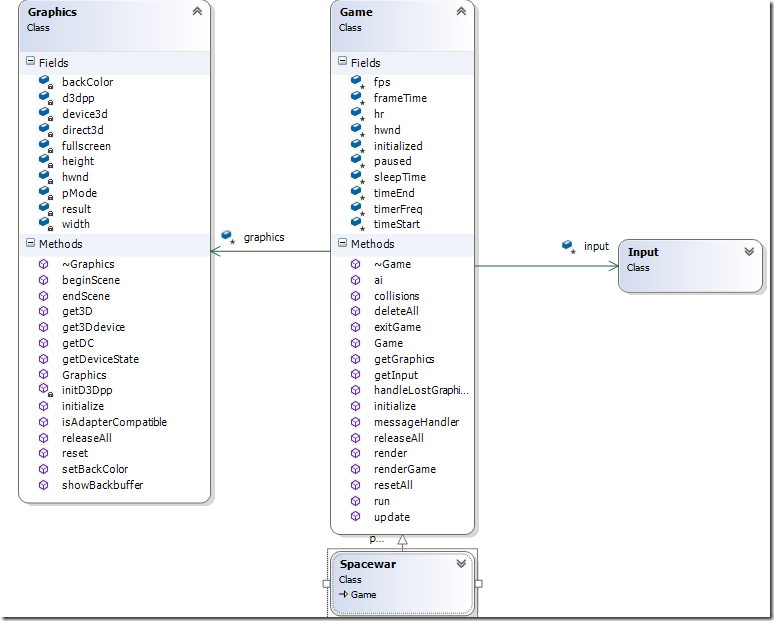
Graphics添加了以下几个方法,beginScene和endScene提高绘图,showBackbuffer去掉了clear方法
    // Reset the graphics device.

    HRESULT reset();

    // get functions

    // Return direct3d.

    LP_3D   get3D()             { return direct3d; }

    // Return device3d.

    LP_3DDEVICE get3Ddevice()   { return device3d; }

    // Return handle to device context (window).

    HDC     getDC()             { return GetDC(hwnd); }

    // Test for lost device

    HRESULT getDeviceState();

    //=============================================================================

    // Inline functions for speed. How much more speed? It depends on the game and

    // computer. Improvements of 3 or 4 percent have been observed.

    //=============================================================================

    // Set color used to clear screen

    void setBackColor(COLOR_ARGB c) {backColor = c;}

    //=============================================================================

    // Clear backbuffer and BeginScene()

    //=============================================================================

    HRESULT beginScene()

    {

        result = E_FAIL;

        if(device3d == NULL)

            return result;

        // clear backbuffer to backColor

        device3d->Clear(0, NULL, D3DCLEAR_TARGET, backColor, 1.0F, 0);

        result = device3d->BeginScene();          // begin scene for drawing

        return result;

    }

    //=============================================================================

    // EndScene()

    //=============================================================================

    HRESULT endScene()

    {

        result = E_FAIL;

        if(device3d)

            result = device3d->EndScene();

        return result;

    }
IDirect3DDevice9::TestCooperativeLevel。因此在设备丢失之后,你应该停止整个游戏循环,而通过反复调用
IDirect3DDevice9::TestCooperativeLevel判断设备是否可用。
//=============================================================================

// Test for lost device

//=============================================================================

HRESULT Graphics::getDeviceState()

{

    result = E_FAIL;    // default to fail, replace on success

    if (device3d == NULL)

        return  result;

    result = device3d->TestCooperativeLevel();

    return result;

}
Game类
现在Graphics类属于Game类包装
Game类主要流程:
1.初始化
//=============================================================================

// Initializes the game

// throws GameError on error

//=============================================================================

void Game::initialize(HWND hw)

{

    hwnd = hw;                                  // save window handle

    // initialize graphics

    graphics = new Graphics();

    // throws GameError

    graphics->initialize(hwnd, GAME_WIDTH, GAME_HEIGHT, FULLSCREEN);

    // initialize input, do not capture mouse

    input->initialize(hwnd, false);             // throws GameError

    // attempt to set up high resolution timer

    if(QueryPerformanceFrequency(&timerFreq) == false)

        throw(GameError(gameErrorNS::FATAL_ERROR, "Error initializing high resolution timer"));

    QueryPerformanceCounter(&timeStart);        // get starting time

    initialized = true;

}
2.messageHandler方法处理消息流程,由Input类接入
3.renderGame
属于Game呈现的主流程,子类重写render方法
//=============================================================================

// Render game items

//=============================================================================

void Game::renderGame()

{

    //start rendering

    if (SUCCEEDED(graphics->beginScene()))

    {

        // render is a pure virtual function that must be provided in the

        // inheriting class.

        render();               // call render in derived class

        //stop rendering

        graphics->endScene();

    }

    handleLostGraphicsDevice();

    //display the back buffer on the screen

    graphics->showBackbuffer();

}
4.子类Spacewar继承自Game
// Programming 2D Games

// Copyright (c) 2011 by:

// Charles Kelly

// Game Engine Part 1

// Chapter 4 spacewar.cpp v1.0

// Spacewar is the class we create.

#include "spaceWar.h"

//=============================================================================

// Constructor

//=============================================================================

Spacewar::Spacewar()

{}

//=============================================================================

// Destructor

//=============================================================================

Spacewar::~Spacewar()

{

    releaseAll();           // call onLostDevice() for every graphics item

}

//=============================================================================

// Initializes the game

// Throws GameError on error

//=============================================================================

void Spacewar::initialize(HWND hwnd)

{

    Game::initialize(hwnd); // throws GameError

    return;

}

//=============================================================================

// Update all game items

//=============================================================================

void Spacewar::update()

{}

//=============================================================================

// Artificial Intelligence

//=============================================================================

void Spacewar::ai()

{}

//=============================================================================

// Handle collisions

//=============================================================================

void Spacewar::collisions()

{}

//=============================================================================

// Render game items

//=============================================================================

void Spacewar::render()

{}

//=============================================================================

// The graphics device was lost.

// Release all reserved video memory so graphics device may be reset.

//=============================================================================

void Spacewar::releaseAll()

{

    Game::releaseAll();

    return;

}

//=============================================================================

// The grahics device has been reset.

// Recreate all surfaces.

//=============================================================================

void Spacewar::resetAll()

{

    Game::resetAll();

    return;

}
以上是一个基本游戏的一个主流程
// Game pointer

Spacewar *game = NULL;

HWND hwnd = NULL;

//=============================================================================

// Starting point for a Windows application

//=============================================================================

int WINAPI WinMain( HINSTANCE hInstance, HINSTANCE hPrevInstance,

                    LPSTR lpCmdLine, int nCmdShow)

{

    // Check for memory leak if debug build

    #if defined(DEBUG) | defined(_DEBUG)

        _CrtSetDbgFlag( _CRTDBG_ALLOC_MEM_DF | _CRTDBG_LEAK_CHECK_DF );

    #endif

    MSG msg;

    // Create the game, sets up message handler

    game = new Spacewar;

    // Create the window

    if (!CreateMainWindow(hwnd, hInstance, nCmdShow))

        return 1;

    try{

        game->initialize(hwnd);     // throws GameError

        // main message loop

        int done = 0;

        while (!done)

        {

            if (PeekMessage(&msg, NULL, 0, 0, PM_REMOVE))

            {

                // look for quit message

                if (msg.message == WM_QUIT)

                    done = 1;

                // decode and pass messages on to WinProc

                TranslateMessage(&msg);

                DispatchMessage(&msg);

            } else

                game->run(hwnd);    // run the game loop

        }

        SAFE_DELETE (game);     // free memory before exit

        return msg.wParam;

    }

    catch(const GameError &err)

    {

        game->deleteAll();

        DestroyWindow(hwnd);

        MessageBox(NULL, err.getMessage(), "Error", MB_OK);

    }

    catch(...)

    {

        game->deleteAll();

        DestroyWindow(hwnd);

        MessageBox(NULL, "Unknown error occured in game.", "Error", MB_OK);

    }

    SAFE_DELETE (game);     // free memory before exit

    return 0;

}

//=============================================================================

// window event callback function

//=============================================================================

LRESULT WINAPI WinProc( HWND hwnd, UINT msg, WPARAM wParam, LPARAM lParam )

{

    return (game->messageHandler(hwnd, msg, wParam, lParam));

}
Programming 2D Games 读书笔记(第四章)的更多相关文章
- Programming 2D Games 读书笔记(第五章)
http://www.programming2dgames.com/chapter5.htm 示例一:Planet 真正示例的开始,首先是载入2张图片 1.Graphics添加了2个方法 load ...
- Programming 2D Games 读书笔记(第六章)
http://www.programming2dgames.com/chapter6.htm 示例一:Bounce 边界碰撞测试 velocity为移动的速度, 超过右边界,velocity.x为 ...
- Programming 2D Games 读书笔记(第三章)
示例一:DirectX Window Graphics类用于初始化Direct 3D 主流程: 仅需要粗体部分 try{ // Create Graphics object graphics = ...
- Programming 2D Games 读书笔记(第二章)
本意还是想了解DirectX的,由于网上拿不到书的pdf文档,幸好有作者的源代码示例,想完整的看一下,基本的游戏需要的点. 下面直接以代码为例,仅用于帮助自身理解 http://www.progr ...
- 《Linux内核设计与实现》第八周读书笔记——第四章 进程调度
<Linux内核设计与实现>第八周读书笔记——第四章 进程调度 第4章 进程调度35 调度程序负责决定将哪个进程投入运行,何时运行以及运行多长时间,进程调度程序可看做在可运行态进程之间分配 ...
- 《Linux内核设计与实现》 第八周读书笔记 第四章 进程调度
20135307 张嘉琪 第八周读书笔记 第四章 进程调度 调度程序负责决定将哪个进程投入运行,何时运行以及运行多长时间,进程调度程序可看做在可运行态进程之间分配有限的处理器时间资源的内核子系统.只有 ...
- 《Linux内核分析》读书笔记(四章)
<Linux内核分析>读书笔记(四章) 标签(空格分隔): 20135328陈都 第四章 进程调度 调度程序负责决定将哪个进程投入运行,何时运行以及运行多长时间,进程调度程序可看做在可运行 ...
- 4 Visual Effects 视觉效果 读书笔记 第四章
4 Visual Effects 视觉效果 读书笔记 第四章 Well, circles and ovals are good, but how about drawing r ...
- 《Linux内核设计与实现》读书笔记 第四章 进程调度
第四章进程调度 进程调度程序可看做在可运行太进程之间分配有限的处理器时间资源的内核子系统.调度程序是多任务操作系统的基础.通过调度程序的合理调度,系统资源才能最大限度地发挥作用,多进程才会有并发执行的 ...
随机推荐
- supperset (python 2.7.12 + mysql)记录
网上看到superset,比较感兴趣,虚机上搭一下,记录操作过程. 版本信息:CentOS 6.6 + python 2.7.12 + mysql 5.1.73 + setuptools 36.5.0 ...
- Docker01 CentOS配置Docker
Docker 是一个开源的应用容器引擎,让开发者可以打包他们的应用以及依赖包到一个可移植的容器中,然后发布到任何流行的 Linux 机器上,也可以实现虚拟化.容器是完全使用沙箱机制,相互之间不会有任何 ...
- 【SVN】命令行忽略不必要的文件和文件夹
SVN命令参考: https://www.cnblogs.com/wlsxmhz/p/5775393.html 我们需要明白命令行设置忽略文件和文件夹是通过设置svn:ignore属性设置的,pr ...
- Maven私服安装及配置——(十二)
0.私服实际是B/S架构的,需要通过浏览器访问.访问地址在 nexus-2.12.0-01\conf\nexus.properties中查看.
- python3之memcached
1.memcached介绍 Memcached是一个自由开源的,高性能,分布式内存对象缓存系统. Memcached是以LiveJournal旗下Danga Interactive公司的Brad Fi ...
- nginx参数优化
大家好,分享即关爱,我们很乐意和你分享一些新的知识,我们准备了一个 Nginx 的教程,分为三个系列,如果你对 Nginx 有所耳闻,或者想增进 Nginx 方面的经验和理解,那么恭喜你来对地方了. ...
- [转]使用 mitmproxy + python 做拦截代理
使用 mitmproxy + python 做拦截代理 本文是一个较为完整的 mitmproxy 教程,侧重于介绍如何开发拦截脚本,帮助读者能够快速得到一个自定义的代理工具. 本文假设读者有基本的 ...
- dblinks
一.Oracle数据库链Database links的作用 当用户要跨本地数据库,访问另外一个数据库表中的数据时,本地数据库中必须创建了远程数据库的dblink,通过dblink本地数据库可以像访问本 ...
- vs code 的背景颜色主题还有背景图片的自定义方法
先说颜色主题吧: 依次点击文件--->首选项---->颜色主题 你就可以看到不同的颜色主题了 如果你还觉得不好看,不满意,不符合你的审美风格 你还可以在插件库里面下载相关插件: THEME ...
- 字符串格式化格式 -- Numeric Format Strings