
Programming 2D Games 读书笔记(第五章)
http://www.programming2dgames.com/chapter5.htm
示例一:Planet
真正示例的开始,首先是载入2张图片
1.Graphics添加了2个方法
loadTexture和drawSprite
loadTexture方法得到一个IRECT3DTEXTURE9接口
//=============================================================================

// Load the texture into default D3D memory (normal texture use)

// For internal engine use only. Use the TextureManager class to load game textures.

// Pre: filename is name of texture file.

//      transcolor is transparent color

// Post: width and height = size of texture

//       texture points to texture

// Returns HRESULT

//=============================================================================

HRESULT Graphics::loadTexture(const char *filename, COLOR_ARGB transcolor,

                                UINT &width, UINT &height, LP_TEXTURE &texture)

{

    // The struct for reading file info

    D3DXIMAGE_INFO info;

    result = E_FAIL;

    try{

        if(filename == NULL)

        {

            texture = NULL;

            return D3DERR_INVALIDCALL;

        }

        // Get width and height from file

        result = D3DXGetImageInfoFromFile(filename, &info);

        if (result != D3D_OK)

            return result;

        width = info.Width;

        height = info.Height;

        // Create the new texture by loading from file

        result = D3DXCreateTextureFromFileEx(

            device3d,           //3D device

            filename,           //image filename

            info.Width,         //texture width

            info.Height,        //texture height

            1,                  //mip-map levels (1 for no chain)

            0,                  //usage

            D3DFMT_UNKNOWN,     //surface format (default)

            D3DPOOL_DEFAULT,    //memory class for the texture

            D3DX_DEFAULT,       //image filter

            D3DX_DEFAULT,       //mip filter

            transcolor,         //color key for transparency

            &info,              //bitmap file info (from loaded file)

            NULL,               //color palette

            &texture );         //destination texture

    } catch(...)

    {

        throw(GameError(gameErrorNS::FATAL_ERROR, "Error in Graphics::loadTexture"));

    }

    return result;

}
drawSprite方法则是画精灵元素
//=============================================================================

// Draw the sprite described in SpriteData structure

// Color is optional, it is applied like a filter, WHITE is default (no change)

// Pre : sprite->Begin() is called

// Post: sprite->End() is called

// spriteData.rect defines the portion of spriteData.texture to draw

//   spriteData.rect.right must be right edge + 1

//   spriteData.rect.bottom must be bottom edge + 1

//=============================================================================

void Graphics::drawSprite(const SpriteData &spriteData, COLOR_ARGB color)

{

    if(spriteData.texture == NULL)      // if no texture

        return;

    // Find center of sprite

    D3DXVECTOR2 spriteCenter=D3DXVECTOR2((float)(spriteData.width/2*spriteData.scale),

                                        (float)(spriteData.height/2*spriteData.scale));

    // Screen position of the sprite

    D3DXVECTOR2 translate=D3DXVECTOR2((float)spriteData.x,(float)spriteData.y);

    // Scaling X,Y

    D3DXVECTOR2 scaling(spriteData.scale,spriteData.scale);

    if (spriteData.flipHorizontal)  // if flip horizontal

    {

        scaling.x *= -1;            // negative X scale to flip

        // Get center of flipped image.

        spriteCenter.x -= (float)(spriteData.width*spriteData.scale);

        // Flip occurs around left edge, translate right to put

        // Flipped image in same location as original.

        translate.x += (float)(spriteData.width*spriteData.scale);

    }

    if (spriteData.flipVertical)    // if flip vertical

    {

        scaling.y *= -1;            // negative Y scale to flip

        // Get center of flipped image

        spriteCenter.y -= (float)(spriteData.height*spriteData.scale);

        // Flip occurs around top edge, translate down to put

        // Flipped image in same location as original.

        translate.y += (float)(spriteData.height*spriteData.scale);

    }

    // Create a matrix to rotate, scale and position our sprite

    D3DXMATRIX matrix;

    D3DXMatrixTransformation2D(

        &matrix,                // the matrix

        NULL,                   // keep origin at top left when scaling

        0.0f,                   // no scaling rotation

        &scaling,               // scale amount

        &spriteCenter,          // rotation center

        (float)(spriteData.angle),  // rotation angle

        &translate);            // X,Y location

    // Tell the sprite about the matrix "Hello Neo"

    sprite->SetTransform(&matrix);

    // Draw the sprite

    sprite->Draw(spriteData.texture,&spriteData.rect,NULL,NULL,color);

}
2.Texture的2个包装类
TextureManager(依赖loadTexture)用于载入一个IRECT3DTEXTURE9对象,Image类(依赖drawSprite)用于获取TextureManager的IRECT3DTEXTURE9对象并进行绘制

TextureManager
//=============================================================================

// Loads the texture file from disk.

// Post: returns true if successful, false if failed

//=============================================================================

bool TextureManager::initialize(Graphics *g, const char *f)

{

    try{

        graphics = g;                       // the graphics object

        file = f;                           // the texture file

        hr = graphics->loadTexture(file, TRANSCOLOR, width, height, texture);

        if (FAILED(hr))

        {

            SAFE_RELEASE(texture);

            return false;

        }

    }

    catch(...) {return false;}

    initialized = true;                    // set true when successfully initialized

    return true;

}
Image
//=============================================================================

// Draw this image using the specified SpriteData.

//   The current SpriteData.rect is used to select the texture.

// Pre : spriteBegin() is called

// Post: spriteEnd() is called

//=============================================================================

void Image::draw(SpriteData sd, COLOR_ARGB color)

{

    if (!visible || graphics == NULL)

        return;

    sd.rect = spriteData.rect;                  // use this Images rect to select texture

    sd.texture = textureManager->getTexture();  // get fresh texture incase onReset() was called

    if(color == graphicsNS::FILTER)             // if draw with filter

        graphics->drawSprite(sd, colorFilter);  // use colorFilter

    else

        graphics->drawSprite(sd, color);        // use color as filter

}
Spacewar载入图片
1.initialize
//=============================================================================

// Initializes the game

// Throws GameError on error

//=============================================================================

void Spacewar::initialize(HWND hwnd)

{

    Game::initialize(hwnd); // throws GameError

    // nebula texture

    if (!nebulaTexture.initialize(graphics,NEBULA_IMAGE))

        throw(GameError(gameErrorNS::FATAL_ERROR, "Error initializing nebula texture"));

    // planet texture

    if (!planetTexture.initialize(graphics,PLANET_IMAGE))

        throw(GameError(gameErrorNS::FATAL_ERROR, "Error initializing planet texture"));

    // nebula

    if (!nebula.initialize(graphics,0,0,0,&nebulaTexture))

        throw(GameError(gameErrorNS::FATAL_ERROR, "Error initializing nebula"));

    // planet

    if (!planet.initialize(graphics,0,0,0,&planetTexture))

        throw(GameError(gameErrorNS::FATAL_ERROR, "Error initializing planet"));

    // place planet in center of screen

    planet.setX(GAME_WIDTH*0.5f  - planet.getWidth()*0.5f);

    planet.setY(GAME_HEIGHT*0.5f - planet.getHeight()*0.5f);

    return;

}
2.render
//=============================================================================

// Render game items

//=============================================================================

void Spacewar::render()

{

    graphics->spriteBegin();                // begin drawing sprites

    nebula.draw();                          // add the orion nebula to the scene

    planet.draw();                          // add the planet to the scene

    graphics->spriteEnd();                  // end drawing sprites

}
呈现了2个图片

示例二:Spaceship
动画
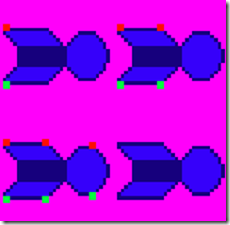
重复更新1张图的4个位置
//=============================================================================

// update

// typically called once per frame

// frameTime is used to regulate the speed of movement and animation

//=============================================================================

void Image::update(float frameTime)

{

    if (endFrame - startFrame > 0)          // if animated sprite

    {

        animTimer += frameTime;             // total elapsed time

        if (animTimer > frameDelay)

        {

            animTimer -= frameDelay;

            currentFrame++;

            if (currentFrame < startFrame || currentFrame > endFrame)

            {

                if(loop == true)            // if looping animation

                    currentFrame = startFrame;

                else                        // not looping animation

                {

                    currentFrame = endFrame;

                    animComplete = true;    // animation complete

                }

            }

            setRect();                      // set spriteData.rect

        }

    }

}
//=============================================================================

//  Set spriteData.rect to draw currentFrame

//=============================================================================

inline void Image::setRect()

{

    // configure spriteData.rect to draw currentFrame

    spriteData.rect.left = (currentFrame % cols) * spriteData.width;

    // right edge + 1

    spriteData.rect.right = spriteData.rect.left + spriteData.width;

    spriteData.rect.top = (currentFrame / cols) * spriteData.height;

    // bottom edge + 1

    spriteData.rect.bottom = spriteData.rect.top + spriteData.height;

}
示例三:Spaceship Movement
各种效果叠加组成的动画效果(图片更换,角度,大小,位置)来模拟
//=============================================================================

// Update all game items

//=============================================================================

void Spacewar::update()

{

    ship.update(frameTime);

    ship.setDegrees(ship.getDegrees() + frameTime * ROTATION_RATE); // rotate ship

    ship.setScale(ship.getScale() - frameTime * SCALE_RATE);    // make ship smaller

    ship.setX(ship.getX() + frameTime * SHIP_SPEED);    // move ship right

    if (ship.getX() > GAME_WIDTH)                       // if off screen right

    {

        ship.setX((float)-ship.getWidth());             // position off screen left

        ship.setScale(SHIP_SCALE);                      // set to starting size

    }

}
示例四:Spaceship Control
根据键盘来移动元素
//=============================================================================

// Update all game items

//=============================================================================

void Spacewar::update()

{

    if(input->isKeyDown(SHIP_RIGHT_KEY))            // if move right

    {

        ship.setX(ship.getX() + frameTime * SHIP_SPEED);

        if (ship.getX() > GAME_WIDTH)               // if off screen right

            ship.setX((float)-ship.getWidth());     // position off screen left

    }

    if(input->isKeyDown(SHIP_LEFT_KEY))             // if move left

    {

        ship.setX(ship.getX() - frameTime * SHIP_SPEED);

        if (ship.getX() < -ship.getWidth())         // if off screen left

            ship.setX((float)GAME_WIDTH);           // position off screen right

    }

    if(input->isKeyDown(SHIP_UP_KEY))               // if move up

    {

        ship.setY(ship.getY() - frameTime * SHIP_SPEED);

        if (ship.getY() < -ship.getHeight())        // if off screen top

            ship.setY((float)GAME_HEIGHT);          // position off screen bottom

    }

    if(input->isKeyDown(SHIP_DOWN_KEY))             // if move down

    {

        ship.setY(ship.getY() + frameTime * SHIP_SPEED);

        if (ship.getY() > GAME_HEIGHT)              // if off screen bottom

            ship.setY((float)-ship.getHeight());    // position off screen top

    }

    ship.update(frameTime);

}
Programming 2D Games 读书笔记(第五章)的更多相关文章
- Programming 2D Games 读书笔记(第四章)
示例一:Game Engine Part 1 更加完善游戏的基本流程 Graphics添加了以下几个方法,beginScene和endScene提高绘图,showBackbuffer去掉了clea ...
- Programming 2D Games 读书笔记(第六章)
http://www.programming2dgames.com/chapter6.htm 示例一:Bounce 边界碰撞测试 velocity为移动的速度, 超过右边界,velocity.x为 ...
- Programming 2D Games 读书笔记(第三章)
示例一:DirectX Window Graphics类用于初始化Direct 3D 主流程: 仅需要粗体部分 try{ // Create Graphics object graphics = ...
- Programming 2D Games 读书笔记(第二章)
本意还是想了解DirectX的,由于网上拿不到书的pdf文档,幸好有作者的源代码示例,想完整的看一下,基本的游戏需要的点. 下面直接以代码为例,仅用于帮助自身理解 http://www.progr ...
- 《Linux内核设计与实现》第四周读书笔记——第五章
<Linux内核设计与实现>第四周读书笔记--第五章 20135301张忻 估算学习时间:共1.5小时 读书:1.0 代码:0 作业:0 博客:0.5 实际学习时间:共2.0小时 读书:1 ...
- 《Linux内核设计与实现》读书笔记——第五章
<Linux内核设计与实现>读书笔记--第五章 标签(空格分隔): 20135321余佳源 第五章 系统调用 操作系统中,内核提供了用户进程与内核进行交互的一组接口.这些接口让应用程序受限 ...
- Programming Entity Framework-dbContext 学习笔记第五章
### Programming Entity Framework-dbContext 学习笔记 第五章 将图表添加到Context中的方式及容易出现的错误 方法 结果 警告 Add Root 图标中的 ...
- 《Linux内核设计与实现》读书笔记 第五章 系统调用
第五章系统调用 系统调用是用户进程与内核进行交互的接口.为了保护系统稳定可靠,避免应用程序恣意忘形. 5.1与内核通信 系统调用在用户空间进程和硬件设备间添加了一个中间层, 作用:为用户空间提供了一种 ...
- Getting Started With Hazelcast 读书笔记(第五章,第六章)
第五章 监听 本章应该是Hazelcast的核心机制了,Hazelcast通过注册各种监听器获悉集群中其他应用对数据的修改,成员的加入,退出等. 分为3个层次. 1.EntryListener(对数据 ...
随机推荐
- 洛谷 P1045 【麦森数】快速幂
不用快速幂,压位出奇迹! 本人是个蒟蒻,不太熟悉快速幂,这里给大家介绍一种压位大法. 让我们来分析一下题目,第一位是送分的,有一个专门求位数的函数:n*log10(2)+1. 然后题目中p<=3 ...
- Hibernate5总结
1. 明确Hibernate是一个实现了ORM思想的框架,它封装了JDBC,是程序员可以用对象编程思想来操作数据库. 2. 明确ORM(对象关系映射)是一种思想,JPA(Java Persistenc ...
- js实现避免浏览器拦截弹出新页面的方法
1 问题描述 点击button按钮,提交页面的form表单,后台执行完毕后返回参数,前台页面需要该参数实现跳转,如何实现保留该原来的页面,并在浏览器选项卡新建一个页面,且不被浏览器拦截? 2 方法及问 ...
- SquishIt引起的HTTP Error 500.0 - Internal Server Error
将一个ASP.NET项目从.NET Framework 4.0升级至.NET Framework 4.5之后,访问时出现HTTP Error 500.0 - Internal Server Error ...
- 【Python】测试dpkt解析pcap
1.前言 本想借助dpkt解析mail.dns.http来辅助分析pcap包进行分析,查阅资料学习却发现并不如使用scapy那么方便. dpkt是一个python模块,可以对简单的数据包创建/解析,以 ...
- ubuntu 安装(install) pwntcha[一个做"验证码识别"的开源程序]
一.安装 1. sudo apt-get install libsdl1.2-dev libsdl1.2debian sudo apt-get install libsdl1.2-dev(比较大,10 ...
- git命令之git stash 暂存临时代码
git stash — 暂存临时代码 stash命令可以很好的解决这样的问题.当你不想提交当前完成了一半的代码,但是却不得不修改一个紧急Bug,那么使用’Git stash’就可以将你当前未提交到 ...
- maven待整理
http://blog.csdn.net/column/details/yuguiyang-maven.html?&page=2
- ThinkPHP中的统计查询方法
• count() 表示查询表中总的记录数 • max() 表示查询某个字段的最大值 • min() 表示查询某个字段的最小值 • avg() 表示查询某个字段的平均值 • sum() 表示求出某个字 ...
- java Queue
队列是一个典型的先进先出(FIFO)的容器,即从容器的一端放入事物,从另一端取出,并且事物放入容器的顺序与取出的顺序是相同的,队列常常被当作一种可靠的对象从程序的某个区域传输到另一个区域,队列在并发编 ...