
offsetHeight、scrollHeight、clientHeight、height
对这几项进行彻底研究。
第一步:纯净div,没有margin,padding,border,height设置为200px。
添加滚动条,overflow:scroll,结果div的高度被压缩,因为被滚动条占用17px(滚动条的高度为17px)。
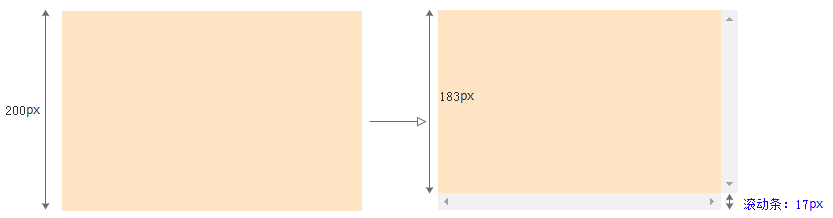
加入滚动条前:
- scrollHeight=200px
- offsetHeight=200px
加入滚动条后:
- scrollHeight=183px=(内容高度200px-滚动条17px) (说明scrollHeight已经不包括滚动条的高度)
- offsetHeight=200px
第二步:将div加上20px的padding
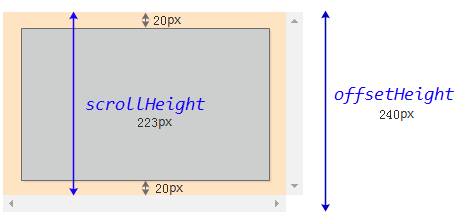
加上padding之后:
- scrollHeight=(内容高度200px+上下padding40px-滚动条17px)=223px(说明scrollheight包括padding,不包括下滚动条的高度。
结论:滚动高度可以理解为和滚动条平行的那段距离,显然,border和margin都不和滚动条平行,所以,border和margin都不算在滚动高度内) - offsetHeight=200px+上下padding=240px (说明offsetHeight就是整个div的最终高度)
结论:offsetHeight直观理解是眼睛能看的到的整个高度,包括(如果有的话):滚动条+内容+padding+border,margin不可见,所以不算在内)
内容超长的情形:
- scrollHeight的值就为内容展平的高度+padding,可以想像成内容展平的高度。
结论:
- scrollHeight=内容高度 + (上下)padding - 底部滚动条17px(如果有)(可变)
- offsetHeight=整个可见高度(固定)
- clientHeight=可见内容高度+(上下)padding(固定)
offsetHeight、scrollHeight、clientHeight、height的更多相关文章
- 【日常总结】scrollTop、scrollHeight与clientHeight的重要关系
前言 在做一个需求的时候涉及懒加载,百度了一下,发现scrollTop.scrollHeight与clientHeight这三个元素起到了重要作用,以前做过类似demo但是时间过太久忘记了,现在已经完 ...
- scrollTop、scrollHeight与clientHeight
MDN上概念 scrollTop:获取或设置一个元素的内容垂直滚动的像素数. scrollHeight:一个元素内容高度的度量,包括由于溢出导致的视图中不可见内容. clientHeight:元素内部 ...
- height、clientHeight、offsetHeight、scrollHeight、height()、 innerHeight()、outerHeight()等的区别
1.height height是css属性,这个属性定义元素内容区的高度,在内容区外面可以增加内边距.边框和外边距. 当 box-sizing: content-box 时,高度应用到元素的内容框. ...
- 关于height、offsetheight、clientheight、scrollheight、innerheight、outerheight的区别一览
平时,不管在pc端页面还是移动端页面,因为我们一般很少会设置某个块的的高度,但是呢,我有时候有需要取到这些高度以便于我们方便进行判断和下一步的编写.一般这个时候我都是直接的获取一个块的高度.heigh ...
- jquery 对象的 height、innerHeight、outerHeight 的区别以及DOM 元素的 clientHeight、offsetHeight、scrollHeight、offsetTop、scrollTop
前言:jquery 对象的 height.innerHeight.outerHeight,还有 DOM 元素的 clientHeight.offsetHeight.scrollHeight.offse ...
- Height、clientHeight、scrollHeight、offsetHeight 、scrollTop、offsetTop
Height 返回当前文档中的<body>元素的高度 clientHeight 对于没有定义CSS或者内联布局盒子的元素为0,否则,它是元素内部的高度(单位像素),包含内边距,但不包括水平 ...
- 各种高度的区别及height、clientHeight、scrollHeight、offsetHeight的区分
1.height.clientHeight.scrollHeight.offsetHeight 我们来实现test中的onclick事件 function justAtest() { ...
- height、clientHeight、scrollHeight、offsetHeight区别
转自 http://www.cnblogs.com/yuteng/articles/1894578.html 我们来实现test中的onclick事件 function justAtest() ...
- 四种浏览器对 clientHeight、offsetHeight、scrollHeight、clientWidth、offsetWidth 和 scrollWidth 的解释差异
网页可见区域宽:document.body.clientWidth 网页可见区域高:document.body.clientHeight 网页可见区域宽:document.body.offsetWid ...
- 详解clientHeight、offsetHeight、scrollHeight
关于clientHeight.offsetHeight.scrollHeight window.screen.availWidth 返回当前屏幕宽度(空白空间) window.screen.av ...
随机推荐
- python消息队列Queue
实例1:消息队列Queue,不要将文件命名为"queue.py",否则会报异常"ImportError: cannot import name 'Queue'" ...
- win10上VMare安装Centos7并使用Xshell连接Centos
一.CentOS 使用VMware虚拟机如何上网 1.宿主机的虚拟网关VMnet8的IP设置为自动获取. (1)打开控制面板:“控制面板” ---> “网络和 Internet” ---&g ...
- iOS.KVC.setValue:forKey:
Foundation Framework 定义了 NSObject(NSKeyValueCoding), - (void)setValue:(id)value forKey:(NSString *)k ...
- APP强制退出
第一种方法: 企业版可以用,Appstore可能被拒,慎用 - (void)exitApplication { AppDelegate *app = [UIApplication sharedAppl ...
- CreateToolhelp32Snapshot 以及 EnumProcesses
RT,请教如何获得Windows任务管理器中所显示的进程列表. CreateToolhelp32Snapshot 以及 EnumProcesses 这些方法我都试过了,但是这两种方法得到的结果和任务管 ...
- rabbitmq安装.教程
https://www.cnblogs.com/ericli-ericli/p/5902270.html (rabbitmq安装)https://www.cnblogs.com/iiwen/p/538 ...
- Ajax(6) Ajax向servlet请求数据库操作 并显示到当前页面 这个未经测试
假设:1.你的页面在Web-Root下,内容为: <div id="showMsg"></div><input type="text&quo ...
- OneZero第三周第一次站立会议(2016.4.4)
1. 时间: 13:30--13:45 共计15分钟. 2. 成员: X 夏一鸣 * 组长 (博客:http://www.cnblogs.com/xiaym896/), G 郭又铭 (博客:http ...
- java数组元素倒置
package dataStructure; import java.util.Arrays; import java.util.ArrayList; public class Test1 { sta ...
- Mac下Maven安装与配置
Mac下Maven安装与配置 下载maven http://maven.apache.org/download.cgi main->download菜单下的Files 下载后解压在Documen ...