
Android Tools update proxy
Android Tools
Android SDK在线更新镜像服务器
中国科学院开源协会镜像站地址:
IPV4/IPV6:
http://mirrors.opencas.cn端口:80IPV4/IPV6:
http://mirrors.opencas.org端口:80IPV4/IPV6:
http://mirrors.opencas.ac.cn端口:80
上海GDG镜像服务器地址:
http://sdk.gdgshanghai.com端口:8000北京化工大学镜像服务器地址:
IPv4:
http://ubuntu.buct.edu.cn/端口:80IPv4:
http://ubuntu.buct.cn/端口:80IPv6:
http://ubuntu.buct6.edu.cn/端口:80
大连东软信息学院镜像服务器地址:
http://mirrors.neusoft.edu.cn端口:80腾讯Bugly 镜像:
http://android-mirror.bugly.qq.com端口:8080腾讯镜像使用方法:http://android-mirror.bugly.qq.com:8080/include/usage.html
使用方法:
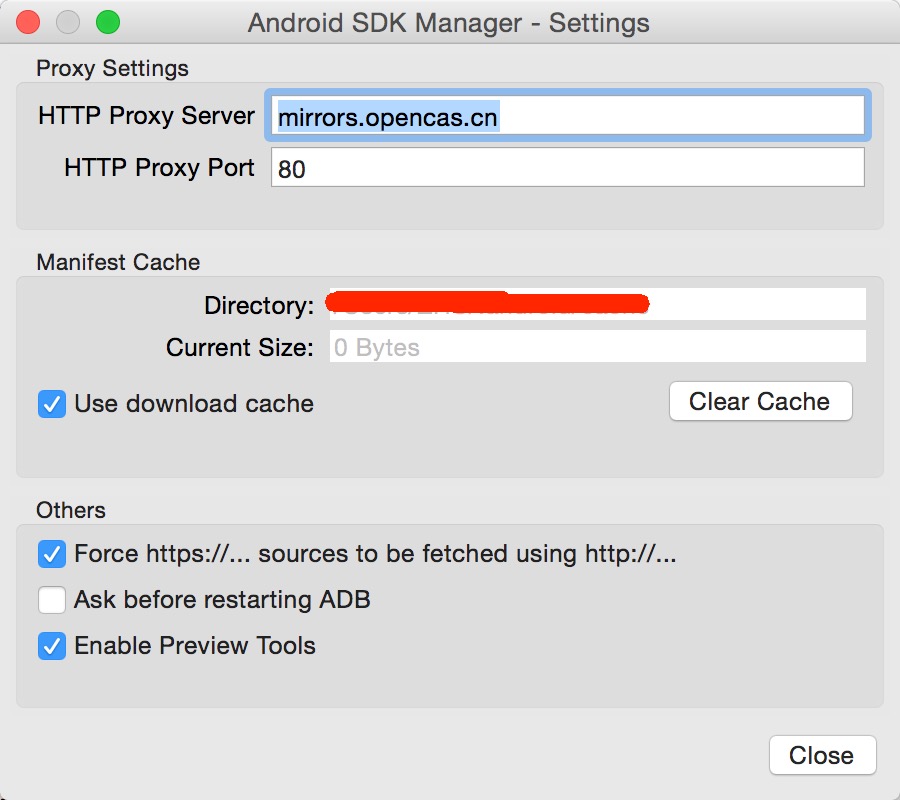
启动 Android SDK Manager ,打开主界面,依次选择『Tools』、『Options...』,弹出『Android SDK Manager - Settings』窗口;
在『Android SDK Manager - Settings』窗口中,在『HTTP Proxy Server』和『HTTP Proxy Port』输入框内填入上面镜像服务器地址(不包含http://,如下图)和端口,并且选中『Force https://... sources to be fetched using http://...』复选框。设置完成后单击『Close』按钮关闭『Android SDK Manager - Settings』窗口返回到主界面;
依次选择『Packages』、『Reload』。
Android Tools update proxy的更多相关文章
- Failed to apply plugin [id 'com.android.application'] 和 Could not find com.android.tools.build:gradle:2.XX的最正确的解决方法
发现android studio是真的可爱啊,上一秒还没问题可以build运行,下一秒就出错...好,你任性,你牛逼.. 说下今天又遇到的两个问题:Failed to apply plugin [id ...
- Could not find com.android.tools.build:gradle:3.0.0-alpha1 in circle ci
Error:(1, 0) The android gradle plugin version 3.0.0-alpha1 is too old, please update to the lates ...
- 解决 Could not find com.android.tools.build:gradle 问题
今天拉同事最新的代码,编译时老是报如下错误: Error:Could not find com.android.tools.build:gradle:2.2.0.Searched in the fol ...
- Could not find com.android.tools.build:gradle:1.3.0.
* What went wrong: A problem occurred configuring project ':TZYJ_Android'.> Could not re ...
- Android requires compiler compliance level 5.0 or 6.0. Found '1.8' instead. Please use Android Tools>Fix project Properties.
重装操作系统之后,或者破坏了Android的开发环境之后,需要重新配置好Android的开发环境.但是配置好后,导入原有的项目时,报错: Android requires compiler compl ...
- Android Studio & HTTP Proxy
Android Studio & HTTP Proxy https://mirrors.neusoft.edu.cn/android https://mirrors.neusoft.edu.c ...
- Could not find com.android.tools.build:aapt2:3.2.1-4818971.
Could not find com.android.tools.build:aapt2:-. Searched in the following locations: file:/H:/Androi ...
- Android APP打包错误,Could not resolve com.android.tools.lint:lint-gradle:26.1.2.
1.Please select the product flavors to build and sign 不专业的翻译一下(请选择产品的味道来制作和签名)什么鬼: 选中Flavors中的选项即可: ...
- android stdio Error Could not find com.android.tools common 25.2.2
Error:Could not find com.android.tools:common:25.2.2. Searched in the following locations: file:/D:/ ...
随机推荐
- [BZOJ] 4145: [AMPPZ2014]The Prices
设\(f[S][i]\)表示考虑到第\(i\)家店,已经买了集合\(S\)内的物品 一个朴素的想法是枚举子集转移 \[ f[S][i]=\min\{f[T][i-1]+cost[S\oplus T][ ...
- JAVA中文字符串编码--GBK转UTF-8
转载自:https://www.cnblogs.com/yoyotl/p/5979200.html 一.乱码的原因 gbk的中文编码是一个汉字用[2]个字节表示,例如汉字“内部”的gbk编码16进制的 ...
- MySQL中 IFNULL、NULLIF和ISNULL函数的用法
mysql 中 ifnull().nullif().isnull()函数的用法讲解: 一.IFNULL(expr1,expr2)用法: 假如expr1不为NULL,则 IFNULL() 的返回值为ex ...
- 怎么删除服务中的mysql服务
可以进WINDOWS的管理里查看MYSQL的服务,把它停止或以DOS下用命令停止1.如果要卸载MYSQL执行下面命令:DOS下>mysqld -remove mysql2.启动MYSQL: DO ...
- Beyond Compare 4 30天试用期后,破解方法
Beyond Compare 4 30天试用期后,破解方法. 方法一:在安装目录下找到文件BCUnrar.dll,比如:D:\software\Beyond Compare 4,重命名该文件即可. 重 ...
- c++IDE
暂时使用Code::Blocks 16.01. 因为之前没有c++编译器,所以去官网选择安装codeblocks-16.01mingw-setup.exe 然后settings>Compiler ...
- 求数组中两两相加等于20的组合(Python实现)
题目 求数组中两两相加等于20的组合. 例:给定一个数组[1, 7, 17, 2, 6, 3, 14],这个数组中满足条件的有两对:17+3=20, 6+14=20. 解析 分为两个步骤: 先采用堆排 ...
- PAT Basic 1077
1077 互评成绩计算 在浙大的计算机专业课中,经常有互评分组报告这个环节.一个组上台介绍自己的工作,其他组在台下为其表现评分.最后这个组的互评成绩是这样计算的:所有其他组的评分中,去掉一个最高分和一 ...
- android自动化测试之Monkey--从参数讲解、脚本制作到实战技巧
视频: http://v.youku.com/v_show/id_XODcyMjM1MDA4.html?from=y1.2-1-87.4.4-1.1-1-2-3 PPT: http://www.doc ...
- body标签相关
03-body标签中相关标签 今日主要内容: 列表标签 <ul>.<ol>.<dl> 表格标签 <table> 表单标签 <fom> 一 ...