
python simple factory mode example
Two python simple factory mode examples shown in this section. One is for base operation and another is for json and xml file handling.
1. Base operation script shown as following:
# -*- coding: utf-8 -*-

"""
OperationFactory.py

This is a simple python3 factory mode example for operation

Created on Thu Sep 20 14:53:22 2018

"""

__author__="lyp"

class Operation:

    def __init__(self,Num1,Num2):

        self.Num1=Num1

        self.Num2=Num2

class OperationAdd(Operation):

    def __init__(self,Num1,Num2):

        Operation.__init__(self,Num1,Num2)

    def result(self):

        return(self.Num1+self.Num2)

class OperationSub(Operation):

    def __init__(self,Num1,Num2):

        Operation.__init__(self,Num1,Num2)

    def result(self):

        return(self.Num1-self.Num2)

class OperationMul(Operation):

    def __init__(self,Num1,Num2):

        Operation.__init__(self,Num1,Num2)

    def result(self):

        return(self.Num1*self.Num2)

class OperationDiv(Operation):

    def __init__(self,Num1,Num2):

        Operation.__init__(self,Num1,Num2)

    def result(self):

        if self.Num2==0:

            raise ValueError("Num2 can't be 0!!!")

        else:

            return(self.Num1/self.Num2)

class OperationFactory:

    def __init__(self):

        pass

    def create_operation(self,string_operate):

        self.string_operate=string_operate

        if self.string_operate=="+":

            return(OperationAdd)

        elif self.string_operate=="-":

            return(OperationSub)

        elif self.string_operate=="*":

            return(OperationMul)

        elif self.string_operate=="/":

            return(OperationDiv)

        else:

            raise ValueError("Operator Error!!!")

def main():

    Add=OperationFactory().create_operation("+")

    value=Add(1.0,2).result()

    print("Add value is: {}".format(value))

    Sub=OperationFactory().create_operation("-")

    value=Sub(1.0,2).result()

    print("Sub value is: {}".format(value))

    Mul=OperationFactory().create_operation("*")

    value=Mul(1.0,2).result()

    print("Mul value is: {}".format(value))

    Div=OperationFactory().create_operation("/")

    value=Div(1.0,2).result()

    print("Div value is: {}".format(value))

if __name__=="__main__":

    main()
result as below:
Add value is: 3.0

Sub value is: -1.0

Mul value is: 2.0

Div value is: 0.5
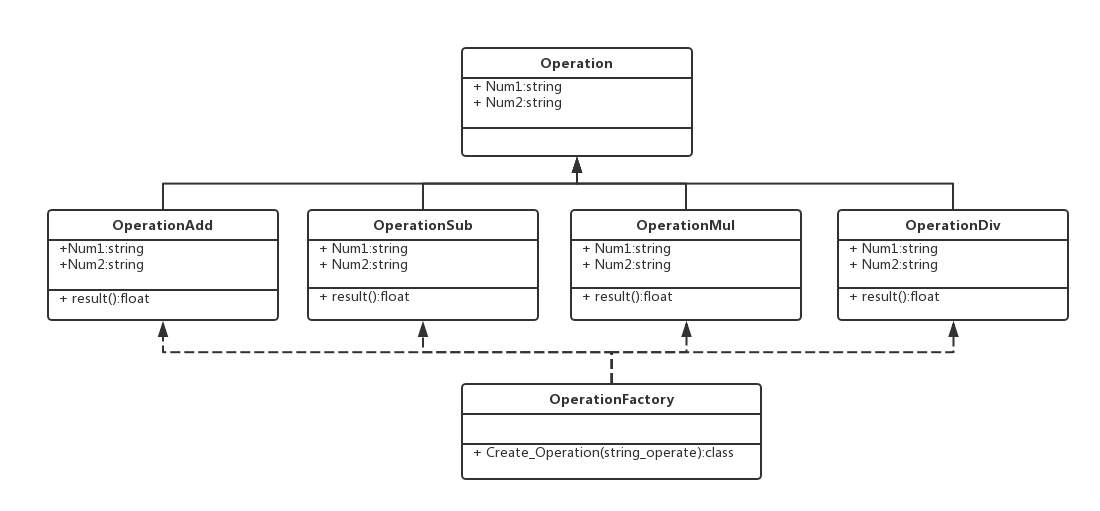
Fig1.UML picture for OperationFactory.py
2. Connector factory script shown as following:
# -*- coding: utf-8 -*-

"""

ConnectorFactory.py

"""

__author__="lyp"

import json

import xml.etree.ElementTree as etree

import os

class jsonconnector:

    def __init__(self,filepath):

        self.data=[]

        with open(filepath,mode='r',encoding='utf-8') as f:

            self.data=json.load(f)

    def parsed_data(self):

        return self.data

class xmlconnector:

    def __init__(self,filepath):

        self.tree=etree.parse(filepath)

    def parsed_data(self):

        return self.tree

def connector_factory(filepath):

    if filepath.endswith('json'):

        connector=jsonconnector

    elif filepath.endswith('xml'):

        connector=xmlconnector

    else:

        raise ValueError('Cannot connect to {}'.format(filepath))

    return connector(filepath)

def connect_to(filepath):

    factory=None

    try:

        factory=connector_factory(filepath)

    except ValueError as ve:

        print(ve)

    return factory

def main():

    sql_factory=connect_to(os.getcwd()+os.sep+"sqlexample.sql")

    print(sql_factory)

    json_factory=connect_to(os.getcwd()+os.sep+"jsonexample.json")

    print(json_factory)

    json_data=json_factory.parsed_data()

    print('found: {} donuts'.format(len(json_data)))

    for donuts in json_data:

        print('name: {}'.format(donuts['name']))

        print('price: ${}'.format(donuts['ppu']))

        [print('topping: {} {}'.format(t['id'], t['type'])) for t in donuts['topping']]

    xml_factory=connect_to(os.getcwd()+os.sep+"xmlexample.xml")

    print(xml_factory)

    xml_data = xml_factory.parsed_data()

    liars = xml_data.findall(".//{}[{}='{}']".format('person','lastName', 'Liar'))

    print('found: {} persons'.format(len(liars)))

    for liar in liars:

        print('first name: {}'.format(liar.find('firstName').text))

        print('last name: {}'.format(liar.find('lastName').text))

        [print('phone number ({})'.format(p.attrib['type']),p.text) for p in liar.find('phoneNumbers')]

if __name__=="__main__":

    main()
result as below(Note that sql_factory in main is test for exception handling):
Cannot connect to C:\Users\sling\Desktop\factory\sqlexample.sql

None

<__main__.jsonconnector object at 0x000000000E4DB9B0>

found: 3 donuts

name: Cake

price: $0.55

topping: 5001 None

topping: 5002 Glazed

topping: 5005 Sugar

topping: 5007 Powdered Sugar

topping: 5006 Chocolate with Sprinkles

topping: 5003 Chocolate

topping: 5004 Maple

name: Raised

price: $0.55

topping: 5001 None

topping: 5002 Glazed

topping: 5005 Sugar

topping: 5003 Chocolate

topping: 5004 Maple

name: Old Fashioned

price: $0.55

topping: 5001 None

topping: 5002 Glazed

topping: 5003 Chocolate

topping: 5004 Maple

<__main__.xmlconnector object at 0x000000000E4DB748>

found: 2 persons

first name: Jimy

last name: Liar

phone number (home) 212 555-1234

first name: Patty

last name: Liar

phone number (home) 212 555-1234

phone number (mobile) 001 452-8819
3. json file content (jsonexample.json)
[

    {

        "id": "",

        "type": "donut",

        "name": "Cake",

        "ppu": 0.55,

        "batters": {

            "batter": [

                {

                    "id": "",

                    "type": "Regular"

                },

                {

                    "id": "",

                    "type": "Chocolate"

                },

                {

                    "id": "",

                    "type": "Blueberry"

                },

                {

                    "id": "",

                    "type": "Devil's Food"

                }

            ]

        },

        "topping": [

            {

                "id": "",

                "type": "None"

            },

            {

                "id": "",

                "type": "Glazed"

            },

            {

                "id": "",

                "type": "Sugar"

            },

            {

                "id": "",

                "type": "Powdered Sugar"

            },

            {

                "id": "",

                "type": "Chocolate with Sprinkles"

            },

            {

                "id": "",

                "type": "Chocolate"

            },

            {

                "id": "",

                "type": "Maple"

            }

        ]

    },

    {

        "id": "",

        "type": "donut",

        "name": "Raised",

        "ppu": 0.55,

        "batters": {

            "batter": [

                {

                    "id": "",

                    "type": "Regular"

                }

            ]

        },

        "topping": [

            {

                "id": "",

                "type": "None"

            },

            {

                "id": "",

                "type": "Glazed"

            },

            {

                "id": "",

                "type": "Sugar"

            },

            {

                "id": "",

                "type": "Chocolate"

            },

            {

                "id": "",

                "type": "Maple"

            }

        ]

    },

    {

        "id": "",

        "type": "donut",

        "name": "Old Fashioned",

        "ppu": 0.55,

        "batters": {

            "batter": [

                {

                    "id": "",

                    "type": "Regular"

                },

                {

                    "id": "",

                    "type": "Chocolate"

                }

            ]

        },

        "topping": [

            {

                "id": "",

                "type": "None"

            },

            {

                "id": "",

                "type": "Glazed"

            },

            {

                "id": "",

                "type": "Chocolate"

            },

            {

                "id": "",

                "type": "Maple"

            }

        ]

    }

]
3. xml file content (xmlexample.xml)
<persons>

     <person>

       <firstName>John</firstName>

       <lastName>Smith</lastName>

       <age>25</age>

       <address>

         <streetAddress>21 2nd Street</streetAddress>

         <city>New York</city>

         <state>NY</state>

         <postalCode>10021</postalCode>

       </address>

       <phoneNumbers>

         <phoneNumber type="home">212 555-1234</phoneNumber>

         <phoneNumber type="fax">646 555-4567</phoneNumber>

       </phoneNumbers>

       <gender>

         <type>male</type>

       </gender>

     </person>

     <person>

       <firstName>Jimy</firstName>

       <lastName>Liar</lastName>

    <age>19</age>

    <address>

      <streetAddress>18 2nd Street</streetAddress>

      <city>New York</city>

      <state>NY</state>

      <postalCode>10021</postalCode>

    </address>

    <phoneNumbers>

      <phoneNumber type="home">212 555-1234</phoneNumber>

    </phoneNumbers>

    <gender>

      <type>male</type>

    </gender>

  </person>

  <person>

    <firstName>Patty</firstName>

    <lastName>Liar</lastName>

    <age>20</age>

    <address>

      <streetAddress>18 2nd Street</streetAddress>

      <city>New York</city>

      <state>NY</state>

      <postalCode>10021</postalCode>

    </address>

    <phoneNumbers>

      <phoneNumber type="home">212 555-1234</phoneNumber>

      <phoneNumber type="mobile">001 452-8819</phoneNumber>

    </phoneNumbers>

    <gender>

      <type>female</type>

    </gender>

  </person>

</persons>
python simple factory mode example的更多相关文章
- PHP设计模式(一)简单工厂模式 (Simple Factory For PHP)
最近天气变化无常,身为程序猿的寡人!~终究难耐天气的挑战,病倒了,果然,程序猿还需多保养自己的身体,有句话这么说:一生只有两件事能报复你:不够努力的辜负和过度消耗身体的后患.话不多说,开始吧. 一.什 ...
- Design Patterns Simplified - Part 3 (Simple Factory)【设计模式简述--第三部分(简单工厂)】
原文链接:http://www.c-sharpcorner.com/UploadFile/19b1bd/design-patterns-simplified-part3-factory/ Design ...
- 设计模式之简单工厂模式Simple Factory(四创建型)
工厂模式简介. 工厂模式专门负责将大量有共同接口的类实例化 工厂模式可以动态决定将哪一个类实例化,不必事先知道每次要实例化哪一个类. 工厂模式有三种形态: 1.简单工厂模式Simple Factory ...
- Net设计模式实例之简单工厂模式(Simple Factory Pattern)
一.简单工厂模式简介(Bref Introduction) 简单工厂模式(Simple Factory Pattern)的优点是,工厂类中包含了必要的逻辑判断,根据客户端的选择条件动态实例化相关的类, ...
- 创建型模式(前引)简单工厂模式Simple Factory
一引出的原因(解决下面的问题) 简单工厂模式(Simple Factory Pattern):又称为静态工厂方法(Static Factory Method)模式,它属于类创建型模式. 在简单工厂模式 ...
- 深入浅出设计模式——简单工厂模式(Simple Factory)
介绍简单工厂模式不能说是一个设计模式,说它是一种编程习惯可能更恰当些.因为它至少不是Gof23种设计模式之一.但它在实际的编程中经常被用到,而且思想也非常简单,可以说是工厂方法模式的一个引导,所以我想 ...
- 设计模式学习之简单工厂(Simple Factory,创建型模式)(1)
简单工厂(Simple Factory,创建型模式) 第一步: 比如我们要采集苹果和香蕉,那么我们需要创建一个Apple类和Banana类,里面各自有采集方法get(),然后通过main方法进行调用, ...
- 设计模式:简单工厂(Simple Factory)
定义:根据提供的数据或参数返回几种可能类中的一种. 示例:实现计算器功能,要求输入两个数和运算符号,得到结果. 结构图: HTML: <html xmlns="http://www.w ...
- Simple Factory vs. Factory Method vs. Abstract Factory【简单工厂,工厂方法以及抽象工厂的比较】
I ran into a question on stackoverflow the other day that sort of shocked me. It was a piece of code ...
随机推荐
- c++程序员学习go
作为一个c++程序员学习go编程的笔记.首先声明本人文笔太差,当你阅读一点觉得实在无法阅读下去时请移步. 下载安装go,安装完毕后会增加系统环境变量path内容指定go程序所在目录,可以打开cmd输入 ...
- 扯不清楚的virtual和abstract
定义Person类: class Person { public void Say() { Console.WriteLine("I am a person"); } } 现在,我 ...
- 十五项指标衡量DevOps是否成功
DevOps在你的组织内部运行的如何?如果你需要一些帮助来度量它的运行情况,我们已经准备了一个用于跟踪的关键DevOps指标的列表,这些度量可以帮助了解你的团队是如何随着时间的推移而运行的. 在团队内 ...
- oracle数据库之操作总结
## 连接数据库: sqlplus test/test##@localhost:/ORCL ## 查询数据库所有的表: select table_name from user_tables; ## 查 ...
- C#中控件Control的Paint事件和OnPaint虚函数的区别
句柄 : 句柄,是整个Windows编程的基础.一个句柄是指使用的一个唯一的整数值,即一个4字节(64位程序中为8字节)长的数值,来标识应用程序中的不同对象和同类对象中的不同的实例,诸如,一个窗口,按 ...
- mac上cocoapods安装与卸载
安装 # 安装最新beta版 sudo gem install cocoapods --pre -n /usr/local/bin # 安装最新稳定版 sudo gem install cocoapo ...
- 初学node.js-MongoDB安装和环境服务配置(4)
一.mongoDB安装: (1)官网下载,我的是windows64位系统,目前最新版mongodb-win32-x86_64-2008plus-ssl-4.0.9-signed.msi 安装步骤不说了 ...
- php 查看使用多少内存
方法memory_get_usage 是指当前脚本正在使用的内存 unset只是把内存标记为空闲但并没有释放,要GC程序结束后才会释放 $bytes = memory_get_peak_usage() ...
- 三、用Delphi10.3 创建一条JSON数据的第三种方法,非常简洁的写法
一.用Delphi10.3构造一个JSON数据的第三种方法,并格式化输出,代码如下: uses // System.JSON, System.JSON.Types, System.JSON.Write ...
- 一个简单python爬虫的实现——爬取电影信息
最近在学习网络爬虫,完成了一个比较简单的python网络爬虫.首先为什么要用爬虫爬取信息呢,当然是因为要比人去收集更高效. 网络爬虫,可以理解为自动帮你在网络上收集数据的机器人. 网络爬虫简单可以大致 ...