
springboot成神之——basic auth和JWT验证结合
本文介绍basic auth和JWT验证结合
目录结构
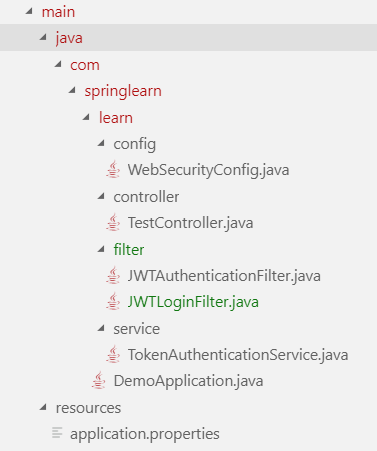
依赖
<dependency>

    <groupId>io.jsonwebtoken</groupId>

    <artifactId>jjwt</artifactId>

    <version>0.9.1</version>

</dependency>

<dependency>

    <groupId>com.auth0</groupId>

    <artifactId>auth0</artifactId>

    <version>1.8.0</version>

</dependency>

<dependency>

	<groupId>com.auth0</groupId>

	<artifactId>auth0-spring-security-api</artifactId>

	<version>1.1.0</version>

</dependency>

<dependency>

    <groupId>org.springframework.boot</groupId>

    <artifactId>spring-boot-starter-security</artifactId>

</dependency>

<dependency>

    <groupId>org.json</groupId>

	<artifactId>json</artifactId>

	<version>20180813</version>

</dependency>

<dependency>

	<groupId>org.glassfish</groupId>

	<artifactId>javax.xml.bind</artifactId>

	<version>10.0-b28</version>

</dependency>
config配置文件WebSecurityConfig
package com.springlearn.learn.config;

import com.springlearn.learn.filter.JWTAuthenticationFilter;

import com.springlearn.learn.filter.JWTLoginFilter;

import org.springframework.beans.factory.annotation.Autowired;

import org.springframework.context.annotation.Bean;

import org.springframework.context.annotation.Configuration;

import org.springframework.http.HttpMethod;

import org.springframework.security.config.annotation.authentication.builders.AuthenticationManagerBuilder;

import org.springframework.security.config.annotation.authentication.configurers.provisioning.InMemoryUserDetailsManagerConfigurer;

import org.springframework.security.config.annotation.web.builders.HttpSecurity;

import org.springframework.security.config.annotation.web.configuration.WebSecurityConfigurerAdapter;

import org.springframework.security.core.userdetails.User;

import org.springframework.security.core.userdetails.UserDetails;

import org.springframework.security.crypto.bcrypt.BCryptPasswordEncoder;

import org.springframework.security.web.authentication.UsernamePasswordAuthenticationFilter;

import org.springframework.web.servlet.config.annotation.CorsRegistry;

import org.springframework.web.servlet.config.annotation.WebMvcConfigurer;

@Configuration

public class WebSecurityConfig extends WebSecurityConfigurerAdapter implements WebMvcConfigurer {

    @Override

    protected void configure(HttpSecurity http) throws Exception {

        http.cors().and().csrf().disable();

        // 所有的请求都要验证

        http.authorizeRequests()

        .antMatchers("/").permitAll() // 访问 "/" 无需验证

        .antMatchers(HttpMethod.POST, "/login").permitAll() // 访问 "/login" 无需token即可进入

        .antMatchers(HttpMethod.GET, "/login").permitAll()

        .anyRequest()

        .authenticated()

        .and()

        .addFilterBefore( // 添加验证过滤器

            new JWTLoginFilter("/login", authenticationManager()),

            UsernamePasswordAuthenticationFilter.class

        )

        .addFilterBefore(

            new JWTAuthenticationFilter(),

            UsernamePasswordAuthenticationFilter.class

        );

    }

    @Bean

    public BCryptPasswordEncoder passwordEncoder() {

        BCryptPasswordEncoder bCryptPasswordEncoder = new BCryptPasswordEncoder();

        return bCryptPasswordEncoder;

    }

    @Autowired

    public void configureGlobal(AuthenticationManagerBuilder auth) throws Exception {

        String password = "234";

        String encrytedPassword = this.passwordEncoder().encode(password);

        System.out.println("Encoded password = " + encrytedPassword);

        // 这里使用写死的验证,你可以在这里访问数据库

        InMemoryUserDetailsManagerConfigurer<AuthenticationManagerBuilder> mngConfig = auth.inMemoryAuthentication();

        UserDetails u1 = User.withUsername("yejiawei").password(encrytedPassword).roles("ADMIN").build();

        UserDetails u2 = User.withUsername("donglei").password(encrytedPassword).roles("USER").build();

        mngConfig.withUser(u1);

        mngConfig.withUser(u2);

    }

    @Override

    public void addCorsMappings(CorsRegistry registry) {

        registry.addMapping("/**").allowedOrigins("*").allowedMethods("GET", "POST", "PUT", "DELETE").allowedOrigins("*")

        .allowedHeaders("*");

    }

}
filter过滤器JWTLoginFilter
package com.springlearn.learn.filter;

import java.io.IOException;

import java.util.Collections;

import java.util.HashMap;

import java.util.Iterator;

import java.util.Map;

import java.util.stream.Collectors;

import javax.servlet.FilterChain;

import javax.servlet.ServletException;

import javax.servlet.http.HttpServletRequest;

import javax.servlet.http.HttpServletResponse;

import com.springlearn.learn.service.TokenAuthenticationService;

import org.json.JSONObject;

import org.springframework.security.authentication.AuthenticationManager;

import org.springframework.security.authentication.UsernamePasswordAuthenticationToken;

import org.springframework.security.core.Authentication;

import org.springframework.security.core.AuthenticationException;

import org.springframework.security.web.authentication.AbstractAuthenticationProcessingFilter;

import org.springframework.security.web.util.matcher.AntPathRequestMatcher;

public class JWTLoginFilter extends AbstractAuthenticationProcessingFilter{

    public JWTLoginFilter(String url, AuthenticationManager authManager) {

        super(new AntPathRequestMatcher(url));

        setAuthenticationManager(authManager);

    }

    @Override

    public Authentication attemptAuthentication(HttpServletRequest request, HttpServletResponse response)

            throws AuthenticationException, IOException, ServletException {

        // get方式获取参数

        // String username = request.getParameter("username");

        // String password = request.getParameter("password");

        // post方式获取数据

        String s = request.getReader().lines().collect(Collectors.joining(System.lineSeparator()));

        JSONObject jsonObject = new JSONObject(s);

        HashMap<String, String> result = new HashMap<String, String>();

        String key = null;

        Iterator<?> keys = jsonObject.keys();

        while(keys.hasNext()) {

            key = (String) keys.next();

            result.put(key, jsonObject.getString(key));

        }

        System.out.printf("JWTLoginFilter.attemptAuthentication: username/password= %s,%s", result.get("username"), result.get("password"));

        System.out.println();

        return getAuthenticationManager().authenticate(new UsernamePasswordAuthenticationToken(result.get("username"), result.get("password"), Collections.emptyList()));

    }

    @Override

    protected void successfulAuthentication(HttpServletRequest request, HttpServletResponse response, FilterChain chain,

            Authentication authResult) throws IOException, ServletException {

        System.out.println("JWTLoginFilter.successfulAuthentication:");

        // Write Authorization to Headers of Response.

        TokenAuthenticationService.addAuthentication(response, authResult.getName());

        String authorizationString = response.getHeader("Authorization");

        System.out.println("Authorization String=" + authorizationString);

    }

    @Override

    protected void unsuccessfulAuthentication(HttpServletRequest request, HttpServletResponse response, AuthenticationException failed) throws IOException, ServletException {

        response.setContentType("application/json");

        response.setStatus(HttpServletResponse.SC_OK);

        response.getOutputStream().println((new JSONObject(){{

            put("status", 500);

            put("message", "Internal Server Error!!!");

            put("result", JSONObject.NULL);

        }}).toString());

    }

}
filter过滤器JWTAuthenticationFilter
package com.springlearn.learn.filter;

import java.io.IOException;

import javax.servlet.FilterChain;

import javax.servlet.ServletException;

import javax.servlet.ServletRequest;

import javax.servlet.ServletResponse;

import javax.servlet.http.HttpServletRequest;

import com.springlearn.learn.service.TokenAuthenticationService;

import org.springframework.security.core.Authentication;

import org.springframework.security.core.context.SecurityContextHolder;

import org.springframework.web.filter.GenericFilterBean;

public class JWTAuthenticationFilter extends GenericFilterBean {

    @Override

    public void doFilter(ServletRequest servletRequest, ServletResponse servletResponse, FilterChain filterChain)

            throws IOException, ServletException {

        System.out.println("JWTAuthenticationFilter.doFilter");

        Authentication authentication = TokenAuthenticationService.getAuthentication((HttpServletRequest) servletRequest);

        SecurityContextHolder.getContext().setAuthentication(authentication);

        filterChain.doFilter(servletRequest, servletResponse);

    }

}
service中的TokenAuthenticationService
package com.springlearn.learn.service;

import java.io.IOException;

import java.util.Collections;

import java.util.Date;

import javax.servlet.http.HttpServletRequest;

import javax.servlet.http.HttpServletResponse;

import org.json.JSONObject;

import org.springframework.security.authentication.UsernamePasswordAuthenticationToken;

import org.springframework.security.core.Authentication;

import io.jsonwebtoken.Jwts;

import io.jsonwebtoken.SignatureAlgorithm;

public class TokenAuthenticationService {

    static final long _expiretime = 864_000_000;

    static final String _secret = "ThisIsASecret";

    static final String _token_prefix = "Bearer";

    static final String _header_string = "Authorization";

    public static void addAuthentication(HttpServletResponse res, String username) throws IOException {

        String JWT =

                Jwts.builder()

                .setSubject(username)

                .setExpiration(new Date(System.currentTimeMillis() + _expiretime))

                .signWith(SignatureAlgorithm.HS512, _secret).compact();

        res.addHeader(_header_string, _token_prefix + " " + JWT);

        res.setContentType("application/json");

        res.setStatus(HttpServletResponse.SC_OK);

        res.getOutputStream().println((new JSONObject(){{

            put("status", 0);

            put("message", "");

            put("result", JWT);

        }}).toString());

    }

    public static Authentication getAuthentication(HttpServletRequest request) {

        String token = request.getHeader(_header_string);

        if (token != null) {

            // parse the token.

            String user = Jwts.parser().setSigningKey(_secret).parseClaimsJws(token.replace(_token_prefix, "")).getBody()

                    .getSubject();

            return user != null ? new UsernamePasswordAuthenticationToken(user, null, Collections.emptyList()) : null;

        }

        return null;

    }

}
启动文件DemoApplication
package com.springlearn.learn;

import org.springframework.boot.SpringApplication;

import org.springframework.boot.autoconfigure.SpringBootApplication;

@SpringBootApplication

public class DemoApplication {

	public static void main(String[] args) {

		SpringApplication.run(DemoApplication.class, args);

	}

}
Controller中的TestController
package com.springlearn.learn.controller;

import javax.servlet.http.HttpServletRequest;

import javax.servlet.http.HttpServletResponse;

import org.springframework.web.bind.annotation.RequestBody;

import org.springframework.web.bind.annotation.RequestMapping;

import org.springframework.web.bind.annotation.RequestMethod;

import org.springframework.web.bind.annotation.ResponseBody;

import org.springframework.web.bind.annotation.RestController;

@RestController

public class TestController {

    @ResponseBody

    @RequestMapping(value = "/AuthTest", method = RequestMethod.GET)

    public String AuthTest(HttpServletRequest request, HttpServletResponse response) {

        return "OK";

    }

    @ResponseBody

    @RequestMapping(value = "/login", method = RequestMethod.GET)

    public String Login(@RequestBody Object user, HttpServletRequest request, HttpServletResponse response) {

        return "OK";

    }

}
前端测试
<!DOCTYPE html>

<html lang="en">

<head>

    <meta charset="UTF-8">

    <meta name="viewport" content="width=device-width, initial-scale=1.0">

    <meta http-equiv="X-UA-Compatible" content="ie=edge">

    <title>Document</title>

    <script src="https://unpkg.com/axios/dist/axios.min.js"></script>

    <script>

        axios.defaults.headers.post['Content-Type'] = 'application/x-www-form-urlencoded';

        axios.post('http://localhost:9001/login', {

            username: 'yejiawei',

            password: '234'

        }).then(function (response) {

            localStorage.setItem("token", response.data.result)

        }).catch(function (error) {

            console.log(error);

        }).then(function () {

        });

        // axios.get('http://localhost:9001/AuthTest', {

        //     headers: {

        //         "Authorization": localStorage.getItem("token")

        //     }

        // }).then(function (response) {

        //     console.log(response.data);

        // }).catch(function (error) {

        //     console.log(error);

        // }).then(function () {

        // });

    </script>

</head>

<body>

</body>

</html>
springboot成神之——basic auth和JWT验证结合的更多相关文章
- springboot成神之——Basic Auth应用
本文介绍Basic Auth在spring中的应用 目录结构 依赖 入口DemoApplication 验证Authenication 配置WebSecurityConfig 控制器TestContr ...
- springboot成神之——ioc容器(依赖注入)
springboot成神之--ioc容器(依赖注入) spring的ioc功能 文件目录结构 lang Chinese English GreetingService MyRepository MyC ...
- springboot成神之——application.properties所有可用属性
application.properties所有可用属性 # =================================================================== # ...
- springboot成神之——springboot入门使用
springboot创建webservice访问mysql(使用maven) 安装 起步 spring常用命令 spring常见注释 springboot入门级使用 配置你的pom.xml文件 配置文 ...
- springboot成神之——mybatis和mybatis-generator
项目结构 依赖 generator配置文件 properties配置 生成文件 使用Example 本文讲解如何在spring-boot中使用mybatis和mybatis-generator自动生成 ...
- springboot成神之——swagger文档自动生成工具
本文讲解如何在spring-boot中使用swagger文档自动生成工具 目录结构 说明 依赖 SwaggerConfig 开启api界面 JSR 303注释信息 Swagger核心注释 User T ...
- springboot成神之——log4j2的使用
本文介绍如何在spring-boot中使用log4j2 说明 依赖 日志记录语句 log4j2配置文件 本文介绍如何在spring-boot中使用log4j2 说明 log4j2本身使用是非常简单的, ...
- springboot成神之——mybatis在spring-boot中使用的几种方式
本文介绍mybatis在spring-boot中使用的几种方式 项目结构 依赖 WebConfig DemoApplication 方式一--@Select User DemoApplication ...
- springboot成神之——发送邮件
本文介绍如何用spring发送邮件 目录结构 依赖 MailConfig TestController 测试 本文介绍如何用spring发送邮件 目录结构 依赖 <dependency> ...
随机推荐
- ffmpeg的centos、msys2、msvc编译
msys2 和 centos https://ffmpeg.org/download.html https://ffmpeg.zeranoe.com/builds/ Windows MSYS2准备 1 ...
- zzuli 2179 最短路
2179: 紧急营救 Time Limit: 1 Sec Memory Limit: 128 MBSubmit: 89 Solved: 9 SubmitStatusWeb Board Descri ...
- Ceph Monitor的数据管理
转自:https://www.ustack.com/blog/ceph-monitor-2/ Monitor管理了Ceph的状态信息,维护着Ceph中各个成员的关系,这些信息都是存放在leveldb中 ...
- 007——VUE中非常使用的计算属性computed实例
<!DOCTYPE html> <html lang="en"> <head> <meta charset="UTF-8&quo ...
- LeetCode OJ:First Missing Positive (第一个丢失的正数)
在leetCode上做的第一个难度是hard的题,题目如下: Given an unsorted integer array, find the first missing positive inte ...
- LeetCode OJ:Palindrome Linked List(回文链表判断)
Given a singly linked list, determine if it is a palindrome. Follow up:Could you do it in O(n) time ...
- form表单的提交地址一定要是完整的绝对地址
<form action="<%=path%>/servlet/DologinServlet" =<form action="<%=requ ...
- 剑指offer--31.二叉树中和为某一值的路径
深度优先搜索 --------------------------------------------------------------------------------------------- ...
- setInterval(callback(),time)
最近在写一个需求的时候,出了点小小的问题,在这做个记录. 对于定时函数setInterval()大家应该都不陌生,setInterval(callback(),time)就是说设置一个定时器,每隔ti ...
- 循环神经网络RNN模型和长短时记忆系统LSTM
传统DNN或者CNN无法对时间序列上的变化进行建模,即当前的预测只跟当前的输入样本相关,无法建立在时间或者先后顺序上出现在当前样本之前或者之后的样本之间的联系.实际的很多场景中,样本出现的时间顺序非常 ...