
windows下rabbitmq-c编译(带openssl、无需MinGW)
因为项目原因,需要使用到rabbitmq的c客户端库。首先,参见上一篇windows下openssl编译,如果已经使用cmake编译过了,则先delete cache(File-Delete Cache),否则原来的cmake缓存都在了,将仍然会出现原来的错误。

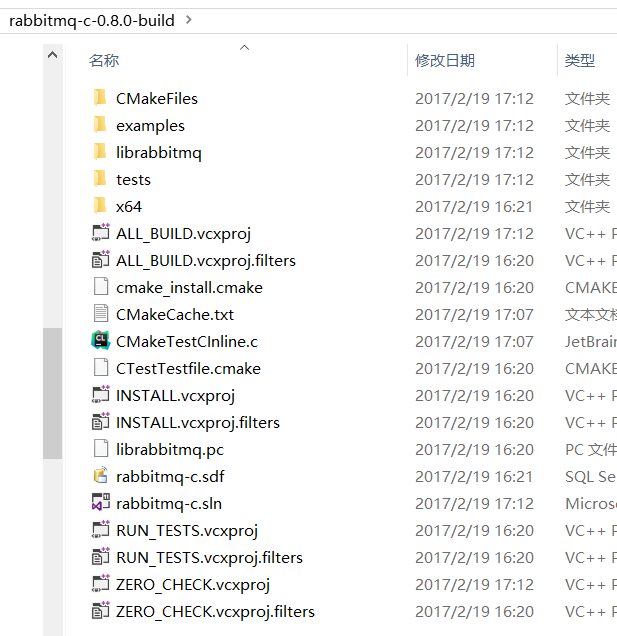
依次点击configire、generate,可以生成vs sln。如下:
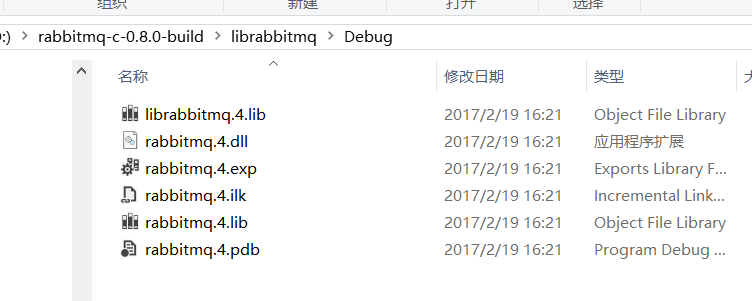
最后使用VS即可生成rabbitmq.4.dll,如下:
测试自带的例子:
D:\RabbitMQ Server\rabbitmq_server-3.6.5\sbin>cd /d D:\rabbitmq-c-0.8.0-build\examples\Debug

D:\rabbitmq-c-0.8.0-build\examples\Debug>amqp_listen localhost 5672 amq.direct test

Delivery 1, exchange amq.direct routingkey test

Content-type: text/plain

----

00000000: 68 65 6C 6C 6F 20 77 6F : 72 6C 64                 hello world

0000000B:

Delivery 2, exchange amq.direct routingkey test

Content-type: text/plain

----

00000000: 68 65 6C 6C 6F 20 77 6F : 72 6C 64                 hello world

0000000B:

Delivery 3, exchange amq.direct routingkey test

Content-type: text/plain

----

00000000: 68 65 6C 6C 6F 20 77 6F : 72 6C 64                 hello world

0000000B:

Delivery 4, exchange amq.direct routingkey test
新开一个窗口,执行如下:
D:\RabbitMQ Server\rabbitmq_server-3.6.5\sbin>cd /d D:\rabbitmq-c-0.8.0-build\examples\Debug

D:\rabbitmq-c-0.8.0-build\examples\Debug>amqp_sendstring localhost 5672 amq.direct test "hello world"

D:\rabbitmq-c-0.8.0-build\examples\Debug>amqp_sendstring localhost 5672 amq.direct test "hello world"

D:\rabbitmq-c-0.8.0-build\examples\Debug>amqp_sendstring localhost 5672 amq.direct test "hello world"

D:\rabbitmq-c-0.8.0-build\examples\Debug>amqp_sendstring localhost 5672 amq.direct test "hello world"

D:\rabbitmq-c-0.8.0-build\examples\Debug>amqp_sendstring localhost 5672 amq.direct test "hello world"

D:\rabbitmq-c-0.8.0-build\examples\Debug>amqp_sendstring localhost 5672 amq.direct test "hello world"

D:\rabbitmq-c-0.8.0-build\examples\Debug>amqp_sendstring localhost 5672 amq.direct test "hello world"
需要注意的是,librabbitmq的channel不是线程安全的,因此需要应用自行保证线程安全性,如下所述:
Threading
You cannot share a socket, an amqp_connection_state_t, or a channel between threads using librabbitmq. The librabbitmqlibrary is built with event-driven, single-threaded applications in mind, and does not yet cater to any of the requirements of pthreaded applications.
Your applications instead should open an AMQP connection (and an associated socket, of course) per thread. If your program needs to access an AMQP connection or any of its channels from more than one thread, it is entirely responsible for designing and implementing an appropriate locking scheme. It will generally be much simpler to have a connection exclusive to each thread that needs AMQP service.
官方主页https://github.com/alanxz/rabbitmq-c
doc api http://alanxz.github.io/rabbitmq-c/docs/0.8.0/classes.html
剩下的就是慢慢啃主要的api了。
windows下rabbitmq-c编译(带openssl、无需MinGW)的更多相关文章
- 【转】Windows下使用VS2008编译OpenCV 2.1 添加Intel TBB和Python支持
Windows下使用VS2008编译OpenCV2.1 添加Intel TBB和Python支持 步骤: 1.仔细阅读OpenCV官网上的InstallGuide:http://opencv.will ...
- 实践详细篇-Windows下使用VS2015编译的Caffe训练mnist数据集
上一篇记录的是学习caffe前的环境准备以及如何创建好自己需要的caffe版本.这一篇记录的是如何使用编译好的caffe做训练mnist数据集,步骤编号延用上一篇 <实践详细篇-Windows下 ...
- windows下用vs2010编译ffmpeg
转载自;http://q1q2q3q4q5q6ln.blog.163.com/blog/static/500794332014666536283/ (注意:请务必先阅读:七,后记补充:) ffmpeg ...
- Windows下从源代码编译Skia
在PPAPI里面画图,能够结合第三方的图形库.比方Cairo.Skia. Google Chrome.Chromium和Android都使用Skia作为画图引擎.我也来试试Skia,先过编译关. fo ...
- Windows 下使用 GNUstep 编译并运行 Objective-C 程序
今晚上开始看<Objective-C 程序设计(第4版)>这本书(OSChina 正在做此书的书评活动,详情请看这里),到现在为止看到第 7 章,于是想动手试试写两简单的程序编译跑跑看. ...
- 在windows下使用vs2013编译和调试mysql源代码
1. 准备工作 1)OS:win10 + VS2013 2)mysql 源码(windows版):mysql-5.6.25.zip 3)perl tool:ActivePerl-5.16.3.1604 ...
- Windows下RabbitMQ安装,部署,配置
安装部署 1.当前环境以及参考资料出处 部署环境:windows server 2008 r2 enterprise 官方安装部署文档:http://www.rabbitmq.com/install- ...
- 在Windows下利用php自带的mail函数发邮件
这几天看<Head First PHP & MySQL>,里面有发邮件的例子是用系统自带的mail函数发送的,自己照书上写的试了一直不成功,后来终于在网上找到解决方案,现在总结下. ...
- Win7 下用 VS2015 编译最新 openssl(1.0.2j)包含32、64位debug和release版本的dll、lib(8个版本)
Win7 64位系统下通过VS2015编译好的最新的OpenSSL(1.0.2j)所有八个版本的链接库, 包含以下八个版本: 1.32位.debug版LIB: 2.32位.release版LIB: 3 ...
- Windows下RabbitMQ安装及入门
1.Windows下安装RabbitMQ需要以下几个步骤 (1):下载erlang,原因在于RabbitMQ服务端代码是使用并发式语言erlang编写的,下载地址:http://www.erlang. ...
随机推荐
- go build -ldflags
http://studygolang.com/articles/2052 ldflags 用法:[路径,非必需,除非你有目录层次]包名.变量 [path]packege.value go build ...
- Ubuntu install mysql database
简要说下ubuntu Linux下安装MySql数据库 一. 安装 # apt-get install mysql-server# apt-get install mysql-client 二.启动 ...
- iOS UI进阶-2.0 CALayer
在iOS中,你能看得见摸得着的东西基本上都是UIView,比如一个按钮.一个文本标签.一个文本输入框.一个图标等等,这些都是UIView 其实UIView之所以能显示在屏幕上,完全是因为它内部的一个图 ...
- vue中动态绑定class
我用的element-ui primary默认是这个颜色,ui设计的是这个颜色所以我们先要重写 .el-button--primary的样式 因为默认是没有勾选的所有事灰色所以下面重写样式为灰色 .e ...
- HTML5特性&&canvas
1.HTML5是由W3C(万维网联盟,专注于XHTML 2.0)和WHATWG(专注于web表单和应用程序)共同合作的结果,2014年10月完成标准制定! 主要设计目的:为了在移动设备上支持多媒体. ...
- D Tree Requests dfs+二分 D Pig and Palindromes -dp
D time limit per test 2 seconds memory limit per test 256 megabytes input standard input output stan ...
- python 可视化
一.环境安装 windows:pip install numpy scipy matplotlib #pip install http://effbot.org/downloads/Imaging-1 ...
- 【Elasticsearch学习之二】Elasticsearch Rest风格操作
环境 虚拟机:VMware 10 Linux版本:CentOS-6.5-x86_64 客户端:Xshell4 FTP:Xftp4 jdk8 elasticsearch-2.2.0 一.Rest简介Re ...
- 多线程(threading)示例
一.多线程简单示例 import threading,time print('第一线程(默认):程序开始啦!') def takeANap(): time.sleep(5) print('第二线程:5 ...
- linux 虚拟机挂载光驱
step 1 step 2 step 3 挂载 root@vm-xiluhua /dev # mount cdrom /mnt mount: /dev/sr0 写保护,将以只读方式挂载 step 4 ...