
jquery实现常用UI布局
tab
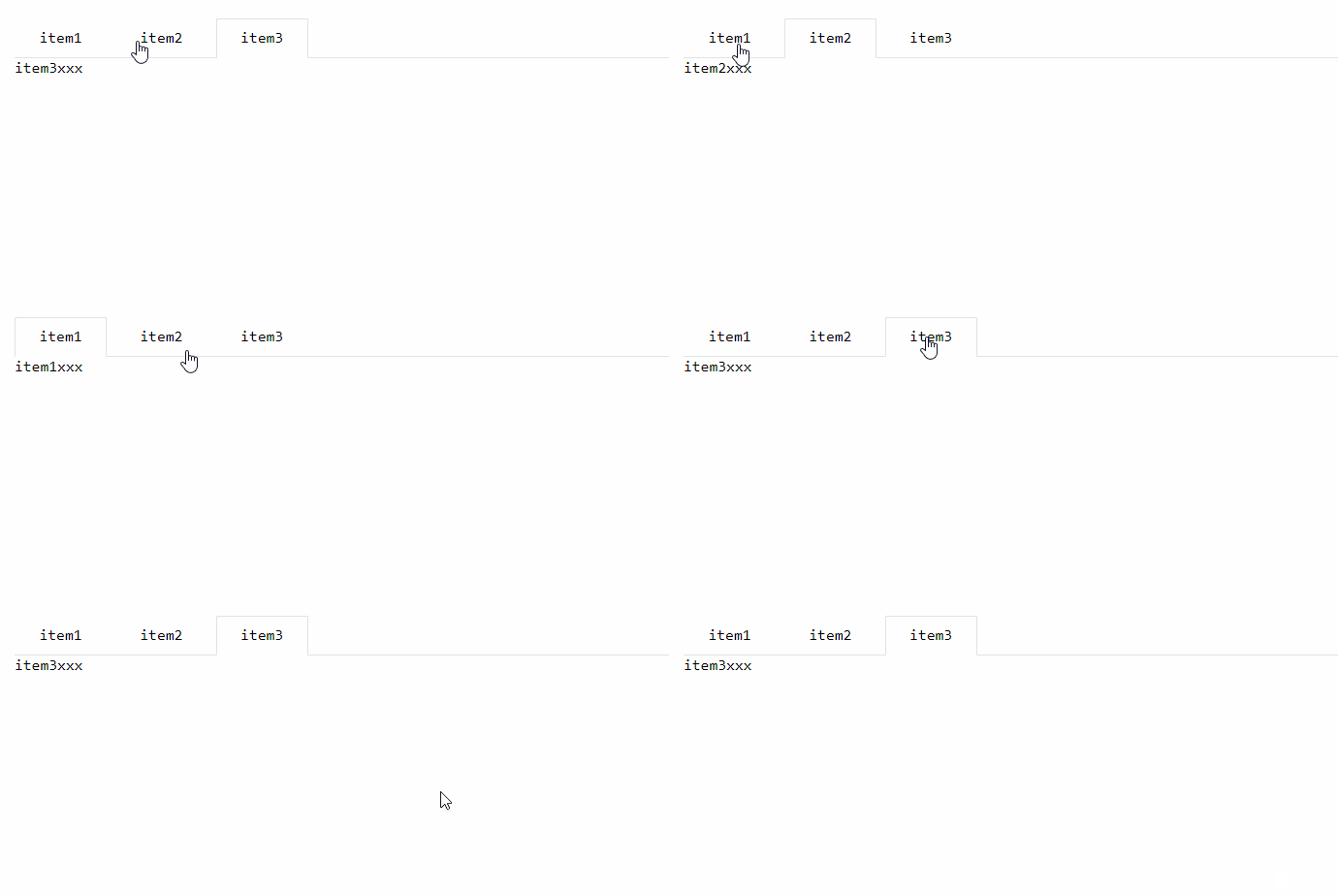
- html
<div class="tab">

    <ul class="tab-title">

        <li class="tab-this">item1</li>

        <li>item2</li>

        <li>item3</li>

    </ul>

    <div class="tab-content">

        <div class="tab-item show">item1xxx</div>

        <div class="tab-item">item2xxx</div>

        <div class="tab-item">item3xxx</div>

    </div>

</div>
- css
*{

    padding: 0; margin: 0; text-decoration: none; list-style: none;

    font-family: Consolas;

}

.tab{

    margin: 20px;

}

/*tab-title*/

.tab-title {

    height: 40px;

    position: relative;

    left: 0;

    white-space: nowrap;

    border-bottom-width: 1px;

    border-bottom-style: solid;

    border-color: #e2e2e2;

    transition: all .2s;

    -webkit-transition: all .2s;

}

.tab-title>li{

    display: inline-block;

    padding: 0 15px;

    text-align: center;

    cursor: pointer;

    line-height: 40px;

    min-width: 65px;

    position: relative;

}

.tab-title .tab-this:after {

    position: absolute;

    left: 0;

    top: 0;

    content: '';

    width: 100%;

    height: 41px;

    border-width: 1px;

    border-style: solid;

    border-color: #e2e2e2;

    border-bottom-color: #fff;

    border-radius: 2px 2px 0 0;

    box-sizing: border-box;

    pointer-events: none;

}

.tab-item{

    display: none;

}

.show{

    display: block !important;

}
- js
$('body').on('click','.tab-title>li:not(.tab-this)', function(){

     $(this).siblings().removeClass('tab-this');

     $(this).addClass('tab-this');

     var index = $(this).prevAll().length+1;

     $('.tab-content>div').removeClass('show');

     $('.tab-content>div:nth-child('+index+')').addClass('show');

 });
jquery实现常用UI布局的更多相关文章
- 常用UI布局
1.LinearLayout(线性布局):将布局所包含的控件在线性方向上依次排列. <1>android:orientation 指定了排列方向(垂直方向(vertical).水平方向(h ...
- 基于jquery开发的UI框架整理分析
根据调查得知,现在市场中的UI框架差不多40个左右,不知大家都习惯性的用哪个框架,现在市场中有几款UI框架稍微的成熟一些,也是大家比较喜欢的一种UI框架,那应该是jQuery,有部分UI框架都是根据j ...
- 常用前端布局,CSS技巧介绍
常用前端布局,CSS技巧介绍 对前端常用布局的整理总结,并对其性能优劣,兼容等情况进行介绍 css常用技巧之可变大小正方形的绘制 1:若通过设置width为百分比的方式,则高度不能通过百分比来控制. ...
- Android开发 UI布局
Android开发 UI布局一.线性布局LinearLayout 什么是线性布局? 其实呢,线性布局就是把所有的孩子摆在同一条线上 <?xml version="1.0" e ...
- Duilib源码分析(五)UI布局—Layout与各子控件
接下来,继续分析duilib之UI布局Layout,目前提供的布局有:VerticalLayout.HorizontalLayout.TileLayout.TabLayout.ChildLayout分 ...
- iOS-屏幕适配-UI布局
iOS 屏幕适配:autoResizing autoLayout和sizeClass 一.图片解说 -------------------------------------------------- ...
- AppleWatch___学习笔记(二)UI布局和UI控件
1.UI布局 直接开发,你会发现Apple Watch并不支持AutoLayout,WatchKit里有个类叫做WKInterfaceGroup,乍一看像是UIView,但是这货其实是用来布局的.从 ...
- DIV+CSS常用网页布局技巧!
以下是我整理的DIV+CSS常用网页布局技巧,仅供学习与参考! 第一种布局:左边固定宽度,右边自适应宽度 HTML Markup <div id="left">Left ...
- iOS开发~UI布局(三)深入理解autolayout
一.概要 通过对iOS8界面布局的学习和总结,发现autolayout才是主角,autolayout是iOS6引入的新特性,当时还粗浅的学习了下,可是没有真正应用到项目中.随着iOS设备尺寸逐渐碎片化 ...
随机推荐
- 「CF126B」Password
题目描述 给定一个字符串 \(S\),我们规定一个字符串 \(P\) 是可行解,\(P\) 需要满足: \(P\) 是 \(S\) 的前缀 \(P\) 是 \(S\) 的后缀 \(P\) 出现在 \( ...
- UniGUI之提示信息MessageDlg及获得信息Prompt(15)
UniGui的信息弹出框MessageDlg的原型定义如下: procedure MessageDlg(const Msg: string; DlgType: TMsgDlgType; Buttons ...
- 全球定位IP位置 2018(离线版)
球定位IP位置 2018(离线版) 这次写的软件使用Python写的,所以体积可能有点大 我特地写了GUI打包成了Exe可执行文件,方便小白使用== 只要输入目标ip就能显示目标所在的国家城市和经纬度 ...
- 微信小程序中,如何实现显示,隐藏密码的功能
最近在搞小程序的开发,遇到隐藏,显示密码的功能的时候,电脑上调试没问题,但是手机上面点击却没有效果,必须要跳转到其他页面再跳回来,才能正常显示. 一时间搞得我很头疼,查找资料后,终于知道了是什么原因. ...
- 进程管理与SELinux
进程(process): 将程序与进程的总结: 程序 (program):通常为 binary program ,放置在储存媒体中 (如硬盘.光盘.软盘.磁带等), 为实体文 件的型态存在 ...
- pwn之偏移量offset
0x7fffffffdd00: 0x4141414141414141 0x4141414141414141 0x7fffffffdd10: 0x4141414141414141 0x414141414 ...
- maven更新JRE更改JSE1.5
1. [代码]在maven的配置文件settings.xml中的<profiles>标签里添加如下代码,设置默认JRE编译版本为1.7 <profile> <id> ...
- 「CF55D」Beautiful numbers
传送门 Luogu 解题思路 毒瘤数位DP,发现一个前缀我们只需要记录它对 \(\operatorname{lcm}(1,2,3,\cdots,9)=2520\) 取模的值即可,所以我们在 DP 时记 ...
- 前端学习笔记系列一:4 vue中@click.native
.native - listen for a native event on the root element of component. 作用:[给组件绑定原生事件] 例子:如果使用router-l ...
- CF755G PolandBall and Many Other Balls 题解
从神 Karry 的题单过来的,然后自己瞎 yy 了一个方法,看题解区里没有,便来写一个题解 一个常数和复杂度都很大的题解 令 \(dp_{i,j}\) 为 在 \(i\) 个球中选 \(j\) 组的 ...