
基于Vue、Bootstrap的Tab形式的进度展示
最近基于Vue、Bootstrap做了一个箭头样式的进度展示的单页应用,并且支持了对于一个本地JS文件的检索,通过这个单页应用,对于Vue的理解又深入了一些。在这里把主要的代码分享出来。
本单页应用实现了几个功能:
1、点击箭头导航栏能够切换页面内容
2、使用了渲染到方式来展示内容,内容采用混合模板
3、对步骤一中的输入文本框进行监听,根据输入的内容,从本地JS文件检索给出用户提示
期望改进的地方
1、点击Tab链接的时候,能够有页面切换效果(左右滑动)
2、文本框的提示方式改为 Suggestion
全部的代码可以参见我的 github 主页上的项目代码,这里只分享主要的代码。
看一下页面效果
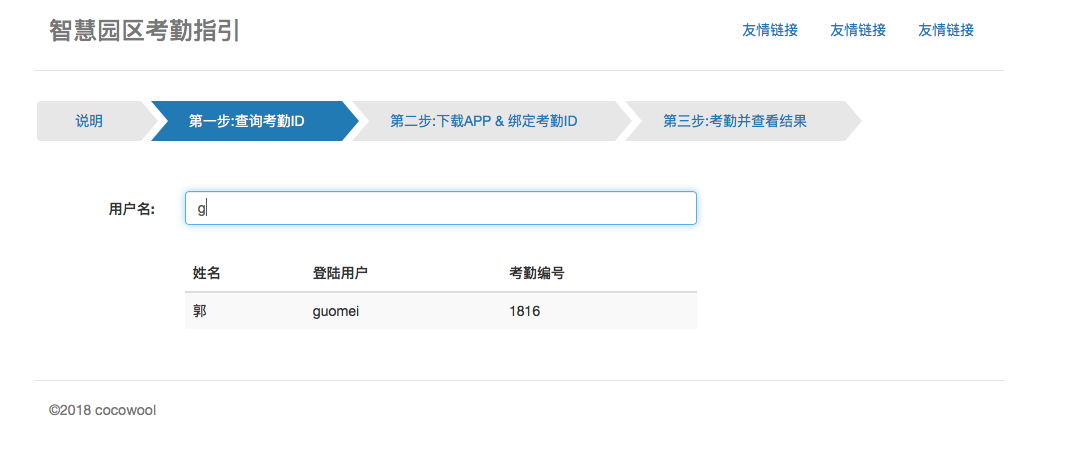
先看一下代码结构

具体的代码
index.html
<!DOCTYPE html>
<html lang="zh-CN">
<head>
<meta charset="utf-8">
<title>智慧园区考勤操作指引</title>
<meta name="description" content="描述了北数员工如何绑定智慧园区,并通过智慧园区进行日常工作考勤。">
<meta name="viewport" content="width=device-width, initial-scale=1, maximum-scale=1, user-scalable=no">
<link href="./bootstrap-3.3.7/css/bootstrap.min.css" rel="stylesheet" type="text/css">
<style type="text/css">
@-ms-viewport { width: device-width; }
@-o-viewport { width: device-width; }
@viewport { width: device-width; }
body { padding-top:20px; padding-bottom: 20px; }
.header, .footer { padding-right: 15px; padding-left: 15px; }
.header { padding-bottom: 20px; border-bottom: 1px solid #e5e5e5; margin-bottom: 30px; }
.header h3 { margin-top: 0; margin-bottom: 0; line-height: 40px; }
.footer { padding-top: 19px; color: #777; border-top: 1px solid #e5e5e5; margin-top: 30px; }
.jumbotron { }
.step-container { margin:30px 0; }
@media (min-width: 1024px) {
.container {
max-width: 1000px;
}
}
.container-narrow > hr { margin: 30px 0; }
.step-container { clear: both; vertical-align: middle; display: table-cell; margin-bottom: 30px; }
.rs-step-container { height: 40px; margin-bottom: 25px; }
.rs-arrow { }
.rs-arrow .rs-step { text-align:center; cursor: pointer; display: inline-block; padding:10px 38px 10px 38px; position: relative; background-color: #e7e7e7; margin:0 3px; font-size: 14px;-webkit-user-select: none; -moz-user-select: none; -ms-user-select: none; user-select: none; }
.rs-arrow .rs-step:after, .rs-arrow .rs-step:before { content: " "; position: absolute; top: 0; right: -17px; width: 0; height: 0; border-top: 20px solid transparent; border-bottom: 20px solid transparent; border-left: 17px solid #e7e7e7; z-index: 2; transition: border-color 0.2s ease; }
.rs-arrow .rs-step:before { right: auto; left: 0; border-left: 17px solid #fff; z-index: 0; }
.rs-arrow .rs-step:first-child:before { border: none; }
.rs-arrow .rs-step:first-child { border-top-left-radius: 4px; border-bottom-left-radius: 4px; }
.rs-arrow .current, .rs-arrow .active { background-color: #337ab7; color:#fff; }
.rs-arrow .current:after, .rs-arrow .active:after { border-left-color: #337ab7; }
.rs-arrow .active a { color:#fff; }
.rs-arrow div:hover { color:tomato; }
.rs-arrow a:hover { text-decoration: none; }
.step-content { margin-top: 50px; }
.fade-enter-active, .fade-leave-active { transition: opacity .5s; }
.fade-enter, .fade-leave-to /* .fade-leave-active below version 2.1.8 */ { opacity: 0; }
/*路由切换动画*/
.slide-right-enter-active,
.slide-right-leave-active,
.slide-left-enter-active,
.slide-left-leave-active {
will-change: transform;
transition: all 500ms;
position: absolute;
}
.slide-right-enter {
opacity: 0;
transform: translate3d(-100%, 0, 0);
}
.slide-right-leave-active {
opacity: 0;
transform: translate3d(100%, 0, 0);
}
.slide-left-enter {
opacity: 0;
transform: translate3d(100%, 0, 0);
}
.slide-left-leave-active {
opacity: 0;
transform: translate3d(-100%, 0, 0);
}
.fade-enter-active, .fade-leave-active {
transition: opacity 0.3s
}
.fade-enter, .fade-leave-active {
opacity: 0
}
</style>
<!--[if lt IE 8]>
<script type="text/javascript">
window.location.href='unsupport_tips.html'
</script>
<![endif]-->
<!--[if lt IE 9]>
<script src="./html5shiv.min.js"></script>
<script src="./respond.min.js"></script>
<![endif]-->
</head>
<body>
<div class="container">
<div class="header clearfix">
<nav>
<ul class="nav nav-pills pull-right">
<li><a href="javascript:void(0);" target="_blank">友情链接</a></li>
<li><a href="javascript:void(0);" target="_blank">友情链接</a></li>
<li><a href="javascript:void(0);">友情链接</a></li>
</ul>
</nav>
<h3 class="text-muted" id="ccb-title" v-bind:title="message">智慧园区考勤指引</h3>
</div>
<div id="app">
</div>
<footer class="footer">
<p>©2018 cocowool</p>
</footer>
</div>
<script src="./jquery-3.3.1.min.js" type="text/javascript"></script>
<script src="./bootstrap-3.3.7/js/bootstrap.min.js" type="text/javascript"></script>
<script type="text/javascript" src="./dist/build.js"></script>
<script type="text/javascript" src="./bsuser_utf8.js"></script>
</body>
</html>
main.js
import Vue from 'vue'

import routes from './routes'

const app = new Vue({

  el: '#app',

  data: {

    currentRoute: window.location.pathname,

  },

  watch : {

    currentRoute (to, from){

      to = routes[to] ? routes[to] : routes['/']

      from = routes[from] ? routes[from] : routes['/']

      if(to.meta.index > from.meta.index){

        this.transitionName = "slide-left"

      }else{

        this.transitionName = "slide-right"

      }

    }

  },

  methods : {

  },

  computed: {

    ViewComponent () {

      //console.log(bsuser)

      const matchingView = routes[this.currentRoute] ? routes[this.currentRoute].name : 'Home'

      return matchingView

        ? require('./pages/' + matchingView + '.vue')

        : require('./pages/Home.vue')

    }

  },

  render (h) {

    return h(this.ViewComponent)

    // return h(require('./pages/About.vue'))

  }

})

window.addEventListener('popstate', () => {

  app.currentRoute = window.location.pathname

})
route.js
export default {

  '/' : {

    name : 'Home',

    path : '/',

    meta : { index:0 }

  },

  '/step1' : {

    name : 'Step1',

    path : '/step1',

    meta : { index:1 }

  },

  '/step2' : {

    name : 'Step2',

    path : '/step2',

    meta : { index:2 }

  },

  '/step3' : {

    name : 'Step3',

    path : '/step3',

    meta : { index:3 }

  }

}
Main.vue
<template>

    <div class="step-container">

        <div class="rs-step-container rs-arrow">

            <v-tab href="/home">说明</v-tab>

            <v-tab href="/step1">第一步:查询考勤ID</v-tab>

            <v-tab href="/step2">第二步:下载APP & 绑定考勤ID</v-tab>

            <v-tab href="/step3">第三步:考勤并查看结果</v-tab>

        </div>

        <!-- <div>

            <input type="text" v-model="question" name="question">

        </div> -->

        <transition name="fade" mode="out-in" v-on:after-enter="afterEnter" appear>

            <slot></slot>

        </transition>

    </div>

</template>

<script>

import VLink from '../components/VLink.vue'

import VTab from '../components/VTab.vue'

export default {

    methods : {

        inputChanged(){

            console.log("Input CHanged")

        }

    },

    watch : {

    },

    components: {

        VLink,

        VTab

    }

}

</script>
Step1.vue
<template>
<main-layout>
<div class="step-content slide-left">
<div class="form-group">
<label for="searchItem" class="col-sm-2 control-label text-right" style="padding-top:8px;">用户名:</label>
<div class="col-sm-8">
<input type="text" id="searchVal" v-model="searchVal" @input="inputChanged" name="searchVal" placeholder="请输入北数考勤系统登录用户名、中文姓名或身份证号进行查询" class="form-control">
</div>
<div class="col-sm-2"> </div>
</div>
<div class="form-group" style="margin-top:30px; clear:both; padding-top:30px;">
<div class="col-sm-2"> </div>
<div class="col-sm-8">
<table class="table table-striped" v-if="userList.length > 0">
<thead>
<tr>
<th>姓名</th>
<th>登陆用户</th>
<th>考勤编号</th>
</tr>
</thead>
<tbody>
<tr v-for='(item, key) in userList'>
<td>{{item.CNNAME}}</td>
<td>{{item.BSUSER}}</td>
<td>{{item.WHID}}</td>
</tr>
</tbody>
</table>
</div>
</div>
<div class="form-group">
<div class="col-sm-offset-2 col-sm-10">
</div>
</div>
</div>
</main-layout>
</template>
<script>
import MainLayout from '../layouts/Main.vue'
export default {
components : {
MainLayout
},
data() {
return {
searchVal : '',
userList : []
}
},
props: {
value : {
type: String,
default:''
}
},
computed:{
},
methods:{
inputChanged(event){
this.userList = []
var len = this.searchVal.length
if( len > 0){
for (var i = 0 ; i < bsuser.length ; i++){
if(bsuser[i].ID.substring(0,len) == this.searchVal || bsuser[i].CNNAME.substring(0,len) == this.searchVal || bsuser[i].BSUSER.substring(0,len) == this.searchVal ){
this.userList.push(bsuser[i])
}
}
}
}
}
}
</script>
参考资料:
1、Fancy arrow-type progress bar
2、Create border arrow with css
3、CSS Progress Wizard Example Page
4、Responsive Step Progress Indicator with Pure CSS
5、使用 vue-router 切换页面时怎么设置过渡动画
6、基于Vue的页面切换左右滑动效果
7、tab切换功能——vue
8、解决vue在ie9中的兼容问题
基于Vue、Bootstrap的Tab形式的进度展示的更多相关文章
- 基于 Vue BootStrap的迷你Chrome插件
代码地址如下:http://www.demodashi.com/demo/14306.html 安装 安装 Visual Studio Code 和Chrome, 自行FQ 详细安装这里略过 安装包管 ...
- 基于Vue开发的tab切换组件
github地址:https://github.com/MengFangui/VueTabSwitch 1.index.html <!DOCTYPE html> <html lang ...
- [译]基于Vue.js的10个最佳UI框架,用于构建移动应用程序
原文查看10 Best Vue.js based UI Frameworks for Building Mobile Apps 如果您期待使用Vue.js构建移动应用程序,那么您可以选择许多可用的UI ...
- vue_shop(基于vue电商管理后台网站)
vue_shop 目录 vue_shop day01 实现登录功能 项目预开发处理 Login.vue完整代码: 处理步骤: 添加element-ui的表单组件 添加第三方字体: 添加表单验证 导入a ...
- 基于Vue实现后台系统权限控制
原文地址:http://refined-x.com/2017/08/29/基于Vue实现后台系统权限控制/,转载请注明出处. 用Vue/React这类双向绑定框架做后台系统再适合不过,后台系统相比普通 ...
- 一款基于Vue的扩展性组件库 VV-UI
github: https://github.com/VV-UI/VV-UI 演示地址: https://vv-ui.github.io/VV-UI/#/meta-info 1. LoadingBar ...
- 基于vue.js的简单用户管理
功能描述:添加.修改.搜索过滤 效果图: <!DOCTYPE html> <html lang="en"> <head> <title&g ...
- 基于springboot+bootstrap+mysql+redis搭建一套完整的权限架构【六】【引入bootstrap前端框架】
https://blog.csdn.net/linzhefeng89/article/details/78752658 基于springboot+bootstrap+mysql+redis搭建一套完整 ...
- 基于Vue的Quasar Framework 介绍 这个框架UI组件很全面
基于Vue的Quasar Framework 介绍 这个框架UI组件很全面 基于Vue的Quasar Framework 中文网http://www.quasarchs.com/ quasarfram ...
随机推荐
- 【LOJ】 #6012. 「网络流 24 题」分配问题
题解 又写了一遍KM算法,这题刚好是把最大最小KM拼在一起写的,感觉比较有记录价值 感觉KM始终不熟啊QAQ 算法流程大抵如下,原理就是每次我们通过减少最少的匹配量达成最大匹配,所以获得的一定是最大价 ...
- QT5 样式随笔
Qt的窗口背景及窗口风格统一与焕肤 button = new QPushButton(this);button->setStyleSheet("QPushButton{color:re ...
- Ubuntu16.04 14.04 配置caffe(CPU only)
1.安装依赖 sudo apt-get install libprotobuf-dev libleveldb-dev libsnappy-dev libopencv-dev libhdf5-seria ...
- 002.etcd使用场景
引用链接: https://blog.csdn.net/linuxheik/article/details/77853119 https://www.cnblogs.com/doscho/p/6221 ...
- JAVA 多线程制作大球吃小球 一、实现球的自动生成及运动 生产消费模型
前几天用多线程实现了创建小球并移动,想到大鱼吃小鱼,便突发奇想要写一个大球吃小球.首先第一步自然是先把界面弄好啦 public class BallUI extends JPanel { privat ...
- [转]C++ template —— 模板基础(一)
<C++ Template>对Template各个方面进行了较为深度详细的解析,故而本系列博客按书本的各章顺序编排,并只作为简单的读书笔记,详细讲解请购买原版书籍(绝对物超所值).---- ...
- 「BZOJ 3645」小朋友与二叉树
「BZOJ 3645」小朋友与二叉树 解题思路 令 \(G(x)\) 为关于可选大小集合的生成函数,即 \[ G(x)=\sum[i\in c ] x^i \] 令 \(F(x)\) 第 \(n\) ...
- [POJ1144]Network
来源:Central Europe 1996 思路:Tarjan求割点. 一个点$x$为割点当且仅当: 1.$x$为根结点且有两棵不相交的子树. 2.$x$不为根结点且它的子树中没有可以返回到$x$的 ...
- BZOJ2973 : 石头游戏
考虑到$lcm(1,2,3,4,5,6)=60$,所以操作序列每60秒一个循环. 将操作表示成转移矩阵的形式,预处理出前60秒的转移矩阵以及它们的乘积$B$. 那么t秒的转移矩阵为前$t\bmod 6 ...
- Slickflow.NET 开源工作流引擎高级开发(三) -- 并行分支容器与会签工作流模式的组合
前言: 流程引擎的核心功能是负责解析流程定义XML和流转,业务环节的不断积累,让人们不断总结和抽象出一些模式,这些模式统称为工作流模式(Workflow Pattern).本文的重点就是介绍一种常见 ...