
swift4.2 - 一个自定义view弹框
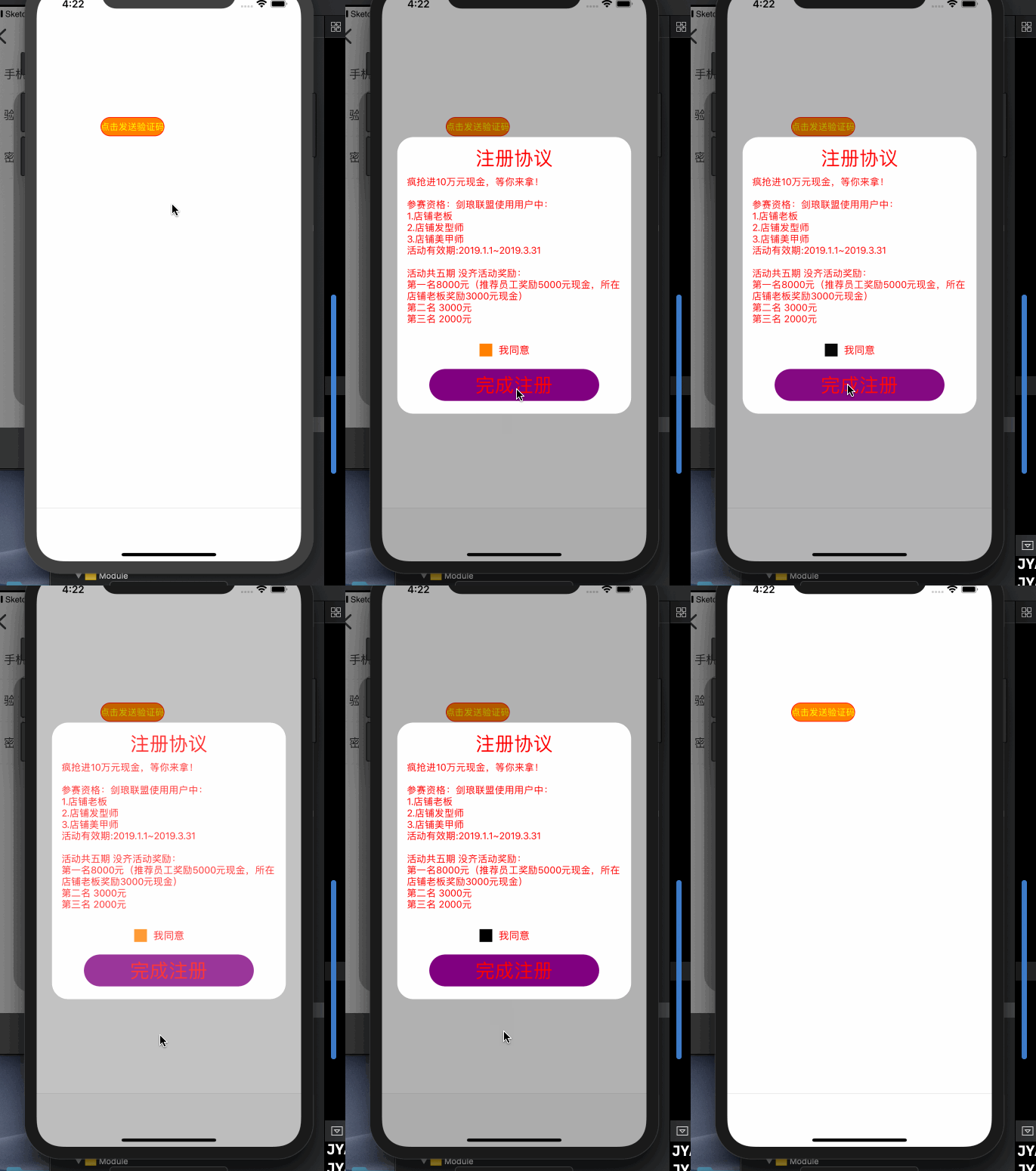
import UIKit

/*

 *  注册协议view:没找到 UI原图,咱不实现

 */

class JYRegisterProtocolView: UIView {

    /// 点击同意协议的回调

    private var clickSelectedBtnBlock:((_ isSelected:Bool) -> Void)?

    /// 点击完成按钮的回调

    private var clickCompleteBtnBlock:(() -> Void)?

    /// 单例属性

    static let share : JYRegisterProtocolView = {

        let view = JYRegisterProtocolView()

        return view

    }()

    /// 背景view

    private lazy var bgView : UIView = {

        let v = JYUIModel.createView()

        v.layer.cornerRadius = 25

        v.layer.masksToBounds = true

        return v

    }()

    /// 注册协议标题

    private lazy var titleLabel : UILabel = JYUIModel.creatLabe(text: "注册协议", font: UIFont.systemFont(ofSize: 30), textColor: UIColor.red, textAlignment: NSTextAlignment.center)

    /// 副标题标题

    private lazy var subtitleLabel : UILabel = {

        let lab = JYUIModel.creatLabe(text: "疯抢进10万元现金,等你来拿!\n\n参赛资格:剑琅联盟使用用户中:\n1.店铺老板 \n2.店铺发型师 \n3.店铺美甲师 \n活动有效期:2019.1.1~2019.3.31\n \n活动共五期 没齐活动奖励:\n第一名8000元(推荐员工奖励5000元现金,所在店铺老板奖励3000元现金)\n第二名 3000元 \n第三名 2000元", font: UIFont.systemFont(ofSize: 15), textColor: UIColor.red, textAlignment: NSTextAlignment.left)

        lab.numberOfLines = 0

        return lab

    }()

    /// 选择按钮

    private lazy var selectedBtn : UIButton = {

        let btn = JYUIModel.createBtn()

        btn.addTarget(self, action: #selector(clickSelectedBtn), for: UIControl.Event.touchUpInside)

        btn.backgroundColor = UIColor.orange

        return  btn

    }()

    /// 同意文字标题

    private lazy var agreeLabel : UILabel = JYUIModel.creatLabe(text: "我已认真阅读并同意", font: UIFont.systemFont(ofSize: 16), textColor: UIColor.red, textAlignment: NSTextAlignment.center)

    /// 完成按钮

    private lazy var completeBtn : UIButton = {

        let btn = JYUIModel.createBtn()

        btn.titleLabel?.font = UIFont.systemFont(ofSize: 30)

        btn.layer.cornerRadius = 25

        btn.layer.masksToBounds = true

        btn.backgroundColor = UIColor.purple

        btn.setTitle("完成注册", for: UIControl.State.normal)

        btn.setTitleColor(UIColor.red, for: UIControl.State.normal)

        btn.setTitle("完成注册", for: UIControl.State.selected)

        btn.setTitleColor(UIColor.green, for: UIControl.State.selected)

        btn.addTarget(self, action: #selector(clickcompleteBtn), for: UIControl.Event.touchUpInside)

        return  btn

    }()

    override init(frame: CGRect) {

        super.init(frame: frame)

        configUI()

    }

    required init?(coder aDecoder: NSCoder) {

        fatalError("init(coder:) has not been implemented")

    }

    //点击背景view 移除当前控件

    override func touchesBegan(_ touches: Set<UITouch>, with event: UIEvent?) {

        if let touch = touches.first  {

            var point =  touch.location(in: self)

            point = bgView.layer.convert(point, from: self.layer)

            if !bgView.layer.contains(point){

                self.removeView()

            }

        }

    }

    /// 移除弹框(内部移除)

    private func removeView() {

        UIView.animate(withDuration: 0.5, animations: { [weak self] in

            self?.alpha = 0

        }) { [weak self] (res) in

            self?.removeFromSuperview()

        }

    }

    /// 初始化欢迎弹框

    convenience init(titleText:String? = nil,

                     subtitle: String? = nil ,

                     agree:String? = nil,

                     buttonText: String? = nil) {

        self.init()

        if agree != nil {

            self.titleLabel.text = titleText

        }

        if agree != nil {

            self.agreeLabel.text = agree

        }

        if subtitle != nil{

            self.subtitleLabel.text = subtitle

        }

        if buttonText != nil{

            self.completeBtn.setTitle(buttonText, for: .normal)

        }

    }

    /// 显示弹框

    func showAlert(selectedBtnBlock:((_ isSelected:Bool) -> Void)? , completeBtnBlock:(() -> Void)?) {

        JYWindow.subviews.forEach { (v) in

            if v is JYRegisterProtocolView {

                return

            }

        }

        JYWindow.addSubview(self)

        self.clickSelectedBtnBlock = selectedBtnBlock

        self.clickCompleteBtnBlock = completeBtnBlock

        self.alpha = 0

        self.isUserInteractionEnabled = false

        UIView.animate(withDuration: 0.5) {

            self.alpha = 1

            self.isUserInteractionEnabled = true

        }

    }

}

// MARK: - 点击事件

extension JYRegisterProtocolView{

    /// 点击阅读

    @objc private func clickSelectedBtn(){

        selectedBtn.isSelected.toggle()

        if selectedBtn.isSelected == true {

            selectedBtn.backgroundColor = UIColor.black

        }else{

            selectedBtn.backgroundColor = UIColor.orange

        }

        clickSelectedBtnBlock?(selectedBtn.isSelected)

    }

    /// 点击完成注册

    @objc private func clickcompleteBtn(){

        if selectedBtn.isSelected == false{

           DDLOG(message: "给个提示")

        }else{

            clickCompleteBtnBlock?()

            self.removeView()

        }

    }

}

// MARK: - UI

extension JYRegisterProtocolView{

    func configUI(){

        self.backgroundColor = "000000".jy.getColor().withAlphaComponent(0.3)

        self.frame = UIScreen.main.bounds

        self.layoutIfNeeded()

        configBgView()

        let vd : [String:UIView] = ["bgView":bgView]

        addSubview(bgView)

        self.addConstraints(NSLayoutConstraint.constraints(withVisualFormat: "|-24-[bgView]-24-|", options: [], metrics: nil, views: vd))

        self.addConstraints(NSLayoutConstraint.constraints(withVisualFormat: "V:[bgView]", options: [], metrics: nil, views: vd))

        bgView.centerYAnchor.constraint(equalTo: self.centerYAnchor).isActive = true

        bgView.centerXAnchor.constraint(equalTo: self.centerXAnchor).isActive = true

        addSubview(bgView)

    }

    /// 背景view的UI

    func configBgView(){

        let vd : [String : UIView] = ["titleLabel":titleLabel,

                                      "subtitleLabel":subtitleLabel,

                                      "selectedBtn":selectedBtn,

                                      "agreeLabel":agreeLabel,

                                      "completeBtn":completeBtn]

        bgView.addSubview(titleLabel)

        bgView.addSubview(subtitleLabel)

        bgView.addSubview(selectedBtn)

        bgView.addSubview(agreeLabel)

        bgView.addSubview(completeBtn)

        bgView.addConstraints(NSLayoutConstraint.constraints(withVisualFormat: "|[titleLabel]|", options: [], metrics: nil, views: vd))

        bgView.addConstraints(NSLayoutConstraint.constraints(withVisualFormat: "|-15-[subtitleLabel]-15-|", options: [], metrics: nil, views: vd))

        bgView.addConstraints(NSLayoutConstraint.constraints(withVisualFormat: "[selectedBtn(20)]-10-[agreeLabel]", options: [.alignAllCenterY], metrics: nil, views: vd))

        bgView.addConstraints(NSLayoutConstraint.constraints(withVisualFormat: "|-50-[completeBtn]-50-|", options: [], metrics: nil, views: vd))

        bgView.addConstraints(NSLayoutConstraint.constraints(withVisualFormat: "V:|-15-[titleLabel]-10-[subtitleLabel]-30-[agreeLabel]-20-[completeBtn(50)]-20-|", options: [.alignAllCenterX], metrics: nil, views: vd))

        selectedBtn.heightAnchor.constraint(equalToConstant: 20).isActive = true

    }

}
swift4.2 - 一个自定义view弹框的更多相关文章
- CodePush自定义更新弹框及下载进度条
CodePush 热更新之自定义更新弹框及下载进度 先来几张弹框效果图 非强制更新场景 image 强制更新场景 image 更新包下载进度效果 image 核心代码 这里的热更新Modal框,是封装 ...
- 使用xib封装一个自定义view的步骤
使用xib封装一个自定义view的步骤 1> 新建一个继承UIView的自定义view,假设类名叫做(MJAppView) 2> 新建一个MJAppView.xib文件来描述MJAppVi ...
- JavaScript实现自定义alert弹框
aaarticlea/png;base64,iVBORw0KGgoAAAANSUhEUgAAAh0AAAFkCAYAAACEpYlzAAAfj0lEQVR4nO3dC5BddZ0n8F93pxOQCO
- 自定义 popWindow弹框 工具包
前言:因为Android 没有像IOS一样的ActionSheet,虽然在github上看到有一些类似ActionSheet的库,总觉得不好用,不如自己写一个弹框通用类,样式全部自已来多好. Step ...
- vue中超简单的方法实现点击一个按钮出现弹框,点击弹框外关闭弹框
效果图展示: View层 <template> <div> <div class="mask" v-if="showModal" ...
- 如何优雅的写一个Vue 的弹框
写Vue或者是react 都会遇见弹框的问题.也尝试了多种办法来写弹框,一直都不太满意,今天特地看了一下 Element UI 的源码,模仿着写了一个简易版. 大概有一下几个问题: 1.弹框的层级问题 ...
- 自定义alert弹框,title不显示域名
问题: 系统默认的alert弹框的title会默认显示网页域名 解决办法: (修改弹框样式) (function() { window.alert = function(name) { $(" ...
- 自定义alert弹框,title不显示域名(重写alert)
问题: 系统默认的alert弹框的title会默认显示网页域名 解决办法: (修改弹框样式) (function() { window.alert = function(name) { $(" ...
- IOS中使用.xib文件封装一个自定义View
1.新建一个继承UIView的自定义view,假设类名叫做 MyAppVew #import <UIKit/UIKit.h> @class MyApp; @interface MyAppV ...
随机推荐
- python字符串的基本用法
var1 = "hello word"var2 = "runootab"print var2.capitalize()#首字母大写print (var2.cou ...
- Lazarus 0.9.26——UTF8编码副作用
Lazarus 0.9.26中,涉及范围最广的的改变就是所有的的String默认都采用UTF8编码,IDE终于有了完全的UTF8支持,以前在源码编辑器中“吃掉”半个汉字的情况不再出现.对于Linux下 ...
- 腾讯助理PHP开发工程师外包岗面经
校招错过腾讯了,在社招上看到腾讯有招外包岗,要求比正式岗低,于是抱着试一试的心态投了简历,没一会就收到了笔试题,还算简单. 第二天收到面试官的面试邀请,然后去面试了…… 腾讯里面真是漂亮,光是看装潢就 ...
- Eclipse SVN文件冲突及不能直接提交情况
下图为Eclipse SVN使用过程中存在文件冲突的情形. 以下是三种冲突情形及相应解决办法: 1.简单的文件版本冲突 情形:A改变了文件的头部,B改变了文件的尾部,如果两者改动互不影响,SVN可以智 ...
- Java设置运行时环境参数
一.代码中,如下: System.setProperty("java.util.concurrent.ForkJoinPool.common.parallelism", " ...
- genymotion使用学习
1 安装 直接去其官网(https://www.genymotion.com/#!/download)下载安装包安装即可,安装中会附带安装VirtualBox. 2 注册 必须使用帐号登录后,方可下载 ...
- kubernetes ui 搭建
1.部署Kubernetes云计算平台,至少准备两台服务器,此处为3台 Kubernetes Master节点:192.168.0.111 Kubernetes Node1节点:192.168.0.1 ...
- .gitignore设置
git提交的时候一直提示 e/.idea/workspace.xml文件冲突, 这个文件是IDE编辑的时候自动带的文件,这个文件在提交的时候是不需要上传到git中的 这个时候我们需要这种.gitign ...
- h5+css 垂直导航菜单
http://blog.csdn.net/baidu_32731497/article/details/51814427
- linux安装node简单方法
1.去官网下载和自己系统匹配的文件: 英文网址:https://nodejs.org/en/download/ 中文网址:http://nodejs.cn/download/ 通过 uname -a ...