
hive,分桶,内外部表,分区
简单的word-count操作:
[root@master test-map]# head -10 The_Man_of_Property.txt #先看看数据
Preface
“The Forsyte Saga” was the title originally destined for that part of it which is called “The Man of Property”; and to adopt it for the collected chronicles of the Forsyte family has indulged the Forsytean tenacity that is in all of us. The word Saga might be objected to on the ground that it connotes the heroic and that there is little heroism in these pages. But it is used with a suitable irony; and, after all, this long tale, though it may deal with folk in frock coats, furbelows, and a gilt-edged period, is not devoid of the essential heat of conflict. Discounting for the gigantic stature and blood-thirstiness of old days, as they have come down to us in fairy-tale and legend, the folk of the old Sagas were Forsytes, assuredly, in their possessive instincts, and as little proof against the inroads of beauty and passion as Swithin, Soames, or even Young Jolyon. And if hero
hive> create table article2(sentence string) row format delimited fields terminated by '\n'; --直接用行号为分隔符导进来。
hive> load data inpath '/The_Man_of_Property.txt' overwrite into table article2; --这个不加local的情况下是在本地导入的,即从hsfs中的/下导入,但是导入进去之后The_Man_of_Property.txt文件会消失。
hive> select explode(split(sentence,' ')) from article2 limit 10; --这个是用explode函数将sentence列,用空格分开。
OK
Preface
“The
Forsyte
hive> select word ,count(*) from (select explode(split(sentence,' ')) as word from article2 ) t group by word limit 10;
Query ID = root_20180504132418_41a4e570-f3d5-4dd8-8a86-3c93256c4063
Total jobs = 1
Launching Job 1 out of 1
Number of reduce tasks not specified. Estimated from input data size: 1
In order to change the average load for a reducer (in bytes):
set hive.exec.reducers.bytes.per.reducer=<number>
In order to limit the maximum number of reducers:
set hive.exec.reducers.max=<number>
In order to set a constant number of reducers:
set mapreduce.job.reduces=<number>
Starting Job = job_1525332220382_0102, Tracking URL = http://master:8088/proxy/application_1525332220382_0102/
Kill Command = /usr/local/src/hadoop-2.6.1/bin/hadoop job -kill job_1525332220382_0102
Hadoop job information for Stage-1: number of mappers: 1; number of reducers: 1
2018-05-04 13:24:24,802 Stage-1 map = 0%, reduce = 0%
2018-05-04 13:24:32,114 Stage-1 map = 100%, reduce = 0%, Cumulative CPU 3.91 sec
2018-05-04 13:24:40,501 Stage-1 map = 100%, reduce = 100%, Cumulative CPU 6.59 sec
MapReduce Total cumulative CPU time: 6 seconds 590 msec
Ended Job = job_1525332220382_0102
MapReduce Jobs Launched:
Stage-Stage-1: Map: 1 Reduce: 1 Cumulative CPU: 6.59 sec HDFS Read: 640084 HDFS Write: 116 SUCCESS
Total MapReduce CPU Time Spent: 6 seconds 590 msec
OK
35
(Baynes 1
(Dartie 1
(Dartie’s 1
(Down-by-the-starn) 2
(Down-by-the-starn), 1
(He 1
(I 1
(James) 1
(L500) 1
Time taken: 23.514 seconds, Fetched: 10 row(s)
分桶的操作:
hive> set hive.enforce.bucketing = true; --不设置的话可能不生效。
hive> create table user_bucket(id int) clustered by (id) into 4 buckets; --人为的分成的4个reduce,即四个桶,使用id分桶。
hive> insert overwrite table user_bucket select cast(user_id as int) from badou.udata;

采样:
• 查看sampling数据:• 查看sampling数据:
– hive> select * from student tablesample(bucket 1 out of 32 on id); 2bucket=1y 32bucket=16y
– tablesample是抽样语句,语法:TABLESAMPLE(BUCKET x OUT OF y)
– y必须是table总bucket数的倍数或者因子。hive根据y的大小,决定抽样的比例。例如,table总共分了64份,当y=32
时,抽取(64/32=)2个bucket的数据,当y=128时,抽取(64/128=)1/2个bucket的数据。x表示从哪个bucket开始抽
取。例如,table总bucket数为32,tablesample(bucket 1 out of 16),表示总共抽取(32/16=)2个bucket的数据,
分3第三个bucket,和第(3+16)19个bucket的数据。这个3是随机的,只要间隔是16就好
采样的例子:
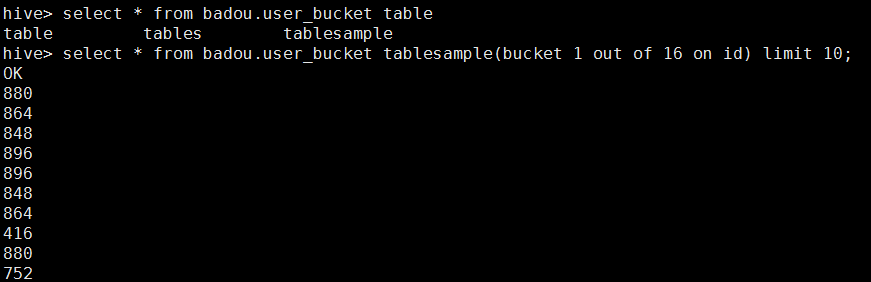
之后我们来查看数据量:
采样的数据量


总数据量:


之后对比一下数量:

结果差不多一致。
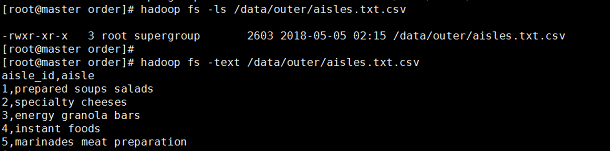
创建内外部表:

然后将数据插入表中


查看hdfs上的路径,

之后删除内部表:

在HIve中查看表

再去hdfs上查看路径,发现没有这个路径了。

之后删除外部表:
表的内容消失了

之后查看hdfs上的路径:
发现外部表的hdfs上的数据并没消失,之后可以导入进去就可以重新,创建了。所以外部表比较安全。
分区表:
内部表:
hive>
create table partition_test(
order_id string,
user_id string,
eval_set string,
order_number string,
order_hourofday string,
order_since_last string
)partitioned by(order_week string)
row format delimited fields terminated by '\t';
在hdfs上查找一下:

hive>insert overwrite table partition_test partition (order_week='3')
select order_id,user_id,eval_set,order_number,order_since_last,order_since_last from orders where order_week='3' ;
将order_week=1,2,3分别作为一个分区:然后查看这个表;(这里只截取一部分)
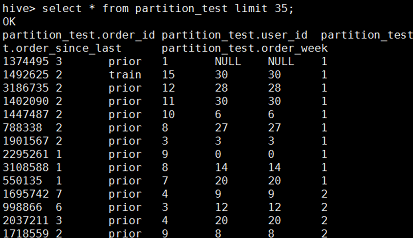
然后器hdfs上查看路径,分成了三个区;

在大量数据的场景中,即(表中的数据以及每个分区的个数都非常大的话),一个高度的安全建议的就是将HIve设置为“strict(严格模式)”,这样如果对分区表进行查询而WHERE子句没有加分区过滤的话,将会禁止提交这个任务。
hive> set hive.mapred.mode=strict; --设置为严格模式;
hive> set hive.mapred.mode=nostrict --设置为非严格模式;
可以使用如下命令查看所有的分区表;
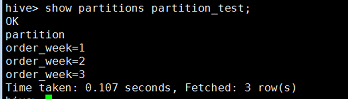
查看指定的分区键的分区;

使用如下命令查看分区表的信息:
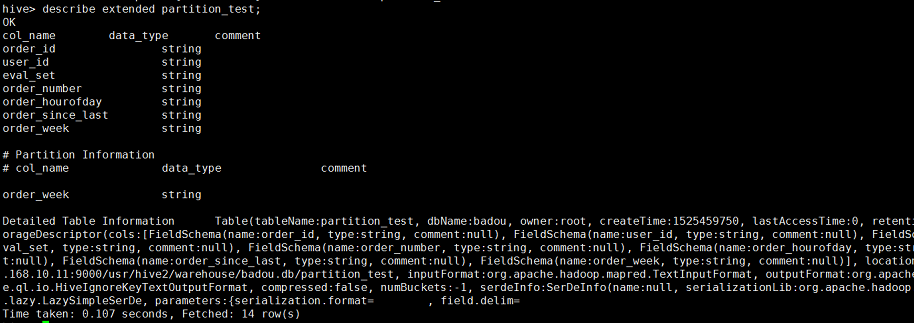
hive>alter table partition_test add partition (order_week=0) location '/usr/hive2/warehouse/badou.db/partition_test/order_week=0'; --添加分区的操作。
外部表:
和内部表差不多,但外部表的优势就是删除表不会删除hdfs上的数据,而且可以共享数据。
hive,分桶,内外部表,分区的更多相关文章
- 二 Hive分桶
二.Hive分桶 1.创建分桶表 create table t_buck (id string ,name string) clustered by (id) //根据id分桶 sorted by ( ...
- hive分桶 与保存数据的方式
创建分桶的表 create table t_buck(id int ,name string) clustered by (id ) sorted by (id) into 4 buckets ; ...
- hive 分桶及抽样调查
1.分桶的概述 分区提供了一个隔离数据和优化查询的遍历方式.不是所有的数据集都可形成合力的分区 对于一张表或者分区,hive可以进一步组织成桶,也就是更为细粒度的数据范围 分区针对的是数据的存储路径( ...
- hive分桶表bucketed table分桶字段选择与个数确定
为什么分桶 (1)获得更高的查询处理效率.桶为表加上了额外的结构,Hive 在处理有些查询时能利用这个结构.具体而言,连接两个在(包含连接列的)相同列上划分了桶的表,可以使用 Map 端连接 (Map ...
- Hive分桶
1.简介 分桶表是对列值取哈希值的方式将不同数据放到不同文件中进行存储.对于hive中每一个表,分区都可以进一步进行分桶.由列的哈希值除以桶的个数来决定数据划分到哪个桶里. 2.适用场景 1.数据抽样 ...
- HIVE—索引、分区和分桶的区别
一.索引 简介 Hive支持索引,但是Hive的索引与关系型数据库中的索引并不相同,比如,Hive不支持主键或者外键. Hive索引可以建立在表中的某些列上,以提升一些操作的效率,例如减少MapRed ...
- hive -- 分区,分桶(创建,修改,删除)
hive -- 分区,分桶(创建,修改,删除) 分区: 静态创建分区: 1. 数据: john doe 10000.0 mary smith 8000.0 todd jones 7000.0 boss ...
- Hive动态分区和分桶(八)
Hive动态分区和分桶 1.Hive动态分区 1.hive的动态分区介绍 hive的静态分区需要用户在插入数据的时候必须手动指定hive的分区字段值,但是这样的话会导致用户的操作复杂度提高,而且在 ...
- Hive SQL之分区表与分桶表
Hive sql是Hive 用户使用Hive的主要工具.Hive SQL是类似于ANSI SQL标准的SQL语言,但是两者有不完全相同.Hive SQL和Mysql的SQL方言最为接近,但是两者之间也 ...
- 【HIVE】(2)分区表、二级分区、动态分区、分桶、抽样
分区表: 建表语句中添加:partitioned by (col1 string, col2 string) create table emp_pt(id int, name string, job ...
随机推荐
- 服务容错保护断路器Hystrix之三:断路器监控(Hystrix Dashboard)-单体监控
turbine:英 [ˈtɜ:baɪn] 美 [ˈtɜ:rbaɪn] n.汽轮机;涡轮机;透平机 一.Hystrix Dashboard简介 在微服务架构中为了保证程序的可用性,防止程序出错导致网络阻 ...
- windows下pem转ppk
下载puttygen.exe,启动 下载路径:链接:https://pan.baidu.com/s/1hstORTa 密码:kvfi pem -> ppk :通过PuTTYgen 转换 1. I ...
- Java内存泄漏相关
之前学习了javaGC的原理机制,有了一定的了解,现在做一个整理总结,便于理解记忆,包括三个问题: 1. java GC是什么时候做的? 2. java GC作用的东西是什么? 3. java GC具 ...
- 倒数第N个字符串
给定一个完全由小写英文字母组成的字符串等差递增序列,该序列中的每个字符串的长度固定为 L,从 L 个 a 开始,以 1 为步长递增.例如当 L 为 3 时,序列为 { aaa, aab, aac, . ...
- JavaScript、CSS样式收集
JS集: //给from一个名字然后在JavaScript的地方就可以用form的名字来调用form表单里input元素的value属性可以得到值 var val=form_name.input_na ...
- [深度分析] Python Web 开发框架 Bottle
[深度分析] Python Web 开发框架 Bottle(这个真的他妈的经典!!!) 作者:lhf2009913 Bottle 是一个非常精致的WSGI框架,它提供了 Python Web开发中需要 ...
- 用dlopen,dlsym加载动态链接库.so中函数
代码如下 static void *findSymbol(const char *path, const char *symbol) { void *handle = dlopen(path, RTL ...
- 图片Alpha预乘的作用[转]
Premultiplied Alpha 这个概念做游戏开发的人都不会不知道.Xcode 的工程选项里有一项 Compress PNG Files,会对 PNG 进行 Premultiplied Alp ...
- 升级cordova
node -v npm -vcordova -v npm install npm -g --force npm install -g n --force n stable npm install -g ...
- SpringBoot项目启用本地Tomcat
1.修改pom.xml文件,配置<packaging>war</packaging>,使其发布的时候打包成war包 <groupId>com.owlforest&l ...