
在ASP.NET MVC中实现一种不同于平常的三级联动、级联方式, 可用于城市、车型选择等多层级联场景
三级或多级联动的场景经常会碰到,比如省、市、区,比如品牌、车系、车型,比如类别的多级联动......我们首先想到的是用三个select来展示,这是最通常的做法。但在另外一些场景中,比如确定搜索条件的时候,对于三级联动来说,可能选择1个,2个,或3个条件,我想,以下的方式可能更适合:
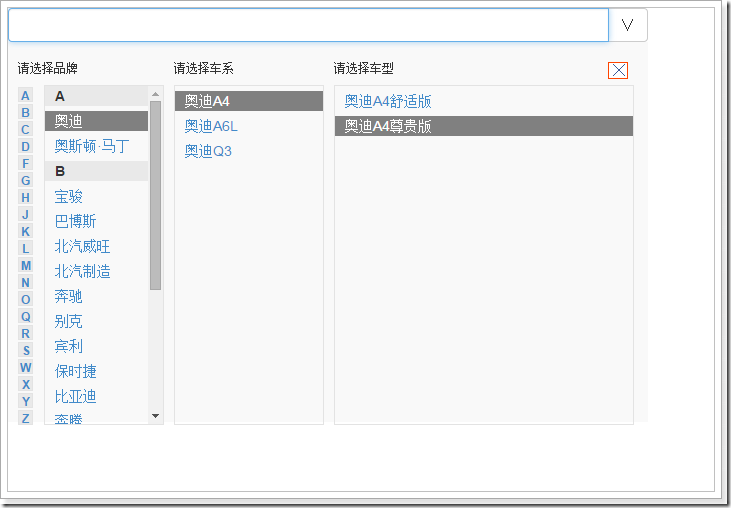
以上,可以只选择品牌,或同时选择品牌、车系,或同时选择品牌、车系、车型,最后把选择的内容展示到input上,并以逗号隔开。

可以实现的功能包括:
○ 点击最上面的input弹出div,此时只显示品牌区域
○ 点击最左边拼音首字母,导航到对应的品牌上
○ 当把鼠标移动到某个品牌上,品牌为选中状态,其对应的车系显示在车系区域
○ 当鼠标不在任何品牌上,所有品牌都为不选中状态
○ 当把鼠标移动到某个车系上,车系为选中状态,其对应的车型显示在车型区域,选中车系的所属品牌也为选中状态
○ 当鼠标不在任何车系上,所有车系、品牌都为不选中状态
○ 当把鼠标移动到某个车型上,车型为选中状态,选中车型的所属车系为选中状态,选中车系所属品牌为选中状态
○ 当鼠标不在任何车型上,所有车型、车系、品牌为不选中状态
○ 点击品牌,品牌显示到input上
○ 点击车系,品牌、车系显示到input上,并以逗号隔开
○ 点击车型,品牌、车系、车型显示到input上,并以逗号隔开
○ 点击div上的关闭按钮或者页面空白区域,div隐藏
界面的构成如下:
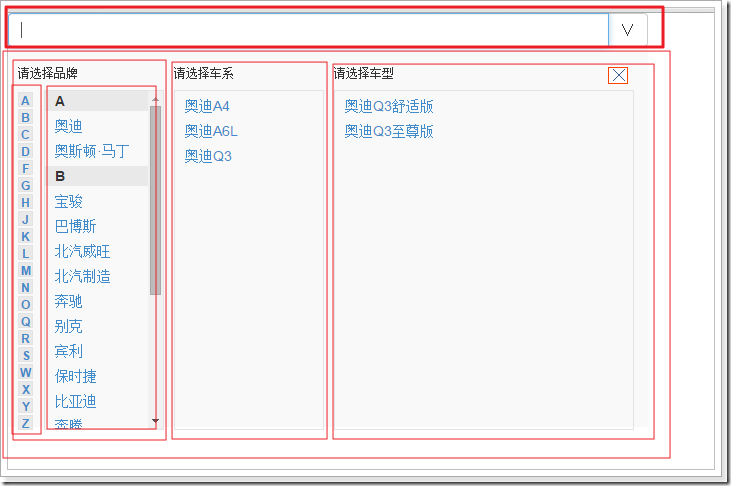
○ 最上面的是一个input
○ 品牌、车系、车型被包裹在一个div中,点击关闭按钮或点击空白处关闭的就是这个div
○ 品牌区域是一个div,分为首字母导航div和品牌显示div
○ 车系区域是一个div
○ 车型区域是一个div
○ 品牌、车系、车型内的内容是一些dl, dt, dd的html元素
○ 样式的事情交给css
实现的思路大致这样:
○ 给input点击事件,点击弹出品牌、车系、车型显示的div,并绑定页面空白区域的点击事件
○ 导航首字母指向锚点,品牌按首字母分类并提供锚点id
○ 在控制器中把品牌按照首字母分类,以json格式返回到前端,填充到tmpl模版,再追加到页面品牌区域
○ 给品牌添加鼠标移上事件,品牌为选中状态,对应的车系显示在车系区域
○ 给品牌添加鼠标移去事件
○ 给品牌添加点击事件,把点击品牌显示到input上
○ 给车系添加鼠标移上事件,当前车系为选中状态,其对应的车型显示在车型区域,其所属的品牌为选中状态
○ 给车系添加鼠标移去事件
○ 给车系添加点击事件,把点击车系和所属品牌显示到input上,以逗号隔开
○ 给车型添加鼠标移上事件,当前车型为选择状态,其所属父类车系为选中状态,车型所属父类品牌也为选中状态
○ 给车型添加点击事件,把点击车型和所属车系、品牌显示到input上,以逗号隔开
○ 给关闭按钮添加点击事件,关闭div,并解除页面空白区域点击事件的绑定
领域先行,首先是有关品牌、车系、车型的模型:
public class CarCategory{public int Id { get; set; }public string Name { get; set; }public int PId { get; set; }public string FirstLetter { get; set; }public string AnchorName { get; set; }public int Level { get; set; }}
○ PId属性用来表示父类Id,车系的父类Id为某个品牌Id,车型的父类Id为某个车系Id
○ FirstLetter属性用来表示首字母,作为分组的条件
○ AnchorName属性用来表示品牌的锚点id,车系和车型此项为空
在ASP.NET MVC4中,在Shared/Layout.cshtml中,该有的css,js都必须有:
<head><meta charset="utf-8" /><meta name="viewport" content="width=device-width" /><title>@ViewBag.Title</title>@Styles.Render("~/Content/css")@RenderSection("styles", required: false)<link href="~/bootstrap/css/bootstrap.min.css" rel="stylesheet" />@Scripts.Render("~/bundles/jquery")<script src="~/bootstrap/js/bootstrap.min.js"></script></head><body>@RenderBody()@RenderSection("scripts", required: false)</body>
模拟一个数据库,该数据库类可以获取到所有的品牌、车系、车型,以及根据品牌Id或车系Id获取对应的车系和车型。
public class Database{public static IEnumerable<CarCategory> GetCarCategories(){return new List<CarCategory>(){new CarCategory(){Id = 0, Name = "奥迪",FirstLetter = "A",AnchorName = "aa", Level = 1, PId = -1},new CarCategory(){Id = 1, Name = "奥斯顿·马丁",FirstLetter = "A",AnchorName = "aa", Level = 1, PId = -1},new CarCategory(){Id = 2, Name = "宝骏",FirstLetter = "B",AnchorName = "bb", Level = 1, PId = -1},new CarCategory(){Id = 3, Name = "巴博斯",FirstLetter = "B",AnchorName = "bb", Level = 1, PId = -1},new CarCategory(){Id = 4, Name = "北汽威旺",FirstLetter = "B",AnchorName = "bb", Level = 1, PId = -1},new CarCategory(){Id = 5, Name = "北汽制造",FirstLetter = "B",AnchorName = "bb", Level = 1, PId = -1},new CarCategory(){Id = 6, Name = "奔驰",FirstLetter = "B",AnchorName = "bb", Level = 1, PId = -1},new CarCategory(){Id = 7, Name = "别克",FirstLetter = "B",AnchorName = "bb", Level = 1, PId = -1},new CarCategory(){Id = 8, Name = "宾利",FirstLetter = "B",AnchorName = "bb", Level = 1, PId = -1},new CarCategory(){Id = 9, Name = "保时捷",FirstLetter = "B",AnchorName = "bb", Level = 1, PId = -1},new CarCategory(){Id = 10, Name = "比亚迪",FirstLetter = "B",AnchorName = "bb", Level = 1, PId = -1},new CarCategory(){Id = 11, Name = "奔腾",FirstLetter = "B",AnchorName = "bb", Level = 1, PId = -1},new CarCategory(){Id = 12, Name = "标致",FirstLetter = "B",AnchorName = "bb", Level = 1, PId = -1},new CarCategory(){Id = 13, Name = "本田",FirstLetter = "B",AnchorName = "bb", Level = 1, PId = -1},new CarCategory(){Id = 14, Name = "宝马",FirstLetter = "B",AnchorName = "bb", Level = 1, PId = -1},new CarCategory(){Id = 15, Name = "北京汽车",FirstLetter = "B",AnchorName = "bb", Level = 1, PId = -1},new CarCategory(){Id = 16, Name = "昌河",FirstLetter = "C",AnchorName = "cc", Level = 1, PId = -1},new CarCategory(){Id = 17, Name = "长安",FirstLetter = "C",AnchorName = "cc", Level = 1, PId = -1},new CarCategory(){Id = 18, Name = "长城",FirstLetter = "C",AnchorName = "cc", Level = 1, PId = -1},new CarCategory(){Id = 19, Name = "奥迪A4",FirstLetter = "A",AnchorName = "", Level = 2, PId = 0},new CarCategory(){Id = 20, Name = "奥迪A6L",FirstLetter = "A",AnchorName = "", Level = 2, PId = 0},new CarCategory(){Id = 21, Name = "奥迪Q3",FirstLetter = "A",AnchorName = "", Level = 2, PId = 0},new CarCategory(){Id = 22, Name = "奥迪A4舒适版",FirstLetter = "A",AnchorName = "", Level = 3, PId = 19},new CarCategory(){Id = 23, Name = "奥迪A4尊贵版",FirstLetter = "A",AnchorName = "", Level = 3, PId = 19},new CarCategory(){Id = 24, Name = "奥迪A6L舒适版",FirstLetter = "A",AnchorName = "", Level = 3, PId = 20},new CarCategory(){Id = 25, Name = "奥迪A6L黄金版",FirstLetter = "A",AnchorName = "", Level = 3, PId = 20},new CarCategory(){Id = 26, Name = "奥迪Q3舒适版",FirstLetter = "A",AnchorName = "", Level = 3, PId = 21},new CarCategory(){Id = 27, Name = "奥迪Q3至尊版",FirstLetter = "A",AnchorName = "", Level = 3, PId = 21},};}//根据品牌或车系I获取所有车系或车型public static IEnumerable<CarCategory> GetCarCategoriesByPId(int pid){return GetCarCategories().Where(c => c.PId == pid);}}
在HomeController中,在前端页面加载的时候,这里提供一个分组好的所有品牌的json格式给前端;当前端把鼠标移动到某个品牌上,这里根据品牌Id返回车系的json格式给前端;当前端把鼠标移动到某个车系上,这里根据车系Id返回车型的json格式给前端。
public class HomeController : Controller{public ActionResult Index(){return View();}//获取所有品牌public ActionResult GetPinPai(){var allPinPai = Database.GetCarCategories().Where(c => c.Level == 1).OrderBy(c => c.Id);var result = from p in allPinPaigroup p by new{p.FirstLetter,p.AnchorName}into gselect new {firstletter = g.Key.FirstLetter, anchor = g.Key.AnchorName, pinpais = g};return Json(result, JsonRequestBehavior.AllowGet);}//根据品牌Id获取车系[HttpPost]public ActionResult GetCheXiByPId(int pid){var allCheXi = Database.GetCarCategoriesByPId(pid).OrderBy(c => c.Id);var result = from c in allCheXiselect new {chexi = c.Name, cxid = c.Id, parentId = c.PId};return Json(result);}//根据车系Id获取车型[HttpPost]public ActionResult GetCheXingByCxId(int cxid){var allCheXing = Database.GetCarCategoriesByPId(cxid).OrderBy(c => c.Id);var result = from c in allCheXingselect new { chexing = c.Name, chexingid = c.Id, parentId = c.PId };return Json(result);}}
在Home/Index.cshtml视图中,品牌、车系、车型内容都是先填充到tmpl模版中,然后追加到页面某个区域上的。
@{ViewBag.Title = "Index";Layout = "~/Views/Shared/_Layout.cshtml";}@section styles{<link href="~/Content/CarSelect.css" rel="stylesheet" />}<div class="input-group"><input type="text" id="mychoice" class="form-control"><span class="input-group-btn"><button class="btn btn-default" type="button">∨</button></span></div><div id="carcategory-picker-outer"><a href="javascript:void(0)" class="cancel"></a><div id="carcategory-picker-inner"><div id="pinpai" class="carcategory-list"><h6>请选择品牌</h6><div id="PreLetter"><a href="#aa">A</a><a href="#bb">B</a><a href="#cc">C</a><a href="#dd">D</a><a href="#ff">F</a><a href="#gg">G</a><a href="#hh">H</a><a href="#jj">J</a><a href="#kk">K</a><a href="#ll">L</a><a href="#mm">M</a><a href="#nn">N</a><a href="#oo">O</a><a href="#qq">Q</a><a href="#rr">R</a><a href="#ss">S</a><a href="#ww">W</a><a href="#xx">X</a><a href="#yy">Y</a><a href="#zz">Z</a></div><div id="AllPinPai"></div></div><div id="chexi" class="carcategory-list"><h6>请选择车系</h6><div id="AllCheXi"></div></div><div id="chexin" class="carcategory-list"><h6>请选择车型</h6><div id="AllCheXing"></div></div></div></div>@section scripts{<script src="~/Scripts/jquery.tmpl.min.js"></script><script type="text/javascript">$(function() {//加载所有品牌$.getJSON('@Url.Action("GetPinPai", "Home")', function(data) {$('#pinpaiTemplate').tmpl(data).appendTo('#AllPinPai');});//点击input弹出品牌车系车型选择$('#mychoice').on("click", function() {$('#carcategory-picker-outer').css('display', 'block');$("body").bind("mousedown", onBodyDown);//绑定鼠标单击事件});//点击关闭按钮隐藏品牌车系车型选择$('.cancel').on("click", function() {hideMenu();});//给所有品牌加上鼠标移动上事件$('#AllPinPai').on("mouseover", ".ppm", function() {$(this).addClass('selected');$('#chexi').css("display", "block");$.post('@Url.Action("GetCheXiByPId","Home")', { 'pid': $(this).attr('pid') }, function (data) {$('#AllCheXi').empty();$('#AllCheXing').empty();$('#chexiTemplate').tmpl(data).appendTo('#AllCheXi');});});//给所有品牌加上鼠标移去事件$('#AllPinPai').on("mouseout", ".ppm", function () {$(this).removeClass('selected');});//品牌点击事件$('#AllPinPai').on("click", ".ppm", function () {$('#mychoice').val('');$('#mychoice').val($(this).text());hideMenu();});//给车系加上鼠标移动上事件$('#AllCheXi').on("mouseover", ".cxm", function () {//取取当前车系的父类Idvar parentId = $(this).attr('parentid');//把品牌中该父类添加selected这个类$('#AllPinPai').find("a[pid='" + parentId + "']").addClass('selected');$(this).addClass('selected');$('#chexin').css("display", "block");$.post('@Url.Action("GetCheXingByCxId","Home")', { 'cxid': $(this).attr('pid') }, function (data) {$('#AllCheXing').empty();$('#chexingTemplate').tmpl(data).appendTo('#AllCheXing');});});//给车系加上鼠标移去事件$('#AllCheXi').on("mouseout", ".cxm", function () {$(this).removeClass('selected');//取取当前车系的父类Idvar parentId = $(this).attr('parentid');//把品牌中该父类添加selected这个类$('#AllPinPai').find("a[pid='" + parentId + "']").removeClass('selected');});//车系点击事件$('#AllCheXi').on("click", ".cxm", function () {$('#mychoice').val('');//取取当前车系的父类Idvar parentId = $(this).attr('parentid');$('#mychoice').val($('#AllPinPai').find("a[pid='" + parentId + "']").text() + "," + $(this).text());hideMenu();});//给车型加上鼠标移上事件$('#AllCheXing').on("mouseover", ".cxim", function () {//取出车型的父类idvar parentId = $(this).attr('parentid');//把车系中该父类添加selected这个类$('#AllCheXi').find("a[pid='" + parentId + "']").addClass('selected');//取出车系的父类idvar parentparentId = $('#AllCheXi').find("a[pid='" + parentId + "']").attr('parentid');//把品牌中该父类添加selected这个类$('#AllPinPai').find("a[pid='" + parentparentId + "']").addClass('selected');});//给车型加上鼠标移去事件$('#AllCheXing').on("mouseout", ".cxim", function () {//取出车型的父类idvar parentId = $(this).attr('parentid');//把车系中该父类添加selected这个类$('#AllCheXi').find("a[pid='" + parentId + "']").removeClass('selected');//取出车系的父类idvar parentparentId = $('#AllCheXi').find("a[pid='" + parentId + "']").attr('parentid');//把品牌中该父类添加selected这个类$('#AllPinPai').find("a[pid='" + parentparentId + "']").removeClass('selected');});//车型点击事件$('#AllCheXing').on("click", ".cxim", function () {$('#mychoice').val('');//取出车型的父类idvar parentId = $(this).attr('parentid');//取出车系的父类idvar parentparentId = $('#AllCheXi').find("a[pid='" + parentId + "']").attr('parentid');$('#mychoice').val($('#AllPinPai').find("a[pid='" + parentparentId + "']").text() + "," + $('#AllCheXi').find("a[pid='" + parentId + "']").text() + "," + $(this).text());hideMenu();});});//隐藏树并解除绑定function hideMenu() {$("#carcategory-picker-outer").fadeOut("fast");$("body").unbind("mousedown", onBodyDown);}//鼠标单击空白处事件function onBodyDown(event) {if (!(event.target.id == "mychoice" || event.target.id == "carcategory-picker-outer" || $(event.target).parents("#carcategory-picker-outer").length > 0)) {hideMenu();}}</script><script id="pinpaiTemplate" type="text/x-jQuery-tmpl"><dl><dt id="${anchor}">${firstletter}</dt>{{if pinpais}}{{each pinpais}}<dd><a class="ppm" pid="${$value.Id}">${$value.Name}</a></dd>{{/each}}{{else}}<dd>没有此品牌</dd>{{/if}}</dl></script><script id="chexiTemplate" type="text/x-jQuery-tmpl"><dl><dd><a class="cxm" pid="${cxid}" parentid="${parentId}">${chexi}</a></dd></dl></script><script id="chexingTemplate" type="text/x-jQuery-tmpl"><dl><dd><a class="cxim" pid="${chexingid}" parentid="${parentId}">${chexing}</a></dd></dl></script>}
css部分如下,关闭按钮可自找。
展开#carcategory-picker-outer {

    background: #f9f9f9;

    padding: 10px;

    width: 640px;

    height: 380px;

    position: relative;

    display: none;

}

#PreLetter {

    border: 0px solid blue;

    width: 21px;

    float: left;

}

#PreLetter a:link{

    display: block;

    text-decoration: none;

    clear: both;

    font-size: 10px;

    text-align: center;

    padding-top: 0px;

    border: 1px solid #e3e3e3;

    width: 15px;

    height: 15px;

    background-color: #e9e9e9;

    margin-top: 2px;

    font-weight: bold;

}

#PreLetter a:hover {

    border: 1px solid blue;

}

#PreLetter a:visited {

    border: 1px solid #e3e3e3;

}

#pinpai {

    border: 0px solid green;

    float: left;

}

#AllPinPai {

    border: 1px solid #e3e3e3;

    margin-left: 5px;

    float: left;

    padding-bottom: 0px;

    width: 120px;

    height: 340px;

    overflow-y: auto;

}

#AllPinPai dl dd a {

    text-decoration: none;

    display: block;

    padding-left: 10px;

}

#AllPinPai dl dd {

    padding-left: 0px;

}

#AllPinPai dl dd a:hover {

    /*background-color: gray;*/

    color: white;

}

#AllPinPai dl {

    margin-bottom: 5px;

}

#chexi {

    border: 0px solid orange;

    float: left;

    margin-left: 10px;

    display: none;

}

#AllCheXi {

    width: 150px;

    height: 340px;

    overflow-y: auto;

    border: 1px solid #e3e3e3;

}

#AllCheXi dl dd a {

    text-decoration: none;

    display: block;

    padding-left: 10px;

}

#AllCheXi dl dd {

    padding-left: 0px;

}

#AllCheXi dl dd a:hover {

    color: white;

}

#AllCheXi dl {

    margin-bottom: 5px;

}

#chexin {

    border: 0px solid red;

    float: left;

    margin-left: 10px;

    display: none;

}

#AllCheXing {

    width: 300px;

    height: 340px;

    overflow-y: auto;

    border: 1px solid #e3e3e3;

}

#AllCheXing dl dd a {

    text-decoration: none;

    display: block;

    padding-left: 10px;

}

#AllCheXing dl dd {

    padding-left: 0px;

}

#AllCheXing dl dd a:hover {

    background-color: gray;

    color: white;

}

#AllCheXing dl {

    margin-bottom: 5px;

}

dt {

    background-color: #e9e9e9;

    padding-left: 10px;

}

dl {

    border: 0px solid red;

}

dd {

    padding-left: 10px;

    line-height: 15px;

    margin-top: 5px;

    margin-bottom: 0px;

    border: 0px solid blue;

    /*background-color: gray;*/

}

.selected {

    background-color: gray;

    color: white;

}

.cancel {

    width: 20px;

    height: 17px;

    position: absolute;

    display: block;

    top: 20px;

    right: 20px;

    background-image: url("../img/close.png");

    border: 1px solid orangered;

    background-color: orangered;

}

.input-group {

    width: 640px;

}
在ASP.NET MVC中实现一种不同于平常的三级联动、级联方式, 可用于城市、车型选择等多层级联场景的更多相关文章
- asp.net mvc 中 一种简单的 URL 重写
asp.net mvc 中 一种简单的 URL 重写 Intro 在项目中想增加一个公告的功能,但是又不想直接用默认带的那种路由,感觉好low逼,想弄成那种伪静态化的路由 (别问我为什么不直接静态化, ...
- ASP.NET MVC中Area的另一种用法
ASP.NET MVC中Area的另一种用法 [摘要]本文只是为一行代码而分享 context.MapRoute("API", "api/{controller}/{ac ...
- ASP.NET MVC中使用Unity进行依赖注入的三种方式
在ASP.NET MVC中使用Unity进行依赖注入的三种方式 2013-12-15 21:07 by 小白哥哥, 146 阅读, 0 评论, 收藏, 编辑 在ASP.NET MVC4中,为了在解开C ...
- ASP.NET MVC中实现多个按钮提交的几种方法
有时候会遇到这种情况:在一个表单上需要多个按钮来完成不同的功能,比如一个简单的审批功能. 如果是用webform那不需要讨论,但asp.net mvc中一个表单只能提交到一个Action处理,相对比较 ...
- 【MVC】ASP.NET MVC中实现多个按钮提交的几种方法
有时候会遇到这种情况:在一个表单上需要多个按钮来完成不同的功能,比如一个简单的审批功能. 如果是用webform那不需要讨论,但asp.net mvc中一个表单只能提交到一个Action处理,相对比较 ...
- 如何在asp.net mvc中添加自定义的HTML辅助种方法
很久没在博客园发表文章了,今天来总结一下如何在asp.net mvc中添加自定义的HTML辅助方法.我们现在设计这么一个目前,利用自定义的HTML方法来渲染一个普通的img标记.直接进入主题吧: 首先 ...
- [转]ASP.NET MVC中实现多个按钮提交的几种方法
本文转自:http://www.cnblogs.com/wuchang/archive/2010/01/29/1658916.html 有时候会遇到这种情况:在一个表单上需要多个按钮来完成不同的功能, ...
- ASP.NET MVC中实现多个button提交的几种方法
有时候会遇到这样的情况:在一个表单上须要多个button来完毕不同的功能,比方一个简单的审批功能. 假设是用webform那不须要讨论,但asp.net mvc中一个表单仅仅能提交到一个Action处 ...
- 在Asp.Net MVC 中配置 Serilog
Serilog 是一种非常简便记录log 的处理方式,使用Serilog可以生成本地的text文件, 也可以通过 Seq 来在Web界面中查看具体的log内容. 接下来就简单的介绍一下在Asp.Net ...
随机推荐
- VCForPython27.msi安装后, 还显示error: Unable to find vcvarsall.bat
C:\Users\zpc\AppData\Local\Programs\Common\Microsoft\Visual C++ for Python\9.0\VC 增加环境变量: SET VCPYTH ...
- lombok使用说明
简介lombok 的官方网址:http://projectlombok.org/lombok 提供了简单的注解的形式来帮助我们简化消除一些必须有但显得很臃肿的 java 代码.特别是相对于 POJO, ...
- 二、vue中组件的使用
1.组件拆分 1.组件实质上也是一个vue实例,因此组件中也可以使用vue的对象属性,反过来每一个vue实例也是一个vue组件(注:1.唯一不同的是el是根实例的特有选项,2.组件中的data必须是一 ...
- hadoop控制map个数(转)
原文链接:https://blog.csdn.net/lylcore/article/details/9136555 hadooop提供了一个设置map个数的参数mapred.map.task ...
- Django项目之cookie+session
原文:https://www.cnblogs.com/sss4/p/7071334.html HTTP协议 是短连接.且状态的,所以在客户端向服务端发起请求后,服务端在响应头 加入cokie响应给浏览 ...
- 使用node创建一个服务器,运行vue打包以后的文件
原理就是使用node里的express框架,搭建一个服务器,然后访问dist文件夹里的文件 prod.server.js var express = require('express') var co ...
- 浅谈js设计模式之迭代器模式
迭代器模式无非就是循环访问聚合对象中的各个元素.比如 jQuery中的 $.each 函数,其中回调函数中的参数 i 为当前索引, n 为当前元素,代码如下: $.each([1, 2, 3], fu ...
- Ubuntu下pycharm安装
参考:http://blog.csdn.net/langb2014/article/details/51166782 http://www.cnblogs.com/zhcncn/p/4027025.h ...
- 操作数组不要只会for循环
很多时候,我们在操作数组的时候往往就是一个for循环干到底,对数组提供的其它方法视而不见.看完本文,希望你可以换种思路处理数组,然后可以写出更加漂亮.简洁.函数式的代码. reduce 数组里所有值的 ...
- Python3 turtle安装和使用教程
Python3 turtle安装和使用教程 Turtle库是Python语言中一个很流行的绘制图像的函数库,想象一个小乌龟,在一个横轴为x.纵轴为y的坐标系原点,(0,0)位置开始,它根据一组函数 ...