
Gitlab在centos7上手工安装
本节内容:
- 安装包
- 安装Gitlab
- 配置Gitlab URL
- 配置防火墙
- 执行Gitlab的一些基本设置
环境及条件:
- 系统:CentOS Linux release 7.5.1804 (Core)
- IP地址: 192.168.2.201
- 内存:建议至少2GB
- 权限:root用户权限
安装步骤:
1. 安装gitlab服务器所要使用到的包和功能。
注意:如果使用别的邮件服务器的话,此处可以不用安装postfix.
[root@c7201 ~]# yum -y install curl policycoreutils openssh-server openssh-clients postfix
Loaded plugins: fastestmirror
Loading mirror speeds from cached hostfile
* base: mirrors.sohu.com
* extras: mirrors.sohu.com
* updates: mirrors.sohu.com
Package curl-7.29.0-46.el7.x86_64 already installed and latest version
Package policycoreutils-2.5-22.el7.x86_64 already installed and latest version
Package openssh-server-7.4p1-16.el7.x86_64 already installed and latest version
Package openssh-clients-7.4p1-16.el7.x86_64 already installed and latest version
Package 2:postfix-2.10.1-6.el7.x86_64 already installed and latest version
Nothing to do[root@c7201 ~]# systemctl start sshd
[root@c7201 ~]# systemctl start postfix
[root@c7201 ~]# systemctl enable sshd
[root@c7201 ~]# systemctl enable postfix
2. 安装Gitlab
(1)Gitlab提供了一个安装安装器,可以简化安装的一些步骤。 下载安装器,并执行脚本。
[root@c7201 ~]# curl -sS https://packages.gitlab.com/install/repositories/gitlab/gitlab-ce/script.rpm.sh | sudo bash
Detected operating system as centos/7.
Checking for curl...
Detected curl...
Downloading repository file: https://packages.gitlab.com/install/repositories/gitlab/gitlab-ce/config_file.repo?os=centos&dist=7&source=script
done.
Installing pygpgme to verify GPG signatures...
Loaded plugins: fastestmirror
Loading mirror speeds from cached hostfile
* base: mirrors.sohu.com
* extras: mirrors.sohu.com
* updates: mirrors.sohu.com
gitlab_gitlab-ce-source/signature | 836 B 00:00:00
Retrieving key from https://packages.gitlab.com/gitlab/gitlab-ce/gpgkey
Importing GPG key 0xE15E78F4:
Userid : "GitLab B.V. (package repository signing key) <packages@gitlab.com>"
Fingerprint: 1a4c 919d b987 d435 9396 38b9 1421 9a96 e15e 78f4
From : https://packages.gitlab.com/gitlab/gitlab-ce/gpgkey
Retrieving key from https://packages.gitlab.com/gitlab/gitlab-ce/gpgkey/gitlab-gitlab-ce-3D645A26AB9FBD22.pub.gpg
gitlab_gitlab-ce-source/signature | 951 B 00:00:01 !!!
gitlab_gitlab-ce-source/primary | 175 B 00:00:02
Package pygpgme-0.3-9.el7.x86_64 already installed and latest version
Nothing to do
Installing yum-utils...
Loaded plugins: fastestmirror
Loading mirror speeds from cached hostfile
* base: mirrors.sohu.com
* extras: mirrors.sohu.com
* updates: mirrors.sohu.com
Resolving Dependencies
--> Running transaction check
---> Package yum-utils.noarch 0:1.1.31-45.el7 will be installed
--> Processing Dependency: python-kitchen for package: yum-utils-1.1.31-45.el7.noarch
--> Processing Dependency: libxml2-python for package: yum-utils-1.1.31-45.el7.noarch
--> Running transaction check
---> Package libxml2-python.x86_64 0:2.9.1-6.el7_2.3 will be installed
---> Package python-kitchen.noarch 0:1.1.1-5.el7 will be installed
--> Processing Dependency: python-chardet for package: python-kitchen-1.1.1-5.el7.noarch
--> Running transaction check
---> Package python-chardet.noarch 0:2.2.1-1.el7_1 will be installed
--> Finished Dependency ResolutionDependencies Resolved
=====================================================================================================================================================
Package Arch Version Repository Size
=====================================================================================================================================================
Installing:
yum-utils noarch 1.1.31-45.el7 base 119 k
Installing for dependencies:
libxml2-python x86_64 2.9.1-6.el7_2.3 base 247 k
python-chardet noarch 2.2.1-1.el7_1 base 227 k
python-kitchen noarch 1.1.1-5.el7 base 267 kTransaction Summary
=====================================================================================================================================================
Install 1 Package (+3 Dependent packages)Total download size: 859 k
Installed size: 4.3 M
Downloading packages:
(1/4): libxml2-python-2.9.1-6.el7_2.3.x86_64.rpm | 247 kB 00:00:00
(2/4): python-chardet-2.2.1-1.el7_1.noarch.rpm | 227 kB 00:00:00
(3/4): yum-utils-1.1.31-45.el7.noarch.rpm | 119 kB 00:00:00
(4/4): python-kitchen-1.1.1-5.el7.noarch.rpm | 267 kB 00:00:06
-----------------------------------------------------------------------------------------------------------------------------------------------------
Total 136 kB/s | 859 kB 00:00:06
Running transaction check
Running transaction test
Transaction test succeeded
Running transaction
Installing : python-chardet-2.2.1-1.el7_1.noarch 1/4
Installing : python-kitchen-1.1.1-5.el7.noarch 2/4
Installing : libxml2-python-2.9.1-6.el7_2.3.x86_64 3/4
Installing : yum-utils-1.1.31-45.el7.noarch 4/4
Verifying : yum-utils-1.1.31-45.el7.noarch 1/4
Verifying : libxml2-python-2.9.1-6.el7_2.3.x86_64 2/4
Verifying : python-kitchen-1.1.1-5.el7.noarch 3/4
Verifying : python-chardet-2.2.1-1.el7_1.noarch 4/4Installed:
yum-utils.noarch 0:1.1.31-45.el7Dependency Installed:
libxml2-python.x86_64 0:2.9.1-6.el7_2.3 python-chardet.noarch 0:2.2.1-1.el7_1 python-kitchen.noarch 0:1.1.1-5.el7Complete!
Generating yum cache for gitlab_gitlab-ce...
Importing GPG key 0xE15E78F4:
Userid : "GitLab B.V. (package repository signing key) <packages@gitlab.com>"
Fingerprint: 1a4c 919d b987 d435 9396 38b9 1421 9a96 e15e 78f4
From : https://packages.gitlab.com/gitlab/gitlab-ce/gpgkeyThe repository is setup! You can now install packages.
(2)安装Gitlab,执行以下命令:
yum –y install gitlab-ce
安装成功后截图:
[root@c7201 ~]# yum -y install gitlab-ce
Loaded plugins: fastestmirror
Loading mirror speeds from cached hostfile
* base: mirrors.sohu.com
* extras: mirrors.sohu.com
* updates: mirrors.sohu.com
Resolving Dependencies
--> Running transaction check
---> Package gitlab-ce.x86_64 0:11.0.0-ce.0.el7 will be installed
--> Processing Dependency: policycoreutils-python for package: gitlab-ce-11.0.0-ce.0.el7.x86_64
--> Running transaction check
---> Package policycoreutils-python.x86_64 0:2.5-22.el7 will be installed
--> Processing Dependency: setools-libs >= 3.3.8-2 for package: policycoreutils-python-2.5-22.el7.x86_64
--> Processing Dependency: libsemanage-python >= 2.5-9 for package: policycoreutils-python-2.5-22.el7.x86_64
--> Processing Dependency: audit-libs-python >= 2.1.3-4 for package: policycoreutils-python-2.5-22.el7.x86_64
--> Processing Dependency: python-IPy for package: policycoreutils-python-2.5-22.el7.x86_64
--> Processing Dependency: libqpol.so.1(VERS_1.4)(64bit) for package: policycoreutils-python-2.5-22.el7.x86_64
--> Processing Dependency: libqpol.so.1(VERS_1.2)(64bit) for package: policycoreutils-python-2.5-22.el7.x86_64
--> Processing Dependency: libcgroup for package: policycoreutils-python-2.5-22.el7.x86_64
--> Processing Dependency: libapol.so.4(VERS_4.0)(64bit) for package: policycoreutils-python-2.5-22.el7.x86_64
--> Processing Dependency: checkpolicy for package: policycoreutils-python-2.5-22.el7.x86_64
--> Processing Dependency: libqpol.so.1()(64bit) for package: policycoreutils-python-2.5-22.el7.x86_64
--> Processing Dependency: libapol.so.4()(64bit) for package: policycoreutils-python-2.5-22.el7.x86_64
--> Running transaction check
---> Package audit-libs-python.x86_64 0:2.8.1-3.el7 will be installed
---> Package checkpolicy.x86_64 0:2.5-6.el7 will be installed
---> Package libcgroup.x86_64 0:0.41-15.el7 will be installed
---> Package libsemanage-python.x86_64 0:2.5-11.el7 will be installed
---> Package python-IPy.noarch 0:0.75-6.el7 will be installed
---> Package setools-libs.x86_64 0:3.3.8-2.el7 will be installed
--> Finished Dependency ResolutionDependencies Resolved
=====================================================================================================================================================
Package Arch Version Repository Size
=====================================================================================================================================================
Installing:
gitlab-ce x86_64 11.0.0-ce.0.el7 gitlab_gitlab-ce 414 M
Installing for dependencies:
audit-libs-python x86_64 2.8.1-3.el7 base 75 k
checkpolicy x86_64 2.5-6.el7 base 294 k
libcgroup x86_64 0.41-15.el7 base 65 k
libsemanage-python x86_64 2.5-11.el7 base 112 k
policycoreutils-python x86_64 2.5-22.el7 base 454 k
python-IPy noarch 0.75-6.el7 base 32 k
setools-libs x86_64 3.3.8-2.el7 base 619 kTransaction Summary
=====================================================================================================================================================
Install 1 Package (+7 Dependent packages)Total download size: 416 M
Installed size: 1.2 G
Downloading packages:
(1/8): audit-libs-python-2.8.1-3.el7.x86_64.rpm | 75 kB 00:00:00
(2/8): checkpolicy-2.5-6.el7.x86_64.rpm | 294 kB 00:00:00
(3/8): libcgroup-0.41-15.el7.x86_64.rpm | 65 kB 00:00:00
(4/8): python-IPy-0.75-6.el7.noarch.rpm | 32 kB 00:00:00
(5/8): libsemanage-python-2.5-11.el7.x86_64.rpm | 112 kB 00:00:00
(6/8): policycoreutils-python-2.5-22.el7.x86_64.rpm | 454 kB 00:00:00
(7/8): setools-libs-3.3.8-2.el7.x86_64.rpm | 619 kB 00:00:00
warning: /var/cache/yum/x86_64/7/gitlab_gitlab-ce/packages/gitlab-ce-11.0.0-ce.0.el7.x86_64.rpm: Header V4 RSA/SHA1 Signature, key ID f27eab47: NOKEY
Public key for gitlab-ce-11.0.0-ce.0.el7.x86_64.rpm is not installed
(8/8): gitlab-ce-11.0.0-ce.0.el7.x86_64.rpm | 414 MB 00:30:15
-----------------------------------------------------------------------------------------------------------------------------------------------------
Total 235 kB/s | 416 MB 00:30:15
Retrieving key from https://packages.gitlab.com/gitlab/gitlab-ce/gpgkey
Importing GPG key 0xE15E78F4:
Userid : "GitLab B.V. (package repository signing key) <packages@gitlab.com>"
Fingerprint: 1a4c 919d b987 d435 9396 38b9 1421 9a96 e15e 78f4
From : https://packages.gitlab.com/gitlab/gitlab-ce/gpgkey
Retrieving key from https://packages.gitlab.com/gitlab/gitlab-ce/gpgkey/gitlab-gitlab-ce-3D645A26AB9FBD22.pub.gpg
Importing GPG key 0xF27EAB47:
Userid : "GitLab, Inc. <support@gitlab.com>"
Fingerprint: dbef 8977 4ddb 9eb3 7d9f c3a0 3cfc f9ba f27e ab47
From : https://packages.gitlab.com/gitlab/gitlab-ce/gpgkey/gitlab-gitlab-ce-3D645A26AB9FBD22.pub.gpg
Running transaction check
Running transaction test
Transaction test succeeded
Running transaction
Installing : checkpolicy-2.5-6.el7.x86_64 1/8
Installing : audit-libs-python-2.8.1-3.el7.x86_64 2/8
Installing : python-IPy-0.75-6.el7.noarch 3/8
Installing : libcgroup-0.41-15.el7.x86_64 4/8
Installing : setools-libs-3.3.8-2.el7.x86_64 5/8
Installing : libsemanage-python-2.5-11.el7.x86_64 6/8
Installing : policycoreutils-python-2.5-22.el7.x86_64 7/8
Installing : gitlab-ce-11.0.0-ce.0.el7.x86_64 8/8
It looks like GitLab has not been configured yet; skipping the upgrade script.*. *.
*** ***
***** *****
.****** *******
******** ********
,,,,,,,,,***********,,,,,,,,,
,,,,,,,,,,,*********,,,,,,,,,,,
.,,,,,,,,,,,*******,,,,,,,,,,,,
,,,,,,,,,*****,,,,,,,,,.
,,,,,,,****,,,,,,
.,,,***,,,,
,*,._______ __ __ __
/ ____(_) /_/ / ____ _/ /_
/ / __/ / __/ / / __ `/ __ \
/ /_/ / / /_/ /___/ /_/ / /_/ /
\____/_/\__/_____/\__,_/_.___/Thank you for installing GitLab!
GitLab was unable to detect a valid hostname for your instance.
Please configure a URL for your GitLab instance by setting `external_url`
configuration in /etc/gitlab/gitlab.rb file.
Then, you can start your GitLab instance by running the following command:
sudo gitlab-ctl reconfigureFor a comprehensive list of configuration options please see the Omnibus GitLab readme
https://gitlab.com/gitlab-org/omnibus-gitlab/blob/master/README.mdVerifying : libsemanage-python-2.5-11.el7.x86_64 1/8
Verifying : setools-libs-3.3.8-2.el7.x86_64 2/8
Verifying : policycoreutils-python-2.5-22.el7.x86_64 3/8
Verifying : libcgroup-0.41-15.el7.x86_64 4/8
Verifying : gitlab-ce-11.0.0-ce.0.el7.x86_64 5/8
Verifying : python-IPy-0.75-6.el7.noarch 6/8
Verifying : audit-libs-python-2.8.1-3.el7.x86_64 7/8
Verifying : checkpolicy-2.5-6.el7.x86_64 8/8Installed:
gitlab-ce.x86_64 0:11.0.0-ce.0.el7Dependency Installed:
audit-libs-python.x86_64 0:2.8.1-3.el7 checkpolicy.x86_64 0:2.5-6.el7 libcgroup.x86_64 0:0.41-15.el7 libsemanage-python.x86_64 0:2.5-11.el7
policycoreutils-python.x86_64 0:2.5-22.el7 python-IPy.noarch 0:0.75-6.el7 setools-libs.x86_64 0:3.3.8-2.el7Complete!
3. 配置 Gitlab URL
cd /etc/gitlab/
vim gitlab.rb
改变gitlab服务器的外部域名

(2)执行下面命令让配置生效。
gitlab-ctl reconfigure
4. 配置防火墙
(1)开启防火墙
systemctl start firewalld
systemctl enable firewalld
(2)开放所需服务,如下是开通ssh, http,https服务.
[root@c7201 gitlab]# firewall-cmd --permanent --add-service ssh
success
[root@c7201 gitlab]# firewall-cmd --permanent --add-service http
success
[root@c7201 gitlab]# firewall-cmd --permanent --add-service https
success[root@c7201 gitlab]# firewall-cmd --reload
success
(3)校验开通了哪些服务,使用以下命令
[root@c7201 gitlab]# firewall-cmd --list-all
public (active)
target: default
icmp-block-inversion: no
interfaces: ens33
sources:
services: ssh dhcpv6-client http https
ports:
protocols:
masquerade: no
forward-ports:
source-ports:
icmp-blocks:
rich rules:
4. 执行基本配置
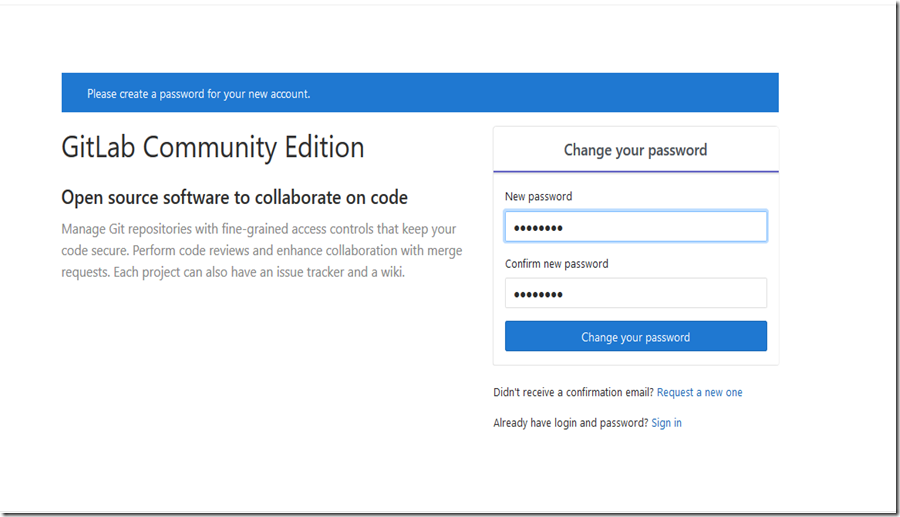
(1)设置密码
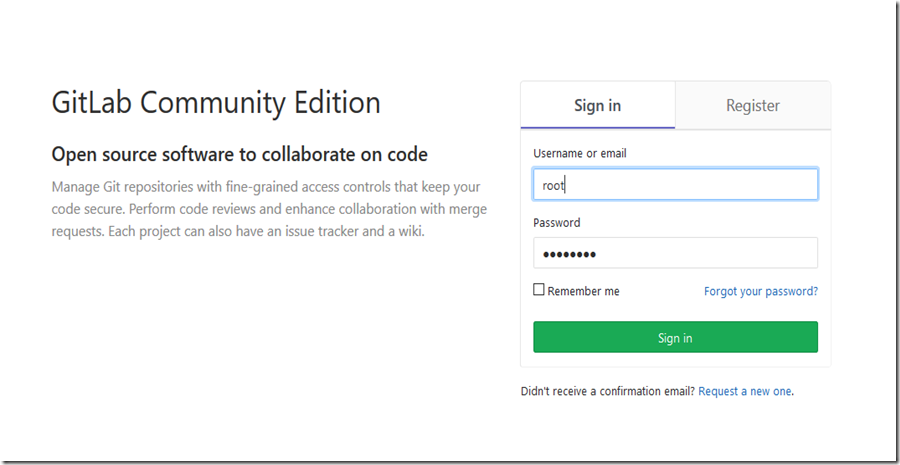
(2)进行登陆,默认的用户名是root.
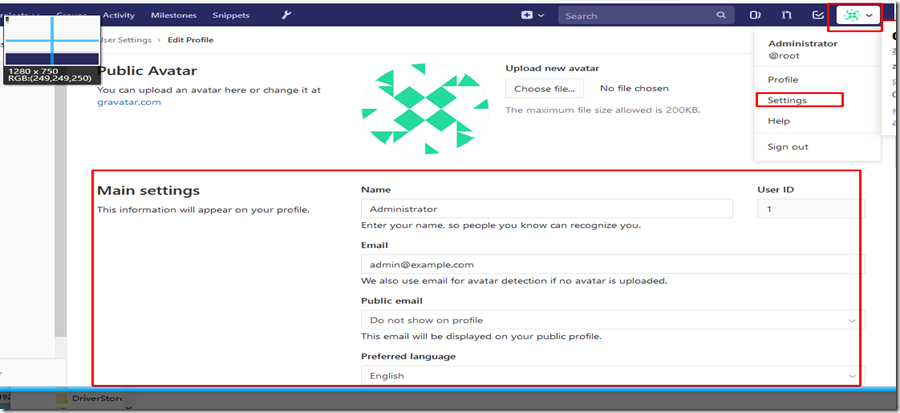
(3) 点击如下图所示,更改个人信息。
Gitlab在centos7上手工安装的更多相关文章
- Gitlab在Centos7上的安装
一 官网说明 安装步骤:https://about.gitlab.com/install/#centos-7 安装说明:本文只是用来给微服务当配置中心,只是较浅的记录一下安装步骤,后面会详细讲解及在d ...
- GitLab在centos7上安装和使用
git的优点 git是分布式的,svn不是 git分布式本地就可以用,可以随便保存各种历史痕迹,不用担心污染服务器,连不上服务器也能提交代码.查看log. GIT分支和SVN的分支不同 分支在SVN中 ...
- gitlab在centos7.3上搭建
gitlab在centos7.3上搭建 最近接到gitlab+jenkins的任务,由于以前只接触过GitHub,并只是简单的使用,这里简单记录gitlab与jenkins搭建的 环境: centos ...
- 在centos7上安装Jenkins
在centos7上安装Jenkins 安装 添加yum repos,然后安装 sudo wget -O /etc/yum.repos.d/jenkins.repo http://pkg.jenkins ...
- 在 CentOS7 上安装 zookeeper-3.4.9 服务
在 CentOS7 上安装 zookeeper-3.4.9 服务 1.创建 /usr/local/services/zookeeper 文件夹: mkdir -p /usr/local/service ...
- 在 CentOS7 上部署 MySQL 主从
在 CentOS7 上部署 MySQL 主从 通过 SecureCRT 连接至 MySQL 主服务器: 找到 my.cnf 文件所在的目录: mysql --help | grep my.cnf 一般 ...
- 在 CentOS7 上部署 zookeeper 服务
在 CentOS7 上部署 zookeeper 服务 1 用 SecureCRT 或 XShell 等 Linux 客户端工具连接至 CentOS7 服务器: 2 进入到 /usr/local/too ...
- 在 CentOS7 上安装 MongoDB
在 CentOS7 上安装 MongoDB 1 通过 SecureCRT 连接至 CentOS7 服务器: 2 进入到 /usr/local/ 目录: cd /usr/local 3 在当前目录下创建 ...
- 在 CentOS7 上安装 MySQL5.7
在 CentOS7 上安装 MySQL5.7 1 通过 SecureCRT 连接到阿里云 CentOS7 服务器: 2 进入到目录 /usr/local/ 中: cd /usr/local/ 3 创建 ...
随机推荐
- @Springboot搭建项目controller层接收json格式的对象失败
今天在使用swagger2测试的时候出错 1.@requestBody注解常用来处理content-type不是默认的application/x-www-form-urlcoded编码的内容,比如说: ...
- AndroidManifest.xml 权限 中英对照表
声明: 1.本文转载自:http://www.52pojie.cn/thread-304613-1-1.html 2.如有转载请复制上面连接声明,尊重原创 常用权限对照表 android.permis ...
- vim,删除所有
vim 删除所有内容:方法1: 按ggdG方法2: :%d
- discuz安装小云app
小云app登录注册: https://oauth.apps.xiaoyun.com/auth/login.do?authentication_error=1 from:http://lusongson ...
- vue 和react
React 和 Vue 有许多相似之处,它们都有: 使用 Virtual DOM 提供了响应式 (Reactive) 和组件化 (Composable) 的视图组件. 将注意力集中保持在核心库,而将其 ...
- 修改tomcat的Response Hearder 头中的Server信息
如图: Server: Apache-Coyote/1.1 这个信息给入侵者提供了一定的指示作用.为了安全起见,要求更改这个信息.那么我们就来修改一下试试,非常简单,只要在Connector中添加se ...
- JAVA多线程提高一:传统线程技术&传统定时器Timer
前面我们已经对多线程的基础知识有了一定的了解,那么接下来我们将要对多线程进一步深入的学习:但在学习之前我们还是要对传统的技术进行一次回顾,本章我们回顾的则是:传统线程技术和传统的定时器实现. 一.传统 ...
- [linux]codeblocks开发mysql配置
1.在安装好mysql后,可以应该安装必要的库文件 $sudo apt-get install libmysqlclient-dev 2.将codeblocks与mysql的库文件连接起来 在code ...
- 【BZOJ】2049: [Sdoi2008]Cave 洞穴勘测 LCT
[题意]给定n个点和m个操作,每次操作:1.连接2个点.2.断开2个点.3.查询2个点是否连通.m<=2*10^5. [算法]Link-Cut Tree [题解]LCT模板题,Link,Cut, ...
- oozie与mapreduce简单案例
准备工作 拷贝原来的模板 mkdir oozie-apps cd oozie-apps/ cp -r ../examples/apps/mar-reduce . mv map-reduce mr-w ...