
QtGui.QProgressBar
A progress bar is a widget that is used when we process lengthy tasks. It is animated so that the user knows that the task is progressing. The QtGui.QProgressBar widget provides a horizontal or vertical progress bar in PyQt4 toolkit. The programmer can set the minimum and maximum value for the progress bar. The default values are 0 and 99.
#!/usr/bin/python

# -*- coding: utf-8 -*-

"""

ZetCode PyQt4 tutorial

This example shows a QtGui.QProgressBar widget.

author: Jan Bodnar

website: zetcode.com

last edited: September 2011

"""

import sys

from PyQt4 import QtGui, QtCore

class Example(QtGui.QWidget):

    def __init__(self):

        super(Example, self).__init__()

        self.initUI()

    def initUI(self):

        self.pbar = QtGui.QProgressBar(self)

        self.pbar.setGeometry(30, 40, 200, 25)

        self.btn = QtGui.QPushButton('Start', self)

        self.btn.move(40, 80)

        self.btn.clicked.connect(self.doAction)

        self.timer = QtCore.QBasicTimer()

        self.step = 0

        self.setGeometry(300, 300, 280, 170)

        self.setWindowTitle('QtGui.QProgressBar')

        self.show()

    def timerEvent(self, e):

        if self.step >= 100:

            self.timer.stop()

            self.btn.setText('Finished')

            return

        self.step = self.step + 1

        self.pbar.setValue(self.step)

    def doAction(self):

        if self.timer.isActive():

            self.timer.stop()

            self.btn.setText('Start')

        else:

            self.timer.start(100, self)

            self.btn.setText('Stop')

def main():

    app = QtGui.QApplication(sys.argv)

    ex = Example()

    sys.exit(app.exec_())

if __name__ == '__main__':

    main()
In our example we have a horizontal progress bar and a push button. The push button starts and stops the progress bar.
self.pbar = QtGui.QProgressBar(self)
This is a QtGui.QProgressBar constructor.
self.timer = QtCore.QBasicTimer()
To activate the progress bar, we use a timer object.
self.timer.start(100, self)
To launch a timer event, we call its start() method. This method has two parameters: the timeout and the object which will receive the events.
def timerEvent(self, e):

    if self.step >= 100:

        self.timer.stop()

        self.btn.setText('Finished')

        return

    self.step = self.step + 1

    self.pbar.setValue(self.step)
Each QtCore.QObject and its descendants have a timerEvent() event handler. In order to react to timer events, we reimplement the event handler.
def doAction(self):

    if self.timer.isActive():

        self.timer.stop()

        self.btn.setText('Start')

    else:

        self.timer.start(100, self)

        self.btn.setText('Stop')
Inside the doAction() method, we start and stop the timer.
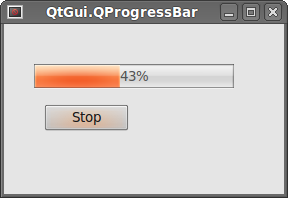 Figure: QtGui.QProgressBar
QtGui.QProgressBar的更多相关文章
- PyQt4进度条QProgressBar
当我们在处理一个好事较长的任务时,可能就会用到进度条部件.因为使用进度条可以形象告诉用户当前的人物正在进行中.PyQt4工具包提供了水平和垂直两种类型的进度条部件.我们可以设置进度条的最大和最小值,默 ...
- Pyqt Smtplib实现Qthread多线程发送邮件
一. smtplib 的介绍 smtplib.SMTP([host[, port[, local_hostname[, timeout]]]]) SMTP类构造函数,表示与SMTP服务器之间的连接 ...
- pyqt4_应用例子(计算器,对话框,进度条,日历等等)
sklearn实战-乳腺癌细胞数据挖掘(博客主亲自录制视频教程) https://study.163.com/course/introduction.htm?courseId=1005269003&a ...
- ZetCode PyQt4 tutorial widgets I
#!/usr/bin/python # -*- coding: utf-8 -*- """ ZetCode PyQt4 tutorial In this example, ...
- qt4.8转qt5.4
1.头文件包含 #include <QtGui/QProgressBar> #include <QtGui/QProgressDialog> #include ...
- PYQT4 Python GUI 编写与 打包.exe程序
工作中需要开发一个小工具,简单的UI界面可以很好的提高工具的实用性,由此开启了我的第一次GUI开发之旅,下面将自己学习的心得记录一下,也做为学习笔记吧!!! 参考:http://www.qaulau. ...
- PyQt4 进度条和日历 代码
# -*- coding: utf-8 -*- """ ------------------------------------------------- File Na ...
- 读Pyqt4教程,带你入门Pyqt4 _007
QSlider 滑块是由一个简单的滑柄的窗口组件.该滑柄可以前后拖动,通过这种方式我们可以为特定任务选择值.有时候使用滑块比简单提供数值或使用微调框(spin box)更自然. QLabel 显示文字 ...
- 【PyQt5-Qt Designer】QProgressBar() 进度条
QProgressBar() 进度条 QProgressBar简介 QProgressBar小部件提供了一个水平或垂直的进度条. 进度条用于向用户指示操作的进度,并向他们保证应用程序仍在运行. 进度条 ...
随机推荐
- luogu P2619 [国家集训队2]Tree I
题目链接 luogu P2619 [国家集训队2]Tree I 题解 普通思路就不说了二分增量,生成树check 说一下坑点 二分时,若黑白边权有相同,因为权值相同优先选白边,若在最有增量时出现黑白等 ...
- 「SCOI2016」萌萌哒
「SCOI2016」萌萌哒 题目描述 一个长度为 \(n\) 的大数,用 \(S_1S_2S_3 \ldots S_n\) 表示,其中 \(S_i\) 表示数的第 \(i\) 位,\(S_1\) 是数 ...
- 「TJOI 2018」游园会 Party
「TJOI 2018」游园会 Party 题目描述 小豆参加了 \(NOI\) 的游园会,会场上每完成一个项目就会获得一个奖章,奖章只会是 \(N, O, I\) 的字样. 在会场上他收集到了 \(K ...
- [HNOI2008]玩具装箱TOY --- DP + 斜率优化 / 决策单调性
[HNOI2008]玩具装箱TOY 题目描述: P教授要去看奥运,但是他舍不下他的玩具,于是他决定把所有的玩具运到北京. 他使用自己的压缩器进行压缩,其可以将任意物品变成一堆,再放到一种特殊的一维容器 ...
- 51nod1675 序列变换
link 题意: 给定长为n的序列a,b,下标从1开始,问有多少对x,y满足gcd(x,y)=1且$a_{b_x}=b_{a_y}$? $n\leq 10^5.$ 题解: $a_{b_x}$和$b_{ ...
- 20162325 金立清 S2 W8 C17
20162325 2017-2018-2 <程序设计与数据结构>第8周学习总结 教材学习内容概要 二叉查找树是一棵二叉树,对于其中的每个结点,左子树上的元素小于父结点的值,而右子树上的元素 ...
- Service里面启动Activity和Alertdialog
启动Activity源码:(记得要加上Intent.FLAG_ACTIVITY_NEW_TASK) Intent intent = new Intent(); intent.setFlags(Inte ...
- CDOJ 842 天下归晋 树状数组
天下归晋 Time Limit: 1 Sec Memory Limit: 256 MB 题目连接 http://acm.uestc.edu.cn/#/problem/show/842 Descrip ...
- DropdownList 赋初始值问题
网上查了这样的代码 虽然是可以用.但是会点击多次会出现”“ dropdownList不能选多个值的问题“ private void initdroplistitemlirun(string c_Bus ...
- Linux下Shell命令的输出信息同时显示在屏幕和保存到日志文件中
#直接覆盖日志文件 ls -l | tee ./t.log #将输出内容附加到日志文件 ls -l | tee -a ./t.log 使用的是tee命令