
06 curl 操作elasticsearch的CRUD
中文文档:
https://www.elastic.co/guide/cn/elasticsearch/guide/current/getting-started.html
查看健康状态
curl -X GET 127.0.0.1:9200/_cat/health?v
查询当前es集群中所有的indices
curl -X GET 127.0.0.1:9200/_cat/indices?v
推荐使用Kibana进行DSL编写,有代码提示与纠正(提示给跟我一样的小白)
创建索引并配置:
number_of_shards为数据分片,默认值为5
number_of_replicas为数据备份数,如果只有一台机器,建议设置为0,避免索引一直处于yellow状态
注:该设置创建索引后无法修改(我记得是这样,有错望纠正)
PUT /index_name/_settings

{

    "number_of_shards": 3,

    "number_of_replicas": 0

}
定义字段的类型
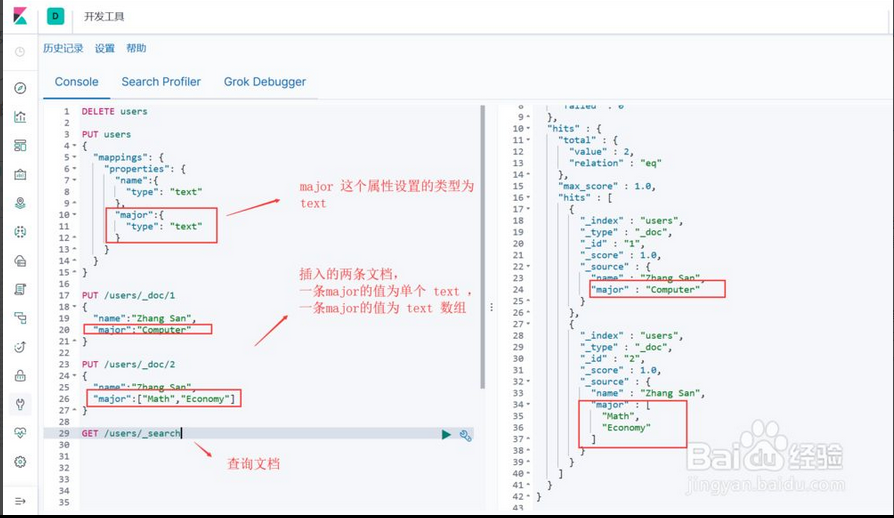
text:文本类型(会被es分词器进行分词)可以保存字符串也可以保存数组

keyword:文本类型(不被分词) 可以保存字符串也可以保存数组

scaled_float:浮点型数据类型,scaling_factor用于精度限制

date:时间类型,可用format约束时间格式(epoch_millis为时间戳)
例子:
查看mapping
PUT /index_name/_doc/_mapping?pretty
{

    "_doc":{

        "properties":{

            "my_id":{

                "type":"long"

            },

            "content":{

                "type":"text"

            },

            "money":{

                "type":"scaled_float",

                "scaling_factor":100

            },

            "customer":{

                "type":"keyword"

            },

            "sync":{

                "type":"boolean"

            },

            "create_time":{

                "type":"date",

                "format":"yyyy-MM-dd HH:mm:ss||yyyy-MM-dd||epoch_millis"

            }

        }

    }

}
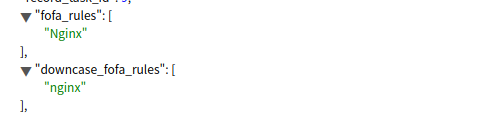
保存数组
text 和 keywor 类型可以保存字符串也可以保存数组
"properties": {

  "fofa_rules": {

  "type": "keyword"

}
创建mapping
curl -H "Content-Type:application/json" -X PUT 127.0.0.1:9200/user1 -d '

{

    "mappings":{

        "person":{

            "properties":{

                "address":{

                    "type":"text",

                    "fields":{

                        "keyword":{

                            "ignore_above":2048,

                            "type":"keyword"

                        }

                    }

                },

                "name":{

                    "type":"text",

                    "fields":{

                        "keyword":{

                            "ignore_above":256,

                            "type":"keyword"

                        }

                    }

                }

            }

        }

    }

}' | jq .
存字符串
修改值为字符串
curl -H "Content-Type:application/json" -X POST 127.0.0.1:9200/user/person/1/_update -d'

{

  "doc":{

    "name":"lisi",

    "address":"北京"

  }

}'
curl -X GET 127.0.0.1:9200/user/person/_search?q=_id:1 | jq .
查询结果:
{

  "took": 1,

  "timed_out": false,

  "_shards": {

    "total": 5,

    "successful": 5,

    "skipped": 0,

    "failed": 0

  },

  "hits": {

    "total": 1,

    "max_score": 1,

    "hits": [

      {

        "_index": "user",

        "_type": "person",

        "_id": "1",

        "_score": 1,

        "_source": {

          "name": "lisi",

          "age": 9,

          "married": false,

          "address": "北京"

        }

      }

    ]

  }

}
存数组
修改值为数组
curl -H "Content-Type:application/json" -X POST 127.0.0.1:9200/user/person/1/_update -d'

{

  "doc":{

    "name":["lisi","wangwu"],

    "address":["安徽","北京"]

  }

}'
curl -X GET 127.0.0.1:9200/user/person/_search?q=_id:1 | jq .
查询结果
{

  "took": 10,

  "timed_out": false,

  "_shards": {

    "total": 5,

    "successful": 5,

    "skipped": 0,

    "failed": 0

  },

  "hits": {

    "total": 1,

    "max_score": 1,

    "hits": [

      {

        "_index": "user",

        "_type": "person",

        "_id": "1",

        "_score": 1,

        "_source": {

          "name": [

            "lisi",

            "wangwu"

          ],

          "age": 9,

          "married": false,

          "address": [

            "安徽",

            "北京"

          ]

        }

      }

    ]

  }

}
创建索引
curl -X PUT 127.0.0.1:9200/www
删除索引
curl -X DELETE 127.0.0.1:9200/www
获取mapping
curl -X GET 127.0.0.1:9200/user/_mapping?pretty
返回参数
{

  "user" : {

    "mappings" : {

      "person" : {

        "properties" : {

          "age" : {

            "type" : "long"

          },

          "married" : {

            "type" : "boolean"

          },

          "name" : {

            "type" : "text",

            "fields" : {

              "keyword" : {

                "type" : "keyword",

                "ignore_above" : 256

              }

            }

          },

          "query" : {

            "properties" : {

              "match" : {

                "properties" : {

                  "name" : {

                    "type" : "text",

                    "fields" : {

                      "keyword" : {

                        "type" : "keyword",

                        "ignore_above" : 256

                      }

                    }

                  }

                }

              }

            }

          }

        }

      }

    }

  }

}
创建mapping
注意:
- 这里只要上面获取mapping返回值里的mapping值
- 要创建的索引必需不存在
curl -H "Content-Type:application/json" -X PUT 127.0.0.1:9200/user -d '

{

    "mappings":{

        "person":{

            "properties":{

                "age":{

                    "type":"long"

                },

                "married":{

                    "type":"boolean"

                },

                "name":{

                    "type":"text",

                    "fields":{

                        "keyword":{

                            "type":"keyword",

                            "ignore_above":256

                        }

                    }

                }

            }

        }

    }

}' | jq .
添加字段
给user引索的person类型添加字段
curl -H "Content-Type:application/json" -X PUT 127.0.0.1:9200/user/_mapping/person -d '

{

    "properties":{

        "created_at":{

            "format":"YYYY-MM-dd HH:mm:ss",

            "type":"date"

        },

        "it":{

            "type":"boolean"

        },

        "is_scan":{

            "type":"long"

        },

        "address":{

            "type":"text",

            "fields":{

                "keyword":{

                    "ignore_above":256,

                    "type":"keyword"

                }

            }

        }

    }

}'
设置默认值
参考下面文档
https://blog.csdn.net/huangzhen__/article/details/104769018?utm_medium=distribute.pc_aggpage_search_result.none-task-blog-2aggregatepagefirst_rank_ecpm_v1~rank_v31_ecpm-1-104769018.pc_agg_new_rank&utm_term=Mapping%E8%AE%BE%E7%BD%AE%E9%BB%98%E8%AE%A4%E5%80%BC&spm=1000.2123.3001.4430
插入记录
post的方式,会自动生成id
curl -H "Content-Type:application/json" -X POST 127.0.0.1:9200/user/person -d '

{

	"name": "dsb",

	"age": 9000,

	"married": true

}'
输出:
{

    "_index":"user",

    "_type":"person",

    "_id":"55GiOH4BfTVguARX3JmZ",

    "_version":1,

    "result":"created",

    "_shards":{

        "total":2,

        "successful":1,

        "failed":0

    },

    "_seq_no":0,

    "_primary_term":1

}
也可以使用PUT方法,但是需要传入id
curl -H "Content-Type:application/json" -X PUT 127.0.0.1:9200/user/person/4 -d '

{

	"name": "sb",

	"age": 9,

	"married": false

}'
检索
Elasticsearch的检索语法比较特别,使用GET方法携带JSON格式的查询条件。
以下带 | jq .需要安装jq这是格式化json显示
全检索:
curl -X GET 127.0.0.1:9200/user/person/_search | jq .
输出结果:
{

  "took": 1,

  "timed_out": false,

  "_shards": {

    "total": 5,

    "successful": 5,

    "skipped": 0,

    "failed": 0

  },

  "hits": {

    "total": 2,

    "max_score": 1,

    "hits": [

      {

        "_index": "user",

        "_type": "person",

        "_id": "55GiOH4BfTVguARX3JmZ",

        "_score": 1,

        "_source": {

          "name": "dsb",

          "age": 9000,

          "married": true

        }

      },

      {

        "_index": "user",

        "_type": "person",

        "_id": "4",

        "_score": 1,

        "_source": {

          "name": "sb",

          "age": 9,

          "married": false

        }

      }

    ]

  }

}
按条件检索:
get查询
curl -X GET 127.0.0.1:9200/user/person/1 | jq .
查询结果:
{

  "_index": "user",

  "_type": "person",

  "_id": "1",

  "_version": 4,

  "found": true,

  "_source": {

    "name": "lisi",

    "age": 9,

    "married": false,

    "address": "北京"

  }

}
查name=sb的记录
curl -X GET 127.0.0.1:9200/user/person/_search?q=name:sb | jq .
返回参数:
{

  "took": 2,

  "timed_out": false,

  "_shards": {

    "total": 5,

    "successful": 5,

    "skipped": 0,

    "failed": 0

  },

  "hits": {

    "total": 1,

    "max_score": 0.2876821,

    "hits": [

      {

        "_index": "user",

        "_type": "person",

        "_id": "1",

        "_score": 0.2876821,

        "_source": {

          "name": "sb",

          "age": 9,

          "married": false

        }

      }

    ]

  }

}
查age=9的记录
curl -X GET 127.0.0.1:9200/user/person/_search?q=age:9 | jq .
post查询
curl -H "Content-Type:application/json" -X POST 127.0.0.1:9200/user/person/_search -d '

{

  "query": {

    "bool": {

      "must": [

        {

          "match": {

            "name": "sb"

          }

        }

      ]

    }

  }

}' | jq .
输出结果:
{

  "took": 4,

  "timed_out": false,

  "_shards": {

    "total": 5,

    "successful": 5,

    "skipped": 0,

    "failed": 0

  },

  "hits": {

    "total": 1,

    "max_score": 0.6931472,

    "hits": [

      {

        "_index": "user",

        "_type": "person",

        "_id": "4",

        "_score": 0.6931472,

        "_source": {

          "name": "sb",

          "age": 9,

          "married": false

        }

      }

    ]

  }

}
更多条件
curl -H "Content-Type:application/json" -X POST 127.0.0.1:9200/user/person/_search -d '

{

  "query": {

    "bool": {

      "must": [

        {

          "range": {

            "age": {

              "gt": "10"

            }

          }

        }

      ]

    }

  },

  "from": 0,

  "size": 10,

  "sort": {

    "age": {

      "order": "desc"

    }

  },

  "aggs": {}

}' | jq .
返回结果:
{

  "took": 1,

  "timed_out": false,

  "_shards": {

    "total": 5,

    "successful": 5,

    "skipped": 0,

    "failed": 0

  },

  "hits": {

    "total": 2,

    "max_score": null,

    "hits": [

      {

        "_index": "user",

        "_type": "person",

        "_id": "55GiOH4BfTVguARX3JmZ",

        "_score": null,

        "_source": {

          "name": "dsb",

          "age": 9000,

          "married": true

        },

        "sort": [

          9000

        ]

      },

      {

        "_index": "user",

        "_type": "person",

        "_id": "0ZHGOH4BfTVguARXXZoF",

        "_score": null,

        "_source": {

          "name": "sbs",

          "age": 6000,

          "married": true

        },

        "sort": [

          6000

        ]

      }

    ]

  }

}
修改
指定id修改
curl -H "Content-Type:application/json" -X POST 127.0.0.1:9200/user/person/4/_update -d'

{

  "doc":{

    "name":"11"

  }

}'
返回结果:
{

    "_index":"user",

    "_type":"person",

    "_id":"4",

    "_version":2,

    "result":"updated",

    "_shards":{

        "total":2,

        "successful":1,

        "failed":0

    },

    "_seq_no":2,

    "_primary_term":1

}
按条件修改
把所有age>1的所有记录的married修改为true
curl -H "Content-Type:application/json" -X POST 127.0.0.1:9200/user/person/_update_by_query -d'

{

    "script":{

        "source":"ctx._source.married=params.married",

        "params":{

            "married":true

        }

    },

    "query":{

        "bool":{

            "must":[

                {

                    "range":{

                        "age":{

                            "gt":"1"

                        }

                    }

                }

            ]

        }

    }

}'
把所有age>1的所有记录的age修改为12
curl -H "Content-Type:application/json" -X POST 127.0.0.1:9200/user/person/_update_by_query -d'

{

    "script":{

        "source":"ctx._source.age=12"

    },

    "query":{

        "bool":{

            "must":[

                {

                    "range":{

                        "age":{

                            "gt":"1"

                        }

                    }

                }

            ]

        }

    }

}'
把所有name=sbs的所有记录的age修改为38
{

    "script":{

        "source":"ctx._source.age=38"

    },

    "query":{

        "bool":{

            "must":[

                {

                    "match":{

                        "name":"sbs"

                    }

                }

            ]

        }

    }

}
删除
删除指定id的记录
curl -H "Content-Type:application/json" -X DELETE 127.0.0.1:9200/user/person/4
按条件删除
curl -H "Content-Type:application/json" -X POST 127.0.0.1:9200/user/person/_delete_by_query -d'

{

    "query":{

        "bool":{

            "must":[

                {

                    "match":{

                        "name":"sb"

                    }

                }

            ]

        }

    }

}'
删除所有数据
# user和product索引里类型为_doc的删除所有数据

curl -H "Content-Type:application/json" -X POST 127.0.0.1:9200/user,product/_doc/_delete_by_query -d'

{

    "query":{

        "bool":{

            "must":[

                {

                    "match_all":{

                    }

                }

            ]

        }

    }

}'
06 curl 操作elasticsearch的CRUD的更多相关文章
- Curl操作Elasticsearch的常用方法
Elasticsearch对于文档操作,提供了以下几种API,本文就说明如何使用curl方式来调用这些API. API种类 单文档操作API 1.* Index API 索引文档 * 为文档创建索引 ...
- elasticsearch(5) curl 操作elasticsearch
创建索引之前可以对索引做初始化操作, 比如指定shards数量以及replicas的数量. library为索引的名称 CURL -XPUT 'http://192.168.1.10:9200 ...
- window下使用curl操作elasticsearch
1.下载curlzip,https://curl.haxx.se/download.html; 2.解压,在bin文件夹中找到curl.exe,右键“以管理员身份运行”,cmd e: 换盘符:出现E: ...
- 使用Sense操作ElasticSearch CRUD
安装完成之后,我们该开始学习关于ElasticSearch最基本的CURD操作了. ElasticSearch作为一个基于Lucene的搜索服务器.它提供了一个分布式多用户能力的全文搜索引擎,其接口也 ...
- ElasticSearch第二步-CRUD之Sense
ElasticSearch系列学习 ElasticSearch第一步-环境配置 ElasticSearch第二步-CRUD之Sense ElasticSearch第三步-中文分词 ElasticSea ...
- 使用curl命令操作elasticsearch
使用curl命令操作elasticsearch 大岩不灿 发表于 2015年4月25日 浏览 7,426 次 第一:_cat系列_cat系列提供了一系列查询elasticsearch集群状态的接口.你 ...
- 学习用Node.js和Elasticsearch构建搜索引擎(3):使用curl命令操作elasticsearch
使用Elasticsearch不免要提到curl工具,curl是利用URL语法在命令行方式下工作的开源文件传输工具.官网地址:https://curl.haxx.se/ 因为elasticsearch ...
- ElasticSearch之CURL操作(有空再去整理)
https://www.cnblogs.com/jing1617/p/8060421.html ElasticSearch之CURL操作 CURL的操作 curl是利用URL语法在命令行方式下工 ...
- Go操作Elasticsearch
文章转自 Elasticsearch Elasticsearch 下载 https://www.elastic.co/cn/start 运行 解压后cd到解压目录 ./bin/elasticsea ...
- GO学习-(31) Go语言操作Elasticsearch
Elasticsearch 本文简单介绍了ES.Kibana和Go语言操作ES. Elasticsearch 介绍 Elasticsearch(ES)是一个基于Lucene构建的开源.分布式.REST ...
随机推荐
- 算法学习笔记【6】| KMP 算法
KMP(Knuth-Morris-Pratt字符串查找算法) KMP 算法是可以快速在文本串 s 中找到模式串 a 的算法. Part 1:幼稚的算法 首先思考我们在暴力匹配模式串时的思路: < ...
- 才储性格测试(INTJ 专家型——追求能力与独立)
INTJ 专家型--追求能力与独立 一.你的荣格理论图形 二.基本描述 才储分析:您的性格类型倾向为" INTJ "(内向 直觉 思维 判断 倾向度: I60 N56 T74 J5 ...
- 12 CSS 的float属性
12 CSS 的float属性 流动布局 流动模型(Flow),即文档流,浏览器打开HTML网页时,从上往下,从左往右,逐一加载. 在正常情况下,HTML元素都会根据文档流来分布网页内容的. 文档流有 ...
- JDK9的新特性:JPMS模块化
目录 简介 JDK9中模块的实现 JDK中的module 创建自己的module 深入理解module-info transitive static exports to open pacakge p ...
- [P4551] 最长异或路径 题解
过程 手写利用DFS求出每个点到根节点的异或距离 不难得出 xor_dis[x][y]=xor_dis[0][x]^xor_dis[0][y] 于是树上异或问题转换成了Trie上异或问题. 代码 直接 ...
- MySQL 数据库操作指南:LIMIT,OFFSET 和 JOIN 的使用
限制结果 您可以通过使用"LIMIT"语句来限制查询返回的记录数量.以下是一个示例,获取您自己的Python服务器中"customers"表中的前5条记录: i ...
- C#中超链接方法
linkLabel控件:双击事件打开网页:System.Diagnostics.Process.Start("http://www.baidu.com"); 截图:
- 前端vue监听activeMQ消息后端推送消息--实战
需求 : 工厂员工完成某道工序后,需要将消息推送给 检查人员 也可以使用 WebSockets ,前端更容易实现 思路: 使用activeMQ推送消息,前端实时接收消息 实现 : 1.基于spring ...
- mask2former出来的灰度图转切割轮廓后的二值图
切割后的灰度图 转成二值图代码如下 点击查看代码 # This is a sample Python script. import cv2 import numpy as np # Press Shi ...
- HarmonyOS传感器开发指南
HarmonyOS系统传感器是应用访问底层硬件传感器的一种设备抽象概念.开发者根据传感器提供的Sensor接口,可以查询设备上的传感器,订阅传感器数据,并根据传感器数据定制相应的算法开发各类应用, ...