
Spring_基于配置文件的方式配置AOP
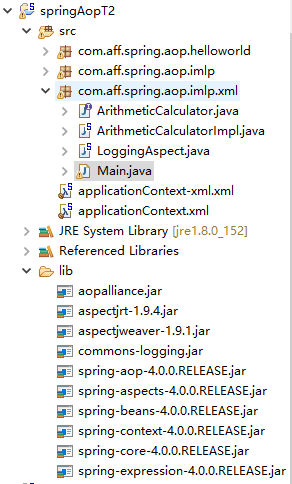
applicationContext-xml.xml
<?xml version="1.0" encoding="UTF-8"?>

<beans xmlns="http://www.springframework.org/schema/beans"

    xmlns:xsi="http://www.w3.org/2001/XMLSchema-instance" xmlns:aop="http://www.springframework.org/schema/aop"

    xmlns:context="http://www.springframework.org/schema/context"

    xsi:schemaLocation="http://www.springframework.org/schema/beans http://www.springframework.org/schema/beans/spring-beans.xsd

        http://www.springframework.org/schema/aop http://www.springframework.org/schema/aop/spring-aop-4.0.xsd

        http://www.springframework.org/schema/context http://www.springframework.org/schema/context/spring-context-4.0.xsd">

    <!--配置bean -->

    <bean id="arithmeticCalculator" class="com.aff.spring.aop.imlp.xml.ArithmeticCalculatorImpl"></bean>

    <!--配置切面的bean -->

    <bean id="loggingAspect" class="com.aff.spring.aop.imlp.xml.LoggingAspect"></bean>

    <!-- 配置AOP -->

    <aop:config>

        <!-- 配置切点表达式 -->

        <aop:pointcut

            expression="execution(* com.aff.spring.aop.imlp.xml.ArithmeticCalculator.*(..))"

            id="pointcut" />

            <!-- 配置切面及通知 -->

            <aop:aspect ref="loggingAspect" order="2">

            <aop:before method="beforeMethod" pointcut-ref="pointcut"/>

            <aop:after method="afterMethod" pointcut-ref="pointcut"/>

            <aop:after-throwing method="afterThrowing" pointcut-ref="pointcut" throwing="e"/>

            <aop:after-returning method="afterReturning" pointcut-ref="pointcut" returning="result"/>

            <!--

            <aop:around method="aroundMethod" pointcut-ref="pointcut"/>

             -->

            </aop:aspect>

    </aop:config>

</beans>
LoggingAspect.java
package com.aff.spring.aop.imlp.xml;

import java.util.Arrays;

import java.util.List;

import org.aspectj.lang.JoinPoint;

import org.aspectj.lang.ProceedingJoinPoint;

//把这个类声明为切面,需要把这个类放到IOC容器中, 再声明为一个切面

public class LoggingAspect {

    /**

     * 定义一个方法, 用于声明切入点表达式,一般,该方法中不再需要添加其他代码

     *

     * @Pointut 声明切点表达式

     *    后面的其他通知 直接使用方法名来引用当前的切点表达式

     */

    public void  declareJointPointExpression(){

    }

    //声明该方法是一个前置通知, 在目标方法开始之前执行

    public void  beforeMethod(JoinPoint joinPoint){

        String methodName =  joinPoint.getSignature().getName();

        List<Object> args =  Arrays.asList(joinPoint.getArgs());

        System.out.println("The method " +methodName+"begins  with"+args);

    }

    //后置通知:在目标方法执行后(无论 是否发生异常) ,执行的通知

    //在后置通知中还不能访问目标方法执行的结果

    //第一个*:任意返回值类型;   第二个*:包下的任意类;  第三个*:任意方法; .. : 任意参数

    public void afterMethod(JoinPoint joinPoint){

        String methodName =  joinPoint.getSignature().getName();

        System.out.println("The method " +methodName+"ends ");

    }

    /**

    *  返回通知

     * 在方法正常结束后执行的代码

     * 返回通知是可以访问到方法的返回值

     * @param joinPoint

     */

    public  void  afterReturning(JoinPoint joinPoint,Object result ){

        String methodName =  joinPoint.getSignature().getName();

        System.out.println("The method " +methodName+"ends with "+result);

    }

    /**

     * 异常通知

     * 在目标方法出现异常时 会执行的代码

     * 可以访问到异常对象,且可以指定出现特定异常时在执行通知代码

     * @param joinPoint

     * @param ex

     */

    public void  afterThrowing(JoinPoint joinPoint,Exception e){

        String methodName =  joinPoint.getSignature().getName();

        System.out.println("The method " +methodName+"ocurs  exception :"+e);

    }

    /**

     * 转绕通知需要携带 ProceedingJoinPoint 类型的参数

     * 环绕通知类似于动态代理的全过程: ProceedingJoinPoint 类型的参数可以决定是否执行目标方法

     * 且环绕通知必须有返回值

     * @param pjd

     */

    public  Object  aroundMethod(ProceedingJoinPoint pjd){

        Object result =null;

        String methodName=   pjd.getSignature().getName();

        //执行目标方法

        try {

            //前置通知

            System.out.println("The method " +methodName+"begins  with"+Arrays.asList(pjd.getArgs()));

            //执行目标方法

            result = pjd.proceed();

            //返回通知

            System.out.println("The method "+methodName +"end with"+result);

        } catch (Throwable e) {

            //异常通知

            System.out.println("The method"+methodName+" ocurs  exception :"+e);

            throw new RuntimeException(e);

        }

        System.out.println("The method "+methodName +"ends");

        return result;

    }

}
Main
package com.aff.spring.aop.imlp.xml;

import org.springframework.context.ApplicationContext;

import org.springframework.context.support.ClassPathXmlApplicationContext;

public class Main {

    public static void main(String[] args) {

        ApplicationContext ctx = new ClassPathXmlApplicationContext("applicationContext-xml.xml");

        ArithmeticCalculator arithmeticCalculator = ctx.getBean(ArithmeticCalculator.class);

        int result = arithmeticCalculator.add(2, 3);

        System.out.println("result:"+result);

        int result2 = arithmeticCalculator.div(2, 1);

        System.out.println("result2:"+result2);

    }

}
运行如下
The method addbegins  with[2, 3]

The method addend with5

The method addends

result:5

The method divbegins  with[2, 1]

The method divend with2

The method divends

result2:2
目录
Spring_基于配置文件的方式配置AOP的更多相关文章
- 基于配置文件的方式配置AOP
之前说的都是通过注释的方式配置,接下来说说如何使用配置文件配置AOP 还是原来的代码,去掉所有注释,接下来配置最基本的几个bean. 然后使用<aop:config>标签进行配置,然后配切 ...
- 22Spring基于配置文件的方式配置AOP
直接看代码: package com.cn.spring.aop.impl; //加减乘除的接口类 public interface ArithmeticCalculator { int add(in ...
- spring-AOP框架(基于配置文件的方式配置AOP)
.xml: ref-指向,order-指定优先级
- Spring(二十):Spring AOP(四):基于配置文件的方式来配置 AOP
基于配置文件的方式来配置 AOP 前边三个章节<Spring(十七):Spring AOP(一):简介>.<Spring(十八):Spring AOP(二):通知(前置.后置.返回. ...
- Spring4学习笔记-AOP(基于配置文件的方式)
原创作品,允许转载,转载时请务必以超链接形式标明文章 原始出处 .作者信息和本声明.否则将追究法律责任.http://shamrock.blog.51cto.com/2079212/1557743 引 ...
- [原创]java WEB学习笔记108:Spring学习---基于配置文件的形式实现AOP
本博客的目的:①总结自己的学习过程,相当于学习笔记 ②将自己的经验分享给大家,相互学习,互相交流,不可商用 内容难免出现问题,欢迎指正,交流,探讨,可以留言,也可以通过以下方式联系. 本人互联网技术爱 ...
- 详解AOP——用配置文件的方式实现AOP
AOP概念 1.AOP:面向切面(方面)编程,扩展功能不修改源代码实现 AOP原理 AOP采用横向抽取机制,取代了传统纵向继承体系重复性代码 传统的纵向抽取机制: 横向抽取机制: AOP操作术语 1. ...
- 使用Spring框架入门四:基于注解的方式的AOP的使用
一.简述 前面讲了基于XML配置的方式实现AOP,本文简单讲讲基于注解的方式实现. 基于注解的方式实现前,要先在xml配置中通过配置aop:aspectj-autoproxy来启用注解方式注入. &l ...
- xml的方式配置AOP:Aspect Oriented Programming
在某些类中, 什么时机, 做什么事情 切入点(point-cut): 在某些类中(Class<?>[] itfc = new Class<?>[] { IStudentServ ...
随机推荐
- Spring IOC的核心机制:实例化与注入
上文我们介绍了IOC和DI,IOC是一种设计模式,DI是它的具体实现,有很多的框架都有这样的实现,本文主要以spring框架的实现,来看具体的注入实现逻辑. spring是如何将对象加入容器的 spr ...
- python基础的一些题目
第一部分: 第二部分: 第三部分:
- GitHub 热点速览 Vol.18:刷 LeetCode 的正确姿势
作者:HelloGitHub-小鱼干 摘要:找对路子,事半功倍,正如本周 GitHub Trending #刷 LeetCode# 主题想表达的那般,正确的学习姿势方能让人走得更远,走进大厂
- tp5中使用ueditor编辑器保存文本到数据库后回显后显示html标签问题解决办法
在编辑器ueditor中获取文本,保存到到数据库后为 当在数据库中提取出来,在显示回ueditor编辑器时候,出了问题, html标签都显示出来了 百度了下别人的解决办法是,使用官方提供的api 可是 ...
- Mysql常用sql语句(九)- like 模糊查询
测试必备的Mysql常用sql语句,每天敲一篇,每次敲三遍,每月一循环,全都可记住!! https://www.cnblogs.com/poloyy/category/1683347.html 前言 ...
- HDU 2000 (水)
题目链接:http://acm.hdu.edu.cn/showproblem.php?pid=2000 题目大意:仨字符从小到大排序 解题思路: 很水很水,需要注意的地方是如果用苦力(三个if)要注意 ...
- HBase 安装snappy压缩软件以及相关编码配置
HBase 安装snappy压缩软件以及相关编码配置 前言 在使用HBase过程中因为数据存储冗余.备份数等相关问题占用过多的磁盘空间,以及在入库过程中为了增加吞吐量所以会采用相关的压缩算法来压缩 ...
- python pip下载设置
安装命名为 pip install -i 网址 所需要安装的库名例如:pip install -i https://pypi.tuna.tsinghua.edu.cn/simple requests ...
- angular controller的使用
在angular.js最常用的模块就是控制器了,通常我们会这样使用: var myAppModule = angular.module('myApp', []); myAppModule.cont ...
- 【图论算法】LCA最近公共祖先问题
LCA模板题https://www.luogu.com.cn/problem/P3379题意理解 对于有根树T的两个结点u.v,最近公共祖先LCA(u,v)表示一个结点x,满足x是u.v的祖先且x的深 ...