
CXF-JAX-WS开发(二)spring整合CXF-JAX-WS
一、服务端
1、目录结构
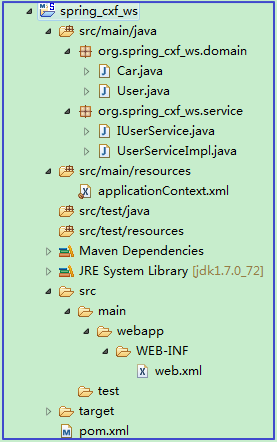
2、创建maven工程[Packaging:war]

3、引入依赖
 <dependencies>

     <!-- CXF(这里不需要引入cxf-rt-transports-http-jetty,使用tomcat启动) -->

     <dependency>

         <groupId>org.apache.cxf</groupId>

       <artifactId>cxf-rt-frontend-jaxws</artifactId>

       <version>3.0.1</version>

     </dependency>

     <!-- 日志 -->

     <dependency>

         <groupId>org.slf4j</groupId>

         <artifactId>slf4j-log4j12</artifactId>

         <version>1.7.12</version>

     </dependency>

     <!-- Spring开发 -->

     <dependency>

         <groupId>org.springframework</groupId>

       <artifactId>spring-context</artifactId>

       <version>4.1.7.RELEASE</version>

     </dependency>

     <dependency>

         <groupId>org.springframework</groupId>

         <artifactId>spring-web</artifactId>

         <version>4.1.7.RELEASE</version>

     </dependency>

     <!-- 基于spring测试开发 -->

     <!-- Spring与Junit整合 -->

     <dependency>

         <groupId>org.springframework</groupId>

       <artifactId>spring-test</artifactId>

       <version>4.1.7.RELEASE</version>

     </dependency>

     <dependency>

         <groupId>junit</groupId>

       <artifactId>junit</artifactId>

       <version>4.11</version>

     </dependency>

 </dependencies>
4、配置web.xml
 <?xml version="1.0" encoding="UTF-8"?>

 <web-app xmlns:xsi="http://www.w3.org/2001/XMLSchema-instance"

     xmlns="http://java.sun.com/xml/ns/javaee"

     xsi:schemaLocation="http://java.sun.com/xml/ns/javaee http://java.sun.com/xml/ns/javaee/web-app_2_5.xsd"

     id="WebApp_ID" version="2.5">

     <welcome-file-list>

         <welcome-file>index.html</welcome-file>

     </welcome-file-list>

     <!-- 引入spring配置文件 -->

     <context-param>

         <param-name>contextConfigLocation</param-name>

         <param-value>classpath:applicationContext.xml</param-value>

     </context-param>

     <!-- spring核心监听器 -->

     <listener>

         <listener-class>org.springframework.web.context.ContextLoaderListener</listener-class>

     </listener>

     <!-- 配置cxf基于web访问 -->

     <servlet>

         <servlet-name>CXFService</servlet-name>

         <servlet-class>org.apache.cxf.transport.servlet.CXFServlet</servlet-class>

         <load-on-startup>1</load-on-startup>

     </servlet>

     <servlet-mapping>

         <servlet-name>CXFService</servlet-name>

         <url-pattern>/services/*</url-pattern>

     </servlet-mapping>

 </web-app>
5、搭建服务
5.1、导入javaBean

5.1.1、domain
参考CXF-JAX-WS开发(一)入门案例,2.4.1、导入实体bean目录下的实体类Car.java和User.java
5.1.2、service
参考CXF-JAX-WS开发(一)入门案例,2.4.2、构建服务bean目录下的类IUserService.java和UserServiceImpl.java
5.2、创建spring配置文件applicationContext.xml
5.2.1、目录

5.2.2、配置
 <?xml version="1.0" encoding="UTF-8"?>

 <beans xmlns="http://www.springframework.org/schema/beans"

     xmlns:xsi="http://www.w3.org/2001/XMLSchema-instance" xmlns:jaxws="http://cxf.apache.org/jaxws"

     xsi:schemaLocation="

     http://www.springframework.org/schema/beans http://www.springframework.org/schema/beans/spring-beans.xsd

     http://cxf.apache.org/jaxws http://cxf.apache.org/schemas/jaxws.xsd">

     <jaxws:server id="userService" address="/userService"

         serviceClass="org.spring_cxf_ws.service.IUserService"><!-- serviceClass指定一个接口 -->

         <jaxws:serviceBean>

             <bean class="org.spring_cxf_ws.service.UserServiceImpl" />

         </jaxws:serviceBean>

         <!-- 日志配置start -->

         <!-- 输入消息拦截器 -->

         <jaxws:inInterceptors>

             <bean class="org.apache.cxf.interceptor.LoggingInInterceptor" />

         </jaxws:inInterceptors>

         <!-- 输出消息拦截器 -->

         <jaxws:outInterceptors>

             <bean class="org.apache.cxf.interceptor.LoggingOutInterceptor" />

         </jaxws:outInterceptors>

         <!-- 日志配置end -->

     </jaxws:server>

 </beans>
5.3、在pom.xml中配置tomcat插件
 <build>

     <plugins>

         <!-- 配置tomcat端口号为: 9800 -->

     <plugin>

         <groupId>org.codehaus.mojo</groupId>

         <artifactId>tomcat-maven-plugin</artifactId>

         <version>1.1</version>

         <configuration>

             <port>9800</port>

         </configuration>

     </plugin>

     </plugins>

 </build>
5.4、配置jre环境1.5以上[使注解@WebService和@WebMethod生效]
参考CXF-JAX-WS开发(一)入门案例,2.4.3、配置jre环境1.5以上[使注解@WebService和@WebMethod生效]
5.5、测试服务发布是否成功
启动spring_cxf_ws,执行tomcat:run。访问:http://localhost:9800/spring_cxf_ws/services/userService?wsdl
| 名称 | 含义 |
|
|
端口号 |
| spring_cxf_ws | 项目名称 |
|
services |
web.xml中配置的servlet的url |
|
userService |
applicationContext.xml中配置的address |

二、搭建客户端
1、客户端目录结构
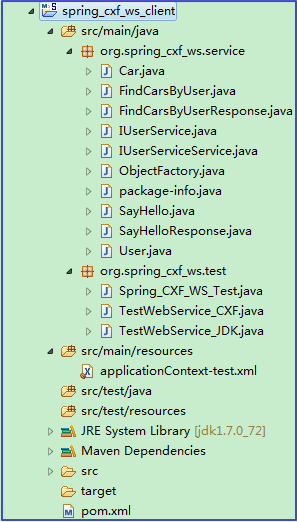
2、JDK的wsimport命令生成本地调用WebService服务的代码
wsimport -s . http://localhost:9800/spring_cxf_ws/services/userService?wsdl

3、创建客户端maven project[Packaing:jar]

4、引入依赖
5、复制调用WebService服务的代码到客户端工程

三、测试
1、目录结构

2、测试方案
2.1、方式一、jdk
 package org.spring_cxf_ws.service;

 import java.util.List;

 /**

  * 基于JDK提供的wsimport命令解析WSDL文档生成本地代码 使用本地代码生成一个代理对象,通过代理对象可以发送HTTP请求

  * 请求webservice服务

  *

  */

 public class TestWebService_JDK {

     public static void main(String[] args) {

         // 方式一、jdk

         IUserServiceService userService = new IUserServiceService();

         IUserService proxy = userService.getIUserServicePort();

         System.out.println(proxy.sayHello("张无忌"));

         User user = new User();

         user.setUsername("xiaoming");

         List<Car> list = proxy.findCarsByUser(user);

         for (Car car : list) {

             System.out.println(car.getId() + ":" + car.getCarName() + ":" + car.getPrice());

         }

     }

 }
2.2、方式二、cxf
 package org.spring_cxf_ws.test;

 import java.util.List;

 import org.apache.cxf.jaxws.JaxWsProxyFactoryBean;

 import org.spring_cxf_ws.service.Car;

 import org.spring_cxf_ws.service.IUserService;

 import org.spring_cxf_ws.service.User;

 /**

  * 基于JDK提供的wsimport命令解析WSDL文档生成本地代码 使用本地代码生成一个代理对象,通过代理对象可以发送HTTP请求

  * 请求webservice服务

  *

  */

 public class TestWebService_CXF {

     public static void main(String[] args) {

         // 方式二、cxf

         JaxWsProxyFactoryBean jaxWsProxyFactoryBean = new JaxWsProxyFactoryBean();

         jaxWsProxyFactoryBean.setServiceClass(IUserService.class);

         jaxWsProxyFactoryBean.setAddress("http://localhost:9800/spring_cxf_ws/services/userService?wsdl");

         // 创建调用远程服务的代理对象

         IUserService proxy = (IUserService) jaxWsProxyFactoryBean.create();

         // 调用远程服务上的sayHello方法

         System.out.println(proxy.sayHello("张无忌"));

         // 调用远程服务上的findCarsByUser方法

         User user = new User();

         user.setUsername("xiaoming");

         List<Car> list = proxy.findCarsByUser(user);

         for (Car car : list) {

             System.out.println(car.getId() + ":" + car.getCarName() + ":" + car.getPrice());

         }

     }

 }
2.3、方式三、spring+cxf
2.3.1、配置applicationContext-test.xml
①所在目录

②配置
 <?xml version="1.0" encoding="UTF-8"?>

 <beans xmlns="http://www.springframework.org/schema/beans"

     xmlns:xsi="http://www.w3.org/2001/XMLSchema-instance" xmlns:jaxws="http://cxf.apache.org/jaxws"

     xsi:schemaLocation="

     http://www.springframework.org/schema/beans http://www.springframework.org/schema/beans/spring-beans.xsd

     http://cxf.apache.org/jaxws http://cxf.apache.org/schemas/jaxws.xsd">

     <!--

         id:唯一标识

         serviceClass:服务接口的路径

         address:服务地址

      -->

     <jaxws:client id="userServiceClient" serviceClass="org.spring_cxf_ws.service.IUserService"

         address="http://localhost:9800/spring_cxf_ws/services/userService?wsdl" >

     </jaxws:client>

 </beans>
2.3.2、测试类
 package org.spring_cxf_ws.test;

 import org.junit.Test;

 import org.junit.runner.RunWith;

 import org.spring_cxf_ws.service.IUserService;

 import org.spring_cxf_ws.service.User;

 import org.springframework.beans.factory.annotation.Autowired;

 import org.springframework.beans.factory.annotation.Qualifier;

 import org.springframework.test.context.ContextConfiguration;

 import org.springframework.test.context.junit4.SpringJUnit4ClassRunner;

 @RunWith(SpringJUnit4ClassRunner.class)

 @ContextConfiguration(locations = "classpath:applicationContext-test.xml")

 public class Spring_CXF_WS_Test {

     @Autowired

     @Qualifier("userServiceClient")

     private IUserService userService;

     @Test

     public void testService() {

         // 方式三、spring+cxf

         System.out.println(userService.sayHello("张无忌"));

         User user = new User();

         user.setUsername("xiaoming");

         System.out.println(userService.findCarsByUser(user));

     }

 }
CXF-JAX-WS开发(二)spring整合CXF-JAX-WS的更多相关文章
- Spring整合CXF,发布RSETful 风格WebService(转)
Spring整合CXF,发布RSETful 风格WebService 这篇文章是承接之前CXF整合Spring的这个项目示例的延伸,所以有很大一部分都是一样的.关于发布CXF WebServer和Sp ...
- Spring整合CXF,发布RSETful 风格WebService
原文地址:http://www.cnblogs.com/hoojo/archive/2012/07/23/2605219.html 这篇文章是承接之前CXF整合Spring的这个项目示例的延伸,所以有 ...
- Spring整合CXF步骤,Spring实现webService,spring整合WebService
Spring整合CXF步骤 Spring实现webService, spring整合WebService >>>>>>>>>>>> ...
- Java WebService 教程系列之 Spring 整合 CXF
Java WebService 教程系列之 Spring 整合 CXF 一.引入 jar 包 <dependency> <groupId>org.apache.cxf</ ...
- Spring整合CXF之发布WebService服务
今天我们来讲下如何用Spring来整合CXF,来发布WebService服务: 给下官方文档地址:http://cxf.apache.org/docs/writing-a-service-with-s ...
- Spring整合CXF webservice restful 实例
webservice restful接口跟soap协议的接口实现大同小异,只是在提供服务的类/接口的注解上存在差异,具体看下面的代码,然后自己对比下就可以了. 用到的基础类 User.java @Xm ...
- 8、Web Service-IDEA-jaxws规范下的 spring整合CXF
前提:开发和之前eclipse的开发有很大的不同! 1.服务端的实现 1.新建项目 此时创建的是web项目 2.此时创建的项目是不完整的需要开发人员手动补充完整 3.对文件夹的设置(满满的软件使用方法 ...
- Spring的AOP开发入门,Spring整合Junit单元测试(基于ASpectJ的XML方式)
参考自 https://www.cnblogs.com/ltfxy/p/9882430.html 创建web项目,引入jar包 除了基本的6个Spring开发的jar包外,还要引入aop开发相关的四个 ...
- So easy Webservice 8.spring整合CXF 发布WS
1.添加jar包(cxf的jar包中包含了spring的jar包),添加spring配置文件 2.web.xml中配置CXFServlet,过滤WS服务的地址 <!-- 配置CXFServlet ...
- Spring整合CXF发布及调用WebService
这几天终于把webService搞定,下面给大家分享一下发布webService和调用webService的方法 添加jar包 (官方下载地址:http://cxf.apache.org/downlo ...
随机推荐
- 磁盘阵列 RAID 技术原理详解
RAID一页通整理所有RAID技术.原理并配合相应RAID图解,给所有存储新人提供一个迅速学习.理解RAID技术的网上资源库,本文将持续更新,欢迎大家补充及投稿.中国存储网一如既往为广大存储界朋友提供 ...
- 洛谷 P4198 BZOJ 2957 楼房重建
题目描述 小A的楼房外有一大片施工工地,工地上有N栋待建的楼房.每天,这片工地上的房子拆了又建.建了又拆.他经常无聊地看着窗外发呆,数自己能够看到多少栋房子. 为了简化问题,我们考虑这些事件发生在一个 ...
- linux -- 视频尺寸-cif、2cif、dcif、D1、HD1、4D1
1 CIF简介 CIF是常用的标准化图像格式(Common Intermediate Format).在H.323协议簇中,规定了视频采集设备的标准采集分辨率.CIF = 352×288像素 ...
- [转]十五天精通WCF——第八天 对“绑定”的最后一点理解
转眼已经中断10几天没有写博客了,也不是工作太忙,正好碰到了端午节,然后最近看天津台的爱情保卫战入迷了...太好看了,一直都是回味无穷...而且 涂磊老师话说的真是tmd的经典,然后就这样耽搁了,好了 ...
- Android:开机自启动并接收推送消息
接收推送消息部分我们通过ZeroMQ实现,可以参考http://www.cnblogs.com/ilovewindy/p/3984283.html. 首先是开机自启动的功能实现,代码如下:1. ...
- PHP array_intersect_uassoc()
定义和用法 array_intersect_uassoc() 函数使用用户自定义的回调函数计算数组的交集,用回调函数比较索引. array_intersect_uassoc() 返回一个数组,该数组包 ...
- Android平台Airplay的实现方法
Airplay属于局域网内异构设备之间分享多媒体数据的一种通信协议.Airplay设备有客户端和服务器之分,一般将小屏IOS设备实现为Airplay客户端,大屏幕设备实现为Airplay服务器.即iP ...
- CF #329 D
D题,LCA是很明显的.要注意的是,因为是除法,所以最多可以除x>2的有64次,当大于64时可以直接返回0.而且注意到可能会有很多值为1的边,可以使用路径压缩,把边为1的边压缩掉,类似于并查集的 ...
- 怎样跟程序猿谈一场没有Bug的恋爱
<iframe width="580" height="90" align="center,center" id="cpro ...
- 【Hibernate学习】 ——ORM(四)再次认识实体继承
在信用办时.做失信.守信.黑名单这一块的时候.先把原来的需求看了看.紧接着就開始设计实体,这一块大部分都是同样的信息,所以就设计了一个实体,而且用一个状态标识出来是失信.守信还是黑名单. 在之后的改动 ...