
python scrapy 实战简书网站保存数据到mysql
1:创建项目

2:创建爬虫

3:编写start.py文件用于运行爬虫程序
# -*- coding:utf-8 -*-
#作者:    baikai
#创建时间: 2018/12/14 14:09
#文件:    start.py
#IDE:    PyCharm
from scrapy import cmdline

cmdline.execute("scrapy crawl js".split())
4:设置settings.py文件的相关设置



爬取详情页数据
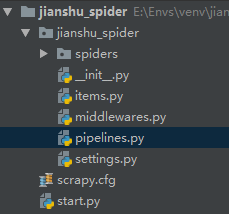
编写items.py文件
# -*- coding: utf-8 -*-

# Define here the models for your scraped items
#
# See documentation in:
# https://doc.scrapy.org/en/latest/topics/items.html

import scrapy

class ArticleItem(scrapy.Item):
    # 定义我们需要的存储数据字段
    title=scrapy.Field()
    content=scrapy.Field()
    article_id=scrapy.Field()
    origin_url=scrapy.Field()
    author=scrapy.Field()
    avatar=scrapy.Field()
    pub_time=scrapy.Field()
编写js.py
# -*- coding: utf-8 -*-
import scrapy
from scrapy.linkextractors import LinkExtractor
from scrapy.spiders import CrawlSpider, Rule
from jianshu_spider.items import ArticleItem

class JsSpider(CrawlSpider):
    name = 'js'
    allowed_domains = ['jianshu.com']
    start_urls = ['https://www.jianshu.com/']

    rules = (
        # 匹配地址https://www.jianshu.com/p/d8804d18d638
        Rule(LinkExtractor(allow=r'.*/p/[0-9a-z]{12}.*'), callback='parse_detail', follow=True),
    )

    def parse_detail(self, response):
        # 获取内容页数据并解析数据
        title=response.xpath("//h1[@class='title']/text()").get()
        #作者图像
        avatar=response.xpath("//a[@class='avatar']/img/@src").get()
        author=response.xpath("//span[@class='name']/a/text()").get()
        #发布时间
        pub_time=response.xpath("//span[@class='publish-time']/text()").get()
        #详情页id
        url=response.url
        #https://www.jianshu.com/p/d8804d18d638
        url1=url.split("?")[0]
        article_id=url1.split("/")[-1]
        #文章内容
        content=response.xpath("//div[@class='show-content']").get()

        item=ArticleItem(
            title=title,
            avatar=avatar,
            author=author,
            pub_time=pub_time,
            origin_url=response.url,
            article_id=article_id,
            content=content
        )
        yield item
设计数据库和表
数据库jianshu
表article
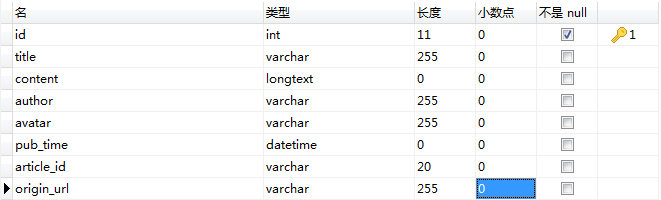
id设置为自动增长

将爬取到的数据存储到mysql数据库中
# -*- coding: utf-8 -*-

# Define your item pipelines here
#
# Don't forget to add your pipeline to the ITEM_PIPELINES setting
# See: https://doc.scrapy.org/en/latest/topics/item-pipeline.html

import pymysql
from twisted.enterprise import adbapi
from pymysql import cursors

class JianshuSpiderPipeline(object):
    def __init__(self):
        dbparams = {
            'host': '127.0.0.1',
            'port': 3306,
            'user': 'root',
            'password': '8Wxx.ypa',
            'database': 'jianshu',
            'charset': 'utf8'
        }
        self.conn = pymysql.connect(**dbparams)
        self.cursor = self.conn.cursor()
        self._sql = None

    def process_item(self, item, spider):
        self.cursor.execute(self.sql, (item['title'], item['content'], item['author'], item['avatar'], item['pub_time'], item['origin_url'],item['article_id']))
        self.conn.commit()
        return item

    @property
    def sql(self):
        if not self._sql:
            self._sql = """
                insert into article(id,title,content,author,avatar,pub_time,origin_url,article_id) values(null,%s,%s,%s,%s,%s,%s,%s)
                """
            return self._sql
        return self._sql
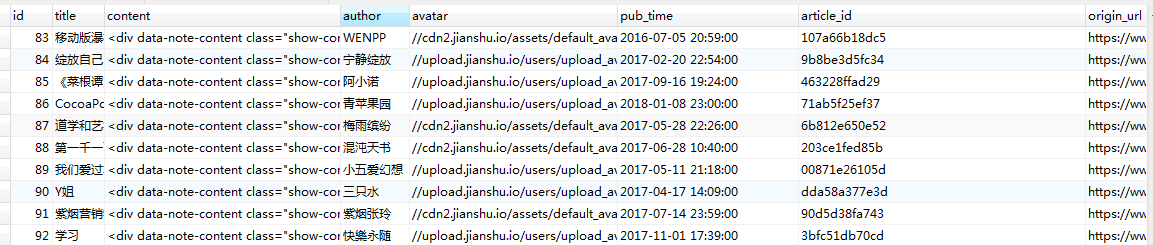
运行start.py效果如下
python scrapy 实战简书网站保存数据到mysql的更多相关文章
- SpringMVC保存数据到mysql乱码问题
SpringMVC保存数据到mysql乱码问题 乱码问题常见配置 一.web.xml配置过滤器 <filter> <filter-name>encoding-filter< ...
- hibernate保存数据到mysql时的中文乱码问题
因为hibernate底层使用的是jdbc的技术,所以我参考了别人使用jdbc保存数据到mysql里面时解决乱码问题的方法! 首先要告诉数据库要插入的字符串的字符集,mysql 默认使用的字符集是 l ...
- python scrapy实战糗事百科保存到json文件里
编写qsbk_spider.py爬虫文件 # -*- coding: utf-8 -*- import scrapy from qsbk.items import QsbkItem from scra ...
- Python爬取简书主页信息
主要学习如何通过抓包工具分析简书的Ajax加载,有时间再写一个Multithread proxy spider提升效率. 1. 关键点: 使用单线程爬取,未登录,爬取简书主页Ajax加载的内容.主要有 ...
- Python Scrapy 实战
Python Scrapy 什么是爬虫? 网络爬虫(英语:web crawler),也叫网络蜘蛛(spider),是一种用来自动浏览万维网的网络机器人.其目的一般为编纂网络索引. Python 爬虫 ...
- 教程+资源,python scrapy实战爬取知乎最性感妹子的爆照合集(12G)!
一.出发点: 之前在知乎看到一位大牛(二胖)写的一篇文章:python爬取知乎最受欢迎的妹子(大概题目是这个,具体记不清了),但是这位二胖哥没有给出源码,而我也没用过python,正好顺便学一学,所以 ...
- Scrapy Item用法示例(保存item到MySQL数据库,MongoDB数据库,使用官方组件下载图片)
需要学习的地方: 保存item到MySQL数据库,MongoDB数据库,下载图片 1.爬虫文件images.py # -*- coding: utf-8 -*- from scrapy import ...
- Spark使用Java读取mysql数据和保存数据到mysql
原文引自:http://blog.csdn.net/fengzhimohan/article/details/78471952 项目应用需要利用Spark读取mysql数据进行数据分析,然后将分析结果 ...
- 利用python scrapy 框架抓取豆瓣小组数据
因为最近在找房子在豆瓣小组-上海租房上找,发现搜索困难,于是想利用爬虫将数据抓取. 顺便熟悉一下Python. 这边有scrapy 入门教程出处:http://www.cnblogs.com/txw1 ...
随机推荐
- mysql-标识列(自增长)
标识列 /* 又称为自增长列 含义:可以不用手动的插入值,系统提供默认的序列值 特点: 1.标识列必须和主键搭配吗?不一定,但要求是一个key,key可以是主键.唯一键.甚至外键(没什么意义) 2.一 ...
- ora-12541:tns: 无监听程序解决办法
1.首先找到 Oracle 安装文件 中 listener.ora文件与tnsnames.ora文件: 列如:路径:E:\app\当前系统的账户名\product\11.2.0\dbhome_1\NE ...
- 【干货】Html与CSS入门学习笔记9-11
九.盒模型 与元素亲密接触 1.盒模型 css将每个元素都看做一个盒子,包括以下属性: 内容区content area:包含内容,内容可以决定大小,也可以自行设定宽度和高度.元素的width属性指定的 ...
- 织梦dedecms去除友情链接中的li和span
文件:/include/taglib/flink.lib.php 1.去除友链中的li if(trim($ctag->GetInnerText())=='') $innertext = &quo ...
- mysql : 修改数据库权限
解决步骤 第一步,点击用户 注意!!! 编辑权限,在我们设置权限之前,我们需要先重新加载才能生效, 如果不用编辑的话,直接按重新载入编辑,这个相当于保存. 中文意思(注意看那段话) 第二步 选择要处理 ...
- 用yum rpm 快速安装zabbix agent
用yum 快速安装zabbix agent. wget http://repo.zabbix.com/zabbix/3.4/rhel/7/x86_64/zabbix-agent-3.4.2-1.el7 ...
- 查看Linux网卡地址,网络地址
查看网络地址 ip a 或ip addr show 或ifconfig,此指令在部分linux系统中不支持
- 利用Js或Css滤镜实现IE6中PNG图片半透明效果 IE6PNG妥妥的
接下来介绍几种PNG图片在IE6中不透明的解决办法 1.用自己的PNG,让IE6一边去吧 首先制作PNG图片的时候,另存为一个GIF图片,因为IE6是支持GIF图片透明,然后在css定义 .pngte ...
- Intel MKL 多线程设置
对于多核程序,多线程对于程序的性能至关重要. 下面,我们将对Intel MKL 有关多线程方面的设置做一些介绍: 我们提到MKL 支持多线程,它包括的两个概念:1>MKL 是线程安全的: MKL ...
- [USACO07FEB]银牛派对Silver Cow Party---最短路模板题
银牛排队 对于我这种蒟蒻来说,还是不要跑一次单元最短路.跑两次好写呀(- ̄▽ ̄)- 而题目中是有向图.如果如果按照题意进行最短路的话.就会出现一个单终点最短路和一个单起点最短路 对于单起点自然就是套模 ...