
iOS 图表工具charts之PieChartView
关于charts的系列视图介绍传送门:
iOS 图表工具charts介绍
iOS 图表工具charts之LineChartView
iOS 图表工具charts之BarChartView
iOS 图表工具charts之PieChartView
iOS 图表工具charts之CandleStickChartView
iOS 图表工具charts之CombinedChartView
PieChartView在charts中可以用来绘制饼状图,由于charts是基于swift开发的,如果需要和objective-C混编(通过pod的方式不用管),可以参考我的上几篇文章iOS OC中桥接swift第三方库》,这里主要讲的是PieChartView的一些常用属性和一些基本用法,实际情况以开发为准
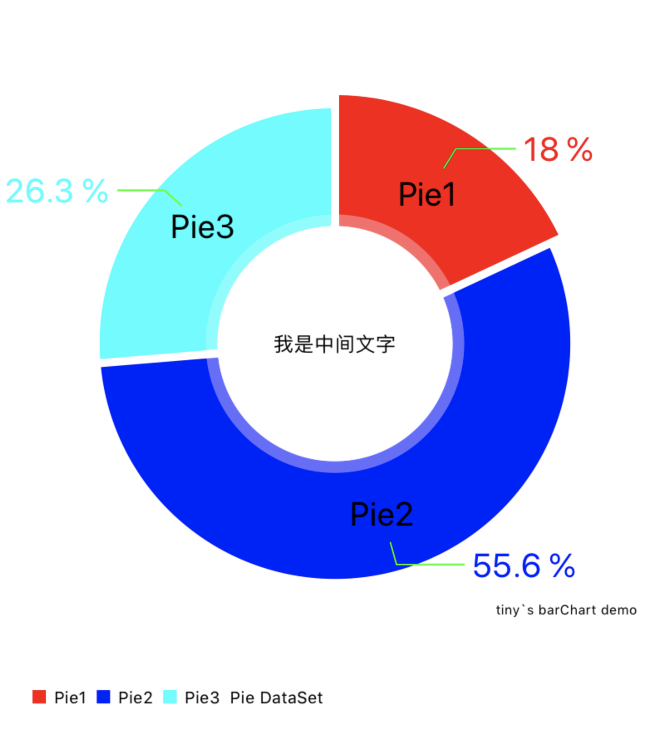
PieChartView的一下属性介绍
    PieChartView *chartView = [[PieChartView alloc] init];

    //设置偏移

    [chartView setExtraOffsetsWithLeft:20 top:20 right:20 bottom:20];

    //无内容显示

    chartView.noDataText = @"";

    //关闭描述

    chartView.chartDescription.enabled = YES;

    chartView.chartDescription.text = @"tiny`s barChart demo";

    //关闭图例

    chartView.legend.enabled = YES;

    //将数据转换为百分比

    chartView.usePercentValuesEnabled = YES;

    //惯性

    chartView.dragDecelerationFrictionCoef = 0.5;  //0 1 惯性

    //设置中间文字

    chartView.drawCenterTextEnabled = YES;

    chartView.centerText = @"我是中间文字";

    //显示扇形区域文字

    chartView.drawEntryLabelsEnabled = YES;

    //可以旋转

    chartView.rotationEnabled = YES;

    //扇区可点击

    chartView.highlightPerTapEnabled = YES;

    //代理

    chartView.delegate = self;
PieChartDataEntry 每个扇形区域
    NSArray *datas = @[@"24",@"74",@"35"];

    NSArray *titles = @[@"Pie1",@"Pie2",@"Pie3"];

    NSMutableArray *array = [NSMutableArray array];

    for (int i = 0; i < datas.count; i++) {

        PieChartDataEntry *entry = [[PieChartDataEntry alloc] initWithValue:[datas[i] integerValue] label:titles[i]];

        [array addObject:entry];

    }
PieChartDataSet 多个PieChartDataEntry扇形区域组合在一起就成了一个饼状图
    PieChartDataSet *set = [[PieChartDataSet alloc] initWithEntries:array label:@"Pie DataSet"];

    //颜色(每个扇形区域可以单独设置颜色)

    set.colors = @[UIColor.redColor,UIColor.blueColor,UIColor.cyanColor];

    set.entryLabelFont = [UIFont systemFontOfSize:20];

    set.entryLabelColor = [UIColor blackColor];

    set.drawIconsEnabled = NO;

    //    当饼状图带折线时,dataSet.yValuePosition 数值的位置只有设置为

    //    PieChartValuePositionOutsideSlice,折线才会显示,valueLine相关属性才有用

    set.drawValuesEnabled = YES;

    set.valueFont = [UIFont systemFontOfSize:20];

    set.valueColors = @[UIColor.redColor,UIColor.blueColor,UIColor.cyanColor];

    set.yValuePosition = PieChartValuePositionOutsideSlice;

    set.valueLineColor = UIColor.greenColor;

    //格式化

    NSNumberFormatter *pFormatter = [[NSNumberFormatter alloc] init];

    pFormatter.numberStyle = NSNumberFormatterPercentStyle;

    pFormatter.maximumFractionDigits = 1;

    pFormatter.multiplier = @1.f;

    pFormatter.percentSymbol = @" %";

    set.valueFormatter = [[ChartDefaultValueFormatter alloc] initWithFormatter:pFormatter];

    //相邻区块之间的间距

    set.sliceSpace = 5;

    //扇形区域放大范围

    set.selectionShift = 8;

    //动画开始的角度

    PieChartData *data = [[PieChartData alloc] initWithDataSet:set];

    self.chartView.data = data;

    //动画开启

    [self.chartView animateWithXAxisDuration:2.0f easingOption:ChartEasingOptionEaseOutExpo];
一些需要注意的点:
1.点击扇形区域可以缩放
1.设置PieChartView可点击chartView.highlightPerTapEnabled = YES;

2.设置PieChartDataSet缩放系数set.selectionShift = 8;
2.扇形区域刚出来的时候动画旋转一定的角度
[self.chartView animateWithXAxisDuration:2.0f easingOption:ChartEasingOptionEaseOutExpo];
3.扇形区域折线要显示出来
1.当饼状图带折线时,dataSet.yValuePosition 数值的位置只有设置为 PieChartValuePositionOutsideSlice,折线才会显示,valueLine相关属性才有用

2.    set.drawValuesEnabled = YES;

    set.valueFont = [UIFont systemFontOfSize:20];

    set.valueColors = @[UIColor.redColor,UIColor.blueColor,UIColor.cyanColor];

    set.yValuePosition = PieChartValuePositionOutsideSlice;

    set.valueLineColor = UIColor.greenColor;
4.扇形区域数值百分比格式化
    NSNumberFormatter *pFormatter = [[NSNumberFormatter alloc] init];

    pFormatter.numberStyle = NSNumberFormatterPercentStyle;

    pFormatter.maximumFractionDigits = 1;

    pFormatter.multiplier = @1.f;

    pFormatter.percentSymbol = @" %";

    set.valueFormatter = [[ChartDefaultValueFormatter alloc] initWithFormatter:pFormatter];
5.显示扇形区域的描述文字
   1.设置文字可显示 chartView.drawEntryLabelsEnabled = NO;

   2.每个扇形区域设置文字titles为对应的文字描述

        NSArray *datas = @[@"24",@"74",@"35"];

    NSArray *titles = @[@"Pie1",@"Pie2",@"Pie3"];

    NSMutableArray *array = [NSMutableArray array];

    for (int i = 0; i < datas.count; i++) {

        PieChartDataEntry *entry = [[PieChartDataEntry alloc] initWithValue:[datas[i] integerValue] label:titles[i]];

        [array addObject:entry];

    }
转载请标注来源:https://www.cnblogs.com/qqcc1388/
iOS 图表工具charts之PieChartView的更多相关文章
- iOS 图表工具charts之CombinedChartView
关于charts的系列视图介绍传送门: iOS 图表工具charts介绍 iOS 图表工具charts之LineChartView iOS 图表工具charts之BarChartView iOS 图表 ...
- iOS 图表工具charts之CandleStickChartView(K线)
关于charts的系列视图介绍传送门: iOS 图表工具charts介绍 iOS 图表工具charts之LineChartView iOS 图表工具charts之BarChartView iOS 图表 ...
- iOS 图表工具charts之BarChartView
关于charts的系列视图介绍传送门: iOS 图表工具charts介绍 iOS 图表工具charts之LineChartView iOS 图表工具charts之BarChartView iOS 图表 ...
- iOS 图表工具charts之LineChartView
关于charts的系列视图介绍传送门: iOS 图表工具charts介绍 iOS 图表工具charts之LineChartView iOS 图表工具charts之BarChartView iOS 图表 ...
- iOS 图表工具charts介绍
charts是一个很好的绘图工具,功能非常强大,可以用来绘制折线,柱状图,饼状图,k线图,k线分时图,雷达图,气泡图等等,charts是一款仿照安卓 MPAndroidChart而来的一个基于swif ...
- JHChart 1.1.0 iOS图表工具库中文ReadMe
JHChart(最新版本1.1.0) 好吧,的确当前的github上已经存有不少的iOS图表工具库,然而,当公司的项目需要图表时,几乎没有哪个第三方能够完全满足我的项目需求.无奈之下,本人不得不花费一 ...
- JHChart iOS图表工具库1.0.3新版本详解
前言. 从2016年4月14日开始,本人着手开发了JHChart图表工具库.经过断断续续的开发,截止到现在,已经实现了折线图.柱状图.饼状图.环形图和表格样式的图表功能.为了方便使用,我已经将一个简单 ...
- iOS图表库Charts集成与使用
Charts是一个很优秀的图表库,它支持Android.iOS.tvOS和macOS,这样使用起来,可以节省学习成本,可以从GitHub上了解更多信息.本文记录在iOS项目上的集成与使用. Chart ...
- .net图表工具汇总
概述:图形图表的可视化数据表现形式已成为一种趋势,本文推荐了10款非常好用的.NET图表控件,希望对广大.NET图表开发者能有所帮助. 读图时代,图形图表的可视化数据表现形式已成为一种趋势.因为图表能 ...
随机推荐
- maven中配置jboss仓库
有两种方式,一种是在项目的pom.xml中<repositories>中添加,这是配置是针对具体的某一个项目,更多时候,我们想把jboss仓库作为所有项目的仓库,这就需要在maven的se ...
- margin 负边距 的知识点
本文介绍了css负边距在普通文档流中的作用和效果.左和右的css负边距对元素宽度的影响.css负边距对浮动元素的影响.css负边距对绝对定位元素的影响.懒人建站偶然浏览到这篇文章,感觉非常好,于是分享 ...
- redis3.2 源码安装
wget http://download.redis.io/releases/redis-3.2.3.tar.gz tar -zxvf redis-.tar.gz cd redis make & ...
- Fatal Error: Out of memory php内存溢出处理三种方法
有时候我们在运行php程序的时候会发现 Fatal Error: Out of memory 这样的提示,这有可能是程序中用到了大量了变量和对象,导致分配的内存不够用. 修改php.ini文件里的me ...
- Addthis分享插件后url乱码的解决办法
Addthis分享插件安装后,有时候URL后面会出现类似#.VB4mxhbjtnQ的一串乱码的乱码,作用是用来追踪客户客户,但是给客户的印象会以为木马中毒之类的 http://localhost/mi ...
- qt打印输出到控制台
创建工程的时候是QT Console Application 1.项目->run->Run in terminal 2.pro文件中添加 CONFIG +=console thread ...
- DveOps路线指南
学习DevOps所需的技能 1. 编程语言 python java javascrit 2. 学习不同的操作系统概念 进程管理,线程和兵法,套接字,I/O管理,虚拟化,内存储存储和文件系统. 3. ...
- Java I/O 全面详解
1.什么是IO Java中I/O操作主要是指使用Java进行输入,输出操作. Java所有的I/O机制都是基于数据流进行输入输出,这些数据流表示了字符或者字节数据的流动序列.Java的I/O流提供了读 ...
- border-box与content-box的区别
㈠box-sizing 属性 ⑴box-sizing 属性允许您以特定的方式定义匹配某个区域的特定元素. ⑵语法:box-sizing: content-box|border-box|inherit; ...
- jquery attribute$=value选择器 语法
jquery attribute$=value选择器 语法 作用:[attribute$=value] 选择器选取每个带有指定属性且以指定字符串结尾的元素. 语法:$("[attribute ...