
.net mvc 权限验证 Filter(过滤器)
一、知识了解
- Asp.Net MVC提供了以下几种默认的Filter:
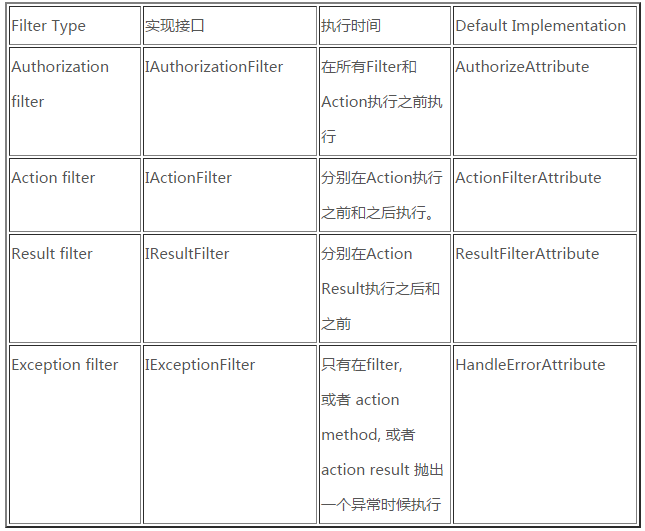
大家注意一点,Asp.Net MVC提供的ActionFilterAttribute默认实现了IActionFilter和IResultFilter。而ActionFilterAttribute是一个Abstract的类型,所以不能直接使用,因为它不能实例化,所以我们想使用它必须继承一下它然后才能使用。
Filter继承于ActionFilterAttribute抽象类,并可以覆写
void OnActionExecuting(ActionExecutingContext)
voidOnActionExecuted(ActionExecutedContext)
void OnResultExecuting(ResultExecutingContext)
void OnResultExecuted(ResultExecutedContext)。- 它们的执行先后顺序如下:
OnActionExecuting是Action执行前的操作
OnActionExecuted则是Action执行后的操作
OnResultExecuting是解析ActionResult前执行
OnResultExecuted是解析ActionResult后执行
接下来我们只要对以上的方法进行重写就可以在相应的步骤做一些操作了。
二、实操
1.首先添加一个普通的类TestFilterAttribute,这个类要继承ActionFilterAttribute,代码如下
/// <summary>

 2     /// Filter 执行顺序Test,需要继承筛选器的基类ActionFilterAttribute

 3     /// </summary>

 4     public class TestFilterAttribute : ActionFilterAttribute

 5     {

 6         public string Message { get; set; }

 7

 8         public override void OnActionExecuting(ActionExecutingContext filterContext)

 9         {

10             base.OnActionExecuting(filterContext);

11             filterContext.HttpContext.Response.Write("Action执行之前" + Message + "<br />");

12         }

13

14         public override void OnActionExecuted(ActionExecutedContext filterContext)

15         {

16             base.OnActionExecuted(filterContext);

17             filterContext.HttpContext.Response.Write("Action执行之后" + Message + "<br />");

18         }

19

20         public override void OnResultExecuting(ResultExecutingContext filterContext)

21         {

22             base.OnResultExecuting(filterContext);

23             filterContext.HttpContext.Response.Write("返回Result之前" + Message + "<br />");

24         }

25

26         public override void OnResultExecuted(ResultExecutedContext filterContext)

27         {

28             base.OnResultExecuted(filterContext);

29             filterContext.HttpContext.Response.Write("返回Result之后" + Message + "<br />");

30         }

31     }
写完这个代码后,我们回到Action上,打上上面的标记如下所示:
 [TestFilterAttribute(Message = "Action")]

2         public ActionResult Index()

3         {

4             HttpContext.Response.Write("Action正在执行···<br />");

5             return Content("正在返回Result···<br />");

6         }
执行结果:

*如果我们将此标签打到Controller上的话,TestFilterAttributeFilter将作用到Controller下的所有的Action
*默认情况下Action上打了TestFilterAttribute 标签后,虽然在Controller上也打上了此标签,但它只有Action上的标签起作用了。
*补充:如果Action没有打上TestFilterAttribute标签,那么Controller上的标签便会被执行。
Index 执行时,Filter的方法只执行了一次,而某些情况下我们也想让Controller上的FilterAttribute也执行一次TestFilterAttribute,那我们怎么才能让Controller上的[TestFilter(Message = "controller")]也起作用呢?
答案是:我们只需在TestFilterAttribute类的定义上打上标记[AttributeUsage(AttributeTargets.All, AllowMultiple = true)]即可,也就是让其成为可以多次执行的Action。代码如下:
/// <summary>

    /// Filter 执行顺序Test,需要继承筛选器的基类ActionFilterAttribute

    /// </summary

    [AttributeUsage(AttributeTargets.All, AllowMultiple = true)] //打标记是让所有的Controller的标记生效

    public class TestFilterAttribute : ActionFilterAttribute

    {

        public string Message { get; set; }

        public override void OnActionExecuting(ActionExecutingContext filterContext)

        {

            base.OnActionExecuting(filterContext);

            filterContext.HttpContext.Response.Write("Action执行之前" + Message + "<br />");

        }

        public override void OnActionExecuted(ActionExecutedContext filterContext)

        {

            base.OnActionExecuted(filterContext);

            filterContext.HttpContext.Response.Write("Action执行之后" + Message + "<br />");

        }

        public override void OnResultExecuting(ResultExecutingContext filterContext)

        {

            base.OnResultExecuting(filterContext);

            filterContext.HttpContext.Response.Write("返回Result之前" + Message + "<br />");

        }

        public override void OnResultExecuted(ResultExecutedContext filterContext)

        {

            base.OnResultExecuted(filterContext);

            filterContext.HttpContext.Response.Write("返回Result之后" + Message + "<br />");

        }

    }
效果:
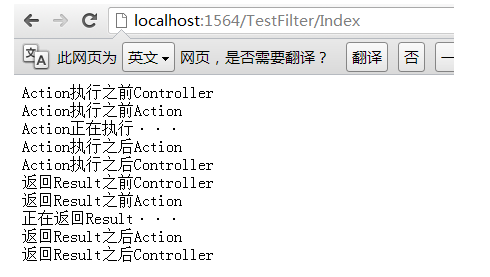
问:如何注册到全局?
答案就在Global.asax中。让我们看以下代码,我是如何将上面我们定义的TestFilterAttribute 注册到全局Filter中
public static void RegisterGlobalFilters(GlobalFilterCollection filters)

        {

            filters.Add(new HandleErrorAttribute());

            //注册全局过滤器

            filters.Add(new TestFilterAttribute() { Message="全局"});

        }
三、其他Fileter
1.AcceptVerbs 规定页面的访问形式,如
        [AcceptVerbs(HttpVerbs.Post)]

         public ActionResult Example(){

             return View();

         }
2.ActionName 如果不想用方法名做为Action名,或Action名为关键字的话,如
       [ActionName("class")]

         public ActionResult Example(){

             return View();

         }
3.NonAction 当前方法仅是普通方法不解析为Action
4.为Action添加缓存
        [OutputCache(Duration = 60, VaryByParam = "*")]

        public ActionResult Example()

        {

            return View();

        }
5.Action可以接受Html等危险代码(ASP.NET MVC在aspx中设置<%@ Page 的属性无法完成等同任务。)
        [ValidateInput(false)]

        public ActionResult Example()

        {

            return View();

        }
文章转载:https://www.cnblogs.com/zhangxiaoyong/p/6906288.html#autoid-0-0-0
.net mvc 权限验证 Filter(过滤器)的更多相关文章
- NET MVC权限验证
ASP.NET MVC权限验证 封装类 写该权限类主要目地 为了让权限配置更加的灵活,可以根据SQL.json.或者XML的方式来动态进行页面的访问控制,以及没有权限的相关跳转. 使用步骤 1.要建一 ...
- 关于filter web api mvc 权限验证 这里说的够详细了。。。
参考:http://www.cnblogs.com/willick/p/3331520.html Filter(筛选器)是基于AOP(面向方面编程)的设计,它的作用是对MVC框架处理客户端请求注入额外 ...
- MVC权限验证过滤器
Action属性,权限设定属性 [AttributeUsage(AttributeTargets.Method, Inherited = true, AllowMultiple = false)] ...
- C# MVC权限验证
前言 之前一直没怎么接触过权限验证这块,刚好公司老平台改版,就有了这篇权限验证.此篇文章大致讲解下 精确到按钮级别的验证如何实现.以及权限验证设计的参考思路(菜鸟一枚,大神勿喷). 在开发大项目的时候 ...
- ASP.NET MVC权限验证 封装类
写该权限类主要目地 为了让权限配置更加的灵活,可以根据SQL.json.或者XML的方式来动态进行页面的访问控制,以及没有权限的相关跳转. 使用步骤 1.要建一个全局过滤器 //受权过滤器 publi ...
- .net web mvc 权限验证
这里分享MVC的权限验证,内容中可能存在一些,莫名其妙的方法,那些是以前封装好的,大致可以根据方法名称知道他的意思. using Game.Entity; using Game.Entity.Plat ...
- mvc 权限验证
using System; using System.Collections.Generic; using System.Linq; using System.Web; using System.We ...
- mvc权限验证--AuthorizeAttribute
在做后台管理时用户登录后就需要验证哪些权限了,没有登录的就直接退出到登录页面. 系统有自带的权限[Authorize],可用于几个地方: 1.将属性[Authorize]置于相关的action上方,验 ...
- MVC权限验证之ActionFilterAttribute
参考:http://www.cnblogs.com/waitingfor/archive/2011/12/27/2303784.html ActionFilterAttribute是Action过滤类 ...
- Asp.net MVC 权限验证,以及是否允许匿名访问
public class CheckUserAttribute : ActionFilterAttribute, IAuthorizationFilter { public void OnAuthor ...
随机推荐
- Java中遇到的常见问题
一.常用的快捷键 查询对应类:Ctrl+N eclipse的快速生成代码:Alt+Shift+s或sources 加单行注释:Ctrl+/ 运行程序:Ctrl+Shift+F10 搜索:Ctrl+ ...
- MyBatis01:框架概述、环境搭建及入门案例、自定义框架
课程介绍 第一天:mybatis的入门 mybatis的概述 mybatis的环境搭建 mybatis入门案例 自定义mybatis框架(目的:了解mybatis的执行细节) 第二天:mybatis基 ...
- 【CDH数仓】Day01:概念、环境搭建、CDH数仓搭建、用户行为数仓搭建
一.数仓之Cloudera Manager 1.CM简介 拥有集群自动化安装.中心化管理.集群监控.报警功能的一个工具 快速安装,快速运维,提高集群的效率 CM架构 2.阿里云服务器准备 注册账号 购 ...
- Linux通过脚本实现多台主机统一部署
该脚本分成三部分,一部分是获取信息的脚本:getInfo.sh 一个是main脚本:main.sh.一个是ssh连接主机脚本:sshing.sh main.sh #是否检查主机是否存活host_che ...
- Redis的数据被删除,占用内存咋还那么大?
通过 CONFIG SET maxmemory 100mb 或者在 redis.conf 配置文件设置 maxmemory 100mb Redis 内存占用限制.当达到内存最大值值,会触发内存淘汰策略 ...
- Codeforces Round #838 (Div. 2) D. GCD Queries
题意 有个长度为n的排列p,[0,1,2,...n-1],你可以进行至多2*n次询问,每次询问两个i,j,返回gcd(pi,pj),让你在规定时间内猜出0在哪两个位置之一 思路 这是一道交互题,询问的 ...
- LoadRunner11录制脚本
1.打开LoadRunner11后界面如下: 2.点击"创建/编辑脚本",会打开一个新窗口,如下: 3.这里新建一个web/html格式的测试.点击"文件"-& ...
- 【机器学习】李宏毅——Anomaly Detection(异常检测)
异常检测概述 首先要明确一下什么是异常检测任务.对于异常检测任务来说,我们希望能够通过现有的样本来训练一个架构,它能够根据输入与现有样本之间是否足够相似,来告诉我们这个输入是否是异常的,例如下图: 那 ...
- nuxt.js框架 如何打包 build
nuxt脚手架开发好项目后怎么打包 以下是脚手架的package.json部分代码 "scripts": { "dev": "cross-env NO ...
- python实验报告(第11章)
实验11:使用Python操作数据库 一.实验目的和要求 1.学会数据库编程接口: 2.学会使用SQLite: 3.学会使用MySQL. 二.实验环境 软件版本:Python 3.10 64_bit ...