
Cesium渲染模块之VAO
1. 引言
Cesium是一款三维地球和地图可视化开源JavaScript库,使用WebGL来进行硬件加速图形,使用时不需要任何插件支持,基于Apache2.0许可的开源程序,可以免费用于商业和非商业用途
Cesium官网:Cesium: The Platform for 3D Geospatial
Cesium GitHub站点:CesiumGS/cesium: An open-source JavaScript library for world-class 3D globes and maps (github.com)
API文档:Index - Cesium Documentation
通过阅读源码,理清代码逻辑,有助于扩展与开发,笔者主要参考了以下两个系列的文章
渲染是前端可视化的核心,本文描述Cesium渲染模块的VAO
2. WebGL中的VAO
以下大致是一个最简的WebGL绘制代码:
<canvas id="canvas"></canvas>

<script>

    const vertexSource = `

                attribute vec3 aPos;

                void main()

                {

                    gl_Position = vec4(aPos.x, aPos.y, aPos.z, 1.0);

                }

              `

    const fragmentSource = `

                void main()

                {

                    gl_FragColor = vec4(1.0, 0.5, 0.2, 1.0);

                }

              `

    const canvas = document.getElementById('canvas');

    canvas.width = canvas.clientWidth;

    canvas.height = canvas.clientHeight;

    const gl = canvas.getContext('webgl2');

    if (!gl) {

        alert('WebGL not supported');

    }

    const vertices = new Float32Array([

        -0.5, -0.5, 0.0,

        0.5, -0.5, 0.0,

        0.0, 0.5, 0.0,

    ]);

    const vbo = gl.createBuffer();

    gl.bindBuffer(gl.ARRAY_BUFFER, vbo);

    gl.bufferData(gl.ARRAY_BUFFER, vertices, gl.STATIC_DRAW);

    const vao = gl.createVertexArray();

    gl.bindVertexArray(vao);

    gl.vertexAttribPointer(0, 3, gl.FLOAT, false, 0, 0);

    gl.enableVertexAttribArray(0)

    const vertexShader = gl.createShader(gl.VERTEX_SHADER);

    gl.shaderSource(vertexShader, vertexSource);

    gl.compileShader(vertexShader);

    const fragmentShader = gl.createShader(gl.FRAGMENT_SHADER);

    gl.shaderSource(fragmentShader, fragmentSource);

    gl.compileShader(fragmentShader);

    const shaderProgram = gl.createProgram();

    gl.attachShader(shaderProgram, vertexShader);

    gl.attachShader(shaderProgram, fragmentShader);

    gl.linkProgram(shaderProgram);

    gl.clearColor(0.2, 0.3, 0.3, 1.0);

    gl.clear(gl.COLOR_BUFFER_BIT);

    gl.useProgram(shaderProgram);

    gl.drawArrays(gl.TRIANGLES, 0, 3);

</script>
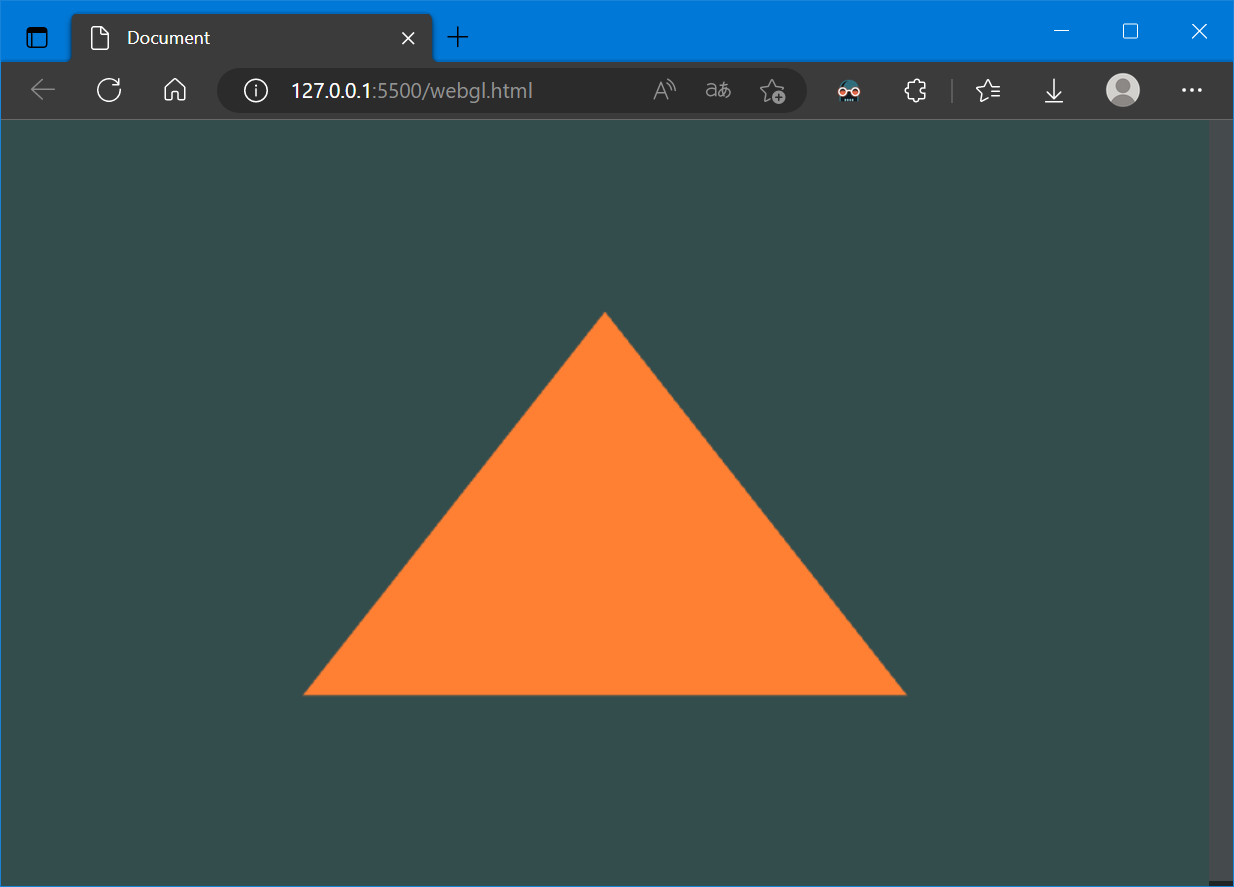
其中,vao是顶点数组对象(Vertex Array Object, VAO),主要用来保存属性信息:
const vao = gl.createVertexArray();

gl.bindVertexArray(vao);

gl.vertexAttribPointer(0, 3, gl.FLOAT, false, 0, 0);

gl.enableVertexAttribArray(0)
WebGLVertexArrayObject接口是WebGL 2 API的一部分,顶点数组对象 (VAOs) 指向顶点数组数据,并提供不同顶点数据集合的名称
当使用WebGLVertexArrayObject对象时,这些方法会很有用:
示例代码中:
createVertexArray()方法创建并初始化(creates and initializes)一个 WebGLVertexArrayObject 的对象 (object) ,它代表一个指向顶点数组数据的顶点数组对象(vertex array object (VAO) ),并为不同的顶点数据集提供名称
bindVertexArray(target) 方法将给定的VAO绑定(后续对VBO的操作将会记录在绑定的这个VAO上),参数:
vertexArray
要绑定的
WebGLVertexArrayObject(VAO) 对象
vertexAttribPointer(index, size, type, normalized, stride, offset) 方法绑定当前绑定的Buffer到到当前顶点的通用顶点属性缓冲区对象(VAO)并指定其布局(告诉显卡从当前绑定的缓冲区(bindBuffer() 指定的缓冲区)中怎么读取顶点数据),参数:
index
GLuint(en-US) 指定要修改的顶点属性的索引size
GLint(en-US) 指定每个顶点属性的组成数量,必须是 1,2,3 或 4type
GLenum(en-US) 指定数组中每个元素的数据类型可能是:gl.BYTE: 有符号的 8 位整数,范围 [-128, 127]gl.SHORT: 有符号的 16 位整数,范围 [-32768, 32767]gl.UNSIGNED_BYTE: 无符号的 8 位整数,范围 [0, 255]gl.UNSIGNED_SHORT: u 无符号的 16 位整数,范围 [0, 65535]gl.FLOAT: 32 位 IEEE 标准的浮点数使用 WebGL2 版本的还可以使用以下值:
gl.HALF_FLOAT: 16-bit IEEE floating point number 16 位 IEEE 标准的浮点数
normalized
GLboolean(en-US) 当转换为浮点数时是否应该将整数数值归一化到特定的范围
对于类型gl.BYTE和gl.SHORT,如果是 true 则将值归一化为 [-1, 1]
对于类型gl.UNSIGNED_BYTE和gl.UNSIGNED_SHORT,如果是 true 则将值归一化为 [0, 1]
对于类型gl.FLOAT和gl.HALF_FLOAT,此参数无效
stride
一个
GLsizei(en-US),以字节为单位指定连续顶点属性开始之间的偏移量 (即数组中一行长度)。不能大于 255。如果 stride 为 0,则假定该属性是紧密打包的,即不交错属性,每个属性在一个单独的块中,下一个顶点的属性紧跟当前顶点之后offset
GLintptr(en-US)指定顶点属性数组中第一部分的字节偏移量,必须是类型的字节长度的倍数
以上大致就是WebGL中vertex array object (VAO)的用法,需要注意,VAO对象在webgl2中才支持,在webgl1中是扩展的
3. Cesium中的VAO
Cesium中,对WebGL的VAO进行了封装:
function VertexArray(options) {

    // ...

    const context = options.context;

    const gl = context._gl;

    const attributes = options.attributes;

    const indexBuffer = options.indexBuffer;

    let vao;

    vao = context.glCreateVertexArray();

    context.glBindVertexArray(vao);

    bind(gl, vaAttributes, indexBuffer);

    context.glBindVertexArray(null);

}
创建一个VAO和VBO的例子:
// Example 1. Create a vertex array with vertices made up of three floating point

// values, e.g., a position, from a single vertex buffer.  No index buffer is used.

const positionBuffer = Buffer.createVertexBuffer({

    context : context,

    sizeInBytes : 12,

    usage : BufferUsage.STATIC_DRAW

});

const attributes = [

    {

        index                  : 0,

        enabled                : true,

        vertexBuffer           : positionBuffer,

        componentsPerAttribute : 3,

        componentDatatype      : ComponentDatatype.FLOAT,

        normalize              : false,

        offsetInBytes          : 0,

        strideInBytes          : 0 // tightly packed

        instanceDivisor        : 0 // not instanced

    }

];

const va = new VertexArray({

    context : context,

    attributes : attributes

});
创建一个VAO和两个VBO的例子:
// Example 2. Create a vertex array with vertices from two different vertex buffers.

// Each vertex has a three-component position and three-component normal.

const positionBuffer = Buffer.createVertexBuffer({

    context : context,

    sizeInBytes : 12,

    usage : BufferUsage.STATIC_DRAW

});

const normalBuffer = Buffer.createVertexBuffer({

    context : context,

    sizeInBytes : 12,

    usage : BufferUsage.STATIC_DRAW

});

const attributes = [

    {

        index                  : 0,

        vertexBuffer           : positionBuffer,

        componentsPerAttribute : 3,

        componentDatatype      : ComponentDatatype.FLOAT

    },

    {

        index                  : 1,

        vertexBuffer           : normalBuffer,

        componentsPerAttribute : 3,

        componentDatatype      : ComponentDatatype.FLOAT

    }

];

const va = new VertexArray({

    context : context,

    attributes : attributes

});
创建一个VAO与合并的两个VBO的例子:
// Example 3. Creates the same vertex layout as Example 2 using a single

// vertex buffer, instead of two.

const buffer = Buffer.createVertexBuffer({

    context : context,

    sizeInBytes : 24,

    usage : BufferUsage.STATIC_DRAW

});

const attributes = [

    {

        vertexBuffer           : buffer,

        componentsPerAttribute : 3,

        componentDatatype      : ComponentDatatype.FLOAT,

        offsetInBytes          : 0,

        strideInBytes          : 24

    },

    {

        vertexBuffer           : buffer,

        componentsPerAttribute : 3,

        componentDatatype      : ComponentDatatype.FLOAT,

        normalize              : true,

        offsetInBytes          : 12,

        strideInBytes          : 24

    }

];

const va = new VertexArray({

    context : context,

    attributes : attributes

});
Cesium中的VAO还支持从Geometry创建:
// ...

// Create geometry with a position attribute and indexed lines.

const positions = new Float64Array([

  0.0, 0.0, 0.0,

  7500000.0, 0.0, 0.0,

  0.0, 7500000.0, 0.0

]);

const geometry = new Cesium.Geometry({

  attributes : {

    position : new Cesium.GeometryAttribute({

      componentDatatype : Cesium.ComponentDatatype.DOUBLE,

      componentsPerAttribute : 3,

      values : positions

    })

  },

  indices : new Uint16Array([0, 1, 1, 2, 2, 0]),

  primitiveType : Cesium.PrimitiveType.LINES,

  boundingSphere : Cesium.BoundingSphere.fromVertices(positions)

});

// ...

// Example 1. Creates a vertex array for rendering a box.  The default dynamic draw

// usage is used for the created vertex and index buffer.  The attributes are not

// interleaved by default.

const geometry = new BoxGeometry();

const va = VertexArray.fromGeometry({

    context            : context,

    geometry           : geometry,

    attributeLocations : GeometryPipeline.createAttributeLocations(geometry),

});

// Example 2. Creates a vertex array with interleaved attributes in a

// single vertex buffer.  The vertex and index buffer have static draw usage.

const va = VertexArray.fromGeometry({

    context            : context,

    geometry           : geometry,

    attributeLocations : GeometryPipeline.createAttributeLocations(geometry),

    bufferUsage        : BufferUsage.STATIC_DRAW,

    interleave         : true

});
在Cesium源码中创建VAO大多是直接使用构造函数,例如PolylineCollection.js:
const va = new VertexArray({

          context: context,

          attributes: attributes,

          indexBuffer: indexBuffer,

        });
此外,VertexArray封装的函数有:
function addAttribute(attributes, attribute, index, context)

function interleaveAttributes(attributes)

function setVertexAttribDivisor(vertexArray)

function setConstantAttributes(vertexArray, gl)

VertexArray.prototype._bind = function ()

VertexArray.prototype._unBind = function ()

VertexArray.prototype.isDestroyed = function ()

VertexArray.prototype.destroy = function ()
4. 参考资料
[1]WebGL2RenderingContext - Web API 接口参考 | MDN (mozilla.org)
[2]Cesium DrawCommand 不谈地球 画个三角形 - 四季留歌 - 博客园 (cnblogs.com)
[3]Cesium原理篇:6 Render模块(5: VAO&RenderState&Command) - fu*k - 博客园 (cnblogs.com)
[4]Cesium渲染模块之概述 - 当时明月在曾照彩云归 - 博客园 (cnblogs.com)
[5]Cesium渲染模块之Buffer - 当时明月在曾照彩云归 - 博客园 (cnblogs.com)
Cesium渲染模块之VAO的更多相关文章
- Cesium原理篇:6 Render模块(5: VAO&RenderState&Command)
VAO VAO(Vertext Array Object),中文是顶点数组对象.之前在<Buffer>一文中,我们介绍了Cesium如何创建VBO的过程,而VAO可以简单的认为是基于VBO ...
- (原)Unreal渲染模块 管线 - 着色器(1)
@author: 白袍小道 转载悄悄说明下 随缘查看,施主开心就好 说明: 本篇继续Unreal搬山部分的渲染模块的Shader部分, 主要牵扯模块RenderCore, ShaderCore, RH ...
- (原)Unreal渲染模块 管线 - 程序和场景查询
@author: 白袍小道 查看随意,转载随缘 第一部分: 这里主要关心加速算法,和该阶段相关的UE模块的结构和组件的处理. What-HOW-Why-HOW-What(嘿嘿,老规矩) 1.渲 ...
- (原)Unreal渲染模块 源码和实例分析说明
@author:白袍小道 说明 1.由于小道就三境武夫而已,而UE渲染部分不仅管理挺大,而且牵扯技术和内容驳杂,所以才有这篇梳理. 2.尽量会按书籍和资料,源码,小模块的调试和搬山(就是敲键盘)..等 ...
- (原)Unreal 渲染模块 渲染流程
@author:白袍小道 浏览分享随缘,评论不喷亦可. 扯淡部分: 在temp中,乱七八糟的说了下大致的UE过程.下面我们还是稍微别那么任性,一步步来吧. UE渲染模块牵扯到场景遍历. ...
- (原)Unreal 渲染模块引言Temp
@author:白袍小道 引言 本文只在对Unreal渲染模块做一些详细的理解,务求能分析出个大概. 其中框架的思想和实现的过程,是非常值得学习和推敲一二的. 涉及资源系统,材 ...
- Django---Http协议简述和原理,HTTP请求码,HTTP请求格式和响应格式(重点),Django的安装与使用,Django项目的创建和运行(cmd和pycharm两种模式),Django的基础文件配置,Web框架的本质,服务器程序和应用程序(wsgiref服务端模块,jinja2模板渲染模块)的使用
Django---Http协议简述和原理,HTTP请求码,HTTP请求格式和响应格式(重点),Django的安装与使用,Django项目的创建和运行(cmd和pycharm两种模式),Django的基 ...
- DRF框架(一)——restful接口规范、基于规范下使用原生django接口查询和增加、原生Django CBV请求生命周期源码分析、drf请求生命周期源码分析、请求模块request、渲染模块render
DRF框架 全称:django-rest framework 知识点 1.接口:什么是接口.restful接口规范 2.CBV生命周期源码 - 基于restful规范下的CBV接口 3.请求组件 ...
- drf框架 - 请求模块 | 渲染模块
Postman接口工具 官方 https://www.getpostman.com/ get请求,携带参数采用Paramspost等请求,提交数据包可以采用三种方式:form-date.urlenc ...
- 第二章、drf框架 - 请求模块 | 渲染模块 解析模块 | 异常模块 | 响应模块 (详细版)
目录 drf框架 - 请求模块 | 渲染模块 解析模块 | 异常模块 | 响应模块 Postman接口工具 drf框架 注册rest_framework drf框架风格 drf请求生命周期 请求模块 ...
随机推荐
- python中文词云生成
一.词云 "词云"就是对网络文本中出现频率较高的"关键词"予以视觉上的突出,形成"关键词云层"或"关键词渲染",从而过滤 ...
- 详解redis网络IO模型
前言 "redis是单线程的" 这句话我们耳熟能详.但它有一定的前提,redis整个服务不可能只用到一个线程完成所有工作,它还有持久化.key过期删除.集群管理等其它模块,redi ...
- .net做一个基于ChatGpt的微信机器人吧~[全教程]
最近这个ChatGPT很火啊,看了B站上很多视频,自己非常手痒,高低自己得整一个啊,很多人都是把ChatGPT和微信结合在一起,正巧我是Wechaty框架的.net sdk贡献者,这不是一应俱全了吗? ...
- JavaScript:原型(prototype)
面向对象有一个特征是继承,即重用某个已有类的代码,在其基础上建立新的类,而无需重新编写对应的属性和方法,继承之后拿来即用: 在其他的面向对象编程语言比如Java中,通常是指,子类继承父类的属性和方法: ...
- 11、lombok日志记录
一.添加依赖: <!--lombok插件--> <dependency> <groupId>org.projectlombok</groupId> &l ...
- 一篇文章带你了解设计模式原理——UML图和软件设计原则
一篇文章带你了解设计模式原理--UML图和软件设计原则 我们在学习过程中可能并不会关心设计模式,但一旦牵扯到项目和面试,设计模式就成了我们的短板 这篇文章并不会讲到二十三种设计模式,但是会讲解设计模式 ...
- win7安装Anaconda+TensorFlow(cpu版)+配置PyCharm
本着不折腾不舒服斯基,好久没安装软件玩了.今天趁天气不错,安装下TensorFlow(cpu版)(因为没钱上GPU),首先在网上搜了下教程,原文出处: https://blog.csdn.net/u0 ...
- 深入理解 Linux 物理内存分配全链路实现
前文回顾 在上篇文章 <深入理解 Linux 物理内存管理>中,笔者详细的为大家介绍了 Linux 内核如何对物理内存进行管理以及相关的一些内核数据结构. 在介绍物理内存管理之前,笔者先从 ...
- SQL Server下7种“数据分页”方案,全网最全
数据分页往往有三种常用方案. 第一种,把数据库中存放的相关数据,全部读入PHP/Java/C#代码/内存,再由代码对其进行分页操作(速度慢,简易性高). 第二种,直接在数据库中对相关数据进行分页操作, ...
- Docker搭建Cloudreve网盘
原文地址: https://blog.laoda.de/archives/docker-compose-install-lighthouse-cloudreve 油管视频: https://www.y ...