
拖动登录框 HTML+CSS+js
先上效果
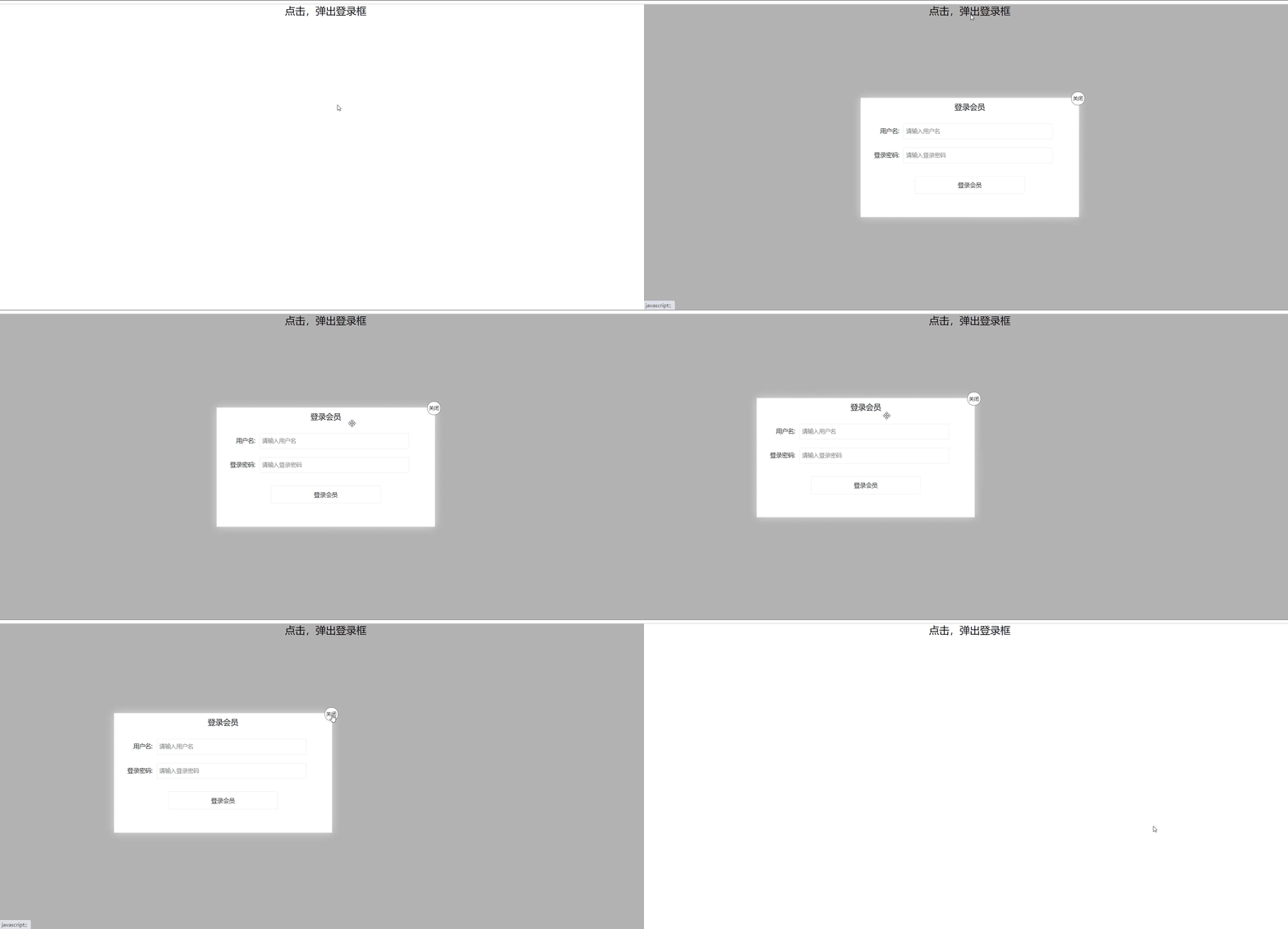
代码
<!DOCTYPE html>

<html lang="en">

<head>

    <meta charset="UTF-8">

    <meta name="viewport" content="width=device-width, initial-scale=1.0">

    <title>拖动登录框</title>

    <Style>

        * {

            margin: 0px;

            padding: 0px;

        }

        a {

            color: black;

            text-decoration: none;

        }

        .one {

            width: 100%;

            text-align: center;

            height: 30px;

            font-size: 24px;

            line-height: 30px;

        }

        .login {

            display: none;

            position: fixed;

            width: 512px;

            height: 280px;

            border: #ebebeb solid 1px;

            left: 50%;

            top: 50%;

            background: #ffffff;

            box-shadow: 0px 0px 20px #ddd;

            z-index: 999;

            transform: translate(-50%,-50%);

        }

        .title {

            position: relative;

            height: 40px;

            width: 100%;

            line-height: 40px;

            font-size: 18px;

            text-align: center;

            cursor: move;

        }

        .title a{

            position: absolute;

            font-size: 12px;

            top: -15px;

            right: -15px;

            width: 30px;

            height: 30px;

            border: 1px solid #666;

            border-radius: 15px;

            text-align: center;

            line-height: 30px;

            background-color: white;

        }

        .con {

           margin-top: 20px;

        }

        .login-input input {

            float: left;

            line-height: 35px;

            height: 35px;

            width: 350px;

            border: #ebebeb solid 1px;

            text-indent: 5px;

        }

        .login-input {

            overflow: hidden;

            margin: 0px 0px 20px 0px;

        }

        .login-input label {

            float: left;

            width: 90px;

            padding-right: 10px;

            text-align: right;

            line-height: 35px;

            height: 35px;

            font-size: 14px;

        }

        .bg {

            display: none;

            width: 100%;

            height: 100%;

            position: fixed;

            top: 0px;

            left: 0px;

            background: rgba(0, 0, 0, .3);

        }

        .button a {

            display: block;

        }

        .button {

            width: 50%;

            margin: 30px auto 0px auto;

            line-height: 40px;

            font-size: 14px;

            border: #ebebeb 1px solid;

            text-align: center;

        }

    </Style>

</head>

<body>

    <div class="one"><a href="javascript:;">点击,弹出登录框</a></div>

    <div class="login">

        <div class="title">登录会员

            <span><a href="javascript:;" id="close">关闭</a></span>

        </div>

        <div class="con">

            <div class="login-input">

                <label>用户名:</label>

                <input type="text" placeholder="请输入用户名" name="" id="name">

            </div>

            <div class="login-input">

                <label>登录密码:</label>

                <input type="text" placeholder="请输入登录密码" name="" id="code">

            </div>

            <div class="button">

                <a href="javascript:;">登录会员</a>

            </div>

        </div>

    </div>

    <div class="bg"></div>

    <script>

        var one = document.querySelector('.one');

        var login = document.querySelector('.login');

        var bg = document.querySelector('.bg');

        //点击弹出背景和登录框

        one.addEventListener('click',function(){

            login.style.display = 'block';

            bg.style.display = 'block';

        })

        //点击关闭,隐藏背景和登录框

        var close = document.querySelector('#close');

        close.addEventListener('click',function(){

            login.style.display = 'none';

            bg.style.display = 'none';

        })

        var title = document.querySelector('.title');

        //拖拽事件

        title.addEventListener('mousedown',function(e){

            //鼠标按下时,获取鼠标在盒子内的坐标

            var x = e.pageX - login.offsetLeft;

            var y = e.pageY - login.offsetTop;

            console.log(x);

            console.log(y);

            //鼠标移动时,把鼠标在页面中的坐标减去鼠标在盒子内的坐标就是left和top值

            document.addEventListener('mousemove',move);

            function move(e){

                login.style.left = e.pageX - x +'px';//返回值不带单位

                login.style.top = e.pageY - y + 'px';

            }

            //鼠标弹起,事件移除

            document.addEventListener('mouseup',function(){

                document.removeEventListener('mousemove',move);

            })

        })

    </script>

</body>

</html>
拖动登录框 HTML+CSS+js的更多相关文章
- js 拟写登录页 可以拖动登录框
<!DOCTYPE html> <html> <head lang="en"> <meta charset="UTF-8&quo ...
- 动态滑动登陆框-Html+Css+Js
动态滑动登陆框 <!DOCTYPE html> <html> <head> <meta charset="utf-8"> <t ...
- JavaScript--结合CSS变形、缩放能拖拽的登录框
上例图: 代码块: <!DOCTYPE html> <html> <head lang="en"> <meta charset=" ...
- html+css+js实现复选框全选与反选
<!DOCTYPE HTML PUBLIC "-//W3C//DTD HTML 4.01 Transitional//EN" "http://www.w3.org/ ...
- HTML和CSS实现的透明登录框效果
实现代码 HTML部分 <!DOCTYPE html> <html lang="en"> <head> <meta charset=&qu ...
- #3使用html+css+js制作网页 制作登录网页
#3使用html+css+js制作网页 制作登录网页 本系列链接 2制作登录网页 2.1 准备 2.1.1 创建文件夹 2.1.2 创建主文件 2.2 html部分 2.2.1 网站信息 2.2.2 ...
- phpmyadmin 4.x 版本无法看到登录框的处理
由于个人dreamhost即将到期问题,购买了一台VPS. 配置了一个CentOS 6.4 Linux 服务器,用Nginx+php-fpm搭建的环境. 这些都是废话,下面是重点: 当搭建后配置php ...
- JQuery+CSS3实现封装弹出登录框效果
原文:JQuery+CSS3实现封装弹出登录框效果 上次发了一篇使用Javascript来实现弹出层的效果,这次刚好用了JQuery来实现,所以顺便记录一下: 因为这次使用了Bootstrap来做一个 ...
- 第一百三十三节,JavaScript,封装库--弹出登录框
JavaScript,封装库--弹出登录框 封装库,增加了两个方法 yuan_su_ju_zhong()方法,将获取到的区块元素居中到页面,chuang_kou_shi_jian()方法,浏览器窗口事 ...
随机推荐
- 解决Linux无法读写U盘中的NTFS问题
1 问题描述 由于笔者因为某些需要把Windows装在了U盘上面(在这里建议一下如果有需要请使用固态U盘),在Linux下挂载时,能读取但并不能写. 2 尝试的解决方案 2.1 remount 一开始 ...
- Spring Boot demo系列(六):HTTPS
2021.2.24 更新 1 概述 本文演示了如何给Spring Boot应用加上HTTPS的过程. 2 证书 虽然证书能自己生成,使用JDK自带的keytool即可,但是生产环境是不可能使用自己生成 ...
- Queue API的几种实现详解
目录 Queue API的几种方法的使用 ArrayBlockingQueue原理及源码解析 ArrayBlockingQueue的成员变量 ArrayBlockingQueue的offer和put方 ...
- SpringBoot中的自动代码生成 - 基于Mybatis-Plus
作者:汤圆 个人博客:javalover.cc 前言 大家好啊,我是汤圆,今天给大家带来的是<SpringBoot中的自动代码生成 - 基于Mybatis-Plus>,希望对大家有帮助,谢 ...
- Mysql之Mycat读写分离及分库分表
## 什么是mycat ```basic 1.一个彻底开源的,面向企业应用开发的大数据库集群 2.支持事务.ACID.可以替代MySQL的加强版数据库 3.一个可以视为MySQL集群的企业级数据库,用 ...
- 【Scrapy(四)】scrapy 分页爬取以及xapth使用小技巧
scrapy 分页爬取以及xapth使用小技巧 这里以爬取www.javaquan.com为例: 1.构建出下一页的url: 很显然通过dom树,可以发现下一页所在的a标签 2.使用scrapy的 ...
- [源码分析] 并行分布式任务队列 Celery 之 Timer & Heartbeat
[源码分析] 并行分布式任务队列 Celery 之 Timer & Heartbeat 目录 [源码分析] 并行分布式任务队列 Celery 之 Timer & Heartbeat 0 ...
- POJ 2752 同一个串的前后串
题解东北赛回来再补 #include<stdio.h> #include<string.h> int next[500000]; int ans[500000]; char s ...
- 我为Dexposed续一秒——论ART上运行时 Method AOP实现
转载于:http://weishu.me/2017/11/23/dexposed-on-art/ 两年前阿里开源了 Dexposed 项目,它能够在Dalvik上无侵入地实现运行时方法拦截,正如其介绍 ...
- POJ1486模拟或者匈牙利变种
题意: 有n个矩形,每个矩形上的某个位置上都有一个点,但是由于矩形是透明的,当一些矩形重叠在一起的时候就很可能分不清哪个点是那个矩形的,给你n个矩形的坐标,还有n个点的坐标,然后让你找出所 ...