
android ExpandableListView实现不同的布局
最近有一个需求要实现listview的不同布局!因为有好几上header,就想到了ExpandableListView!
这个是我的需求模型:看图(自己画的)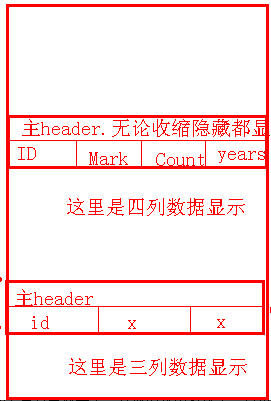
然后百度~google~发帖~总算有点效果了!其他的就不多说了。直接主要代码讲解--
主要是适配器的部分:ExpandableListAdapter.jave
public class ExpandableListAdapter extends BaseExpandableListAdapter {

	// Client Status

	private String mClient_id;

	private String mClient_name;

	private String mClient_realid;

	private String mClient_totally;

	// Stocks's product

	private String mStocks;

	private String mStocks_name;

	private String mStocks_counts;

	private String mStocks_cost;

	private String mStocks_now;

	private String mStocks_mark;

	// Moreprofit's product

	private String mMoreprofit;

	private String mMoreprofit_name;

	private String mMoreprofit_counts;

	private String mMoreprofit_rate;

	private String mMoreprofit_years;

	private String mMoreprofit_mark;

	// Pes's product

	private String mPes;

	private String mPes_projects;

	private String mPes_invest_amount;

	private String mPes_mark;

	private Context mContext;

	private final int VIEW_TYPE = 3;

	private final int TYPE_1 = 0;

	private final int TYPE_2 = 1;

	private final int TYPE_3 = 2;

	private LayoutInflater mLayoutInflater;

	// private HandleClick mHandleClick;

	private String[] mProduct_what = new String[] { "xx类产品", "xx收益类产品", "xx类投资" };

	private String[][] mProduct_what_items = {

			{ "产品名称", "持有数量", "买入成本", "当前净值", "备注" },

			{ "产品名称", "持有数量", "年收益率", "期限", "备注" }, { "项目", "投资金额", "备注" } };

	public ExpandableListAdapter(Context mContext) {

		mLayoutInflater = LayoutInflater.from(mContext);

		this.mContext = mContext;

	}

	public ExpandableListAdapter(Context mContext, String mClient_id,

			String mClient_name, String mClient_realid, String mClient_totally,

			String mStocks, String mStocks_name, String mStocks_counts,

			String mStocks_cost, String mStocks_now, String mStocks_mark,

			String mMoreprofit, String mMoreprofit_name,

			String mMoreprofit_counts, String mMoreprofit_rate,

			String mMoreprofit_years, String mMoreprofit_mark, String mPes,

			String mPes_projects, String mPes_invest_amount, String mPes_mark) {

		// super();

		this.mClient_id = mClient_id;

		this.mClient_name = mClient_name;

		this.mClient_realid = mClient_realid;

		this.mClient_totally = mClient_totally;

		this.mStocks = mStocks;

		this.mStocks_name = mStocks_name;

		this.mStocks_counts = mStocks_counts;

		this.mStocks_cost = mStocks_cost;

		this.mStocks_now = mStocks_now;

		this.mStocks_mark = mStocks_mark;

		this.mMoreprofit = mMoreprofit;

		this.mMoreprofit_name = mMoreprofit_name;

		this.mMoreprofit_counts = mMoreprofit_counts;

		this.mMoreprofit_rate = mMoreprofit_rate;

		this.mMoreprofit_years = mMoreprofit_years;

		this.mMoreprofit_mark = mMoreprofit_mark;

		this.mPes = mPes;

		this.mPes_projects = mPes_projects;

		this.mPes_invest_amount = mPes_invest_amount;

		this.mPes_mark = mPes_mark;

		this.mContext = mContext;

		mLayoutInflater = LayoutInflater.from(mContext);

	}

	@Override

	public Object getChild(int arg0, int arg1) {

		return null;

	}

	@Override

	public long getChildId(int groupPosition, int childPosition) {

		return 0;

	}

	public int getItemViewType(int groupPosition) {

		int p = groupPosition;

		if (p == 0) {

			return TYPE_1;

		} else if (p == 1) {

			return TYPE_2;

		} else if (p == 2) {

			return TYPE_3;

		} else {

			return TYPE_1;

		}

	}

	@Override

	public View getChildView(int groupPosition, int childPosition,

			boolean isLastChild, View convertView, ViewGroup parent) {

		int type = getItemViewType(groupPosition);

		switch (type) {

		case TYPE_1:

			convertView = mLayoutInflater.inflate(R.layout.item_table, null);

			TextView mProduct_name_1 = (TextView) convertView

					.findViewById(R.id.product_name);

			TextView mProduct_counts_1 = (TextView) convertView

					.findViewById(R.id.product_count);

			TextView mProduct_cost_1 = (TextView) convertView

					.findViewById(R.id.product_cost);

			TextView mProduct_status_1 = (TextView) convertView

					.findViewById(R.id.product_status);

			TextView mProduct_mark_1 = (TextView) convertView

					.findViewById(R.id.product_mark);

			//这里是自定义一个子item的,当position==0时显示标题栏

			switch (childPosition) {

			case 0:

				mProduct_name_1.setText(mProduct_what_items[0][0]);

				mProduct_counts_1.setText(mProduct_what_items[0][1]);

				mProduct_cost_1.setText(mProduct_what_items[0][2]);

				mProduct_status_1.setText(mProduct_what_items[0][3]);

				mProduct_mark_1.setText(mProduct_what_items[0][4]);

				break;

			default:

				mProduct_name_1.setText("888");

				mProduct_counts_1.setText("888");

				mProduct_cost_1.setText("888");

				mProduct_status_1.setText("888");

				mProduct_mark_1.setText("888");

				break;

			}

			break;

		case TYPE_2:

			convertView = mLayoutInflater.inflate(R.layout.item_table, null);

			TextView mProduct_name_2 = (TextView) convertView

					.findViewById(R.id.product_name);

			TextView mProduct_counts_2 = (TextView) convertView

					.findViewById(R.id.product_count);

			TextView mProduct__rate_2 = (TextView) convertView

					.findViewById(R.id.product_cost);

			TextView mProduct__years_2 = (TextView) convertView

					.findViewById(R.id.product_status);

			TextView mProduct_mark_2 = (TextView) convertView

					.findViewById(R.id.product_mark);

			//这里是自定义一个子item的,当position==0时显示标题栏

			switch (childPosition) {

			case 0:

				mProduct_name_2.setText(mProduct_what_items[1][0]);

				mProduct_counts_2.setText(mProduct_what_items[1][1]);

				mProduct__rate_2.setText(mProduct_what_items[1][2]);

				mProduct__years_2.setText(mProduct_what_items[1][3]);

				mProduct_mark_2.setText(mProduct_what_items[1][4]);

				break;

			default:

				mProduct_name_2.setText("888");

				mProduct_counts_2.setText("888");

				mProduct__rate_2.setText("888");

				mProduct__years_2.setText("888");

				mProduct_mark_2.setText("888");

				break;

			}

			break;

		case TYPE_3:

			convertView = mLayoutInflater.inflate(R.layout.item_table_p, null);

			TextView mProject_name_3 = (TextView) convertView

					.findViewById(R.id.project_name);

			TextView mProject_invest_amount_3 = (TextView) convertView

					.findViewById(R.id.project_invest_amount);

			TextView mProject_mark = (TextView) convertView

					.findViewById(R.id.project_mark);

			//这里是自定义一个子item的,当position==0时显示标题栏

			switch (childPosition) {

			case 0:

				mProject_name_3.setText(mProduct_what_items[2][0]);

				mProject_invest_amount_3.setText(mProduct_what_items[2][1]);

				mProject_mark.setText(mProduct_what_items[2][2]);

				break;

			default:

				mProject_name_3.setText("888");

				mProject_invest_amount_3.setText("888");

				mProject_mark.setText("888");

				break;

			}

			break;

		}

		return convertView;

	}

	@Override

	public int getChildrenCount(int groupPosition) {

		return 1;

	}

	@Override

	public Object getGroup(int groupPosition) {

		return null;

	}

	@Override

	public int getGroupCount() {

		return mProduct_what.length;

		// return 0;

	}

	@Override

	public long getGroupId(int groupPosition) {

		return 0;

	}

	@Override

	public View getGroupView(int groupPosition, boolean isExpanded,

			View convertView, ViewGroup parent) {

		int type = getItemViewType(groupPosition);

		switch (type) {

		case TYPE_1:

			convertView = mLayoutInflater.inflate(R.layout.header_table, null);

			TextView mProduct_what_1 = (TextView) convertView

					.findViewById(R.id.product_what_1);

			mProduct_what_1.setText(mProduct_what[groupPosition]);

			break;

		case TYPE_2:

			convertView = mLayoutInflater

					.inflate(R.layout.header_table_f, null);

			TextView mProduct_what_2 = (TextView) convertView

					.findViewById(R.id.product_what_2);

			mProduct_what_2.setText(mProduct_what[groupPosition]);

			break;

		case TYPE_3:

			convertView = mLayoutInflater

					.inflate(R.layout.header_table_p, null);

			TextView mProject_what_3 = (TextView) convertView

					.findViewById(R.id.project_what_3);

			mProject_what_3.setText(mProduct_what[groupPosition]);

			break;

		}

		return convertView;

	}

	@Override

	public boolean hasStableIds() {

		return false;

	}

	@Override

	public boolean isChildSelectable(int groupPosition, int childPosition) {

		return false;

	}

}
android ExpandableListView实现不同的布局的更多相关文章
- Android ExpandableListView
ExpandableListView 结合SimpleExpandableListAdapter用法 最终实现效果: activity_main.xml <?xml version=" ...
- Android ExpandableListView的技巧和问题
前言: 最近一个多月在认真的学习Android和做项目,文章内容表达的不好或者理解错了,希望大家评论指出. :-) 本文是总结几个比较常用且使用的技巧,和一个大家都会遇到的问题. 文章中大部分语句摘抄 ...
- Android 自定义View及其在布局文件中的使用示例(三):结合Android 4.4.2_r1源码分析onMeasure过程
转载请注明出处 http://www.cnblogs.com/crashmaker/p/3549365.html From crash_coder linguowu linguowu0622@gami ...
- Android 自定义View及其在布局文件中的使用示例(二)
转载请注明出处 http://www.cnblogs.com/crashmaker/p/3530213.html From crash_coder linguowu linguowu0622@gami ...
- android项目的结构和布局
一.res文件夹 1.res文件夹用于存放Android的资源.包括:动画.静态图片.字符串.菜单.布局.视频.文件等. 1.drawable-ldpi:低分辨率图形(120像素/英寸) 2.draw ...
- Android UI基础之五大布局
Android UI基础之五大布局 Android的界面是有布局和组件协同完成的,布局好比是建筑里的框架,而组件则相当于建筑里的砖瓦.组件按照布局的要求依次排列,就组成了用户所看见的界面.Andro ...
- 【开源项目4】Android ExpandableListView
如果你对Android提供的Android ExpandableListView并不满意,一心想要实现诸如Spotify应用那般的效果,那么SlideExpandableListView绝对是你最好的 ...
- Android学习笔记④——页面的布局方式
FrameLayout(帧布局) 这个布局的特点是简单的默认把每一个视图组件都放在边框内且放在左上角,即使添加多个视图组件,他们也都是重叠在左上角,新的视图会遮挡住旧的视图.可以根据gravity来改 ...
- Android UI学习 - FrameLayou和布局优化(viewstub)
原创作品,允许转载,转载时请务必以超链接形式标明文章 原始出处 .作者信息和本声明.否则将追究法律责任.http://android.blog.51cto.com/268543/308090 Fram ...
随机推荐
- [算法] trie树实现
小写字母的字典树 #include <stdio.h> #include <stdlib.h> #include <string.h> #define MAXN 1 ...
- JS传递到后台中文 出现乱码问题
js 异步传递中文字符,后台接收出现乱码问题 function showFirSelect(a){ var b = encodeURI(a); var secUrl = "<%=bas ...
- Redis数据备份和重启恢复
一.对Redis持久化的探讨与理解 目前Redis持久化的方式有两种: RDB 和 AOF 首先,我们应该明确持久化的数据有什么用,答案是用于重启后的数据恢复. Redis是一个内存数据库,无论是RD ...
- iOS9新特性-3D Touch
本文主要讲解3DTouch各种场景下的开发方法,开发主屏幕应用icon上的快捷选项标签(Home Screen Quick Actions),静态设置 UIApplicationShortcutIte ...
- 改变导航栏title字体的大小和颜色
方法一:自定义视图的方法 就是在导航向上添加一个titleView,可以使用一个label,再设置label的背景颜色透明,字体什么的设置就很简单了. //自定义标题视图 UILabel *title ...
- 文本去重-----awk或者uniq
对于awk '!a[$3]++',需要了解3个知识点 1.awk数组知识,不说了 2.awk的基本命令格式 awk 'pattern{action}' 省略action时,默认action是{ ...
- 歪国人DIY的MINI四轴
歪国人DIY的MINI四轴 Crazyflie 2.0 自己仿Crazyflie.CrazyPony
- Android如何调用第三方SO库(转)
源:Android如何调用第三方SO库 问题描述:Android如何调用第三方SO库:已知条件:SO库为Android版本连接库(*.so文件),并提供了详细的接口说明:已了解解决方案:1.将SO文件 ...
- STM32的时钟树深入详解以及RCC配置
在STM32上如果不使用外部晶振,OSC_IN和OSC_OUT的接法 如果使用内部RC振荡器而不使用外部晶振,请按照下面方法处理: 1)对于100脚或144脚的产品,OSC_IN应接地,OSC_OUT ...
- 基于libUSB的USB设备固件更新程序(下载数据)(转)
源:基于libUSB的USB设备固件更新程序(下载数据) 本文紧接上一篇日志:基于libUSB-Win32的USB设备固件更新程序(前言),相关背景以及起因等,此处不再赘述,如感兴趣请移步. libU ...