
android ExpandableListView实现不同的布局
最近有一个需求要实现listview的不同布局!因为有好几上header,就想到了ExpandableListView!
这个是我的需求模型:看图(自己画的)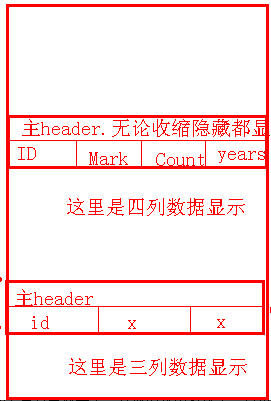
然后百度~google~发帖~总算有点效果了!其他的就不多说了。直接主要代码讲解--
主要是适配器的部分:ExpandableListAdapter.jave
public class ExpandableListAdapter extends BaseExpandableListAdapter {

	// Client Status

	private String mClient_id;

	private String mClient_name;

	private String mClient_realid;

	private String mClient_totally;

	// Stocks's product

	private String mStocks;

	private String mStocks_name;

	private String mStocks_counts;

	private String mStocks_cost;

	private String mStocks_now;

	private String mStocks_mark;

	// Moreprofit's product

	private String mMoreprofit;

	private String mMoreprofit_name;

	private String mMoreprofit_counts;

	private String mMoreprofit_rate;

	private String mMoreprofit_years;

	private String mMoreprofit_mark;

	// Pes's product

	private String mPes;

	private String mPes_projects;

	private String mPes_invest_amount;

	private String mPes_mark;

	private Context mContext;

	private final int VIEW_TYPE = 3;

	private final int TYPE_1 = 0;

	private final int TYPE_2 = 1;

	private final int TYPE_3 = 2;

	private LayoutInflater mLayoutInflater;

	// private HandleClick mHandleClick;

	private String[] mProduct_what = new String[] { "xx类产品", "xx收益类产品", "xx类投资" };

	private String[][] mProduct_what_items = {

			{ "产品名称", "持有数量", "买入成本", "当前净值", "备注" },

			{ "产品名称", "持有数量", "年收益率", "期限", "备注" }, { "项目", "投资金额", "备注" } };

	public ExpandableListAdapter(Context mContext) {

		mLayoutInflater = LayoutInflater.from(mContext);

		this.mContext = mContext;

	}

	public ExpandableListAdapter(Context mContext, String mClient_id,

			String mClient_name, String mClient_realid, String mClient_totally,

			String mStocks, String mStocks_name, String mStocks_counts,

			String mStocks_cost, String mStocks_now, String mStocks_mark,

			String mMoreprofit, String mMoreprofit_name,

			String mMoreprofit_counts, String mMoreprofit_rate,

			String mMoreprofit_years, String mMoreprofit_mark, String mPes,

			String mPes_projects, String mPes_invest_amount, String mPes_mark) {

		// super();

		this.mClient_id = mClient_id;

		this.mClient_name = mClient_name;

		this.mClient_realid = mClient_realid;

		this.mClient_totally = mClient_totally;

		this.mStocks = mStocks;

		this.mStocks_name = mStocks_name;

		this.mStocks_counts = mStocks_counts;

		this.mStocks_cost = mStocks_cost;

		this.mStocks_now = mStocks_now;

		this.mStocks_mark = mStocks_mark;

		this.mMoreprofit = mMoreprofit;

		this.mMoreprofit_name = mMoreprofit_name;

		this.mMoreprofit_counts = mMoreprofit_counts;

		this.mMoreprofit_rate = mMoreprofit_rate;

		this.mMoreprofit_years = mMoreprofit_years;

		this.mMoreprofit_mark = mMoreprofit_mark;

		this.mPes = mPes;

		this.mPes_projects = mPes_projects;

		this.mPes_invest_amount = mPes_invest_amount;

		this.mPes_mark = mPes_mark;

		this.mContext = mContext;

		mLayoutInflater = LayoutInflater.from(mContext);

	}

	@Override

	public Object getChild(int arg0, int arg1) {

		return null;

	}

	@Override

	public long getChildId(int groupPosition, int childPosition) {

		return 0;

	}

	public int getItemViewType(int groupPosition) {

		int p = groupPosition;

		if (p == 0) {

			return TYPE_1;

		} else if (p == 1) {

			return TYPE_2;

		} else if (p == 2) {

			return TYPE_3;

		} else {

			return TYPE_1;

		}

	}

	@Override

	public View getChildView(int groupPosition, int childPosition,

			boolean isLastChild, View convertView, ViewGroup parent) {

		int type = getItemViewType(groupPosition);

		switch (type) {

		case TYPE_1:

			convertView = mLayoutInflater.inflate(R.layout.item_table, null);

			TextView mProduct_name_1 = (TextView) convertView

					.findViewById(R.id.product_name);

			TextView mProduct_counts_1 = (TextView) convertView

					.findViewById(R.id.product_count);

			TextView mProduct_cost_1 = (TextView) convertView

					.findViewById(R.id.product_cost);

			TextView mProduct_status_1 = (TextView) convertView

					.findViewById(R.id.product_status);

			TextView mProduct_mark_1 = (TextView) convertView

					.findViewById(R.id.product_mark);

			//这里是自定义一个子item的,当position==0时显示标题栏

			switch (childPosition) {

			case 0:

				mProduct_name_1.setText(mProduct_what_items[0][0]);

				mProduct_counts_1.setText(mProduct_what_items[0][1]);

				mProduct_cost_1.setText(mProduct_what_items[0][2]);

				mProduct_status_1.setText(mProduct_what_items[0][3]);

				mProduct_mark_1.setText(mProduct_what_items[0][4]);

				break;

			default:

				mProduct_name_1.setText("888");

				mProduct_counts_1.setText("888");

				mProduct_cost_1.setText("888");

				mProduct_status_1.setText("888");

				mProduct_mark_1.setText("888");

				break;

			}

			break;

		case TYPE_2:

			convertView = mLayoutInflater.inflate(R.layout.item_table, null);

			TextView mProduct_name_2 = (TextView) convertView

					.findViewById(R.id.product_name);

			TextView mProduct_counts_2 = (TextView) convertView

					.findViewById(R.id.product_count);

			TextView mProduct__rate_2 = (TextView) convertView

					.findViewById(R.id.product_cost);

			TextView mProduct__years_2 = (TextView) convertView

					.findViewById(R.id.product_status);

			TextView mProduct_mark_2 = (TextView) convertView

					.findViewById(R.id.product_mark);

			//这里是自定义一个子item的,当position==0时显示标题栏

			switch (childPosition) {

			case 0:

				mProduct_name_2.setText(mProduct_what_items[1][0]);

				mProduct_counts_2.setText(mProduct_what_items[1][1]);

				mProduct__rate_2.setText(mProduct_what_items[1][2]);

				mProduct__years_2.setText(mProduct_what_items[1][3]);

				mProduct_mark_2.setText(mProduct_what_items[1][4]);

				break;

			default:

				mProduct_name_2.setText("888");

				mProduct_counts_2.setText("888");

				mProduct__rate_2.setText("888");

				mProduct__years_2.setText("888");

				mProduct_mark_2.setText("888");

				break;

			}

			break;

		case TYPE_3:

			convertView = mLayoutInflater.inflate(R.layout.item_table_p, null);

			TextView mProject_name_3 = (TextView) convertView

					.findViewById(R.id.project_name);

			TextView mProject_invest_amount_3 = (TextView) convertView

					.findViewById(R.id.project_invest_amount);

			TextView mProject_mark = (TextView) convertView

					.findViewById(R.id.project_mark);

			//这里是自定义一个子item的,当position==0时显示标题栏

			switch (childPosition) {

			case 0:

				mProject_name_3.setText(mProduct_what_items[2][0]);

				mProject_invest_amount_3.setText(mProduct_what_items[2][1]);

				mProject_mark.setText(mProduct_what_items[2][2]);

				break;

			default:

				mProject_name_3.setText("888");

				mProject_invest_amount_3.setText("888");

				mProject_mark.setText("888");

				break;

			}

			break;

		}

		return convertView;

	}

	@Override

	public int getChildrenCount(int groupPosition) {

		return 1;

	}

	@Override

	public Object getGroup(int groupPosition) {

		return null;

	}

	@Override

	public int getGroupCount() {

		return mProduct_what.length;

		// return 0;

	}

	@Override

	public long getGroupId(int groupPosition) {

		return 0;

	}

	@Override

	public View getGroupView(int groupPosition, boolean isExpanded,

			View convertView, ViewGroup parent) {

		int type = getItemViewType(groupPosition);

		switch (type) {

		case TYPE_1:

			convertView = mLayoutInflater.inflate(R.layout.header_table, null);

			TextView mProduct_what_1 = (TextView) convertView

					.findViewById(R.id.product_what_1);

			mProduct_what_1.setText(mProduct_what[groupPosition]);

			break;

		case TYPE_2:

			convertView = mLayoutInflater

					.inflate(R.layout.header_table_f, null);

			TextView mProduct_what_2 = (TextView) convertView

					.findViewById(R.id.product_what_2);

			mProduct_what_2.setText(mProduct_what[groupPosition]);

			break;

		case TYPE_3:

			convertView = mLayoutInflater

					.inflate(R.layout.header_table_p, null);

			TextView mProject_what_3 = (TextView) convertView

					.findViewById(R.id.project_what_3);

			mProject_what_3.setText(mProduct_what[groupPosition]);

			break;

		}

		return convertView;

	}

	@Override

	public boolean hasStableIds() {

		return false;

	}

	@Override

	public boolean isChildSelectable(int groupPosition, int childPosition) {

		return false;

	}

}
android ExpandableListView实现不同的布局的更多相关文章
- Android ExpandableListView
ExpandableListView 结合SimpleExpandableListAdapter用法 最终实现效果: activity_main.xml <?xml version=" ...
- Android ExpandableListView的技巧和问题
前言: 最近一个多月在认真的学习Android和做项目,文章内容表达的不好或者理解错了,希望大家评论指出. :-) 本文是总结几个比较常用且使用的技巧,和一个大家都会遇到的问题. 文章中大部分语句摘抄 ...
- Android 自定义View及其在布局文件中的使用示例(三):结合Android 4.4.2_r1源码分析onMeasure过程
转载请注明出处 http://www.cnblogs.com/crashmaker/p/3549365.html From crash_coder linguowu linguowu0622@gami ...
- Android 自定义View及其在布局文件中的使用示例(二)
转载请注明出处 http://www.cnblogs.com/crashmaker/p/3530213.html From crash_coder linguowu linguowu0622@gami ...
- android项目的结构和布局
一.res文件夹 1.res文件夹用于存放Android的资源.包括:动画.静态图片.字符串.菜单.布局.视频.文件等. 1.drawable-ldpi:低分辨率图形(120像素/英寸) 2.draw ...
- Android UI基础之五大布局
Android UI基础之五大布局 Android的界面是有布局和组件协同完成的,布局好比是建筑里的框架,而组件则相当于建筑里的砖瓦.组件按照布局的要求依次排列,就组成了用户所看见的界面.Andro ...
- 【开源项目4】Android ExpandableListView
如果你对Android提供的Android ExpandableListView并不满意,一心想要实现诸如Spotify应用那般的效果,那么SlideExpandableListView绝对是你最好的 ...
- Android学习笔记④——页面的布局方式
FrameLayout(帧布局) 这个布局的特点是简单的默认把每一个视图组件都放在边框内且放在左上角,即使添加多个视图组件,他们也都是重叠在左上角,新的视图会遮挡住旧的视图.可以根据gravity来改 ...
- Android UI学习 - FrameLayou和布局优化(viewstub)
原创作品,允许转载,转载时请务必以超链接形式标明文章 原始出处 .作者信息和本声明.否则将追究法律责任.http://android.blog.51cto.com/268543/308090 Fram ...
随机推荐
- android-tools adb for ARM Linux
/************************************************************************* * android-tools adb for A ...
- layer 的一些知识
layer类似于ps的图层,如果把一个uiview看做图片的画,layer就像是图层.一个图片是由很多个大小不同的有层次的图层构成的,uiview也是. 1. 一个view有一个underlying ...
- Spring 工作原理
1.spring原理 内部最核心的就是IOC了,动态注入,让一个对象的创建不用new了,可以自动的生产,这其实就是利用java里的反射,反射其实就是在运行时动态的去创建.调用对象,Spring就是在运 ...
- JS利用短路原理简写if语句
看GoogleDoodle-Dance的源代码,学习到一个小知识——简写if语句. 几乎所有语言中||和&&都遵循“短路”原理,如&&中第一个表达式为假就不会去处理第二 ...
- spring DateUtils
/* * Licensed to the Apache Software Foundation (ASF) under one or more * contributor license agreem ...
- log4j的用法
1.导入 2.在src下新建log4j.properties,内容如下 log4j.rootLogger=DEBUG, A1 ,R log4j.appender.A1=org.apache.log4j ...
- Unity3D ——强大的跨平台3D游戏开发工具(三)
第四章 为地形添加水源.水流以及水下的模糊效果 制作好了地形的各种效果,接下来我们给场景添加一些水效果,使场景更加丰富. 第一步:添加水面 由于我在上一次的地形创作中就已经在山峰之间制作了一块洼地,它 ...
- [osg]osg显示中文信息
转自:http://www.cnblogs.com/feixiang-peng/articles/3152754.html 写好了在osg中实时显示中文信息的效果.中间遇到两个问题,一个是中文显示,一 ...
- ps--记录几个方法步骤
1.图片文字去掉 1.1 矩形工具-->吸管-->alt+delete 1.2 钢笔工具-->Ctrl+回车(变换选区)-->吸管-->alt+delete 2.图层锁不 ...
- PHP与MySql建立连接
通过PHP脚本建立与一个MySQL数据库的连接时,数据库服务器的主机位置(在本地就是localhost).用户名(root).密码.和数据库名是必须的.一旦建立连接,脚本就能执行SQL命令.二者联系的 ...