
C#压缩文件夹至zip,不包含所选文件夹【转+修改】
转自园友:jimcsharp的博文C#实现Zip压缩解压实例【转】
在此基础上,对其中的压缩文件夹方法略作修正,并增加是否对父文件夹进行压缩的方法。(因为笔者有只压缩文件夹下的所有文件,却不想将选中的文件夹打入压缩文件的需求),话不多说,上代码:
其中需要依赖ICSharpCode.SharpZipLib.dll: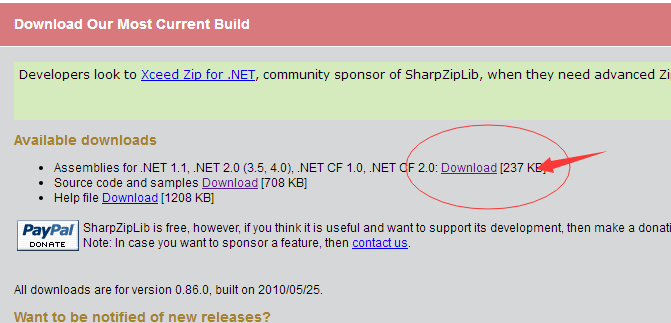
之后,新建一个类,代码如下:
using System;
using System.Collections.Generic;
using System.Linq;
using System.Text;
using System.IO;
using ICSharpCode.SharpZipLib;
using ICSharpCode.SharpZipLib.Zip;
using ICSharpCode.SharpZipLib.Checksums; namespace Zip.Util
{
/// <summary>
/// 适用与ZIP压缩
/// </summary>
public class ZipHelper
{
#region 压缩 /// <summary>
/// 递归压缩文件夹的内部方法
/// </summary>
/// <param name="folderToZip">要压缩的文件夹路径</param>
/// <param name="zipStream">压缩输出流</param>
/// <param name="parentFolderName">此文件夹的上级文件夹</param>
/// <returns></returns>
private static bool ZipDirectory(string folderToZip, ZipOutputStream zipStream, string parentFolderName)
{
bool result = true;
string[] folders, files;
ZipEntry ent = null;
FileStream fs = null;
Crc32 crc = new Crc32(); try
{
ent = new ZipEntry(Path.Combine(parentFolderName, Path.GetFileName(folderToZip) + "/"));
zipStream.PutNextEntry(ent);
zipStream.Flush(); files = Directory.GetFiles(folderToZip);
foreach (string file in files)
{
fs = File.OpenRead(file); byte[] buffer = new byte[fs.Length];
fs.Read(buffer, , buffer.Length);
ent = new ZipEntry(Path.Combine(parentFolderName, Path.GetFileName(folderToZip) + "/" + Path.GetFileName(file)));
ent.DateTime = DateTime.Now;
ent.Size = fs.Length; fs.Close(); crc.Reset();
crc.Update(buffer); ent.Crc = crc.Value;
zipStream.PutNextEntry(ent);
zipStream.Write(buffer, , buffer.Length);
} }
catch
{
result = false;
}
finally
{
if (fs != null)
{
fs.Close();
fs.Dispose();
}
if (ent != null)
{
ent = null;
}
GC.Collect();
GC.Collect();
} folders = Directory.GetDirectories(folderToZip);
foreach (string folder in folders)
if (!ZipDirectory(folder, zipStream, Path.GetFileName(folderToZip)))
return false; return result;
} /// <summary>
/// 私有方法,增加是否包含父文件夹方法
/// </summary>
/// <param name="folderToZip">要压缩的文件夹路径</param>
/// <param name="zipStream">压缩输出流</param>
/// <param name="ContainParent">是否包含父文件夹</param>
/// <returns></returns>
private static bool ZipDirectory(string folderToZip, ZipOutputStream zipStream, Boolean ContainParent)
{
string[] folders, files;
ZipEntry ent = null;
FileStream fs = null;
Crc32 crc = new Crc32(); try
{ if (ContainParent)
{
ent = new ZipEntry(Path.GetFileName(folderToZip) + "/");
zipStream.PutNextEntry(ent);
zipStream.Flush();
} files = Directory.GetFiles(folderToZip);
foreach (string file in files)
{
fs = File.OpenRead(file); byte[] buffer = new byte[fs.Length];
fs.Read(buffer, , buffer.Length); if (ContainParent)
{
ent = new ZipEntry(Path.GetFileName(folderToZip) + "/" + Path.GetFileName(file));
}
else
{
ent = new ZipEntry(Path.GetFileName(file));
} ent.DateTime = DateTime.Now;
ent.Size = fs.Length; fs.Close(); crc.Reset();
crc.Update(buffer); ent.Crc = crc.Value;
zipStream.PutNextEntry(ent);
zipStream.Write(buffer, , buffer.Length);
} }
catch
{
return false;
}
finally
{
if (fs != null)
{
fs.Close();
fs.Dispose();
}
if (ent != null)
{
ent = null;
}
GC.Collect();
GC.Collect();
} folders = Directory.GetDirectories(folderToZip); if (ContainParent)
{
foreach (string folder in folders)
if (!ZipDirectory(folder, zipStream, Path.GetFileName(folderToZip)))
return false;
}
else
{
foreach (string folder in folders)
if (!ZipDirectory(folder, zipStream, ""))
return false;
} return true;
} /// <summary>
/// 生成Zip
/// </summary>
/// <param name="folderToZip"></param>
/// <param name="zipedFile"></param>
/// <param name="IncludeParent">是否包含父文件夹</param>
/// <returns></returns>
public static bool ZipDirectory(string folderToZip, string zipedFile, Boolean IncludeParent)
{
bool result = false;
if (!Directory.Exists(folderToZip))
return result; ZipOutputStream zipStream = new ZipOutputStream(File.Create(zipedFile));
zipStream.SetLevel(); result = ZipDirectory(folderToZip, zipStream, IncludeParent); zipStream.Finish();
zipStream.Close(); return result;
} /// <summary>
/// 压缩文件夹
/// </summary>
/// <param name="folderToZip">要压缩的文件夹路径</param>
/// <param name="zipedFile">压缩文件完整路径</param>
/// <param name="password">密码</param>
/// <returns>是否压缩成功</returns>
public static bool ZipDirectory(string folderToZip, string zipedFile, string password)
{
bool result = false;
if (!Directory.Exists(folderToZip))
return result; ZipOutputStream zipStream = new ZipOutputStream(File.Create(zipedFile));
zipStream.SetLevel();
if (!string.IsNullOrEmpty(password)) zipStream.Password = password; result = ZipDirectory(folderToZip, zipStream, ""); zipStream.Finish();
zipStream.Close(); return result;
} /// <summary>
/// 压缩文件夹
/// </summary>
/// <param name="folderToZip">要压缩的文件夹路径</param>
/// <param name="zipedFile">压缩文件完整路径</param>
/// <returns>是否压缩成功</returns>
public static bool ZipDirectory(string folderToZip, string zipedFile)
{
bool result = ZipDirectory(folderToZip, zipedFile, null);
return result;
} /// <summary>
/// 压缩文件
/// </summary>
/// <param name="fileToZip">要压缩的文件全名</param>
/// <param name="zipedFile">压缩后的文件名</param>
/// <param name="password">密码</param>
/// <returns>压缩结果</returns>
public static bool ZipFile(string fileToZip, string zipedFile, string password)
{
bool result = true;
ZipOutputStream zipStream = null;
FileStream fs = null;
ZipEntry ent = null; if (!File.Exists(fileToZip))
return false; try
{
fs = File.OpenRead(fileToZip);
byte[] buffer = new byte[fs.Length];
fs.Read(buffer, , buffer.Length);
fs.Close(); fs = File.Create(zipedFile);
zipStream = new ZipOutputStream(fs);
if (!string.IsNullOrEmpty(password)) zipStream.Password = password;
ent = new ZipEntry(Path.GetFileName(fileToZip));
zipStream.PutNextEntry(ent);
zipStream.SetLevel(); zipStream.Write(buffer, , buffer.Length); }
catch
{
result = false;
}
finally
{
if (zipStream != null)
{
zipStream.Finish();
zipStream.Close();
}
if (ent != null)
{
ent = null;
}
if (fs != null)
{
fs.Close();
fs.Dispose();
}
}
GC.Collect();
GC.Collect(); return result;
} /// <summary>
/// 压缩文件
/// </summary>
/// <param name="fileToZip">要压缩的文件全名</param>
/// <param name="zipedFile">压缩后的文件名</param>
/// <returns>压缩结果</returns>
public static bool ZipFile(string fileToZip, string zipedFile)
{
bool result = ZipFile(fileToZip, zipedFile, null);
return result;
} /// <summary>
/// 压缩文件或文件夹
/// </summary>
/// <param name="fileToZip">要压缩的路径</param>
/// <param name="zipedFile">压缩后的文件名</param>
/// <param name="password">密码</param>
/// <returns>压缩结果</returns>
public static bool Zip(string fileToZip, string zipedFile, string password)
{
bool result = false;
if (Directory.Exists(fileToZip))
result = ZipDirectory(fileToZip, zipedFile, password);
else if (File.Exists(fileToZip))
result = ZipFile(fileToZip, zipedFile, password); return result;
} /// <summary>
/// 压缩文件或文件夹
/// </summary>
/// <param name="fileToZip">要压缩的路径</param>
/// <param name="zipedFile">压缩后的文件名</param>
/// <returns>压缩结果</returns>
public static bool Zip(string fileToZip, string zipedFile)
{
bool result = Zip(fileToZip, zipedFile, null);
return result; } #endregion #region 解压 /// <summary>
/// 解压功能(解压压缩文件到指定目录)
/// </summary>
/// <param name="fileToUnZip">待解压的文件</param>
/// <param name="zipedFolder">指定解压目标目录</param>
/// <param name="password">密码</param>
/// <returns>解压结果</returns>
public static bool UnZip(string fileToUnZip, string zipedFolder, string password)
{
bool result = true;
FileStream fs = null;
ZipInputStream zipStream = null;
ZipEntry ent = null;
string fileName; if (!File.Exists(fileToUnZip))
return false; if (!Directory.Exists(zipedFolder))
Directory.CreateDirectory(zipedFolder); try
{
zipStream = new ZipInputStream(File.OpenRead(fileToUnZip));
if (!string.IsNullOrEmpty(password)) zipStream.Password = password;
while ((ent = zipStream.GetNextEntry()) != null)
{
if (!string.IsNullOrEmpty(ent.Name))
{
fileName = Path.Combine(zipedFolder, ent.Name);
fileName = fileName.Replace('/', '\\');//change by Mr.HopeGi if (fileName.EndsWith("\\"))
{
Directory.CreateDirectory(fileName);
continue;
} fs = File.Create(fileName);
int size = ;
byte[] data = new byte[size];
while (true)
{
size = zipStream.Read(data, , data.Length);
if (size > )
fs.Write(data, , data.Length);
else
break;
}
}
}
}
catch
{
result = false;
}
finally
{
if (fs != null)
{
fs.Close();
fs.Dispose();
}
if (zipStream != null)
{
zipStream.Close();
zipStream.Dispose();
}
if (ent != null)
{
ent = null;
}
GC.Collect();
GC.Collect();
}
return result;
} /// <summary>
/// 解压功能(解压压缩文件到指定目录)
/// </summary>
/// <param name="fileToUnZip">待解压的文件</param>
/// <param name="zipedFolder">指定解压目标目录</param>
/// <returns>解压结果</returns>
//public static bool UnZip(string fileToUnZip, string zipedFolder)
//{
// bool result = UnZip(fileToUnZip, zipedFolder, null);
// return result;
//} /// <summary>
/// 解压功能(解压压缩文件到指定目录)
/// </summary>
/// <param name="fileToUnZip">待解压的文件</param>
/// <param name="zipedFolder">指定解压目标目录</param>
/// <returns>解压结果</returns>
public static bool UnZip(string fileToUnZip, string zipedFolder)
{ if (Directory.Exists(zipedFolder))
{
Directory.Delete(zipedFolder, true);
}
Directory.CreateDirectory(zipedFolder);
ZipInputStream zipInputStream = new ZipInputStream(File.Open(fileToUnZip, FileMode.Open));
ZipEntry zipEntryFromZippedFile = zipInputStream.GetNextEntry();
while (zipEntryFromZippedFile != null)
{
if (zipEntryFromZippedFile.IsFile)
{
FileInfo fInfo = new FileInfo(string.Format(zipedFolder + "\\{0}", zipEntryFromZippedFile.Name));
if (!fInfo.Directory.Exists) fInfo.Directory.Create(); FileStream file = fInfo.Create();
byte[] bufferFromZip = new byte[zipInputStream.Length];
zipInputStream.Read(bufferFromZip, , bufferFromZip.Length);
file.Write(bufferFromZip, , bufferFromZip.Length);
file.Close();
}
zipEntryFromZippedFile = zipInputStream.GetNextEntry();
}
zipInputStream.Close();
return true;
} #endregion
}
}
压缩文件夹,是否包含父文件夹,调用:
 public static bool ZipDirectory(string folderToZip, string zipedFile, Boolean IncludeParent)

解压缩功能我也将原方法注释了,重新找了一个方法,因为原方法在将.xml文件解压出来的时候,会在末尾加入一堆NULNULNULNUL.......,大家可以自己去尝试下。
2017.8.12补充:
解压自己的打包的压缩包报错:EOF in header.......
准备换winrar.
C#压缩文件夹至zip,不包含所选文件夹【转+修改】的更多相关文章
- PHP 多文件打包下载 zip
<?php $zipname = './photo.zip'; //服务器根目录下有文件夹public,其中包含三个文件img1.jpg, img2.jpg, img3.jpg,将这三个文件打包 ...
- 如何使用Beyond Compare 对比差异文件【制作Patch(补丁包)文件】
场景:研发部的代码从SVN变更至GIt,通过Jenkins每天自动生成程序包. 如需要获取单独的程序包更新,而不是整个程序包覆盖更新,这时候就需要用到Beyond Compare 对比工具 操作步骤1 ...
- 命令行方式调用winrar对文件夹进行zip压缩示例代码
调用winRAR进行压缩 using System; using System.Collections.Generic; using System.Linq; using System.Text; u ...
- Python压缩指定文件及文件夹为zip
Python压缩指定的文件及文件夹为.zip 代码: def zipDir(dirpath,outFullName): """ 压缩指定文件夹 :param dirpat ...
- Java实现文件压缩与解压[zip格式,gzip格式]
Java实现ZIP的解压与压缩功能基本都是使用了Java的多肽和递归技术,可以对单个文件和任意级联文件夹进行压缩和解压,对于一些初学者来说是个很不错的实例. zip扮演着归档和压缩两个角色:gzip并 ...
- Linux命令(十六) 压缩或解压缩文件和目录 zip unzip
目录 1.命令简介 2.常用参数介绍 3.实例 4.直达底部 命令简介 zip 是 Linux 系统下广泛使用的压缩程序,文件压缩后扩展名为 ".zip". zip 命令用来将文件 ...
- linux下压缩成zip文件解压zip文件
linux zip命令的基本用法是: zip [参数] [打包后的文件名] [打包的目录路径] linux zip命令参数列表: -a 将文件转成ASCII模式 -F 尝试修复损坏 ...
- java笔试题: ——将e:/source文件夹下的文件打个zip包后拷贝到f:/文件夹下面
将e:/source文件夹下的文件打个zip包后拷贝到f:/文件夹下面 import java.io.*; import java.util.zip.ZipEntry; import java.uti ...
- gulp插件实现压缩一个文件夹下不同目录下的js文件(支持es6)
gulp-uglify:压缩js大小,只支持es5 安装: cnpm: cnpm i gulp-uglify -D yarn: yarn add gulp-uglify -D 使用: 代码实现1:压缩 ...
随机推荐
- C#的SplitPanel如何设置上下和左右
定位到Orientation属性即可
- 华为OJ2011-最长公共子串
一.题目描述 描述: 计算两个字符串的最大公共子串(Longest Common Substring)的长度,字符区分大小写. 输入: 输入两个字符串 输出: 输出一个整数 样例输入: asdfas ...
- MariaDB -- 数据类型
Mariadb 的数据类型 MariaDB数据类型可以分为数字,日期和时间以及字符串值. 使用数据类型的原则:够用就行, 尽量使用范围小的,而不用大的 常用的数据类型 整数:int, bit 小数:d ...
- JAVA进阶-网络编程
>通过套接字连接server Socket指代套接字 >读取随意站点的首页 --------- /** * @author Lean @date:2014-10-9 */ public c ...
- 【bzoj4591】[Shoi2015]超能粒子炮·改
设S(n,k)=Σ C(n,i) i=0..k 根据lucas定理可以得到 S(n,k) mod p = [ S(n/p,k/p-1)*S(n mod p,p-1)+C(n/p,k/p)*S(n mo ...
- Ubuntu14.04 x64 zabbix 3.0 安装
U buntu14.04 x64 zabbix 3.0 安装 苦于网上的文档很多,但是对初学者来说,很多都搭建不成功,我重新安装一下.记录一下. 下载deb wget http://repo.za ...
- ASP.NET Core开发Docker部署
ASP.NET Core开发Docker部署,.NET Core支持Docker 部署运行.我们将ASP.NET Core 部署在Docker 上运行. 大家可能都见识过Docker ,今天我们就详细 ...
- bzoj1016 [JSOI2008]最小生成树计数——Kruskal+矩阵树定理
题目:https://www.lydsy.com/JudgeOnline/problem.php?id=1016 从 Kruskal 算法的过程来考虑产生多种方案的原因,就是边权相同的边有一样的功能, ...
- bzoj1854 [Scoi2010]游戏——匈牙利算法
题目:https://www.lydsy.com/JudgeOnline/problem.php?id=1854 这题...据说可以用并查集做,但没有去看... 用二分图匹配的话,就把装备和它的两个属 ...
- 炫酷的 CSS 形状(值得收藏)
在今日头条中看到炫酷的 CSS 形状,就记录一下: 1.圆形 #circle { width: 100px; height: 100px; background: red; border-radius ...