
Gridview 多重表头 (二)
多重表头之排序
这是个有点忧桑的故事。。。Cynthia告诉我,研究一个问题,我们不可能有超过一天的时间。。。
结果好好几天过去鸟~~还没有完成。。。
由于不再使用Gridview自带的表头行,于是无法绑定gridview自带排序方法。只能根据点击列名做不同处理。
我的思路是酱滴,将点击的列名存在一个hiddenfield里,排序时候根据hiddenfield里存储的值作为升/降序的依据。
好丢人的说,第一次的时候存在了label里,每次回传都被label默认值覆盖,后来才发现,不是所有控件都叫Hidden field...
ASPX
 <script language="javascript" type="text/javascript">

     function test(o)

     {

         document.getElementById("Label1").innerText = o;

         document.getElementById("LinkButton1").click();

     }

 </script>

                                  ....

       <asp:GridView ID="GridView1" runat="server" AutoGenerateColumns="False"  AllowSorting="true"

             onrowcreated="GridView1_RowCreated">

           <Columns>

               <asp:BoundField DataField="StoreId" HeaderText="Store Id" SortExpression="StoreId" />

               <asp:BoundField DataField="Requeseter" HeaderText="Requester" SortExpression="Requeseter" />

               <asp:BoundField DataField="EmployeeId" HeaderText="EmployeeId"  SortExpression="EmployeeId"/>

               <asp:BoundField DataField="StoreId" HeaderText="StoreId2" SortExpression="StoreId"  />

           </Columns>

     </asp:GridView>

         <asp:LinkButton ID="LinkButton1" runat="server" onclick="LinkButton1_Click"

             ClientIDMode="Static">LinkButton</asp:LinkButton>

          <asp:HiddenField ID="Label1" runat="server" Value=""/>
CS
         protected void Page_Load(object sender, EventArgs e)

         {

             if (!IsPostBack)

             {

                 List<Mix> list = new List<Mix>();

                 int i = ;

                 list.AddRange(new List<Mix> { new Mix { StoreId = , Requeseter = "A", EmployeeId = i +  }, new Mix { StoreId = , Requeseter = "A", EmployeeId = i +  }, new Mix { StoreId = , Requeseter = "A", EmployeeId = i +  }, new Mix { StoreId = , Requeseter = "B", EmployeeId = i +  } });

                 ViewState["lst"] = list;

                 GridView1.DataSource = list;

                 GridView1.DataBind();

                 ViewState["i"] = ;

             }

             this.LinkButton1.Style.Add("display", "none");

         }

         protected void GridView1_RowCreated(object sender, GridViewRowEventArgs e)

         {

             switch (e.Row.RowType)

             {

                 case DataControlRowType.Header:

                     TableCellCollection tcHeader = e.Row.Cells;

                     tcHeader.Clear();

                     //Associate

                     tcHeader.Add(new TableHeaderCell());

                     tcHeader[].BackColor = System.Drawing.Color.FromArgb(, , );

                     tcHeader[].ForeColor = System.Drawing.Color.White;

                     tcHeader[].BorderColor = System.Drawing.Color.LightGray;

                     tcHeader[].HorizontalAlign = HorizontalAlign.Center;

                     tcHeader[].Attributes.Add("rowspan", "");

                     tcHeader[].Text = "<br><a  id='Associate' href=\"#\" onclick='test(this.id)'>Associate</a>";

                     //   ClientScriptManager.RegisterForEventValidation();

                     //SecurityLevel

                     tcHeader.Add(new TableHeaderCell());

                     tcHeader[].BackColor = System.Drawing.Color.FromArgb(, , );

                     tcHeader[].ForeColor = System.Drawing.Color.White;

                     tcHeader[].BorderColor = System.Drawing.Color.LightGray;

                     tcHeader[].HorizontalAlign = HorizontalAlign.Center;

                     tcHeader[].Attributes.Add("colspan", "");

                     tcHeader[].Text = "<p>SecurityLevel</p></th></tr><tr>";

                     //2Line: Default Level

                     tcHeader.Add(new TableHeaderCell());

                     tcHeader[].BackColor = System.Drawing.Color.FromArgb(, , );

                     tcHeader[].ForeColor = System.Drawing.Color.White;

                     tcHeader[].BorderColor = System.Drawing.Color.LightGray;

                     tcHeader[].HorizontalAlign = HorizontalAlign.Center;

                     tcHeader[].Text = "<a  id='jobcodedefault' href=\"#\" onclick='test(this.id)'>Job Code Default</a>";

                     //tcHeader[2].Text = "<p>Job Code Default</p>";

                     //2Line: Current Level

                     tcHeader.Add(new TableHeaderCell());

                     tcHeader[].BackColor = System.Drawing.Color.FromArgb(, , );

                     tcHeader[].ForeColor = System.Drawing.Color.White;

                     tcHeader[].BorderColor = System.Drawing.Color.LightGray;

                     tcHeader[].HorizontalAlign = HorizontalAlign.Center;

                     //<a  id='jobcodedefault' href=\"#\" onclick='test(this.id)'>Job Code Default</a>

                     tcHeader[].Text = "<a  id='current' href=\"#\" onclick='test(this.id)'>Current</a>";

                     //tcHeader[3].Text = "<label style='width:99%; text-align:center; vertical-align:middle; color:White; font-weight:bold '>Current</label>";

                     tcHeader.Add(new TableHeaderCell());

                     //2Line: Requested Level

                     tcHeader[].BackColor = System.Drawing.Color.FromArgb(, , );

                     tcHeader[].ForeColor = System.Drawing.Color.White;

                     tcHeader[].BorderColor = System.Drawing.Color.LightGray;

                     tcHeader[].HorizontalAlign = HorizontalAlign.Center;

                     tcHeader[].Style.Add("BorderColor", "White");

                     //      tcHeader[4].Text = "<label style='width:99%; text-align:center; vertical-align:middle; color:White; font-weight:bold '>Requested</label></tr>";

                     tcHeader[].Text = "<a  id='requester' href=\"#\" onclick='test(this.id)'>Requester</a></tr>";

                     break;

             }

         }

         protected void LinkButton1_Click(object sender, EventArgs e)

         {

             List<Mix> list = new List<Mix>();

             List<Mix> listSorted = new List<Mix>();

             list = (List<Mix>)ViewState["lst"];

             switch (Label1.Value)

             {

                 case "Associate":

                     {

                         int j = (int)ViewState["i"];

                         if ((j++) %  == )

                         {

                             var historydesc = from c in list orderby c.StoreId descending select c;

                             foreach (var x in historydesc)

                             {

                                 listSorted.Add(x);

                             }

                         }

                         else

                         {

                             var historyasc = from c in list orderby c.StoreId ascending select c;

                             foreach (var x in historyasc)

                             {

                                 listSorted.Add(x);

                             }

                         }

                         ViewState["i"] = j;

                         break;

                     }

                 case "jobcodedefault":

                     {

                         int j = (int)ViewState["i"];

                         if ((j++) %  == )

                         {

                             var historydesc= from c in list orderby c.Requeseter descending select c;

                             foreach (var x in historydesc)

                             {

                                 listSorted.Add(x);

                             }

                         }

                         else

                         {

                             var historyasc = from c in list orderby c.Requeseter ascending select c;

                             foreach (var x in historyasc)

                             {

                                 listSorted.Add(x);

                             }

                         }

                         ViewState["i"] = j;

                         break;

                     }

                 case "current":

                     {

                         int j = (int)ViewState["i"];

                         if ((j++) %  == )

                         {

                             var historydesc = from c in list orderby c.EmployeeId descending select c;

                             foreach (var x in historydesc)

                             {

                                 listSorted.Add(x);

                             }

                         }

                         else

                         {

                             var historyasc = from c in list orderby c.EmployeeId ascending select c;

                             foreach (var x in historyasc)

                             {

                                 listSorted.Add(x);

                             }

                         }

                         ViewState["i"] = j;

                         break;

                     }

                 case "requester":

                     {

                         int j = (int)ViewState["i"];

                         if ((j++) %  == )

                         {

                             var historydesc = from c in list orderby c.StoreId descending select c;

                             foreach (var x in historydesc)

                             {

                                 listSorted.Add(x);

                             }

                         }

                         else

                         {

                             var historyasc = from c in list orderby c.StoreId ascending select c;

                             foreach (var x in historyasc)

                             {

                                 listSorted.Add(x);

                             }

                         }

                         ViewState["i"] = j;

                         break;

                     }

             }

             this.GridView1.DataSource = listSorted;

             this.GridView1.DataBind();

         }
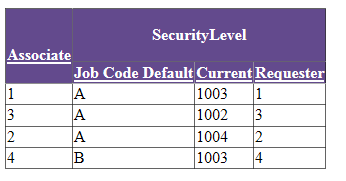
就算是简单的实现了吧,直到Cynthia告诉我可以酱。
lkbAssociate.Click += new EventHandler(grdHistorySort);
以Associate列为栗子。
         //flag for asc and desc

         private bool AssociateAsc

         {

             get { return (ViewState["AssociateAsc"] == null) ? true : (bool)ViewState["AssociateAsc"]; }

             set { ViewState["AssociateAsc"] = value; }

         }
        tcHeader.Add(new TableHeaderCell());

                         tcHeader[].BackColor = System.Drawing.Color.FromArgb(, , );

                         tcHeader[].ForeColor = System.Drawing.Color.White;

                         tcHeader[].BorderColor = System.Drawing.Color.LightGray;

                         tcHeader[].HorizontalAlign = HorizontalAlign.Center;

                         tcHeader[].Attributes.Add("rowspan", "");

                         LinkButton lkbAssociate = new LinkButton();

                         lkbAssociate.Style.Add("text-align", "center");

                         lkbAssociate.Style.Add("color", "white");

                         lkbAssociate.ID = "lkbAssociate";

                         lkbAssociate.Text = "Associate (EID)";

                         lkbAssociate.Click += new EventHandler(grdHistorySort);

                         tcHeader[].Controls.Add(lkbAssociate);
         protected void grdHistorySort(object sender, EventArgs e)

         {

             List<PMSecRequestHistoryInfo> originalList = new List<PMSecRequestHistoryInfo>();

             List<PMSecRequestHistoryInfo> sortedList = new List<PMSecRequestHistoryInfo>();

             originalList = (List<PMSecRequestHistoryInfo>)ViewState["InitHistoryTabList"];

             LinkButton linkButonClicked = sender as LinkButton;

             switch (linkButonClicked.ID)

             {

                 case "lkbAssociate":

                     {

                         if (ViewState["AssociateAsc"] == null || (bool)ViewState["AssociateAsc"])

                         {

                             var sorted = from c in originalList orderby c.DisplayName ascending select c;

                             foreach (var info in sorted)

                             {

                                 sortedList.Add(info);

                             }

                             ViewState["AssociateAsc"] = false;

                         }

                         else

                         {

                             var sorted = from c in originalList orderby c.DisplayName descending select c;

                             foreach (var info in sorted)

                             {

                                 sortedList.Add(info);

                             }

                             ViewState["AssociateAsc"] = true;

                         }

                     }

                     break;

                    ...
酱婶儿的,会不会简明扼要的多。。。Cynthiao(≧v≦)o~~好棒
唯一遗憾的是我不晓得如何为分隔的列添加控件同时添加格式。

这样两列,不能如法炮制。
第一次时候用了上次的写法,写了一个<a onclik></a>,发现页面要刷瞎我的双眼。。。
不闪的,才是健康的~
于是,拽了一个LinkButton,点了事件里的onclick想看看是个什么样子。ViewSource 发现是辣样一个东西,于是模仿了一个。
tcHeader[].Text = "<a id='LinkButton1' href='javascript:__doPostBack('LinkButton1','')' style='text-align:center;color:white' >Request</a></th></tr><tr>";
排序类似
         protected void LinkButton1_Click(object sender, EventArgs e)

         {

             List<PMSecRequestHistoryInfo> originalList = new List<PMSecRequestHistoryInfo>();

             List<PMSecRequestHistoryInfo> sortedList = new List<PMSecRequestHistoryInfo>();

             originalList = (List<PMSecRequestHistoryInfo>)ViewState["InitHistoryTabList"];

                 if (ViewState["RequestedLevelAsc"] == null || (bool)ViewState["RequestedLevelAsc"] == true)

                 {

                     var sorted = from c in originalList orderby c.RequestedSecurityLevel ascending select c;

                     foreach (var info in sorted)

                     {

                         sortedList.Add(info);

                     }

                     ViewState["RequestedLevelAsc"] = false;

                 }

                 else

                 {

                     var sorted = from c in originalList orderby c.RequestedSecurityLevel descending select c;

                     foreach (var info in sorted)

                     {

                         sortedList.Add(info);

                     }

                     ViewState["RequestedLevelAsc"] = true;

                 }

             grdHistoryRequest.DataSource = sortedList;

             grdHistoryRequest.DataBind();

             ViewState["InitHistoryTabList"] = sortedList;

         }
真正困惑我的是,如果我把页面上的LinkButton删掉,排序会 米!有!效!
百思不得姐,姐百思不得。。。。
Gridview 多重表头 (二)的更多相关文章
- Gridview 多重表头 (一)
今天看到一个人每个月更新博客,结果七年后改行去卖土特产...感慨良多... 虽然我也想去开餐厅~~ 今天需求里有一个多重表头,感觉比较奇特,特意留下记录,以防我的大脑被艾滋海默攻占~~没有女主的命,不 ...
- GridView合并表头多重表头
后台代码: using System; using System.Data; using System.Configuration; using System.Web; using System.We ...
- GridView七十二绝技-大全(收藏版)(转至别人博客)
快速预览:GridView无代码分页排序GridView选中,编辑,取消,删除GridView正反双向排序GridView和下拉菜单DropDownList结合GridView和CheckBox结合鼠 ...
- Silverlight多重表头实现
效果: 实现主要逻辑:通过动态拼接XML生成表头样式,绑定到列上. 主要是动态拼接XML时要仔细核对对应的占位行,具体可以看代码,注释很详细 两个类一个接口 NTree<T>:定义表头树形 ...
- GridView合并表头、多重表头(转)
protected void GridView1_RowCreated(object sender, GridViewRowEventArgs e) { switch (e.Row.RowType) ...
- gridview自定义表头
gridview为我们提供了丰富的接口,用于满足自定义需求. 通常asp:gridview会根据绑定的列Columns自动生成表头,展现在前台元素. 序号 类别 有时候需要复杂一些的表头. 序号 类别 ...
- GridView 自定义表头
//修改表头 protected void GridView1_RowCreated(object sender, GridViewRowEventArgs e) { switch (e.Row.Ro ...
- 从头学起android<GridView网格视图.二十八.>
GridView基于组件的网络格所有的形式的组分的,例如:当制作专辑,所有的图片将在相同的尺寸在不同的显示格在孩子,是否能够依靠这个组件完成.此组件的继承结构参见例如下面: java.lang.Obj ...
- Gridview 重建表头/单击单元格弹出对话框/改变单元格背景色
整理工作~ 完整的代码在GitHub上, 路径: 项目背景:追踪某个issue,并且记录每天的状态. 要求:1.点击日期就能更改,并且用颜色标志不同的状态 2.增加按钮可关闭issue 3.布局要求日 ...
随机推荐
- webservice和.net remoting浅谈
服务器端向客户端发送一个进程编号,一个程序域编号,以确定对象的位置. webservice和.net remoting都是用来通信的框架,它们最大的优点是可以像调用本地对象一样调用远程对象,比如: ...
- 数据存储: sqlite,coredata plist 归档
sql 语句 结构化查询语言 通用数据库操作语言1.创建数据库create database 1407EDB2.删除数据库drop database 1407EDB3.备份use master ex ...
- UIImage加载图片的区别和渲染模式
前言 关于本地图片UIImage的加载问题,还是需要注意的.不同的加载处理方式,在效率和性能上还是有差异的. 今天,我们来讲讲UIImage的加载应该选择什么样的API来加载! 两种API 这两种AP ...
- Spark集群搭建简要
Spark集群搭建 1 Spark编译 1.1 下载源代码 git clone git://github.com/apache/spark.git -b branch-1.6 1.2 修改pom文件 ...
- php函数、类和对象以及类的封装、继承、类的静态方法、静态属性
1.函数 php内置函数可以直接使用,如果没有安装php扩展即可 自定义函数 //函数function 函数名 function dump($var = null){ //支出默认参数 ...
- C# 对类中的保护成员进行写操作(邀请大家拍砖)
假如我有一个类库 Lib,提供一个类 ClassA 对外服务,ClassA 中有若干只读属性 PropA, PropB 等等,外部调用者无法对 ClassA 中的 PropA 和 PropB 进行写操 ...
- gulp压缩js
1.安装nodejs -> 全局安装gulp -> 项目安装gulp以及gulp插件 -> 配置gulpfile.js -> 运行任务 2.查看nodejs的版本号 3.npm ...
- awk之基本信息
awk 利用RS来分割文本,分割后形成一条一条的record awk 利用FS来分割record,分割后形成一段一段的field field由一串一串的字符串构成 默认的RS是换行符 默认的FS是空格 ...
- pyspider安装后,点击run,报pyhton has stop working或python已停止运行的错误
问题解决虽然只有几句话,但是背后花了一天时间,各种FQ搜索. pyspider目测只支持32位的系统,所以你下载32位的python安装就行了,然后安装pyspider运行就没有问题了,坑爹啊---- ...
- Raising Modulo Numbers(POJ 1995 快速幂)
Raising Modulo Numbers Time Limit: 1000MS Memory Limit: 30000K Total Submissions: 5934 Accepted: ...