
css模仿ipad的日历
https://www.cnblogs.com/sandraryan/
题外话之:最近的练习用js之类的写起来会简单点,但是为了巩固基础,只好html和css硬怼页面X﹏X
这是一个日历的代码
注释有写哦。
先上效果图
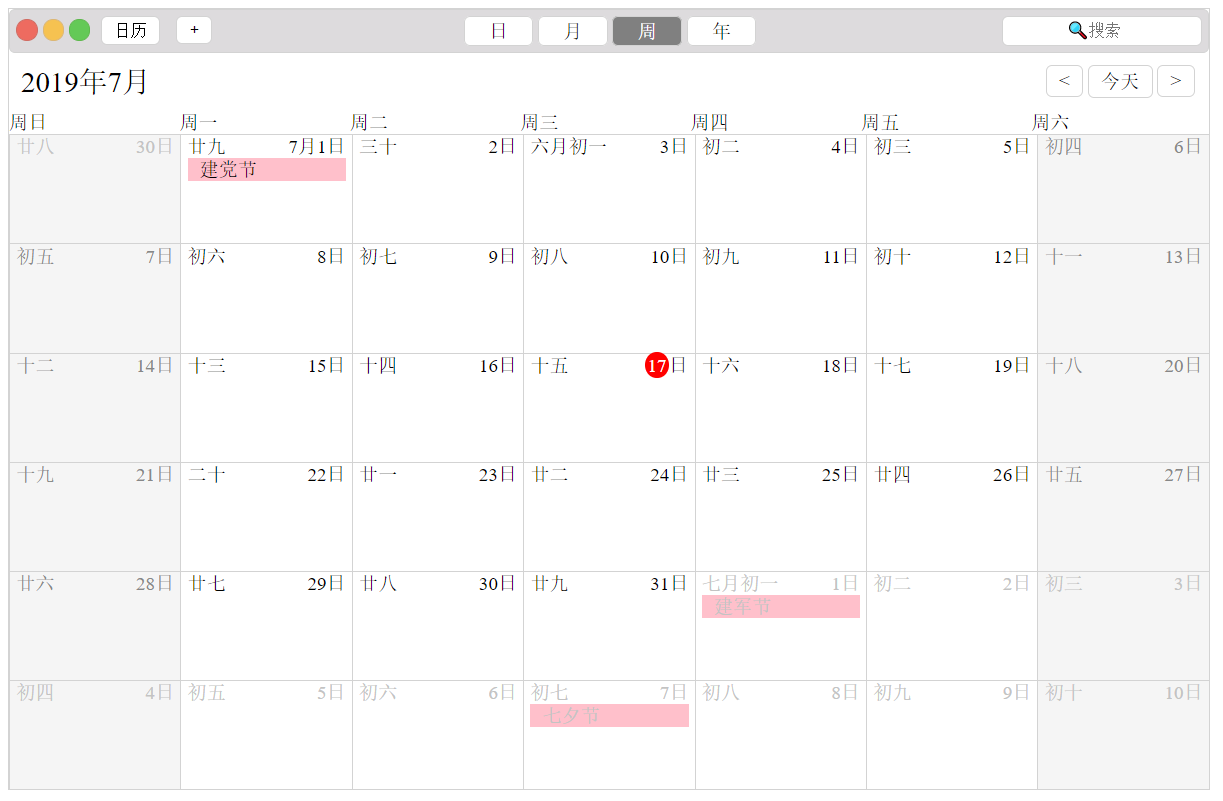
是ipad上的日历本历了。
大概思路是日期部分用弹性盒子,设置换行,让他们排列好。
写的很随意,因为我菜。
凑活看吧。

<!DOCTYPE html>
<html lang="en"> <head>
<meta charset="UTF-8">
<meta name="viewport" content="width=device-width, initial-scale=1.0">
<meta http-equiv="X-UA-Compatible" content="ie=edge">
<title>Document</title>
<style>
.wrap {
width: 1000px;
border: 1px solid lightgray;
margin: 0 auto;
} /* 头部开始 */
.top {
display: flex;
padding: 5px;
justify-content: space-between;
border: 1px solid lightgray;
border-radius: 5px;
overflow: hidden;
background-color: #dddbdd;
} .topLeft span,
.topLeft input {
display: inline-block;
vertical-align: middle;
} .topLeft span {
display: inline-block;
width: 16px;
height: 16px;
border-radius: 50%;
} .topLeft>span:nth-child(1) {
background-color: #ee6b60;
border: 1px solid #d16c63;
} .topLeft>span:nth-child(2) {
background-color: #f6c251;
border: 1px solid #dcb774;
} .topLeft>span:nth-child(3) {
background-color: #64c957;
border: 1px solid #5eb84d;
} .topLeft>input {
background-color: rgb(255, 255, 255);
border: 1px solid lightgray;
padding: 3px 10px;
border-radius: 5px;
margin: 0 5px;
} .topMiddle {
margin-top: 3px;
} .topMiddle span {
border: 1px solid lightgray;
padding: 3px 20px;
background-color: #fff;
border-radius: 5px;
} .topMiddle>span:nth-child(3) {
background-color: gray;
color: white;
} .topRight input {
border-radius: 5px;
border: 1px solid lightgray;
height: 25px;
} .topRight input::placeholder {
text-align: center;
} /* 头部结束 */
/* 中间开始 */
.center {
margin: 10px;
} .center .left {
font-size: 24px;
} .center>span>span {
box-sizing: border-box;
float: right;
border: 1px solid lightgray;
padding: 3px 10px;
margin: 0 2px;
border-radius: 5px;
} /* 中间结束 */
/* 内容开始 */
.main {
display: flex;
/* width: 800px; */
flex-wrap: wrap;
} .week span {
display: inline-block;
width: 138px;
/* border: 1px solid lightgray; */
} .main div {
display: inline-block;
width: 141.85px;
height: 90px;
border: 1px solid lightgray;
border-right: none;
border-bottom: none;
}
.main>div>span {
margin: 0 5px;
}
.main div>span:nth-child(2){
float: right;
}
.red {
background-color: red;
border-radius: 50%;
padding: 2px;
color: white;
}
.holidy {
background-color: pink;
display: block;
padding-left: 10px;
margin-top: 10px;
}
.main>div:nth-child(7n+1),.main>div:nth-child(7n){
background-color: #f5f5f5;
color: #878787;
}
.main>div:nth-child(1) {
color: #c3c3c3;
}
.main>div:nth-last-child(1),
.main>div:nth-last-child(2),
.main>div:nth-last-child(3),
.main>div:nth-last-child(4),
.main>div:nth-last-child(5),
.main>div:nth-last-child(6),
.main>div:nth-last-child(7),
.main>div:nth-last-child(8),
.main>div:nth-last-child(9),
.main>div:nth-last-child(10)
{
color: #c3c3c3;
}
/* 内容结束 */
</style>
</head> <body>
<div class="wrap">
<!-- 头部开始 -->
<div class="top">
<div class="topLeft">
<span></span>
<span></span>
<span></span>
<input type="button" value="日历">
<input type="button" value="+">
</div>
<div class="topMiddle">
<span>日</span>
<span>月</span>
<span>周</span>
<span>年</span>
</div>
<div class="topRight">
<input type="search" placeholder="css模仿ipad的日历的更多相关文章
- iOS开发UI篇—模仿ipad版QQ空间登录界面
iOS开发UI篇—模仿ipad版QQ空间登录界面 一.实现和步骤 1.一般ipad项目在命名的时候可以加一个HD,标明为高清版 2.设置项目的文件结构,分为home和login两个部分 3.登陆界面的 ...
- css模仿微信弹出菜单
css模仿微信弹出菜单 效果图: html: <div class="action-sheet-backdrop"> <div class="act ...
- 100% width CSS 在 iPad / iPhone Safari 背景被截断 / 显示不全
Tips: 调试 iPad 或 iPhone 可在设置中启动调试模式,在 Mac 中的 Safari 浏览器 同样开启开发者模式后,进行联机调试.功能彪悍. 最近在做一个页面时,发现在 iPad 的 ...
- div+css模仿登录界面
我的代码,这种方式形成了遮罩层,遮罩层的"登录"按钮仍可被点击,非我想要的. <!DOCTYPE html> <html lang="en"& ...
- vue 模仿机票自定义日历组件,区间选择
1.创建组件 components > calander > index.vue <template> <div class="page" v-if ...
- html+css模仿的锤子官方首页
<div id="wrapper"> <header> <div class="container"> <h1> ...
- js+css模仿打字效果
1.效果 2.源码 <%@ page contentType="text/html;charset=UTF-8" language="java" %> ...
- 【HTML】实战阿里云src页面css模仿基础学习
实战结果页面gif图片 阿里云src首页模仿完整代码(500行左右) <!DOCTYPE html> <html> <head> <meta charset= ...
- HTMl+CSS 模仿京东网登录页面
课后实践项目,仅页面效果,写博客纯属记录! 码云开源仓库地址:https://gitee.com/ynavc/jd 演示地址:https://ynavc.gitee.io/jd 效果图: 实现代码: ...
随机推荐
- hdu 1671&& poj 3630 (trie 树应用)
Phone List Time Limit: 1000MS Memory Limit: 65536K Total Submissions: 25280 Accepted: 7678 Descr ...
- CentOS7安装步骤
CentOS7安装详解 本文基于vmware workstations进行CentOS7安装过程展示,关于vmware workstations安装配置本人这里不再介绍,基本过程相当于window ...
- Spring_自动组件扫描和 基于注解配置bean
自动组件扫描 启用Spring组件扫描功能. 使用@Component注释来表示这是类是一个自动扫描组件. package com.tanlei.dao; import org.springfram ...
- MAC+VS Code+Python+Markdown调试配置
目录 VS Code官网下载 VS Code插件推荐 VS Code Python环境配置 Markdown配置 VS Code官方文档 VS Code官网下载 VS Code官网下载地址 VS Co ...
- HDU - 4788 Hard Disk Drive (成都邀请赛H 水题)
HDU - 4788 Hard Disk Drive Time Limit:1000MS Memory Limit:32768KB 64bit IO Format:%I64d & %I ...
- Directx11教程(46) alpha blend(3)
原文:Directx11教程(46) alpha blend(3) 现在我们尝试改变box的贴图,使用一张带alpha的dds文件wirefence.dds, 用directx textu ...
- 从 Program Manager 看 Leader 是什么角色
http://blog.csdn.net/uxyheaven/article/details/50396951 从 Program Manager 看 Leader 是什么角色 转载请注明出处http ...
- 配置一个Oracle共享服务器进程环境需要哪两项参数
SHARED_SERVERS和DISPATCHERS. PROTOCOL(pro或prot): 调度程序要监听的网络协议.这是唯一必需的属性 ADDRESS(ADD或者ADDR): 指定调度程序正在上 ...
- Android Binder简介
Android使用Linux的进程管理机制,以进程为单位分配虚拟地址空间.为了安全考虑,Android的不同进程之间是相互隔离的(进程之间被禁止直接交互).如果进程间需要通信,必须通过Android的 ...
- KiCad EDA 过孔是否可以开窗?
KiCad EDA 过孔是否可以开窗? 和传统的商业 EDA 不同,KiCad EDA 的过孔默认就是盖绿油. 在 KiCad 的过孔界面没有任何可以设置的地方,这也有一个好处,不过考虑过孔是否盖油. ...