
C# 定时器和队列结合,卖包子啦,Timer、 AutoResetEvent、 ManualResetEvent
再你们得到源码之前,我先做个广告:张家港杰德机械/张家港三兴华轩机械是我一朋友的公司,希望需要做净水,灌装机,拔盖机,封口机,传送带等的朋友光顾。
张家港杰德机械有限公司:http://www.jiedejx.com
张家港三兴华轩机械厂:http://huaxuancch.com
OK ,开始卖包子
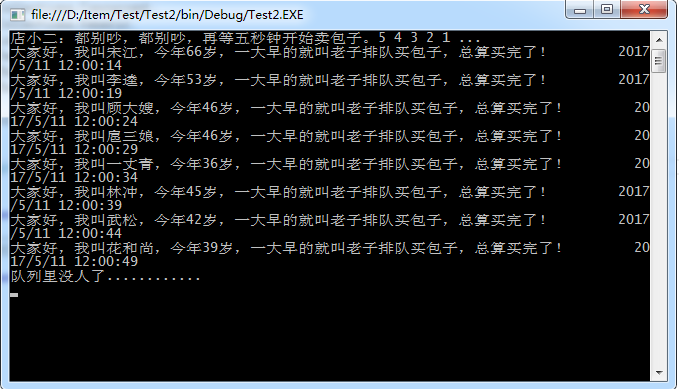
本程序用到队列,定时器,很简单,没什么好说的,因为用得到,所以作个记录:
如下:
    class Program

    {

        /// <summary>

        /// 本篇示例 讲解C#队列 入队  和  定时出队,例如:早上排队买包子 设置为每隔五秒,买包子成功排队的人出队!

        /// </summary>

        /// <param name="args">@陈卧龙 张家港杰德机械、张家港华轩机械:http://www.huaxuancch.com    http://www.jiedejx.com </param>

        /// <summary>

        /// 全局队列

        /// </summary>

        public static ConcurrentQueue<Person> _ConcurrenPersons = new ConcurrentQueue<Person>();

        static void Main(string[] args)

        {

            //模拟入队

            Person model1 = new Person("宋江", "男", );

            Person model2 = new Person("李逵", "男", );

            Person model3 = new Person("顾大嫂", "女", );

            Person model4 = new Person("扈三娘", "女", );

            Person model5 = new Person("一丈青", "女", );

            Person model6 = new Person("林冲", "男", );

            Person model7 = new Person("武松", "男", );

            Person model8 = new Person("花和尚", "男", );

            List<Person> listPerson = new List<Person>();

            listPerson.Add(model1);

            listPerson.Add(model2);

            listPerson.Add(model3);

            listPerson.Add(model4);

            listPerson.Add(model5);

            listPerson.Add(model6);

            listPerson.Add(model7);

            listPerson.Add(model8);

            foreach (var item in listPerson)

            {

                //开始排队

                PersonEnqueue(item);

            }

            //排队完成

            //

            //注册Timer 在web项目中可以在  ApplicationStart  或者   静态构造函数中注册

            Time_Task.Instance().ExecuteTask += new System.Timers.ElapsedEventHandler(ExecuteTask);

            Time_Task.Instance().Interval =  * ;//表示间隔  5秒钟执行一次

            Time_Task.Instance().Start();

            //

            Console.WriteLine("店小二:都别吵,都别吵,再等五秒钟开始卖包子。5 4 3 2 1 ...");

            Console.ReadKey();

        }

        /// <summary>

        /// 入队

        /// </summary>

        public static void PersonEnqueue(Person Model)

        {

            _ConcurrenPersons.Enqueue(Model);

        }

        /// <summary>

        /// 定时执行出队操作

        /// </summary>

        /// <param name="sender"></param>

        /// <param name="e"></param>

        static void ExecuteTask(object sender, System.Timers.ElapsedEventArgs e)

        {

           PersonDequeue();

        }

        /// <summary>

        /// 出队

        /// </summary>

        public static void PersonDequeue()

        {

            if (_ConcurrenPersons.Count > )

            {

                bool dequeueSuccesful = false;

                bool peekSuccesful = false;

                Person workItem;

                peekSuccesful = _ConcurrenPersons.TryPeek(out workItem);

                if (peekSuccesful)

                {

                    dequeueSuccesful = _ConcurrenPersons.TryDequeue(out workItem);//出队

                    Console.WriteLine("大家好,我叫" + workItem.uName + ",今年" + workItem.uAge + "岁,一大早的就叫老子排队买包子,总算买完了!" + "        " + DateTime.Now);

                }

            }

            else

            {

                Console.WriteLine("队列里没人了............");

            }

        }

    }

    public class Time_Task

    {

        public event System.Timers.ElapsedEventHandler ExecuteTask;

        private static readonly Time_Task _task = null;

        private System.Timers.Timer _timer = null;

        //定义时间

        private int _interval = *;

        public int Interval

        {

            set

            {

                _interval = value;

            }

            get

            {

                return _interval;

            }

        }

        static Time_Task()

        {

            _task = new Time_Task();

        }

        public static Time_Task Instance()

        {

            return _task;

        }

        //开始

        public void Start()

        {

            if (_timer == null)

            {

                _timer = new System.Timers.Timer(_interval);

                _timer.Elapsed += new System.Timers.ElapsedEventHandler(_timer_Elapsed);

                _timer.Enabled = true;

                _timer.Start();

            }

        }

        protected void _timer_Elapsed(object sender, System.Timers.ElapsedEventArgs e)

        {

            if (null != ExecuteTask)

            {

                ExecuteTask(sender, e);

            }

        }

        //停止

        public void Stop()

        {

            if (_timer != null)

            {

                _timer.Stop();

                _timer.Dispose();

                _timer = null;

            }

        }

    }

    /// <summary>

    /// 排队的人实体

    /// </summary>

    public class Person

    {

        public Person(string N,string S,int A)

        {

            uName = N;

            uSex = S;

            uAge = A;

        }

        public string uName { get; set; }

        public string uSex { get; set; }

        public int uAge { get; set; }

    }
@陈卧龙的博客
未完持续......
如果我们换种思路,定时器一秒钟执行一次,但,每次卖包子用时还是五秒,我们应当怎么办?这样修改的好处时,用户来了,就可以直接买包子,而不用多等五秒,同理,这一波买包子的人走了后,后续来的人也不需要多等待这个五秒!
using System;

using System.Collections.Concurrent;

using System.Collections.Generic;

using System.Linq;

using System.Text;

using System.Threading;

using System.Threading.Tasks;

namespace Test2

{

    class Program

    {

        /// <summary>

        /// 本篇示例 讲解C#队列 入队  和  定时出队,例如:早上排队买包子 设置为每隔五秒,买包子成功排队的人出队!

        /// </summary>

        /// <param name="args">@陈卧龙 张家港杰德机械、张家港华轩机械:http://www.huaxuancch.com    http://www.jiedejx.com </param>

        /// <summary>

        /// 全局队列

        /// </summary>

        public static ConcurrentQueue<Person> _ConcurrenPersons = new ConcurrentQueue<Person>();

        static Program()

        {

            Time_Task.Instance().ExecuteTask += new System.Timers.ElapsedEventHandler(ExecuteTask);

            Time_Task.Instance().Interval =  * ;//修改成每隔一秒执行一次

            Time_Task.Instance().Start();

        }

        static void Main(string[] args)

        {

            Console.WriteLine("店小二:都别吵,都别吵,现在马上开始卖包子 ...");

            //模拟入队

            Person model1 = new Person("宋江", "男", );

            Person model2 = new Person("李逵", "男", );

            Person model3 = new Person("顾大嫂", "女", );

            Person model4 = new Person("扈三娘", "女", );

            Person model5 = new Person("一丈青", "女", );

            Person model6 = new Person("林冲", "男", );

            Person model7 = new Person("武松", "男", );

            Person model8 = new Person("花和尚", "男", );

            List<Person> listPerson = new List<Person>();

            listPerson.Add(model1);

            listPerson.Add(model2);

            listPerson.Add(model3);

            listPerson.Add(model4);

            listPerson.Add(model5);

            listPerson.Add(model6);

            listPerson.Add(model7);

            listPerson.Add(model8);

            foreach (var item in listPerson)

            {

                //开始排队

                PersonEnqueue(item);

            }

            //排队完成

            Console.ReadKey();

        }

        /// <summary>

        /// 入队

        /// </summary>

        public static void PersonEnqueue(Person Model)

        {

            _ConcurrenPersons.Enqueue(Model);

        }

        /// <summary>

        /// 定时执行出队操作

        /// </summary>

        /// <param name="sender"></param>

        /// <param name="e"></param>

        static void ExecuteTask(object sender, System.Timers.ElapsedEventArgs e)

        {

           PersonDequeue();

        }

        /// <summary>

        /// 出队

        /// </summary>

        public static void PersonDequeue()

        {

            if (_ConcurrenPersons.Count > )

            {

                bool dequeueSuccesful = false;

                bool peekSuccesful = false;

                Person workItem;

                 Time_Task.Instance().Stop();

                peekSuccesful = _ConcurrenPersons.TryPeek(out workItem);

                if (peekSuccesful)

                {

                    Console.WriteLine("大家好,我叫" + workItem.uName + ",今年" + workItem.uAge + "岁,一大早的就叫老子排队买包子,总算买完了!" + "        " + DateTime.Now);

                    Thread.Sleep();

                    dequeueSuccesful = _ConcurrenPersons.TryDequeue(out workItem);//出队

                }

                Time_Task.Instance().Start();

            }

            else

            {

                Console.WriteLine("队列里没人了,我要关闭定时器啦............");

                Time_Task.Instance().Stop();

            }

        }

    }

    public class Time_Task

    {

        public event System.Timers.ElapsedEventHandler ExecuteTask;

        private static readonly Time_Task _task = null;

        private System.Timers.Timer _timer = null;

        //定义时间

        private int _interval = *;

        public int Interval

        {

            set

            {

                _interval = value;

            }

            get

            {

                return _interval;

            }

        }

        static Time_Task()

        {

            _task = new Time_Task();

        }

        public static Time_Task Instance()

        {

            return _task;

        }

        //开始

        public void Start()

        {

            if (_timer == null)

            {

                _timer = new System.Timers.Timer(_interval);

                _timer.Elapsed += new System.Timers.ElapsedEventHandler(_timer_Elapsed);

                _timer.Enabled = true;

                _timer.Start();

            }

        }

        protected void _timer_Elapsed(object sender, System.Timers.ElapsedEventArgs e)

        {

            if (null != ExecuteTask)

            {

                ExecuteTask(sender, e);

            }

        }

        //停止

        public void Stop()

        {

            if (_timer != null)

            {

                _timer.Stop();

                _timer.Dispose();

                _timer = null;

            }

        }

    }

    /// <summary>

    /// 排队的人实体

    /// </summary>

    public class Person

    {

        public Person(string N,string S,int A)

        {

            uName = N;

            uSex = S;

            uAge = A;

        }

        public string uName { get; set; }

        public string uSex { get; set; }

        public int uAge { get; set; }

    }

}
案例2,如下:又来了一波买包子的人,
using System;

using System.Collections.Concurrent;

using System.Collections.Generic;

using System.Linq;

using System.Text;

using System.Threading;

using System.Threading.Tasks;

namespace Test2

{

    class Program

    {

        /// <summary>

        /// 本篇示例 讲解C#队列 入队  和  定时出队,例如:早上排队买包子 设置为每隔五秒,买包子成功排队的人出队!

        /// </summary>

        /// <param name="args">@陈卧龙 张家港杰德机械、张家港华轩机械:http://www.huaxuancch.com    http://www.jiedejx.com </param>

        /// <summary>

        /// 全局队列

        /// </summary>

        public static ConcurrentQueue<Person> _ConcurrenPersons = new ConcurrentQueue<Person>();

        static Program()

        {

            Time_Task.Instance().ExecuteTask += new System.Timers.ElapsedEventHandler(ExecuteTask);

            Time_Task.Instance().Interval =  * ;//修改成每隔一秒执行一次

            Time_Task.Instance().Start();

        }

        static void Main(string[] args)

        {

            Console.WriteLine("店小二:都别吵,都别吵,现在马上开始卖包子 ...");

            //模拟入队

            Person model1 = new Person("宋江", "男", );

            Person model2 = new Person("李逵", "男", );

            List<Person> listPerson = new List<Person>();

            listPerson.Add(model1);

            listPerson.Add(model2);

            foreach (var item in listPerson)

            {

                //开始排队

                PersonEnqueue(item);

            }

            //排队完成

            Thread.Sleep();

            AginEnque();// 又来了一波买包子的人

            Console.ReadKey();

        }

        /// <summary>

        /// 又来了一波买包子的人

        /// </summary>

        public  static void AginEnque()

        {

            Console.WriteLine("又有一波买包子的人来了......");

            List<Person> listPerson = new List<Person>();

            listPerson.Clear();

            Person model1 = new Person("刘备", "男", );

            Person model2 = new Person("关羽", "男", );

            Person model3 = new Person("张飞", "男", );

            listPerson.Add(model1);

            listPerson.Add(model2);

            listPerson.Add(model3);

            foreach (var item in listPerson)

            {

                //第二次开始排队

                PersonEnqueue(item);

            }

            Time_Task.Instance().Start();

        }

        /// <summary>

        /// 入队

        /// </summary>

        public static void PersonEnqueue(Person Model)

        {

            _ConcurrenPersons.Enqueue(Model);

        }

        /// <summary>

        /// 定时执行出队操作

        /// </summary>

        /// <param name="sender"></param>

        /// <param name="e"></param>

        static void ExecuteTask(object sender, System.Timers.ElapsedEventArgs e)

        {

           PersonDequeue();

        }

        /// <summary>

        /// 出队

        /// </summary>

        public static void PersonDequeue()

        {

            if (_ConcurrenPersons.Count > )

            {

                bool dequeueSuccesful = false;

                bool peekSuccesful = false;

                Person workItem;

                 Time_Task.Instance().Stop();

                peekSuccesful = _ConcurrenPersons.TryPeek(out workItem);

                if (peekSuccesful)

                {

                    Console.WriteLine("大家好,我叫" + workItem.uName + ",今年" + workItem.uAge + "岁,一大早的就叫老子排队买包子,总算买完了!" + "        " + DateTime.Now);

                    Thread.Sleep();

                    dequeueSuccesful = _ConcurrenPersons.TryDequeue(out workItem);//出队

                }

                Time_Task.Instance().Start();

            }

            else

            {

                Console.WriteLine("队列里没人了,我要关闭定时器啦............");

                Time_Task.Instance().Stop();

            }

        }

    }

    public class Time_Task

    {

        public event System.Timers.ElapsedEventHandler ExecuteTask;

        private static readonly Time_Task _task = null;

        private System.Timers.Timer _timer = null;

        //定义时间

        private int _interval = *;

        public int Interval

        {

            set

            {

                _interval = value;

            }

            get

            {

                return _interval;

            }

        }

        static Time_Task()

        {

            _task = new Time_Task();

        }

        public static Time_Task Instance()

        {

            return _task;

        }

        //开始

        public void Start()

        {

            if (_timer == null)

            {

                _timer = new System.Timers.Timer(_interval);

                _timer.Elapsed += new System.Timers.ElapsedEventHandler(_timer_Elapsed);

                _timer.Enabled = true;

                _timer.Start();

            }

        }

        protected void _timer_Elapsed(object sender, System.Timers.ElapsedEventArgs e)

        {

            if (null != ExecuteTask)

            {

                ExecuteTask(sender, e);

            }

        }

        //停止

        public void Stop()

        {

            if (_timer != null)

            {

                _timer.Stop();

                _timer.Dispose();

                _timer = null;

            }

        }

    }

    /// <summary>

    /// 排队的人实体

    /// </summary>

    public class Person

    {

        public Person(string N,string S,int A)

        {

            uName = N;

            uSex = S;

            uAge = A;

        }

        public string uName { get; set; }

        public string uSex { get; set; }

        public int uAge { get; set; }

    }

}
未完持续...
如果我们不使用定时器,该怎么写呢?
不使用定时器时,我们可以使用C#的信号量机制,所谓信号量机制请参考鄙人写的博客:C#深入理解AutoResetEvent和ManualResetEvent 。
具体怎么实现,看下面代码:
    class Program

    {

        /// <summary>

        /// 本篇示例 讲解C#队列 入队  和  定时出队,例如:早上排队买包子 设置为每隔五秒,买包子成功排队的人出队!

        /// </summary>

        /// <param name="args">@陈卧龙 张家港杰德机械、张家港华轩机械:http://www.huaxuancch.com    http://www.jiedejx.com </param>

        /// <summary>

        /// 全局队列

        /// </summary>

        public static ConcurrentQueue<Person> _ConcurrenPersons = new ConcurrentQueue<Person>();

        static AutoResetEvent myResetEvent = new AutoResetEvent(false);

        static void Main(string[] args)

        {

            Console.WriteLine("店小二:都别吵,都别吵,再等五秒钟开始卖包子。5 4 3 2 1 ...");

            Thread thread = new Thread(PersonDequeue);

            thread.Name = "queue";

            thread.Start();

            //模拟入队

            Person model1 = new Person("宋江", "男", );

            Person model2 = new Person("李逵", "男", );

            List<Person> listPerson = new List<Person>();

            listPerson.Add(model1);

            listPerson.Add(model2);

            foreach (var item in listPerson)

            {

                //开始排队

                PersonEnqueue(item);

            }

            //

            Console.ReadKey();

        }

        /// <summary>

        /// 入队

        /// </summary>

        public static void PersonEnqueue(Person Model)

        {

            _ConcurrenPersons.Enqueue(Model);

            myResetEvent.Set();

            Thread.Sleep();

        }

        /// <summary>

        /// 出队

        /// </summary>

        public static void PersonDequeue()

        {

            while (true)

            {

                myResetEvent.WaitOne();

                if (_ConcurrenPersons.Count > )

                {

                    bool dequeueSuccesful = false;

                    bool peekSuccesful = false;

                    Person workItem;

                    peekSuccesful = _ConcurrenPersons.TryPeek(out workItem);

                    if (peekSuccesful)

                    {

                        dequeueSuccesful = _ConcurrenPersons.TryDequeue(out workItem);//出队

                        Console.WriteLine("大家好,我叫" + workItem.uName + ",今年" + workItem.uAge + "岁,一大早的就叫老子排队买包子,总算买完了!" + "        " + DateTime.Now);

                    }

                }

                else

                {

                    Console.WriteLine("队列里没人了............");

                }

            }

        }

    }

    /// <summary>

    /// 排队的人实体

    /// </summary>

    public class Person

    {

        public Person(string N, string S, int A)

        {

            uName = N;

            uSex = S;

            uAge = A;

        }

        public string uName { get; set; }

        public string uSex { get; set; }

        public int uAge { get; set; }

    }
@陈卧龙的博客
C# 定时器和队列结合,卖包子啦,Timer、 AutoResetEvent、 ManualResetEvent的更多相关文章
- NodeJs之定时器与队列
NodeJs之定时器与队列 一,介绍与需求 1.1,介绍 定时任务(node-schedule),是针对Node.js的一种灵活的cron-like和not-cron-like作业调度程序.它允许您使 ...
- 《Python》线程之锁、信号量、事件、条件、定时器、队列
一.锁 线程为什么要有锁: += .-= 赋值操作数据不安全(要经过取值.计算.放回值,3部操作) pop .append 都是数据安全的(只有添加和删除,一次操作) 队列也是数据安全的 1.同步锁 ...
- 7-[多线程]-Event、定时器、队列、堆栈
1.Event对象 线程的一个关键特性是每个线程都是独立运行且状态不可预测. 如果程序中的其他线程需要通过判断某个线程的状态来确定自己下一步的操作,这时线程同步问题就会变得非常棘手. 为了解决这些问题 ...
- python全栈开发,Day42(Thread类的其他方法,同步锁,死锁与递归锁,信号量,事件,条件,定时器,队列,Python标准模块--concurrent.futures)
昨日内容回顾 线程 什么是线程? 线程是cpu调度的最小单位 进程是资源分配的最小单位 进程和线程是什么关系? 线程是在进程中的一个执行单位 多进程 本质上开启的这个进程里就有一个线程 多线程 单纯的 ...
- muduo网络库学习笔记(三)TimerQueue定时器队列
目录 muduo网络库学习笔记(三)TimerQueue定时器队列 Linux中的时间函数 timerfd简单使用介绍 timerfd示例 muduo中对timerfd的封装 TimerQueue的结 ...
- C# 队列和栈 线程安全
队列是其元素以先进先出(FIFO)的方式来处理集合,先入队的元素会先读取. 栈是和队列非常类似的另一个容器,栈和队列最大的区别是后进先出(LIFO),也可以说成先进后出. 队列在现实生活中的例子数不胜 ...
- Day034--Python--锁, 信号量, 事件, 队列, 生产者消费者模型, joinableQueue
进程同步: 1. 锁 (重点) 锁通常被用来实现对共享资源的同步访问.为每一个共享资源创建一个Lock对象,当你需要访问该资源时,调用acquire方法来获取锁对象(如果其它线程已经获得了该锁, ...
- 多线程之----定时器TIMER
结上一篇 多线程的简单介绍 http://www.cnblogs.com/duanxiaojun/p/6595847.html 在上一讲中我主要是对多线程学习这个系列做了一个大致的学习计划,然后对 ...
- 8.12 day31 进程间通信 Queue队列使用 生产者消费者模型 线程理论 创建及对象属性方法 线程互斥锁 守护线程
进程补充 进程通信 要想实现进程间通信,可以用管道或者队列 队列比管道更好用(队列自带管道和锁) 管道和队列的共同特点:数据只有一份,取完就没了 无法重复获取用一份数据 队列特点:先进先出 堆栈特点: ...
随机推荐
- android一个倾斜的TextView,适用于标签效果
描述: android一个倾斜的TextView,适用于标签效果 应用截图: 使用说明: <com.haozhang.lib.SlantedTextView android:layout_wid ...
- bs4爬虫入门
# -*- coding: utf-8 -*- """ Created on Fri Nov 16 13:35:33 2018 @author: zhen "& ...
- [20180806]tune2fs调整保留块百分比.txt
[20180806]tune2fs调整保留块百分比.txt --//生产系统一台dg磁盘空间满了.我前一阵子已经将*convert参数修改,增加磁盘,但是这个分区里面的数据文件还可以增长,这样依旧存- ...
- 使用EWS API读取邮件
#安装EwsManagedApi.msi,然后导入EWS模块 Import-Module -Name "C:\Program Files\Microsoft\Exchange\Web Ser ...
- Centos 如何关闭自动更新
法一 安装Centos 6.5后,系统yum自动更新状态默认为开启,若禁止系统自动更新需要手动关闭. 1.进入yum目录 [root@localhost ~]$ cd /etc/yum 2.编辑yum ...
- 【PAT】B1077 互评成绩计算(20 分)
录入成绩,直接将所有同学给的分数相加,排序,减去最大和最小 省去了遍历一次 注意四舍五入 #include<cstdio> #include<string.h> #includ ...
- redis数据库的简单介绍
NoSQL:一类新出现的数据库(not only sql) 泛指非关系型的数据库 不支持SQL语法 存储结构跟传统关系型数据库中的那种关系表完全不同,nosql中存储的数据都是KV形式 NoSQL的世 ...
- arcgis javascript api 事件的监听及移除
On Style Events 方式 var mapExtentChange = map.on("extent-change", changeHandler); function ...
- 使用POI读写Word doc文件
使用POI读写word doc文件 目录 1 读word doc文件 1.1 通过WordExtractor读文件 1.2 通过HWPFDocument读文件 2 写w ...
- PHP开发小技巧③—实现多维数组转化为一维数组
在平常的项目开发中我们多会用到让多维数组转化为一维数组的情况,但是很多Programmer不会将其进行转化,也有些没有想到很好的算法然后经过乱起八糟的运算方式将其勉强转化好,但是所写的程序代码冗余非常 ...