
【读书笔记】iOS-UIWindow-密码框
一,工程结构,如下图所示:
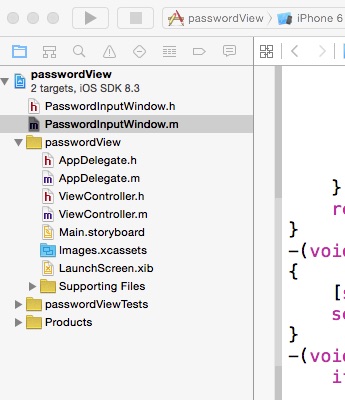
二,代码
PasswordInputWindow.h

#import <UIKit/UIKit.h>

@interface PasswordInputWindow : UIWindow

+(PasswordInputWindow *)shareInstance;

-(void)show;

@end
PasswordInputWindow.m
#import "PasswordInputWindow.h"

@implementation PasswordInputWindow

{

    UITextField *_textField;

}

+(PasswordInputWindow *)shareInstance

{

    static id shareInstance=nil;

    static dispatch_once_t onceToken;

    dispatch_once(&onceToken,^{

        shareInstance=[[self alloc] initWithFrame:[[UIScreen mainScreen] bounds]];

    });

    return shareInstance;

}

-(id)initWithFrame:(CGRect)frame

{

    self=[super initWithFrame:frame];

    if (self) {

        UILabel *label=[[UILabel alloc]initWithFrame:CGRectMake(10, 50, 200, 20)];

        label.text=@"请输入密码";

        [self addSubview:label];

        UITextField *textField=[[UITextField alloc]initWithFrame:CGRectMake(10, 80, 200, 20)];

        textField.backgroundColor=[UIColor whiteColor];

        textField.secureTextEntry=YES;

        [self addSubview:textField];

        UIButton *button=[[UIButton alloc] initWithFrame:CGRectMake(10, 110, 200, 44)];

        [button setBackgroundColor:[UIColor blueColor]];

        button.titleLabel.textColor=[UIColor blackColor];

        [button setTitle:@"确定" forState:UIControlStateNormal];

        [button addTarget:self action:@selector(completeButtonPressed:) forControlEvents:UIControlEventTouchUpInside];

        [self addSubview:button];

        self.backgroundColor=[UIColor yellowColor];

        _textField=textField;

    }

    return self;

}

-(void)show

{

    [self makeKeyAndVisible];

    self.hidden=NO;

}

-(void)completeButtonPressed:(id)sender{

    if ([_textField.text isEqualToString:@"abcd"]) {

        [_textField resignFirstResponder];

        [self resignFirstResponder];

        self.hidden=YES;

    }else{

        [self showErrorAlertView];

    }

}

-(void)showErrorAlertView

{

    UIAlertView *alertView=[[UIAlertView alloc]initWithTitle:nil message:@"密码错误,正确密码是abcd" delegate:nil cancelButtonTitle:@"OK" otherButtonTitles:nil, nil];

    [alertView show];

}

@end
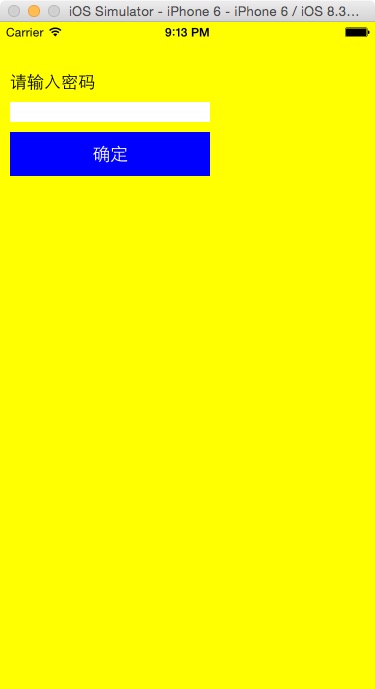
三,运行效果。
参考资料 :
《iOS开发进阶》-唐巧
【读书笔记】iOS-UIWindow-密码框的更多相关文章
- UIwindow ---密码框
程序运行显示结果如下 : 验证密码输入错误显示如下: 代码如下 : 1> //// PasswordInputWindow.m// UIWindow--密码框//// Created by ...
- [读书笔记]iOS 7 UI设计 对比度
好久没写随笔了,最近在读<iOS 7 byTutorials>,很不错,推荐给大家. 每一个好的程序员也都是一个设计师,不懂设计的程序员不是好的CTO.哈哈,开个小玩笑. iOS 7设计的 ...
- 读书笔记-iOS核心动画高级技巧
如果不使用+imageNamed:,那么把整张图片绘制到CGContext可能是最佳的方式了. 这里我们利用了CALayer的KVC来存储和检索任意的值,将图层和索引打标签. 使用KVC打标签
- iOS密码框实现(二)取消确定按钮
由于将确定按钮去掉了,所以需要重新修改下代码,当输入第四个数字时,自动进入房间. iOS 密码框效果图: 实现方式: 首先声明一个block初始化方法,因为这只是个框框,并不需要处理网 ...
- iOS密码框的实现方式
说一下密码加密的实现方式 效果图: 实现方式: 主要说一下密码框的实现,这个密码框中间的四个数字其实是4个 UITextField ,然后通过键盘删除键 和TextFile ...
- iPhone与iPad开发实战读书笔记
iPhone开发一些读书笔记 手机应用分类1.教育工具2.生活工具3.社交应用4.定位工具5.游戏6.报纸和杂志的阅读器7.移动办公应用8.财经工具9.手机购物应用10.风景区相关应用11.旅游相关的 ...
- 锋利的jQuery读书笔记---选择器
前段时间入手了锋利的jQuery(第二版),想着加强下自己的js能力,可前段时间一只在熟悉Spring和Hibernate.最近抽时间开始读这本书了,随便也做了些记录. 读书的过程是边看边代码测试,所 ...
- <读书笔记> 代码整洁之道
概述 1.本文档的内容主要来源于书籍<代码整洁之道>作者Robert C.Martin,属于读书笔记. 2.软件质量,不仅依赖于架构和项目管理,而且与代码质量紧密相关,本书提出一 ...
- WPF,Silverlight与XAML读书笔记第四十三 - 多媒体支持之文本与文档
说明:本系列基本上是<WPF揭秘>的读书笔记.在结构安排与文章内容上参照<WPF揭秘>的编排,对内容进行了总结并加入一些个人理解. Glyphs对象(WPF,Silverlig ...
随机推荐
- SNF开发平台WinForm之五-高级查询使用说明-SNF快速开发平台3.3-Spring.Net.Framework
5.1运行效果: 5.2开发实现: 1.按上面效果来说,先来看一下在程序当中如果调用.第一步在页面拖拽一个按钮为“高级查询”,事件上写下如下代码: 如果是单表查询的话,只需要传GridView就行,如 ...
- 详解SPI中的极性CPOL和相位CPHA
SPI由于接口相对简单(只需要4根线),用途算是比较广泛,主要应用在 EEPROM,FLASH,实时时钟,AD转换器,还有数字信号处理器和数字信号解码器之间.即一个SPI的Master通过SPI与一个 ...
- log4net各种Filter使用
log4net里面的filter类常用的为: 1.DenyAllFilter 拒绝所用的日志输出 <filter type="log4net.Filter.LevelMatchFilt ...
- ruby -- 问题解决(一)无法连接mysql数据库
>rails g controller home index 运行该命令时无法连接mysql 先下载配置文件:mysql-connector-c-noinstall-6.0.2-win32. ...
- 二项堆(二)之 C++的实现
概要 上一章介绍了二项堆的基本概念,并通过C语言实现了二项堆.本章是二项堆的C++实现. 目录1. 二项树的介绍2. 二项堆的介绍3. 二项堆的基本操作4. 二项堆的C++实现(完整源码)5. 二项堆 ...
- 【Java多线程】JUC包下的工具类CountDownLatch、CyclicBarrier和Semaphore
前言 JUC中为了满足在并发编程中不同的需求,提供了几个工具类供我们使用,分别是CountDownLatch.CyclicBarrier和Semaphore,其原理都是使用了AQS来实现,下面分别进行 ...
- C中extern的用法
/*********************************************************************** INPUT3.C -- Input data pars ...
- UWP开发入门(十九)——10分钟学会在VS2015中使用Git
写程序必然需要版本控制,哪怕是个人项目也是必须的.我们在开发UWP APP的时候,VS2015默认提供了对微软TFS和Git的支持.考虑到现在Git很火,作为微软系的程序员也不得不学一点防身,以免被开 ...
- 在Asp.Net MVC中使用ModelBinding构造Array、List、Collection以及Dictionary
在asp.net mvc中,我们可以在html表单中使用特定的格式传递参数,从而通过model binder构造一些集合类型. 第一种方式 public ActionResult Infancy(Pe ...
- Sql Server来龙去脉系列之三 查询过程跟踪
我们在读写数据库文件时,当文件被读.写或者出现错误时,这些过程活动都会触发一些运行时事件.从一个用户角度来看,有些时候会关注这些事件,特别是我们调试.审核.服务维护.例如,当数据库错误出现.列数据被更 ...